

TranslateTransform
is used to move an element from one position to other. The X and Y properties
are used to move an element towards the x and y axes.
The
code listed in Listing creates two rectangles with same position and sizes
accept the second rectangle is translated to 50 and 20 pixels towards x and y
axes respectively.
<Rectangle
Width="200" Height="50"
Fill="Yellow" Margin="61,27,117,184"
/>
<Rectangle
Width="200" Height="50"
Fill="Blue" Opacity="0.5" Margin="59,101,119,110">
<Rectangle.RenderTransform>
<TranslateTransform X="50" Y="20" />
</Rectangle.RenderTransform>
</Rectangle>
The
output of Listing looks like Figure 1.
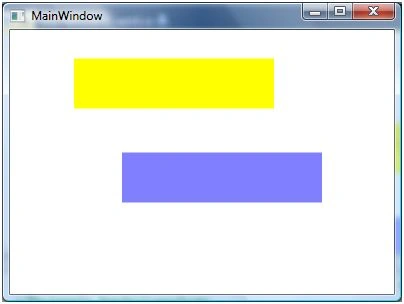
Figure 1
The
code listed in Listing creates a TranslateTransform object dynamically and set
it as RenderTransform property of a Rectangle. The output looks like Figure .
private void TranslateTransformSample()
{
Rectangle
originalRectangle = new Rectangle();
originalRectangle.Width = 200;
originalRectangle.Height = 50;
originalRectangle.Fill = Brushes.Yellow;
LayoutRoot.Children.Add(originalRectangle);
Rectangle
movedRectangle = new Rectangle();
movedRectangle.Width = 200;
movedRectangle.Height = 50;
movedRectangle.Fill = Brushes.Blue;
movedRectangle.Opacity = 0.5;
TranslateTransform
translateTransform1 = new TranslateTransform(50,
20);
movedRectangle.RenderTransform =
translateTransform1;
LayoutRoot.Children.Add(movedRectangle);
}
Join the conversation! Your thoughts help the community grow.