For most us, Windows's Taskbar is common one used to switch between applications. But, Windows's Taskbar will make our work of switching little bit hard.
It won't support enhanced iconic view of an application, easy navigation and screenshot capturing etc. I think it's better to design an application that will make switching among applications little bit easier. So, I design this application in VS.NET 2005 using C# and windows forms. I will explain features provided by this application followed by its design and coding.
Features present in this application:
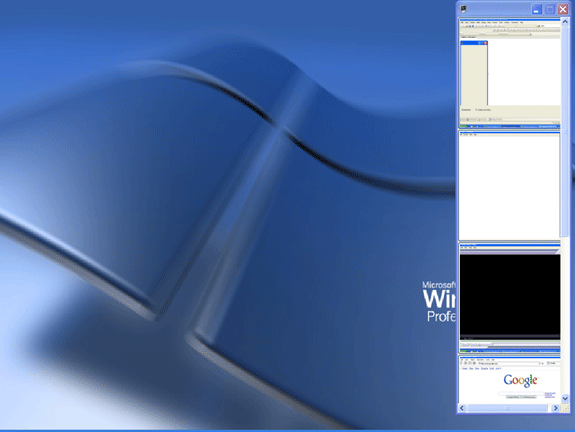
- It provides enhanced iconic view of active application, which gets updated automatically.
- It provides clear view of the running applications.
- It allows us to take screenshot of required application.
- It allows us to close the application.
- It allows us to switch between applications easily.
Now, create a new Windows Application using C# in VS.NET 2005 and name it as EnhancedTaskBarExplorer. Add controls to Main Form (TaskBar) as shown below:
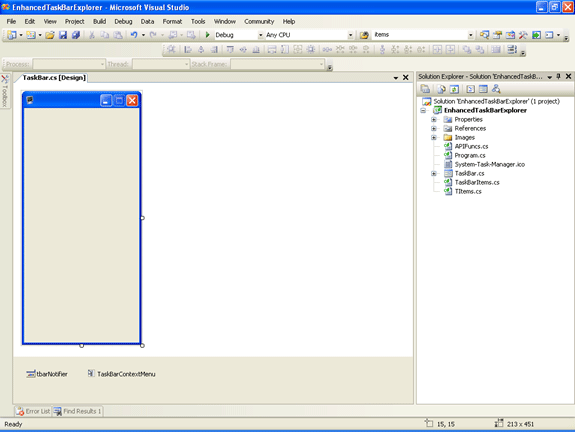
I placed a ContextMenu and NotifyIcon control on the form. Contextmenu is assigned to TaskBar Item (for button displayed on the form for each TaskBar item) and NotifyIcon is assigned to Main Form for controlling visibility of the application.
Following are the menuitems present in Contextmenu (TaskBarContextMenu control, assigned to TaskBar item (Button)):
- Close --> It is used to kill selected application.
- Save Screenshot --> It is used to store the screenshot of the application.
- Save Updated Screenshot --> It is used to store the screenshot of the current application.
- Enter File Name Textbox --> It is used to set the filename of the application's screenshot to be stored.
- Clear All --> It is used to clear all TaskBar Items.
The main functionality of this application is it will create a button with a screenshot of the application as an image on it in main form whenever a new application (Window) is activated and monitors for active window change by using System.Threading.Timer object.
Now, I will explain coding part of this application. I added three class files to the application. I will outline functionality of each class.
TItems.cs is used to handle the properties of a window like Window Handle, Window title, Process ID, Screenshot of the Window etc.
Functionality present in TaskBarItems.cs:
In order to create buttons for each taskbar item, I implemented concept of control array of VB here. Here, I just created a class named TaskBarItems which inherits from System.Collections.CollectionBase and in constructor of this class, I am passing container (Main Form) for this buttons. Than I added three methods to implement add new button (taskbar item), to remove selected taskbar item, to remove all taskbar items from application.
In AddnewTaskBarItem(), I created a new button having following properties:
Name --> WindowHandle of the Application.
Image --> Screenshot of the active Window.
And also some other properties like width, height and onclick event handler etc.
Functionality present in APIFuncs.cs:
In this class, I am using Windows API methods to get active window's screenshot. Actually, I am getting Handle of the active window using GetForegroundWindow() and than that handle is passed to GetWindowProcessID() to get Process ID. Than, this process id is passed to GetProcessById() for getting process. Finally, I am taking screenshot of the active window and created an instance of TItems class with above values added to the TItems's properties. This TItems object will be added to generic list [MyTaskBarItems] for later use.
Functionality present in TaskBar.cs:
Here, we are creating an instance of timer, which will call GetAndDisplayTaskBarData() method and performs following things:
Step 1: It will get active window's title, Handle, process ID etc.
Step 2: Than, it will check whether that window handle is present or not in MyTaskBarItems list.If it doesn't exist,than it is a new window which is not having screenshot of it in the Form.So,it will add it to the Form with a screenshot of it.If that window handle already exists,than it will just finds that handle (button having name as that window handle) and updates its Image property with current screenshot.By this, we can see updation in active window immediately in this Taskbar Form.
Finally, some code is added to save screenshot to a file, close selected application, enhance UI etc. And, the final output will be like this:
We can still enhance this application by improving UI, adding extra functionality like using more WIN32 functions instead of timers etc.
By using this application, we can easily access running applications with a better view on it. I am attaching source code for further reference. I hope this code will be useful for all.