

Introduction :
In the previous article, we had gone through Enterprise Library and its components. In this article, we will start our journey with a Validation Application block (VAB). We will go through a series of samples that make use of this block. Validation is a very common activity in any kind of application. Before looking into this block, the following explains why validation is necessary:
-
Store Correct information: By validation, we can make sure the data entered is proper. For example, an account balance should be numeric only.
-
Security: By validation, we can protect our code from threats, hacking techniques and SQL injection etc.
-
System crash: By validation, we can make sure our code won't crash due to invalid data like storing non-numeric data in a numeric variable etc.
Because of the above reasons, validation became a quite essential task in most of the projects.
Now, let's see the benefits of using VAB; they are:
-
Less Code: By using VAB, the amount of code needed for validations get reduced.
-
Code Readability: It's easy to understand the code by using VAB.
-
Easy to maintain: It's easy to modify code without side-effects.
-
Centralization of code: By using VAB, we can place validation logic in a single place for easy maintenance.
VAB is based on a set of classes called validators. These validators provide the basic validation functionality like null checking, string length checking etc. By combining these built-in validators and using and/or conditions, we can create complex validators.
We can combine validators by using Rule sets. We will look into rule sets deeply in future articles. For the time being, assume a rule set combines two or more validators and make sure that all validations are carried out.
By using VAB, we can create validators in three ways:
-
using Attributes
-
using Configuration
-
using Code.
VAB comes with a set of adapters for working with the following technologies:
-
ASP.NET
-
Windows Forms and
-
WCF
Let's start with an example showing an Attribute-based validation implementation. Open VS 2008 with Enterprise Library 4.1 installed.
Create a new console application and name it AttrBasedVAB. Add a reference to the following assemblies present in the installation folder of Enterprise Library:
Microsoft.Practices.EnterpriseLibrary.Common.dll
Microsoft.Practices.EnterpriseLibrary.Validation.dll
And import the following namespaces:
Microsoft.Practices.EnterpriseLibrary.Validation.Validators
Microsoft.Practices.EnterpriseLibrary.Validation
Create an employee class in program.cs as shown below: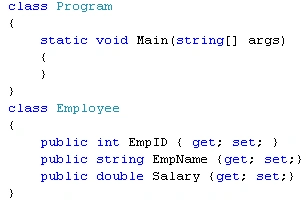
Now, we will add some validations like empid should be less than 2000; empname should not be more than 10 characters by using VAB attributes as shown below:
Here, rangevalidator validates empid between 0-2000 inclusive and stringlength validator validates empname should be less than 10 characters. By default, all validators will have a default error message. The MessageTemplate property is used to override default error message and set a custom error message.
Now, go to the Main method and add the following code: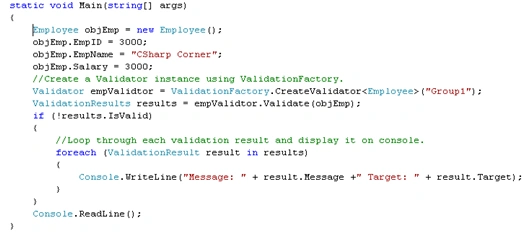
Here, we are creating an Employee and Validator instance and validating an objEmp object using the validator's Validate Method. This method will return a list of validation messages. We are looping through this validation results and displaying on the console.
Run the application, we will see the validation messages on the console as shown below:
In this way, we can implement an attribute-based validation using VAB. My suggestion is to use attribute-based validation, if it is a new project starting from scratch. Since, it's hard to implement this validation in an existing code base, because it requires adding this kind of validation in many places. The main benefit of attribute-based validation is that modifying the validation logic is easy, since it is present in a single place.
I experienced the real benefit of this kind of validation in my application. In my project, Job Number should not be more than 7 characters. The current requirement is that it should not be more than 9 characters. I saw they are doing this 7 character validation in many places. Finally, I had gone through all modules and modified it to 9 characters. If I had used this attribute validation, than I need to change only in one place.
I am ending this here. I am attaching the source code for reference. In future articles, we will go deep into this Application block. I hope this article will be helpful for all.
Join the conversation! Your thoughts help the community grow.