

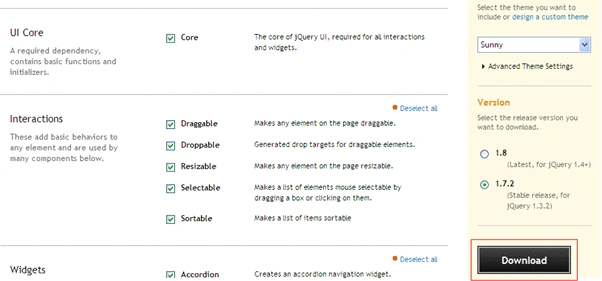
After downloading, extract the files to a folder "jquery-ui-1.7.2". JQuery UI 1.7.2 is built on top of JQuery library 1.3.2. So, we will be using this version of JQuery library for the demos. Now, we will have a look at folder's structure:
css folder will have the selected theme's CSS and images. js folder will have JQuery library and its UI .js files. development-bundle folder contains demo and documentation for the components and scripts for effects. Index.html will have sample of all UI components.
The components of JQuery UI are:
- Core: It's a perquisite for other widgets and effects to work properly.
- Interactions: It allows us to add behavior like Draggable, Droppable, Sortable etc on the UI elements.
- Widgets: It provides UI controls like tabs, dialog, slider etc.
- Effects: It provides ready to use effects like clip, bounce, explode etc.
Let's start the demo with interactions. This library provide below interactions:
- Draggable
- Droppable
- Resizable
- Selectable
- Sortable
<html>
<head>
<title>jQuery UI Draggable - Basic</title>
<!-- This StyleSheet is taken from selected theme "sunny" folder under ..\development-bundle\themes\sunny -->
<link type="text/css" href="jquery-ui-1.7.2.custom.css" rel="stylesheet" />
<script type="text/javascript" src="jquery-1.3.2.min.js"></script>
<!-- These script files are taken from folder ..\development-bundle\ui -->
<script type="text/javascript" src="ui.core.js"></script>
<script type="text/javascript" src="ui.draggable.js"></script>
<script type="text/javascript"> $(function() { $("#draggable").draggable(); });
</script>
</head>
<body>
<div id="draggable" class="ui-widget-content">
JQuery Enabled Dragging....</div>
</body>
</html>
We need below files to implement dragging:
- jquery-1.3.2.js
- ui.core.js
- ui.draggable.js
- jquery-ui-1.7.2.custom.css taken from 'sunny' theme.
<script type="text/javascript">
$(function()
{
$("#draggable").draggable({ containment: '#dragLimit', axis: 'y',delay:500, cursorAt: { cursor: 'move', top: -55, left: -55, bottom: 0 },
stop: function()
{
alert('left:' + $(this).css('left')+', top:'+$(this).css('top'));
}
});
});
</script>
For below div tag:
<div id="dragLimit" style="width:400px;height:400px">
<div id="draggable" class="ui-widget-content" style="width:100px;height:100px">
JQuery Enabled Dragging....
</div>
</div>
containment option specifies the boundary, within which element can be dragged.
axis option will specify in which direction element can be dragged either horizontal or vertical.
delay specifies time in ms to delay the dragging effect.
stop, start and drag specifies functions to be executed.
cursorAt option specifies the properties for cursor style and position, while dragging.
For complete list of methods, events for Draggable API, refer: http://jqueryui.com/demos/draggable/.
I am ending the things here. I am attaching the source code with it. In coming articles, we will cover other interactions provided by JQuery UI in depth. I hope this article will be helpful for all.
Mahesh ChandPosted Feb 4, 2011, 11:02 PM
Good work Sathish.