Introduction
In the
last article, you saw how to insert a value from a radio button in the MySQL database in PHP. Now in this article, you will see how to insert a value from a checkbox in the MySQL database. Using a checkbox you can insert multiple values in the MySQL database in PHP.
First of all, we will create a database and a table in MySQL.
Create Database
- <?php
- $con = mysql_connect ("localhost", "root" , "" ) ;
- $ db="MCN";
- if ( ! $con)
- die ( ' Could not connect: ' . mysql_error( ) ) ;
- if (mysql_query ("CREATE DATABASE $db" , $con) )
- echo "Your Database Created Which Name is : $db";
- }
- else
- {
- echo "Error creating database: " . mysql_error( ) ;
- }
- mysql_close ($con) ;
- ?>
Create Table
- <?php
- $con = mysql_connect ("localhost", "root", "" ) ;
- if ( ! $con)
- die ( ' Could not connect: ' .mysql_error ( ) ) ;
- }
- mysql_select_db ("MCN", $con) ;
- $sql = "CREATE TABLE EMPLOYEE
- (
- Name varchar ( 50) ,
- )" ;
- mysql_query($sql, $con) ;
- mysql_close ($con) ;
- ?>
Create a config.php file
Now we will create a config.php file for connecting the database to all PHP files.
- <?php
-
- $sDbHost = 'localhost' ;
- $sDbName = 'mcn' ;
- $sDbUser = 'root';
- $sDbPud = '';
- $ Conn = mysql_connect ($sDbHost, $sDbUser, $sDbPwd);
- mysql_select_db ($sDbName, $Conn);
- ?>
Create the form.php file
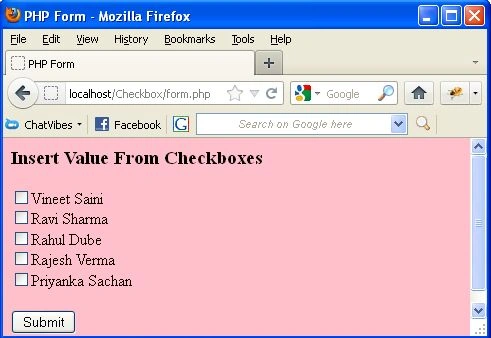
Now we will create a form.php file by which we will insert a value through checkboxes in the MySQL database.
- <html>
- <head>
- <title> PHP Form<</title>
- </head>
- <body bgcolor="pink">
- <h3>Insert Value From Checkboxes</h3>
- <form action="checkbox . php" method="post">
- <input type="checkbox" name="chkl[ ]" value="Vineet Saini">Vineet Saini<br />
- <input type="checkbox" name="chkl[ ]" value="Ravi Sharma">Ravi Sharma<br />
- <input type="checkbox" name="chkl[ ]" value="Rahul Dube">Rahul Dube<br />
- <input type="checkbox" name="chkl[ ]" value="Rajesh Verma">Rajesh Verma<br />
- <input type="checkbox" name="chkl[ ]" value="Priyanka Sachan"> Priyanka Sachan<br />
- <br>
- <input type="submit" name="Submit" value="Submit">
- </form>
- </body>
- </html>
Create checkbox.php file
No, we will create a PHP file in which we include a config.php file and write the insert command for inserting the data in the database.
- <php
- include ("config . php");
- $checkbox1 = $_POST['chkl'] ;
- if ($_POST["Submit" ]=="Submit")
- {
- for ($i=0; $i<sizeof ($checkbox1);$i++) {
- $query="INSERT INTO employee (name) VALUES ('".$checkboxl[$i]. "')";
- mysql_query($query) or die(mysql_error());
- }
- echo "Record is inserted";
- }
- ?>
Output
For running the above code we will write in the web browser "http://localhost/foldername/form.php".
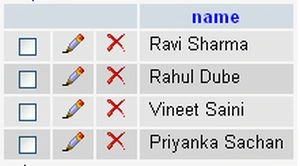
Now we select any checkbox. Suppose we select four checkboxes i.e. Vineet Saini, Ravi Sharma, Rahul Dube, Priyanka Sachan. Then we will click on the submit button.
When we click on the submit button then you will get a message i.e. Record is inserted.
Now you will see there are four records inserted in the database. As in the following image.
So in this article, you saw how to insert multiple records in a MySQL database through a checkbox. Using this article one can easily understand the insertion of multiple data in a MySQL database.
Some Helpful Resources




Abhishek DongrePosted Sep 25, 2017, 11:55 AM
<?php$conn = mysqli_connect("localhost","root","","furniture"); $vehicle= $_POST['vehicle']; if($_POST["Submit"] == "Submit") { for($i=0; $i<sizeof($vehicle);$i++) { $query="INSERT INTO events (status) VALUES ('".$vehicle[$i]."')"; mysqli_query($query) or die (mysqli_error()); } echo "updated"; } ?> <html> <body> <form action="test.php" method="post"> <input type="checkbox" name="vehicle" value="Car" checked> I have a car<br> <input type="submit" value="Submit"> </form> </body> </html> it is showing undefined index vehicle and undefined index submit. please help
Atcharawan BoonvearojkulPosted Apr 11, 2017, 6:09 AM
Thank you so much. this is example as good.because this example code make my project passed so well.
mauro bonucciPosted May 2, 2013, 1:35 PM
If i want to put one more field for example name how do i insert one more variable in a 'for'?
nur hannaneditedPosted Mar 13, 2013, 3:03 PMEdited Mar 13, 2013, 3:04 PM
can u..helped solve this up?..pls....for mylast final project..."Notice: Undefined variable: i in C:\xampp\htdocs\cuba\checkbox.php on line 6 Column count doesn't match value count at row 1"============================ checkbox.php <?php include ("connectdatabase.php"); $chk = $_POST['chk1']; if($_POST["submit"]=="submit")$query="INSERT INTO senarai_stud (kod_kursus,nama_kursus,class) VALUES ('".$chk[$i]."')";mysql_query($query) or die(mysql_error());echo "Maklumat anda telah dihantar";?>
rajesh selvamPosted Dec 19, 2012, 3:46 AM
excellent tutor.. i was done successfully few columns these were wrote here..fullname,sex(radio button),date,address,available course(check box),,etc.thanks
Abhinav AnandPosted Oct 3, 2012, 11:38 AM
Suppose i had 2 text field and another field called hobby with 4 options as checkbox, of which we could select any one! How would we then add the vales to the database? Would it be the same as the radio button exapmple, with only checkbox type in place of radio? Or would there be more difference ?
Timothy JohnstonPosted Aug 26, 2012, 9:27 AM
This is great. How could I include 2nd and 3rd columns into the POST? For example, if there was a column for age and city, how would I include these into the post?
NasraPosted Aug 21, 2012, 2:12 PM
i want to insert values/input of every textbox that is checked on a form in to a new row of mySQL database with active staus for checked checkboxes. How to do it ??