

Background
In an MVC application time, you need to change the Layout page according to the user role or any other purpose that needs to differentiate between two pages such as for Login page and the Admin page. Let's learn about the layout pages step by step.
What Is layout page?
The layout page shares the common design across all pages. It is similar to the master page in ASP.NET. There are many methods which are listed below to change the layout page dynamically in ASP.NET MVC
- While Adding the View Page, Assign the Layout Page.
- Using View Start Page
I hope you understand the Layout page from the preceding summary. Now let's implement it practically.
Step 1. Create an MVC application.
- "Start", then "All Programs" and select "Microsoft Visual Studio 2015".
- "File", then "New" and click "Project" then select "ASP.NET Web Application Template", then provide the Project a name as you wish and click on OK.
- Choose the MVC empty application option and click on OK
Step 2. Add user and admin controller controller. Right-click on the Controller folder in the created MVC application and add the controller class as.
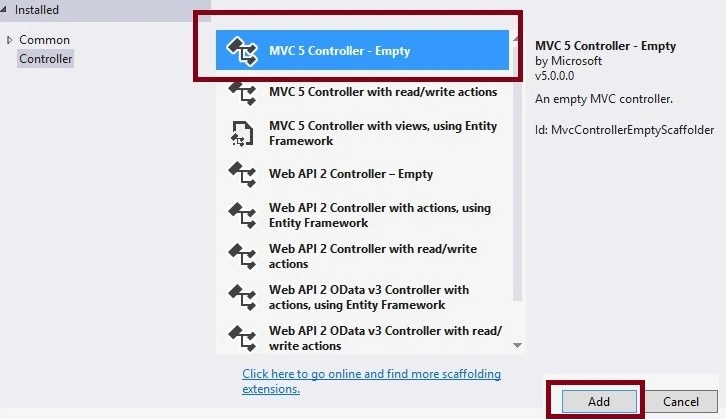
Now after selecting the controller template, click on the add button then the following window appears.
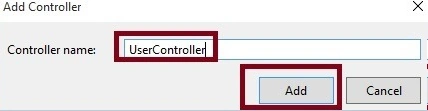
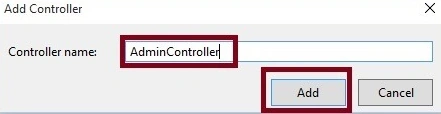
Now specify the controller name and click on the add button then the UserController class will be added to the application, now follow the same steps and add the AdminController class.
After adding the two controllers the solution explorer will be like the following.
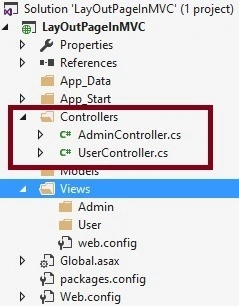
The preceding two controller classes are added into the project which is User and Admin and create the following action methods in the respective controller classes.
UserController.cs
public class UserController : Controller
{
    public ActionResult Login()
    {
        //write logic here
        return View();
    }
}
AdminController.cs
public class AdminController : Controller
{
    [HttpPost]
    public ActionResult AddRole()
    {
        //write logic here
        return View();
    }
}
For the preceding two controllers we will use two different layout pages.
Step 3. Add Views and Layout pages.
We can decide which layout page to use while adding the view. It is the same as deciding master page while adding an ASP.NET web page. Let us follow the following steps to add a layout page with a view.
Click on the View folder of the created MVC application.
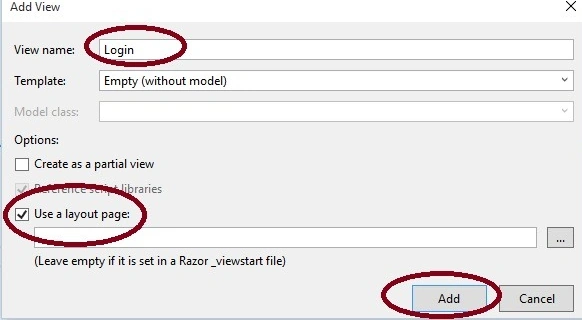
As shown in the preceding image, specify the view name check on the use layout page option, and click on the add button then the following default layout page will be added to the solution explorer.
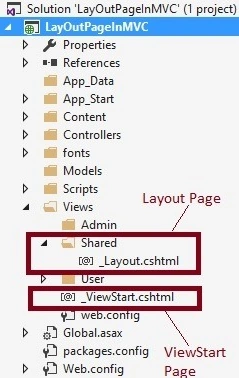
The above is the default layout page and will be added to the solution explorer. Now let's add another layout page named admin as in the following. Click on Solution Explorer and add the layout page.
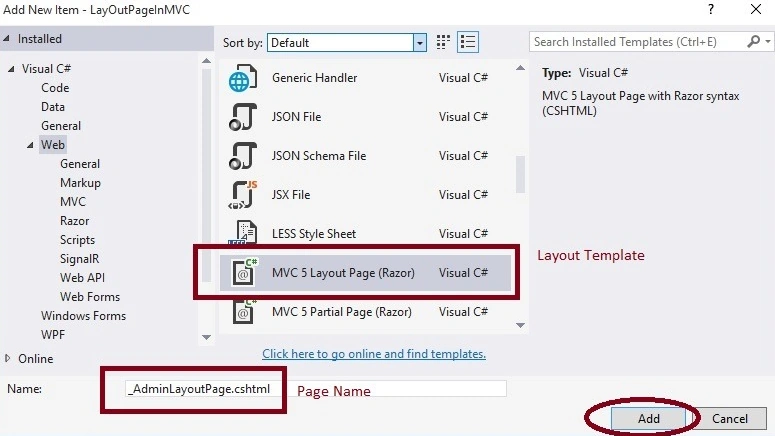
Now click on the add button, The added layout pages will look like as follows.
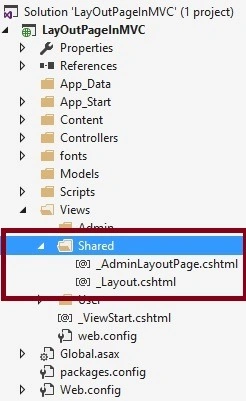
In the preceding image, two layout pages are added under the shared folder which are AdminLayoutPage and Layout.
Step 4. Set layout pages to view.
We have created view and layout pages. Now let us assign layout pages to the views. There are many ways to assign a layout page to the view which are listed in the following.
- Using wizard
- Using ViewStart page
- Using view method
Using wizard
You can use the wizard to set the layout page while adding the view, the steps are as follows.
Right-click on the view folder and select view template.
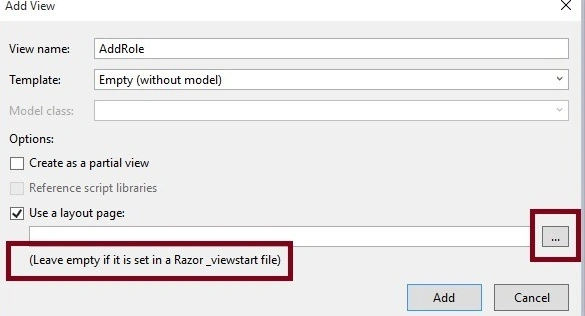
Specify the view name check on the Use a Layout page and click on the browse button. The following window will appear.
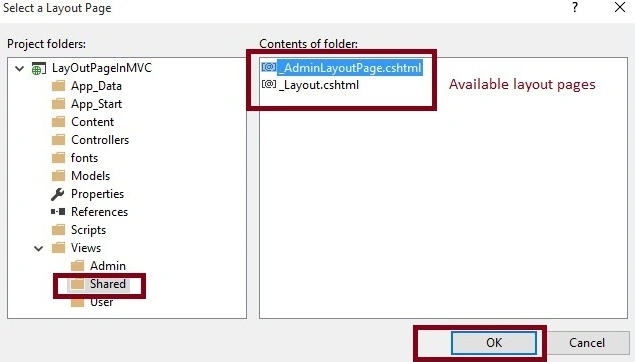
Now choose the layout page from the preceding available Layout pages and click on the ok button. The layout page will look like as follows.
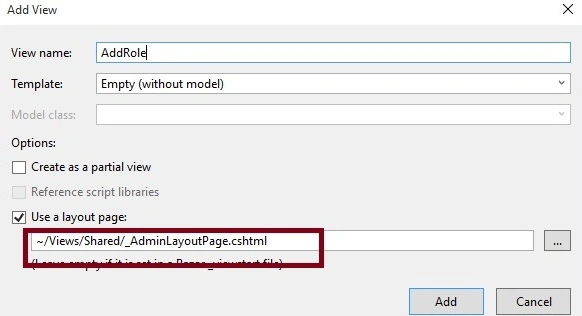
Now click on the add button then the layout page reference is added to the view page.
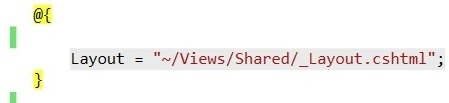
So whenever you will add through wizard or manually the layout page reference needs to be set in every view page where the layout page is needed.
Using ViewStart page
Adding references to the layout page on every page is very difficult and repetitive of code. Let us consider I have one controller with a twenty-plus action method then each twenty views we need to add a reference to the layout page. Assume another requirement we need to set the layout page according to condition basic or controller basic then we need to use the viewstart page.
So let's open the ViewStart.cshtm page and write the following code.
@{
    string CurrentName = Convert.ToString(HttpContext.Current.Request.RequestContext.RouteData.Values["Controller"]);
    dynamic Layout;
    switch (CurrentName)
    {
        case "User":
            Layout = "~/Views/Shared/_Layout.cshtml";
            break;
        default:
            //Admin layout
            Layout = "~/Views/Shared/_AdminLayoutPage.cshtml";
            break;
    }
}
Now run the application, the Login view will look as follows we have used the Layout page.
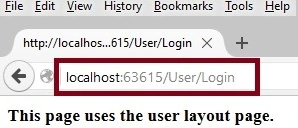
Now run AddRole view, Then the output will look like the following.
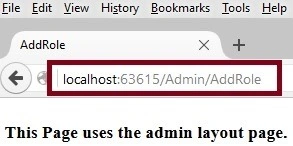
I hope from all the preceding examples, you have learned how to set a layout page dynamically in ASP.NET MVC.
Note
- Download the Zip file of the sample application for a better understanding.
- Apply proper validation before using it in your project.
Summary
I hope this article is useful for all readers. If you have any suggestions, then please mention them in the comment section.
Maaz AliPosted Jan 26, 2021, 1:05 PM
Just remove dynamic line in viewstart than it works properly for me as I want. Thanks
Maaz AliPosted Jan 26, 2021, 12:10 PM
Why Layout content not shown. in this case Layout useless
Nasir UllahPosted Aug 27, 2018, 9:02 AM
What i want to do is to add one subfolder to the view for the admin USer with getellla theme and by default it should use the frontend default Design.Let me Explain you the scanrio.for the normal users the design sholud be the same but if type admin it should load the admin dashboard from the subfolder from the view. I am using Asp.net Core 2.1 no MVC. Glaze. SOrry I am totally new to .net. Started one day ago.
Md ImamPosted Aug 18, 2017, 11:59 AM
Can i override only some specific elements like footer of layout page for one particular view
Vithal WadjePosted Mar 13, 2016, 4:07 PM
Thanks
Amit Kumar SinghPosted Mar 11, 2016, 12:50 AM
Nice one
Vithal WadjePosted Dec 8, 2015, 9:13 AM
Thanks sir
Mukesh KumarPosted Dec 8, 2015, 12:42 AM
Good Job Sir
Vithal WadjePosted Dec 7, 2015, 10:34 PM
Thanks
sreenivasa kPosted Dec 7, 2015, 4:41 PM
nice
Vithal WadjePosted Dec 7, 2015, 12:16 PM
Thanks
kalu singh raoPosted Dec 7, 2015, 11:08 AM
Great...
Vithal WadjePosted Dec 7, 2015, 9:23 AM
Thanks Raja T sir
Vithal WadjePosted Dec 7, 2015, 9:23 AM
Santhakumar Munuswamy sir
Vithal WadjePosted Dec 7, 2015, 9:23 AM
Thanks Rupesh Kahane sir
Vithal WadjePosted Dec 7, 2015, 9:22 AM
Thanks Jaipal Reddy sir
Vithal WadjePosted Dec 7, 2015, 9:22 AM
Thanks Humayun Kabir Mamun sir
Raja TPosted Dec 7, 2015, 7:15 AM
Nice, thanks for sharing
Santhakumar MunuswamyPosted Dec 7, 2015, 6:52 AM
Good One
Rupesh KahanePosted Dec 7, 2015, 6:41 AM
Good one
Jaipal ReddyPosted Dec 7, 2015, 6:18 AM
Nice sir. .
Vithal WadjePosted Dec 7, 2015, 4:43 AM
thanks Ankur sir
Vithal WadjePosted Dec 7, 2015, 4:42 AM
Thanks upendra sir
Humayun Kabir MamunPosted Dec 7, 2015, 4:22 AM
Nice...
Ankur MistryPosted Dec 7, 2015, 4:08 AM
Nice share
Upendra Pratap ShahiPosted Dec 7, 2015, 4:03 AM
nice sir...