

Background
Now, recently I am focusing on files related articles due to their relevance to file related operations. Now in this article I will explain how to upload Word files into a database and how to download those files from the database. This type of requirement can exist in any project such as how to upload only a .doc or .docx file resume, so because of the above requirement I have decide to write this article.
Now before creating the application, let us create a table named WordFiles in a database to store the uploaded Word files in a database table having the following fields (shown in the following image):
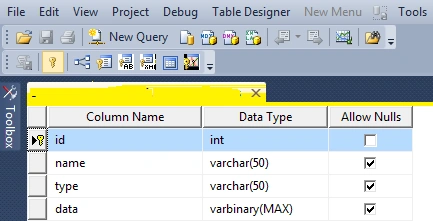
In the preceding table I have created four columns, they are id for the unique identity, Name for the Word file name, type for file type and data to store the actual content of the files with a binary datatype because the content of the files are stored in bytes.
I hope you have created the same type of table.
Now let us start to create an application to upload and download Word files step-by-step.
- "Start" - "All Programs" - "Microsoft Visual Studio 2010".
- "File" - "New Project" - "C#" - "Empty Project" (to avoid adding a master page).
- Give the Project name such as WordFileUploadDownload or another as you wish and specify the location.
- Then right-click on Solution Explorer - "Add New Item" - Default.aspx page.
- One File upload control, two Buttons, one label and a grid view.
<form id="form1" runat="server">
<div>
<table>
<tr>
<td>
Select File
</td>
<td>
<asp:FileUpload ID="FileUpload1" runat="server" ToolTip="Select Only word File" />
</td>
<td>
<asp:Button ID="Button1" runat="server" Text="Upload" onclick="Button1_Click" />
</td>
<td>
<asp:Button ID="Button2" runat="server" Text="View Files"
onclick="Button2_Click" />
</td>
</tr>
</table>
<table><tr><td><p><asp:Label ID="Label2" runat="server" Text="label"></asp:Label> </p></td></tr></table>
<asp:GridView ID="GridView1" runat="server" Caption="Excel Files "
CaptionAlign="Top" HorizontalAlign="Justify"
DataKeyNames="id" onselectedindexchanged="GridView1_SelectedIndexChanged"
ToolTip="Word FIle DownLoad Tool" CellPadding="4" ForeColor="#333333"
GridLines="None">
<RowStyle BackColor="#E3EAEB" />
<Columns>
<asp:CommandField ShowSelectButton="True" SelectText="Download" ControlStyle-ForeColor="Blue"/>
</Columns>
<FooterStyle BackColor="#1C5E55" Font-Bold="True" ForeColor="White" />
<PagerStyle BackColor="#666666" ForeColor="White" HorizontalAlign="Center" />
<SelectedRowStyle BackColor="#C5BBAF" Font-Bold="True" ForeColor="#333333" />
<HeaderStyle BackColor="Gray" Font-Bold="True" ForeColor="White" />
<EditRowStyle BackColor="#7C6F57" />
<AlternatingRowStyle BackColor="White" />
</asp:GridView>
</div>
</form>
Now switch to design mode and double-click on the upload button and use the following code to upload and validate that only PDF files are allowed to be uploaded.
protected void Button1_Click(object sender, EventArgs e)
{
Label2.Visible = true;
string filePath = FileUpload1.PostedFile.FileName; // getting the file path of uploaded file
string filename1 = Path.GetFileName(filePath); // getting the file name of uploaded file
string ext = Path.GetExtension(filename1); // getting the file extension of uploaded file
string type = String.Empty;
if (!FileUpload1.HasFile)
{
Label2.Text = "Please Select File"; //if file uploader has no file selected
}
else
if (FileUpload1.HasFile)
{
try
{
switch (ext) // this switch code validate the files which allow to upload only PDF file
{
case ".doc":
type = "application/word";
break;
case ".docx":
type = "application/word";
break;
}
if (type != String.Empty)
{
connection();
Stream fs = FileUpload1.PostedFile.InputStream;
BinaryReader br = new BinaryReader(fs); //reads the binary files
Byte[] bytes = br.ReadBytes((Int32)fs.Length); //counting the file length into bytes
query = "insert into wordFiles (Name,type,data)" + " values (@Name, @type, @Data)"; //insert query
com = new SqlCommand(query, con);
com.Parameters.Add("@Name", SqlDbType.VarChar).Value = filename1;
com.Parameters.Add("@type", SqlDbType.VarChar).Value = type;
com.Parameters.Add("@Data", SqlDbType.Binary).Value = bytes;
com.ExecuteNonQuery();
Label2.ForeColor = System.Drawing.Color.Green;
Label2.Text = " Word File Uploaded Successfully";
}
else
{
Label2.ForeColor = System.Drawing.Color.Red;
Label2.Text = "Select Only word Files "; // if file is other than speified extension
}
}
catch (Exception ex)
{
Label2.Text = "Error: " + ex.Message.ToString();
}
}
}
Add the following code in the view file button click to View uploaded PDF files in GridView
}
Add the following code to the Gridview selected index changed event to download the files:
}
Then run the page which will look as in the following:
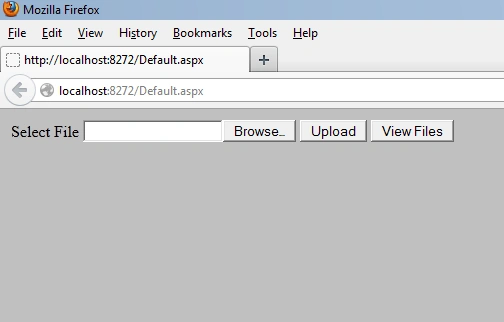
From the above view I am using two buttons to do the upload; one to upload the selected files to the database and view files which shows the files in a grid view which is stored in a database table.
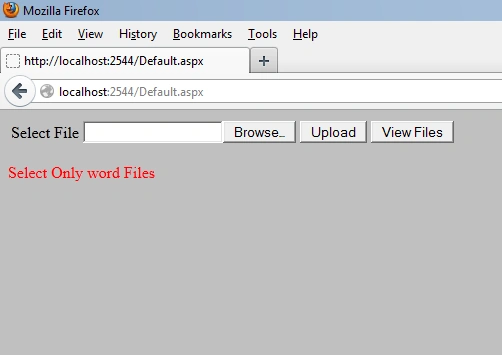
Now run the application and select a file that is not a Word file and the result will be the error as shown in the following:
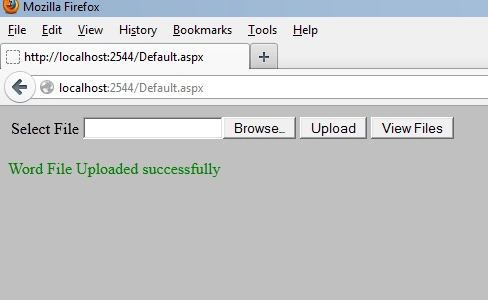
Now select the Word file, which shows the following message after being successfully uploaded:
Now click on view files details. The gridview shows the uploaded files with details as shown below.
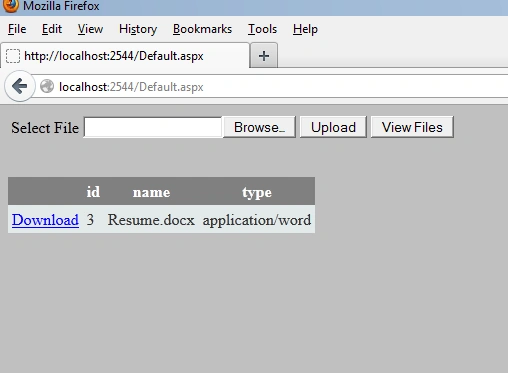
Now click on the download button of the gridview, the following prompt message is displayed as shown in the following image:
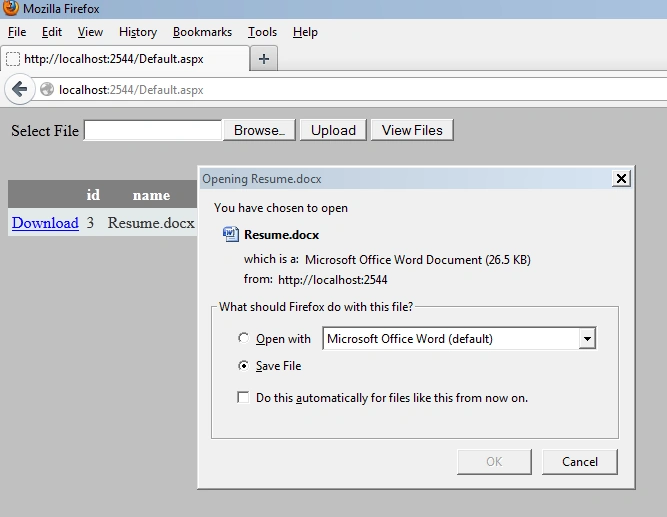
Then choose browse with MicroSoft Word and click on the "Ok" button. Then the file will be opened in Word format.
Summary
I hope this article is useful for all readers, if you have any suggestion then please contact me including beginners also.
Note
Download the zip file from the attachment for the full source code of an application.
AlexPosted Feb 3, 2023, 9:54 AM
I wish to when user save changes in word app. Data directly save to table.
lavji jhingranPosted Nov 22, 2018, 3:55 AM
Where is GridView1.DataBind();
rakesh DPosted Oct 17, 2018, 12:32 AM
Where the id value is getting inserting?.......i am trying to insert the values but it shows id wont be null?
keshav sharmaPosted Jan 13, 2016, 12:13 AM
how we will open a new tab when we click on lick button in gridview
Vithal WadjePosted Jun 17, 2015, 1:11 PM
thanks sir
Upendra Pratap ShahiPosted Jun 17, 2015, 6:42 AM
nice code..
Vithal WadjePosted May 11, 2015, 2:09 PM
cybotech solution you can use above same code for it
cybotech solutionPosted May 11, 2015, 4:08 AM
how to download files using details view??
cybotech solutionPosted May 10, 2015, 7:52 AM
any sugsn plz if u hv.
cybotech solutionPosted May 10, 2015, 7:51 AM
word file is downloading, but with an unknown format. i hv to choose a file format from open with option.
Vithal WadjePosted May 9, 2015, 10:37 AM
yes..
cybotech solutionPosted May 9, 2015, 9:03 AM
will it work on hosting
Vithal WadjePosted Jan 13, 2015, 1:06 PM
wait for my next article
hothorasman panjaitanPosted Jan 13, 2015, 5:42 AM
how to update / files that are stored in the Folder / Path in gridview
Vithal WadjePosted Jan 5, 2015, 10:43 AM
Use same code as above
Sujeet ShuklaPosted Jan 5, 2015, 10:33 AM
how to Uploading and Downloading Word, PDF,Image Files From Database Using C# Window Form
hothorasman panjaitanPosted Dec 2, 2014, 5:43 AM
how to display image to another page loads in asp.net
hothorasman panjaitanPosted Dec 1, 2014, 2:40 AM
how to save a multi files at once in asp.net
Vithal WadjePosted Nov 30, 2014, 11:47 AM
I don't understand what u want ,search on c#corner site you will get hundreds of examples
hothorasman panjaitanPosted Nov 30, 2014, 7:17 AM
how coding Mr. Vithal Wadje
Vithal WadjePosted Nov 28, 2014, 12:47 PM
simple .assign row values to textbox
hothorasman panjaitanPosted Nov 28, 2014, 12:05 PM
? how to fill textebox from data table
hothorasman panjaitanPosted Nov 28, 2014, 10:10 AM
after I click the link files in this detail_view page url results in my browser/% 3C% Eval (% 22file_data% 22)% 20 %% 3E
Vithal WadjePosted Nov 27, 2014, 1:42 PM
send me your screen shot on my any of the social site ,i will see what the error is
hothorasman panjaitanPosted Nov 27, 2014, 9:15 AM
but after i click view in link file, not respond. example <asp:hyperlink ID="Hyperlink2" runat="server" Text='<%#Eval("data_file") %>' NavigateUrl='<%#Eval("data_file")'>HyperLink</asp:hyperlink>
Vithal WadjePosted Nov 27, 2014, 7:16 AM
code is fine
hothorasman panjaitanPosted Nov 26, 2014, 10:42 AM
and this code behind in details_view protected void Page_Load(object sender, EventArgs e) { MySqlConnection con = new MySqlConnection(strConnString); if (!Page.IsPostBack) { string id_plp; id_plp = Request.QueryString["id_plp"]; con.Open(); sqlcmd = new MySqlCommand("SELECT * FROM detailsview WHERE id_plp='" + id_plp + "'", con); da = new MySqlDataAdapter(sqlcmd); da.Fill(dt); if (dt.Rows.Count > 0) { txtid.Text = dt.Rows[0]["id_plp"].ToString(); txtpropinsi.Text = dt.Rows[0]["propinsi_nama"].ToString(); txtkab.Text = dt.Rows[0]["kabupaten_nama"].ToString(); txtsektor.Text = dt.Rows[0]["sektor_nama"].ToString(); txtperda.Text = dt.Rows[0]["perda_nama"].ToString(); txtnmlembaga.Text = dt.Rows[0]["nm_lembaga"].ToString(); txtkategori.Text = dt.Rows[0]["kat_peraturan"].ToString(); txtnomor.Text = dt.Rows[0]["nomor"].ToString(); txttahun.Text = dt.Rows[0]["tahun"].ToString(); txttentang.Text = dt.Rows[0]["tentang"].ToString(); lbldata.Text = dt.Rows[0]["file_data"].ToString(); txtketerangan.Text = dt.Rows[0]["keterangan"].ToString(); } } }
hothorasman panjaitanPosted Nov 26, 2014, 10:40 AM
protected void gvDetails_RowCommand(object sender, GridViewCommandEventArgs e) { LinkButton lb = (LinkButton)e.CommandSource; int index = Convert.ToInt32(lb.CommandArgument); string pkey; pkey = gvDetails.Rows[index].Cells[0].Text; Response.Redirect("details_view.aspx?id_plp=" + pkey); }
Vithal WadjePosted Nov 9, 2014, 7:53 AM
can you send me your sample code
hothorasman panjaitanPosted Nov 9, 2014, 1:18 AM
I have a page details_view, when I click the view details of the gridview, in halman details_view the previously saved file that I can not show please enlightenment
Vithal WadjePosted Nov 5, 2014, 9:54 AM
Lazola Booi we can set it from web.config file
Vithal WadjePosted Nov 5, 2014, 9:53 AM
kaurm can you send me your code
Vithal WadjePosted Nov 5, 2014, 9:47 AM
thanks karthi pm sir
karthi pmPosted Nov 5, 2014, 9:14 AM
its nice perfect
Vithal WadjePosted May 27, 2014, 2:28 PM
check your connection string
uroosah BanoPosted May 26, 2014, 6:00 PM
im getting this error when I click on upload button :Object reference not set to an instance of an object
Vithal WadjePosted May 26, 2014, 3:46 PM
thanks Habtamu Link ,please download whole article for better understanding
Habtamu LinkPosted May 25, 2014, 3:37 AM
thank you sir it is very useful but what about namespace b/c it not work for me?
kaurmPosted Nov 18, 2013, 6:27 PM
Hi, I'm doing something similar but having issues with it. I'm trying to have the program upload a pdf file which in the file name contains information such as product id, chip id and is separated by - or _. It has to recognize the product id and update the db section where the pdf needs to be placed but it should only do that if the file name contains the product id that is in the db. I have written the code but it's not working. If you could help me that would be great.
Vithal WadjePosted Sep 18, 2013, 11:43 AM
ok,Lazola sir,i will look out on that and once it done i will message you ok
Lazola BooiPosted Sep 18, 2013, 10:59 AM
Hello, just to say I am greatfull of your tutorials, they really helped me in my project. Now, I see that the code does not allow uploading of pdf that are of 3MB or greater. Please help me figure out how I can add pdf's greater than 3MB.
Luis EnriquePosted Jun 25, 2013, 7:53 PM
Solo te falto postear la base de datos: CREATE TABLE [dbo].[Wordfiles]([id] [int] IDENTITY(1,1) NOT NULL,[name] [varchar](50) NULL,[type] [varchar](50) NULL,[data] [varbinary](max) NULL, PRIMARY KEY CLUSTERED ](
Luis EnriquePosted Jun 25, 2013, 7:50 PM
Thank you very much I much sirvira your code of your project works 100% just have to have patience to know how to run it
Luis EnriquePosted Jun 25, 2013, 7:48 PM
I can not download when clicking to download it marks me error in (dr.Read())
Vithal WadjePosted Mar 18, 2013, 12:04 AM
see it in web.config file of this article
janaeditedPosted Mar 17, 2013, 11:26 AMEdited Mar 17, 2013, 11:31 AM
pls tell me what is database and serer name in is code...
Vithal WadjePosted Jan 9, 2013, 11:04 PM
you can convert C# code to VB.net online try that one
john sualogPosted Jan 9, 2013, 9:42 PM
i can't download the uploaded files, please send me in a vb language