

Introduction
This is a simple application which allow user to sign up using his/her LinkedIn Account. And after successfully signing in save some of the user details in the database.
Description
For this, we have to perform the following two tasks:
- Create a ASP.NET Page.
- Create a LinkedIn Application.
Here are the steps to create this application.
Create an ASP.NET Page
Create a blank ASP.NET website, run it and copy its URL.
Create a LinkedIn Application
- Before moving further you should have a LinkedIn account. If not create it.
- Visit the following link: https://www.linkedin.com/developer/apps.
- Here you will find all your apps if you already have any apps like the following image.
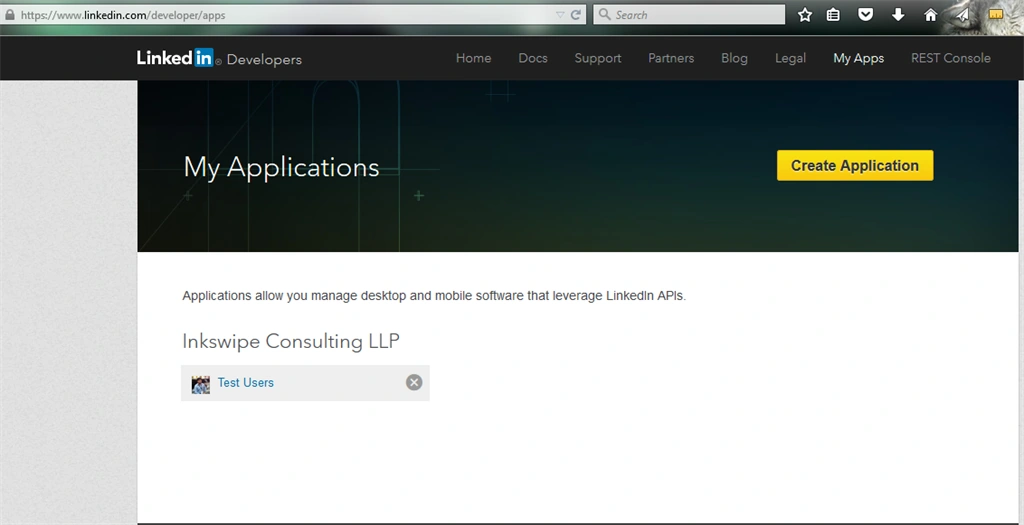
As you see I have an app Test Users.
Now click create application and it will look like the following image:
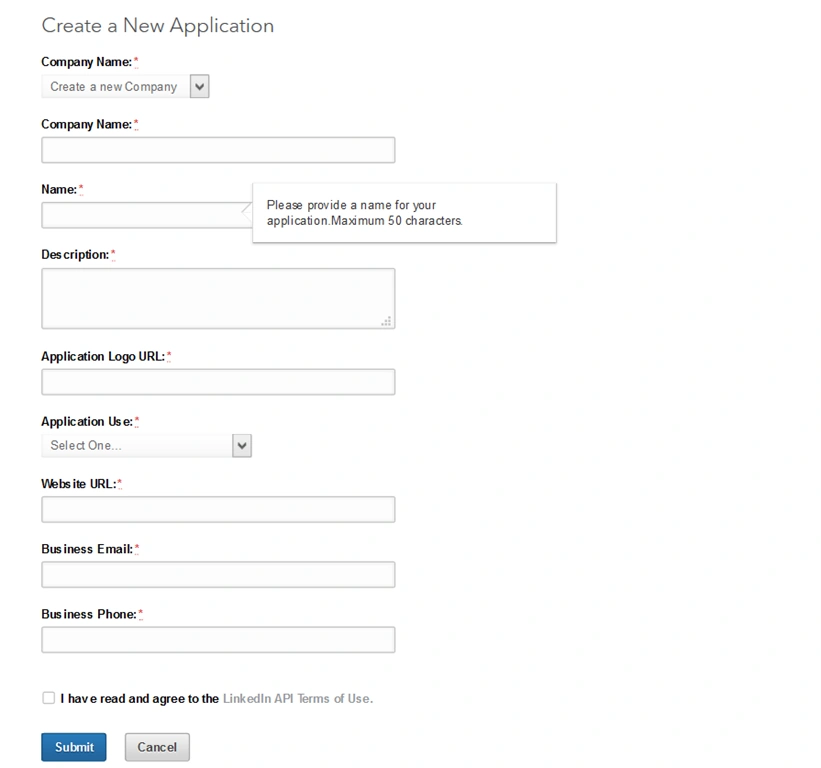
- Fill all the details (Follow the hints).
- Website URL is the URL of your site you want to implement the apps.
- Application Logo is the sign-up-users-using-linkedin-and-save-users-detailo of your application. Here I have given my own Image from the following HTTPS URL https://media.licdn.com/mpr/mpr/shrinknp_400_400/p/7/005/097/269/3344b22.jpg

See the following image:
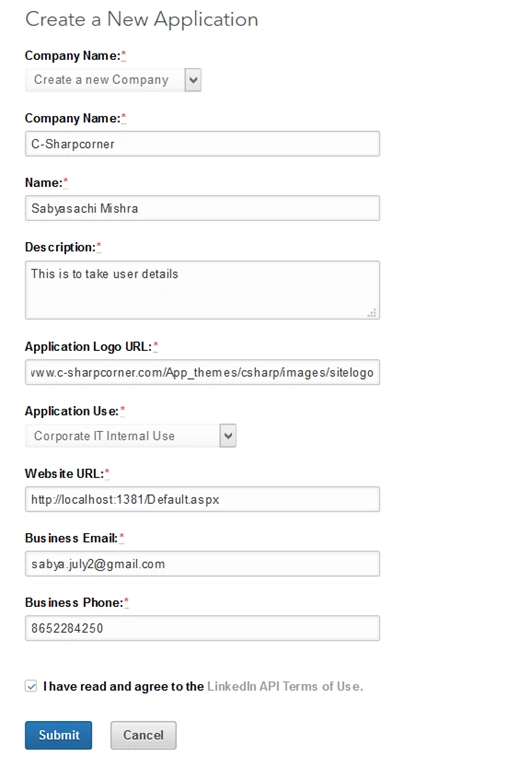
After that it will redirect you to the authentication page and you can find your Client Id(api_key) and Client Secret.
On Default Application Permissions check r-emailAddress if you want to save User EmailId.
Go to JavaScript, give your website url, click add and update like the following image:
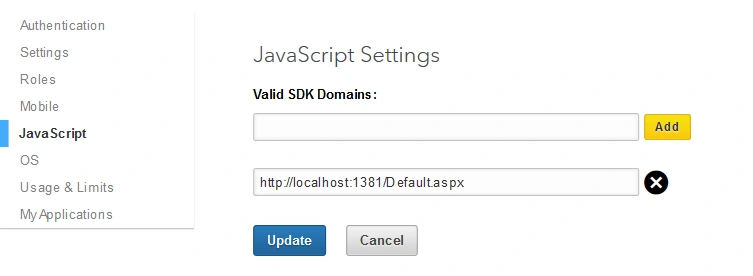
You can follow this link https://developer.linkedin.com/docs/signin-with-linkedin for more information how to create a LinkedIn Login Button for accessing user details.
- I have used JavaScript SDK.
- Below are my codes follow the comments for better understanding.
- Copy the code in .aspx Page.
- In api_key provide your own Client ID.
- <html xmlns="http://www.w3.org/1999/xhtml">
- <head runat="server">
- <title>Linkedin User Details</title>
- <!-- For Showing Login Button -->
- <script type="text/javascript" src="//platform.linkedin.com/in.js">
- api_key: 75zd01h5j2597m //Add your own Client ID
- authorize: true
- onLoad: onLinkedInLoad
- </script>
- <!-- For Showing Login Button -->
- <script type="text/javascript" src="http://ajax.googleapis.com/ajax/libs/jquery/1.8.3/jquery.min.js">
- </script>
- <!-- For Getting Data and storing in database -->
- <script type="text/javascript">
- function onLinkedInLoad() {
- IN.Event.on(IN, "auth", getDetails);
- }
- function getDetails() { // Getting required details
- IN.API.Profile("me")
- .fields("firstName", "lastName", "industry", "current-share", "location:(name)", "picture-url", "headline", "summary", "num-connections", "public-profile-url", "distance", "positions", "email-address", "educations", "date-of-birth")
- .result(displayProfiles)
- .error(displayProfilesErrors);
- }
- function displayProfiles(data) {
- console.log(data); // See the log in your browser you can find all the data
- var details = data.values[0];
- var user = {};
- user.FName = details.firstName; // FName as per my User Class in .cs page
- user.LName = details.lastName;
- user.Email = details.emailAddress;
- user.FunctionalArea = details.industry;
- $.ajax({ // Ajax call to save user details
- type: "Post",
- contentType: "application/json; charset=utf-8",
- url: "Default.aspx/SaveUser", // Default.aspx is my page and SaveUser is my WebMethod.
- data: '{objUserdtl: ' + JSON.stringify(user) + '}',
- success: function () {
- alert("Data Added Successfully.");
- }, error: function () {
- alert("Some error encountered.");
- }
- });
- }
- function displayProfilesErrors(error) {
- console.log(error);
- }
- </script>
- <!-- For Getting Data and storing in database -->
- </head>
- <body>
- <form id="form1" runat="server">
- <div>
- <!-- For Showing Login Button -->
- <script type="in/Login">
- Login
- </script>
- <!-- For Showing Login Button -->
- </div>
- </form>
- </body>
- </html>
- CREATE TABLE [dbo].[Userdetails]
- (
- [UserId] [int] IDENTITY(1,1) NOT NULL,
- [FName] [varchar](50) NULL,
- [LName] [varchar](50) NULL,
- [Email] [varchar](50) NULL,
- [FunctionalArea] [varchar](50) NULL,
- [CreatedDateTime] [datetime] NULL
- )
- <connectionStrings>
- <add name="Linkedin" connectionString="Data Source=local;Initial Catasign-up-users-using-linkedin-and-save-users-detail=Demo;User ID=sa;Password=Admin;" providerName="System.Data.SqlClient" />
- </connectionStrings>
- public partial class Default : System.Web.UI.Page
- {
- public static string Constr = ConfigurationManager.ConnectionStrings["Linkedin"].ConnectionString; // Connection string
- protected void Page_Load(object sender, EventArgs e)
- {
- }
- [WebMethod]
- public static void SaveUser(User objUserdtl) //Save data in Databse using Ajax
- {
- try
- {
- using (var con = new SqlConnection(Constr))
- {
- using (var cmd = new SqlCommand("INSERT INTO Userdetails VALUES(@Fname,@Lname,@Email,@FunctionalArea,@CreatedDate)"))
- {
- cmd.CommandType = CommandType.Text;
- cmd.Parameters.AddWithValue("@Fname", objUserdtl.FName);
- cmd.Parameters.AddWithValue("@Lname", objUserdtl.LName);
- cmd.Parameters.AddWithValue("@Email", objUserdtl.Email);
- cmd.Parameters.AddWithValue("@FunctionalArea", objUserdtl.FunctionalArea);
- cmd.Parameters.AddWithValue("@CreatedDate", DateTime.Now);
- cmd.Connection = con;
- con.Open();
- cmd.ExecuteNonQuery();
- con.Close();
- }
- }
- }
- catch (Exception ex)
- {
- throw;
- }
- }
- }
- public class User // Taken class for ajax call
- {
- public int UserId;
- public string FName;
- public string LName;
- public string Email;
- public string FunctionalArea;
- public DateTime CreatedDateTime;
- }
Now if you run the code you will see the following button:
On click of this button you will get the following popup window asking for your LinkedIn EmailId and Password:
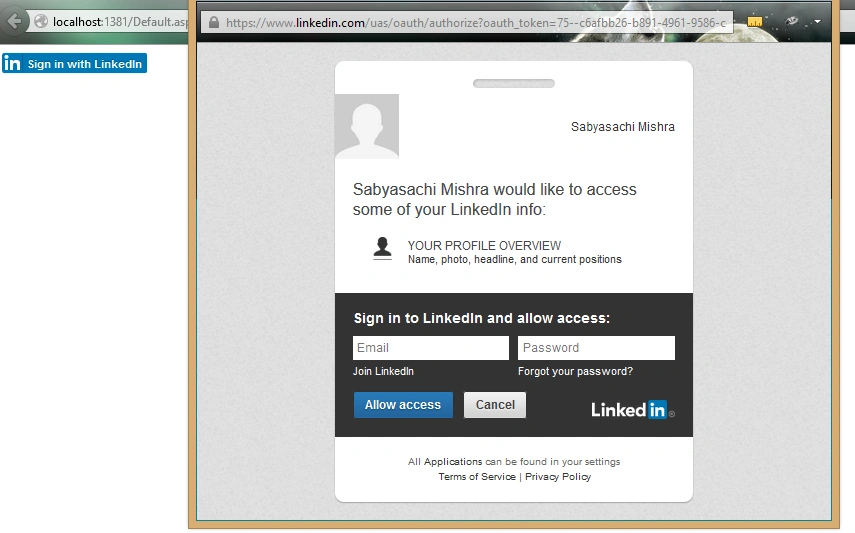
Give your details and click Allow access.
See your console response you will find the details as I am also showing all the data in console.sign-up-users-using-linkedin-and-save-users-detail (data) in Ajax.
Now see your database, the data has been added in your database. You can provide your desired condition for not storing multiple times data for same user.
Note
- I have taken my page as Default.aspx and SaveUser is my method for ajax call. Any change in page name and Method has to change in Ajax.
- If you run the attached project it will open my apps that I have created in LinkedIn. I suggest you to create your own.
Hope that helps you.
Please add comments you you find any difficulties while building this application.
Rakesh EPosted Jun 18, 2019, 6:26 AM
How do i search linkedin profile using name and company fields that i have given in web form.
neha vermaPosted Nov 29, 2018, 4:38 AM
I followed your article step by step.But its not showing any button on my page?What to do?
Sathish KumarPosted Aug 3, 2017, 1:19 AM
How can I extract or get the LinkedIn recommendations and endorsement for my website? I am able to get LinkedIn basic information as well as number of connections. But I am unable to get LinkedIn recommendations received and endorsement for my asp.net website. Please anyone can help. Thanks in advance!
SubashPosted Aug 1, 2016, 5:43 AM
Nice
Nilesh PatelPosted Jun 21, 2016, 5:47 AM
at time of get profile details given Error of net::ERR_TIMED_OUT
Ashish PathakPosted Nov 19, 2015, 2:47 AM
it isn't working, i did as you said
Humayun Kabir MamunPosted Sep 28, 2015, 6:19 AM
Nice...
Santhakumar MunuswamyPosted Sep 26, 2015, 12:20 PM
Nice share
Ankit BansalPosted Sep 25, 2015, 1:12 AM
nice
Shridhar SharmaPosted Sep 24, 2015, 5:17 PM
nice article.
RakeshPosted Sep 24, 2015, 10:26 AM
Good Article Share Sir
Gopi ChandPosted Sep 24, 2015, 5:01 AM
Good one
ROHAN THAKURPosted Sep 24, 2015, 5:00 AM
nice article...
Sibeesh VenuPosted Sep 24, 2015, 2:17 AM
Nice Share
Siddarth PathakPosted Sep 24, 2015, 2:10 AM
nice
Vinodh NarayananPosted Sep 24, 2015, 2:00 AM
nice share
Harshad PansuriyaPosted Sep 24, 2015, 1:53 AM
Nice One
Ajeet MishraPosted Sep 24, 2015, 1:50 AM
nice