

Open your Visual Studio 2102.
Then select "File" -> "New" -> "Project..." then select Empty SharePoint Project.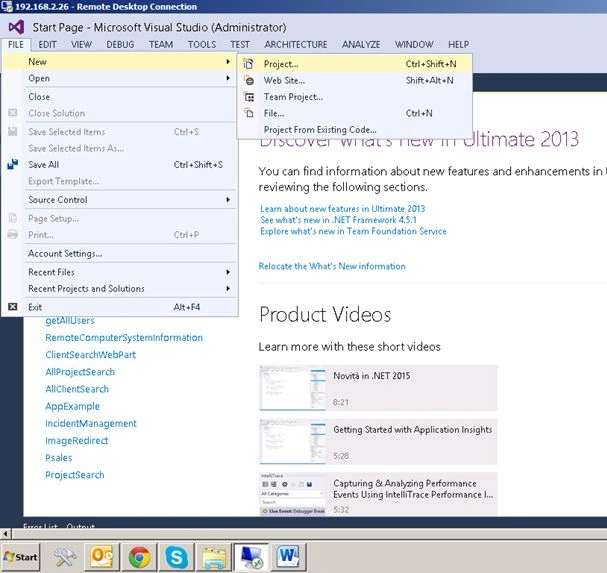
Then click Office/SharePoint.
Then click SharePoint Solutions.
Then click SharePoint 2013 Empty Project.
Then set your server name where you want to deploy your solution and choose Deploy on Farm solution.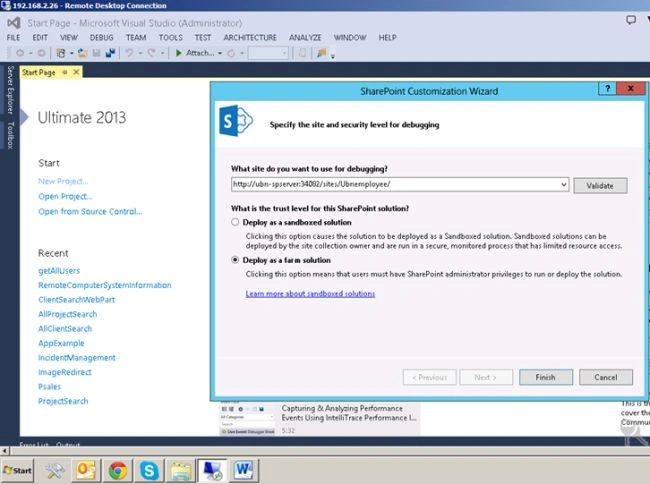
Then click Finish.
Then right-click on Solution Explorer (or press Ctrl+ ;).
Then add a new item.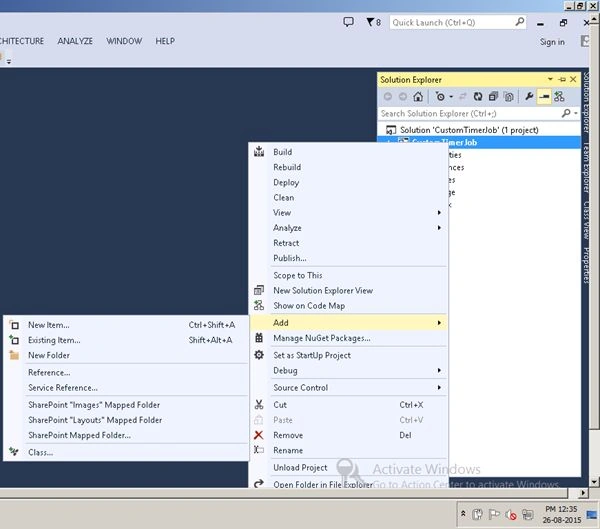
Select code from the Installed Menu under Visual C# Items and click on Class.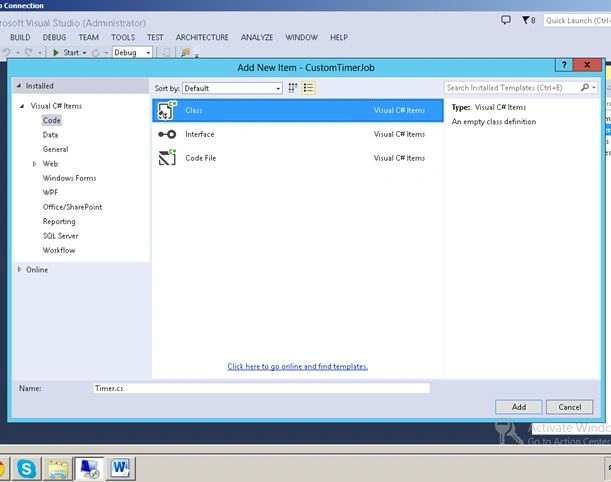
Please use the following code.
- using System;
- using System.Collections.Generic;
- using System.Linq;
- using System.Text;
- using Microsoft.SharePoint.Administration;
- using Microsoft.SharePoint;
- using System.Net.Mail;
- namespace CustomTimerJob {
- public class Timer: Microsoft.SharePoint.Administration.SPJobDefinition {
- public Timer(): base() {}
- public Timer(string jobName, SPService service, SPServer server, SPJobLockType targetType): base(jobName, service, server, targetType) {}
- public Timer(string jobName, SPWebApplication webApplication): base(jobName, webApplication, null, SPJobLockType.ContentDatabase) {
- this.Title = "Email Notification Job";
- }
- public override void Execute(Guid contentDbId) {
- string from = string.Empty;
- string smtpAddress = string.Empty;
- string to = "[email protected]";
- string subject = "Email Notification";
- string body = "<h1> Email Sending from Testing My Timer Job Application </h1>";
- SPSecurity.RunWithElevatedPrivileges(delegate() {
- // get a reference to the current site collection's content database
- SPWebApplication webApplication = this.Parent as SPWebApplication;
- SPContentDatabase contentDb = webApplication.ContentDatabases[contentDbId];
- // get a reference to the "Tasks" list in the RootWeb of the first site collection in the content database
- SPWeb rootWeb = contentDb.Sites[0].RootWeb;
- // Get the DB News Announcements List
- SPList listjob = rootWeb.Lists.TryGetList("Tasks");
- // Get sender address from web application settings
- from = rootWeb.Site.WebApplication.OutboundMailSenderAddress;
- // Get SMTP address from web application settings
- smtpAddress = rootWeb.Site.WebApplication.OutboundMailServiceInstance.Server.Address;
- // Send an email if the news is approved
- bool emailSent = SendMail(smtpAddress, subject, body, true, from, to, null, null);
- if (listjob != null && emailSent) {
- SPListItem newListItem = listjob.Items.Add();
- newListItem["Title"] = string.Concat("Email Notification Sent at : ", DateTime.Now.ToString());
- newListItem.Update();
- }
- });
- }
- public bool SendMail(string smtpAddress, string subject, string body, bool isBodyHtml, string from, string to, string cc, string bcc) {
- bool mailSent = false;
- SmtpClient smtpClient = null;
- try {
- // Assign SMTP address
- smtpClient = new SmtpClient();
- smtpClient.Host = smtpAddress;
- //Create an email message
- MailMessage mailMessage = new MailMessage(from, to, subject, body);
- if (!String.IsNullOrEmpty(cc)) {
- MailAddress CCAddress = new MailAddress(cc);
- mailMessage.CC.Add(CCAddress);
- }
- if (!String.IsNullOrEmpty(bcc)) {
- MailAddress BCCAddress = new MailAddress(bcc);
- mailMessage.Bcc.Add(BCCAddress);
- }
- mailMessage.IsBodyHtml = isBodyHtml;
- // Send the email
- smtpClient.Send(mailMessage);
- mailSent = true;
- } catch (Exception) {
- mailSent = false;
- }
- return mailSent;
- }
- }
- }
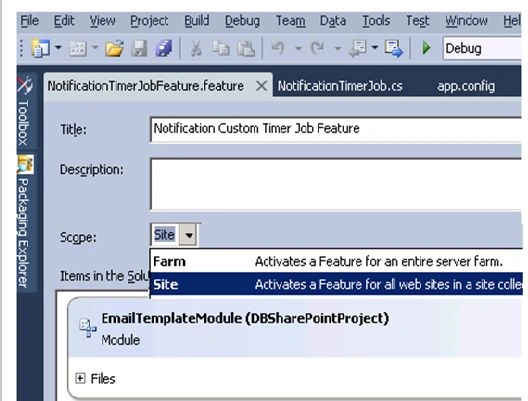
Then create another class and copy this code.
We need to set the interval of our timer job application.
- using System;
- using System.Runtime.InteropServices;
- using System.Security.Permissions;
- using Microsoft.SharePoint;
- using Microsoft.SharePoint.Security;
- using System.Linq;
- namespace CustomTimerJob.Features.NotificationTimerJobFeature {
- public class EventReceiver: SPFeatureReceiver {
- // Name of the Timer Job, but not the Title which is displayed in central admin
- private
- const string List_JOB_NAME = "NotificationTimerJob";
- // Uncomment the method below to handle the event raised after a feature has been activated.
- public override void FeatureActivated(SPFeatureReceiverProperties properties) {
- SPSecurity.RunWithElevatedPrivileges(delegate() {
- SPSite site = properties.Feature.Parent as SPSite;
- // make sure the job isn't already registered
- site.WebApplication.JobDefinitions.Where(t => t.Name.Equals(List_JOB_NAME)).ToList().ForEach(j => j.Delete());
- // install the job
- Timer listLoggerJob = new Timer(List_JOB_NAME, site.WebApplication);
- SPMinuteSchedule schedule = new SPMinuteSchedule();
- schedule.BeginSecond = 0;
- schedule.EndSecond = 59;
- schedule.Interval = 15;
- listLoggerJob.Schedule = schedule;
- listLoggerJob.Update();
- });
- }
- // Uncomment the method below to handle the event raised before a feature is deactivated.
- public override void FeatureDeactivating(SPFeatureReceiverProperties properties) {
- SPSecurity.RunWithElevatedPrivileges(delegate() {
- SPSite site = properties.Feature.Parent as SPSite;
- // delete the job
- site.WebApplication.JobDefinitions.Where(t => t.Name.Equals(List_JOB_NAME)).ToList().ForEach(j => j.Delete());
- });
- }
- // Uncomment the method below to handle the event raised after a feature has been installed.
- //public override void FeatureInstalled(SPFeatureReceiverProperties properties)
- //{
- //}
- // Uncomment the method below to handle the event raised before a feature is uninstalled.
- //public override void FeatureUninstalling(SPFeatureReceiverProperties properties)
- //{
- //}
- // Uncomment the method below to handle the event raised when a feature is upgrading.
- //public override void FeatureUpgrading(SPFeatureReceiverProperties properties, string upgradeActionName, System.Collections.Generic.IDictionary<string, string> parameters)
- //{
- //}
- }
- }

After successful deployment go to your SharePoint central administrator.
Click on monitoring.
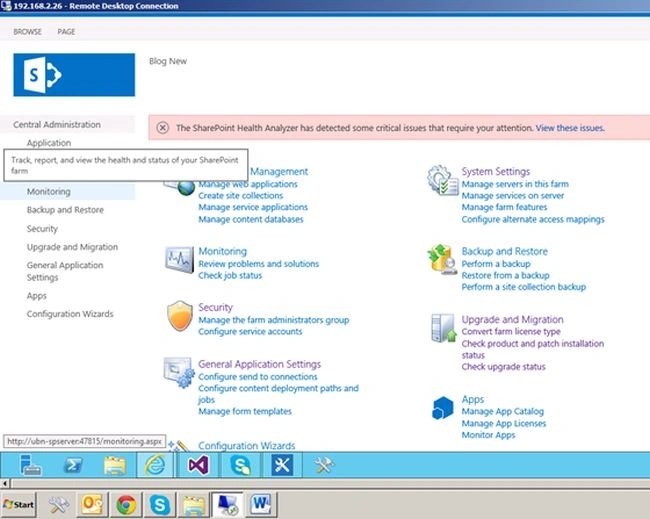
Then click Review job definition.
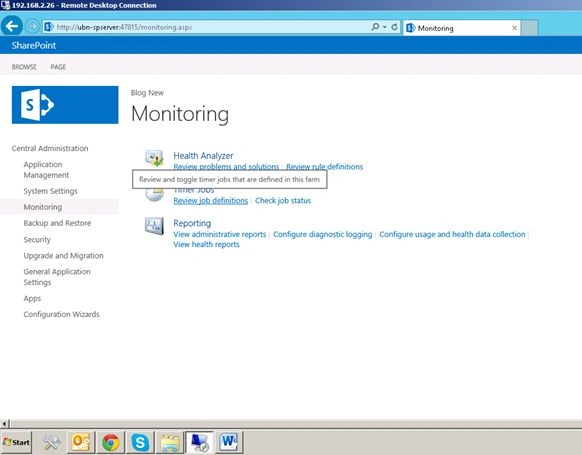
Then go to your created timer job application.
It’s working successfully.
Shobana JPosted Jul 12, 2016, 3:19 AM
Nice one
yangyeswar RaajalingamPosted May 6, 2016, 5:46 AM
I have tried this code and deployed also,but i am not getting email notification.can u help me?
Abhay ShankerPosted Aug 27, 2015, 10:41 AM
Good...
Gowtham RajamanickamPosted Aug 27, 2015, 9:49 AM
Good
Jacob RobinsonPosted Aug 27, 2015, 5:57 AM
Good Article...
Yashwanth MuthineniPosted Aug 27, 2015, 3:27 AM
Nice share
Rajkiran SwainPosted Aug 27, 2015, 2:59 AM
thanks all..
Swatismita BiswalPosted Aug 27, 2015, 2:54 AM
Nice!!
Ankit BansalPosted Aug 27, 2015, 2:21 AM
Good one..Thanks for sharing..
Rajeesh MenothPosted Aug 27, 2015, 1:52 AM
Thanks for sharing
Mohammed IbrahimPosted Aug 27, 2015, 12:05 AM
nice
Santhakumar MunuswamyPosted Aug 26, 2015, 11:34 PM
Good article. Thanks for sharing
Karthikeyan KPosted Aug 26, 2015, 11:23 PM
Good one sir...Thanks for sharing
Gowtham KPosted Aug 26, 2015, 10:37 PM
Good one