

Hello Guys, I am showing you how to create a Tic-Tac-Toe game for 2 players.
Before proceeding, the following is a short description of what Tic-Tac-Toe is.
Tic-tac-toe (or Noughts and crosses, Xs and Os) is a paper and pencil game for two players, each of which is either an X or an O, who take turns marking filling in spaces in a 3 by 3 grid. The player who succeeds in placing three respective marks in a horizontal, vertical, or diagonal row wins the game.
Let's Begin
Create a new Windows application project. Give it a name and then press Enter. (All of us know how to do that.) Then you will see a blank form as in the following:
Now add 9 buttons on your form using tools.
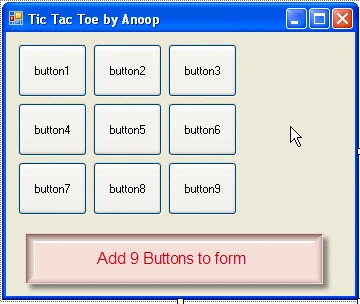
Select a button then delete the text from the properties (in other words button1 and button2). Actually we want no text on the buttons.
Now put a label on your form to set the backcolor as you wish (here I chose the skyblue color from properties), set the textalign to middlecenter and set the text to "Turn". Actually we are creating a box for showing the player's turn.
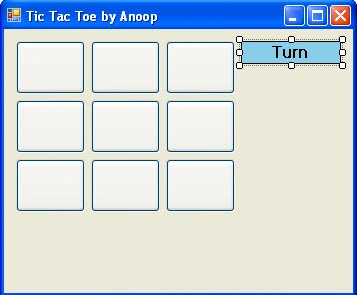
Add another Label below the label above. Remove the text from it, leave it blank. Give it the name="displayturn". Now our application looks something the following:
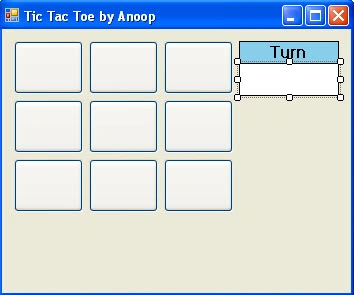
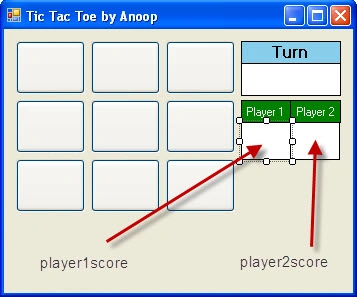
Now do the same as above. I created a Scorecard for player1 and player2. I gave the names playerscore1 and playerscore2 for the labels as shown in the figure.

I am creating this game for 2 people, so I suppose here the Player1 symbol="X" and Player2 Symbol="O". Now I want that when player1 clicks it makes an "X" symbol on the button. Then for Player2's turn when the button is clicked it shows an "O" on another button. Double-click on button1 and add the code given below.
void Button1Click(object sender, EventArgs e)
{
if(click1==0)
{
if(turn%2!=0)
{
button1.Text="X";
}
else
{
button1.Text="O";
}
turn++;
click1++;
}
else
{
button1.Text=button1.Text;
}
display();
checkit();
}
I have created int turn=1 (help us in finding the turn), int click1=0 (for checking if the button is pressed more than one time).
When a player clicks on a button, it checks the if condition, in other words click1=0 is true then it checks another condition for finding the player's turn. The starting value of the turn is 1, so it checks using (1%2!=0) and that is True. So, it displays "X" on the button and increases by 1 in int turn (turn++) and click1 (click++). If the condition becomes False then it displays "O" on the button. If the player presses the key again then the condition becomes false (because click1 became equal to 1) and the text on the button remains the same.
After that I am calling the "display()" and "checkit()" methods.
The display() methods displays the player's turn and the checkit() method checks for the winner of the game.
The same code is done for the other buttons instead of button1 write button2 and for click1 write click2;
display() method:
public void display()
{
if(turn%2!=0)
{
displayturn.Text="Player 1";
}
else
{
displayturn.Text="Player 2";
}
}
It shows the turn of the player. For example, if turn=2 then it shows "Player2" turn in our application.
checkit() method:
public void checkit()
{
if(button1.Text!="" && button2.Text!="" && button3.Text!="")
{
if(button1.Text==button2.Text && button1.Text==button3.Text)
{
button1.BackColor=Color.Green;
button1.ForeColor=Color.White;
button2.BackColor=Color.Green;
button2.ForeColor=Color.White;
button3.BackColor=Color.Green;
button3.ForeColor=Color.White;
if(button1.Text=="X")
{
MessageBox.Show("Player 1 Wins!");
player1++;
player1score.Text=player1.ToString();
}
else
{
MessageBox.Show("Player 2 Wins!");
player2++;
player2score.Text=player2.ToString();
}
cleargame();
}
}
}
The checkit() method first checks that the button contains text. After that if it finds that three buttons have the same text then it changes the Back and ForeColor. After that it checks the button text. If text =="X" then provide the message "Player1 Wins!" or if text=="O" then it gives the message that player 2 Wins. Add +1 to player1 or player2 (these are int variables) and display them in labels (player1score, player2score).
The cleargame() method clears the data (in other words the BackColor, ForeColor, Buttons text amd displayturn variable's values back to the starting value) but does not clear the player1score and player2score.
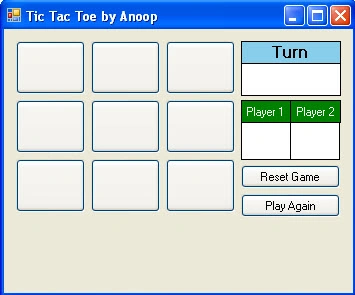
Create two buttons, one to reset and the other is Play Again (for ties). In the Play Again Button (for ties) I the cleargame() method.
Game Preview:
I am attaching the source files for downloading.
That's all. I hope you like it.
Thanks.
Cseh GergőPosted Apr 21, 2018, 6:00 AM
I have a problem,it only puts an x or an o in button 1 but it doesnt puts anything in the other ones
GURINDER KAURPosted Apr 27, 2017, 2:26 PM
Can you Please tell the code for each button and labels?
Craig KellyPosted Oct 14, 2016, 4:01 PM
Wow dude that is the most untidy code Ive seen . well done for going with it and making it work
Venus ♛Posted Oct 13, 2016, 6:54 PM
Hi where can I download the source code?
kalu singh raoPosted Jul 19, 2016, 2:08 AM
Nice...
Sthitaprajnya Debasis NayakPosted Apr 5, 2016, 7:30 AM
Super !
Asfend YarPosted Feb 29, 2016, 1:54 PM
good
jerome gillsPosted Nov 12, 2015, 1:47 PM
now say you want a simulation game of 2 AI players instead of 2 human players how would you accomplish that.
Anoop Kumar SharmaPosted Nov 7, 2015, 10:01 AM
Thanks Ryan Mustafa..!!
Ryan MustafaPosted Nov 6, 2015, 11:54 PM
Nice!! Nice!! Nice!!
Anoop Kumar SharmaPosted Nov 5, 2015, 9:27 AM
Thanks Humayun Kabir Mamun..!!
Humayun Kabir MamunPosted Nov 4, 2015, 11:13 PM
Nice...
MD SHAHWAZ AKHTERPosted Sep 30, 2015, 8:34 AM
Good sir.....jee
Chiheb ChebbiPosted Jun 29, 2015, 10:20 AM
great article
James PyperPosted Apr 4, 2015, 11:44 PM
I have tried to implement your code, but on the first click of every new game I automatically get a message saying player two wins? I cant see how this occurs... any help would be greatly appreciated. Other than that, awesome tutorial!! :) Also I fixed the tie/draw bug, you should have an if statement that includes all buttons not equal to "", then output a messagebox saying draw, and finally call an instance of clear game!
Anoop Kumar SharmaPosted Mar 28, 2015, 1:12 AM
Thanks Gowtham Rajamanickam..!!
Gowtham RajamanickamPosted Mar 27, 2015, 2:37 PM
good...
badal kumarPosted Mar 9, 2015, 6:48 AM
what if draw occurs, any logic for that!
Vithal WadjePosted Sep 26, 2014, 2:00 PM
super keep it up
Felix AryeePosted Aug 6, 2014, 8:31 AM
Appreciate, your help in the design.. but is it possible to show a text saying " Tie " or " Draw " , when both players are not able to win
Hayot IsmatovPosted Jul 4, 2014, 8:31 AM
awesome
marcus nnamdiPosted Apr 25, 2014, 4:48 AM
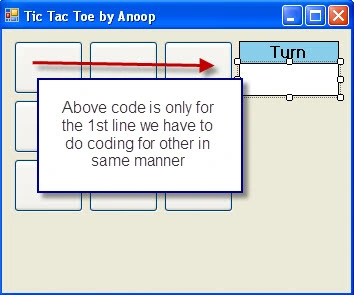
how do u mean, the above coding is for the first line
Former memberPosted Apr 9, 2014, 5:25 AM
lol why u do dis buk lau
Abdu HamodePosted Jan 11, 2014, 4:36 PM
Thanks for you