

This example shows how to use a RowDataBound event in a GridView to highlight the rows or cells in ASP.NET. This example is helpful in situations where you need to highlight the GridView rows or cells based on a specific condition. For demonstration purposes, I created a database (named Database.mdf) in which we have a table (named tbl_Employee).
The following is the table schema used in this example:
- CREATE TABLE [dbo].[tbl_Employee] (
- [Id] INT NOT NULL,
- [Name] VARCHAR (50) NULL,
- [City] VARCHAR (50) NULL,
- [Salary] INT NULL,
- PRIMARY KEY CLUSTERED ([Id] ASC)
- );
Let's begin. Use the following procedure.
- Drop a GridView control from the toolbox and set the AutoGenerateColumns property to false.
- Add a Columns Collection (element) to manage the collection of Column fields.
- Inside the Columns tag, add a column field (BoundField) that displays the value of a field in a data source.
- Set the DataField property to the name of the column in the table for binding to the BoundField object and set the HeaderText value for displaying it on the GridView's Header.
- Add a RowDataBound Event to the GridView.
- <form id="form1" runat="server">
- <div>
- <asp:GridView ID="GridView1" runat="server" CellPadding="6" AutoGenerateColumns="False" OnRowDataBound="GridView1_RowDataBound">
- <Columns>
- <asp:BoundField DataField="Id" HeaderText="Id"/>
- <asp:BoundField DataField="Name" HeaderText="Name"/>
- <asp:BoundField DataField="City" HeaderText="City"/>
- <asp:BoundField DataField="Salary" HeaderText="Salary"/>
- </Columns>
- </asp:GridView>
- </div>
- </form>
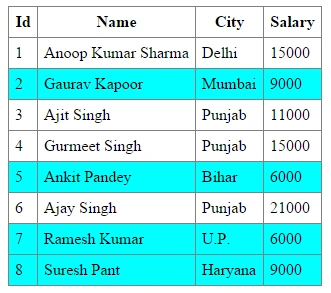
In this example, I will highlight the complete row for the Employee with a Salary less than 10000.
Default.aspx.cs Code
Default.aspx.cs Code
- using System;
- using System.Web.UI.WebControls;
- using System.Data;
- using System.Data.SqlClient;
- using System.Configuration;
- using System.Drawing;
- public partial class _Default : System.Web.UI.Page
- {
- SqlConnection con;
- //Connection String from Web.config file
- string cs = ConfigurationManager.ConnectionStrings["DBCS"].ConnectionString;
- protected void Page_Load(object sender, EventArgs e)
- {
- if(!IsPostBack)
- {
- ShowData();
- }
- }
- //method for Displaying Data in Gridview
- protected void ShowData()
- {
- DataTable dt = new DataTable();
- con = new SqlConnection(cs);
- SqlDataAdapter adapt = new SqlDataAdapter("select * from tbl_Employee",con);
- con.Open();
- adapt.Fill(dt);
- con.Close();
- GridView1.DataSource = dt;
- GridView1.DataBind();
- }
- //RowDataBound Event
- protected void GridView1_RowDataBound(object sender, GridViewRowEventArgs e)
- {
- //Checking the RowType of the Row
- if(e.Row.RowType==DataControlRowType.DataRow)
- {
- //If Salary is less than 10000 than set the row Background Color to Cyan
- if(Convert.ToInt32(e.Row.Cells[3].Text)<10000)
- {
- e.Row.BackColor = Color.Cyan;
- }
- }
- }
- }
Example 2
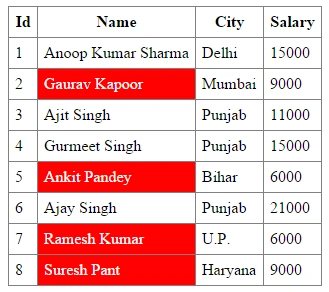
Suppose we need to highlight the name of Employee but not the entire row of the GridView. We can do that using the following code:
- protected void GridView1_RowDataBound(object sender, GridViewRowEventArgs e)
- {
- //Checking the RowType of the Row
- if (e.Row.RowType == DataControlRowType.DataRow)
- {
- //If Salary is less than 10000 than set the Cell BackColor to Red and ForeColor to White
- if (Convert.ToInt32(e.Row.Cells[3].Text) < 10000)
- {
- e.Row.Cells[1].BackColor = Color.Red;
- e.Row.Cells[1].ForeColor = Color.White;
- }
- }
- }
I hope you like it. Thanks.
My other articles on GridView:
sumit sankpalPosted Jan 11, 2024, 5:06 AM
I want to validate only 1 and 2 rows how to do that
Ramzanali MominPosted Oct 22, 2018, 12:40 AM
Good Atricle
Aditya KumarPosted Jun 23, 2017, 5:13 AM
Hello Sir, How can i use this event with <asp:TemplateField HeaderText="Salary"> <ItemTemplate> <%#Eval("Salary") %> </ItemTemplate> </asp:TemplateField>
Supriya BharadwajPosted Apr 26, 2017, 3:41 AM
Hi.. Nice example.. How can i do the same for gender?
kalu singh raoPosted Jul 5, 2016, 3:31 AM
Nice...
nethaji jayaveluPosted Mar 17, 2016, 2:44 AM
i want highlight sharma only in first row
pranita dandawatePosted Mar 16, 2016, 1:06 PM
nice
Navnath UgalePosted Nov 21, 2015, 11:38 PM
very very nice sir but when we given label on grid that time how to handle this column in row data bound
Anoop Kumar SharmaPosted Aug 20, 2015, 12:45 PM
Thanks Anand Vignesh..!! :-)
Anand VigneshPosted Aug 20, 2015, 5:47 AM
simple and nice
Manish Kumar ChoudharyPosted Nov 25, 2014, 1:16 AM
Nice one Anoop Kumar Sharma sir..