

Introduction
This article explains the Nested View in backbone.js. Here we will create an application using a Nested View. Views extended from it can be infinitely nested with each other using these methods such as "appendview" and "setView".
Now we will see how to create an application using a Nested View.
Step 1
Create a Web application as in the following:
- Start Visual Studio 2013. From the Start window select "New Project".
- Select "Installed" -> "Template" -> "Visual C#" -> "Web" -> "Visual Studio 2012" and select "ASP.NET Empty Web Application".
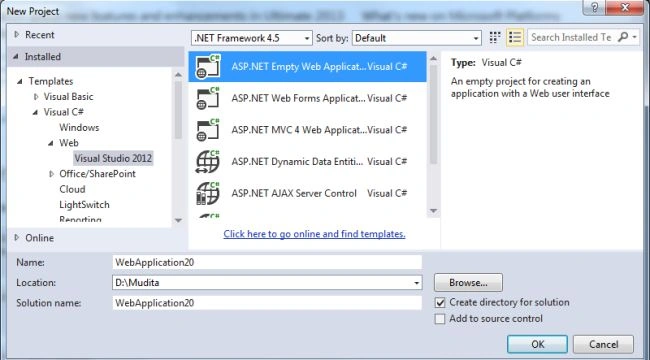
- Click on the "OK" button.
Step 2
Now add the HTML page.
- In the Solution Explorer.
- Right-click on the project then select "Add" -> "HTML page".
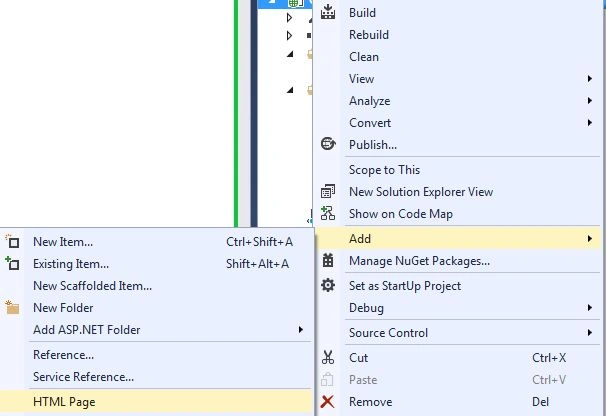
- Change the name of the page.
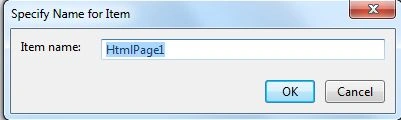
- Click on the add button.
Add the following code:
<!doctype html>
<html>
<head>
<title>List</title>
<script src="js/jquery.js"></script>
<script src="js/underscore.js"></script>
<script src="js/backbone.js"></script>
<script src="js/backbone.viewmaster.js"></script>
<script type="template" id="layout">
<div class="header"></div>
<hr>
<h1>List</h1>
<div class="addview-container"></div>
<div class="list-container"></div>
<div>You have <%= count %> lists</div>
<hr>
<div class="footer"></div>
</script>
<script type="template" id="addview">
<input type="text" autofocus>
<button>Add</button>
</script>
<script type="template" id="product">
<span class="product"><%= text %></span>
<button class="edit">EditList</button>
<button class="done">Remove</button>
</script>
<script src="js/app.js"></script>
</head>
<body>
</body>
</html>
Step 3
Add a JavaScript file as in the following:
- In the Solution Explorer.
- Right-click on the "js" folder, select "Add" -> "New Item".
- Select "JavaScript".
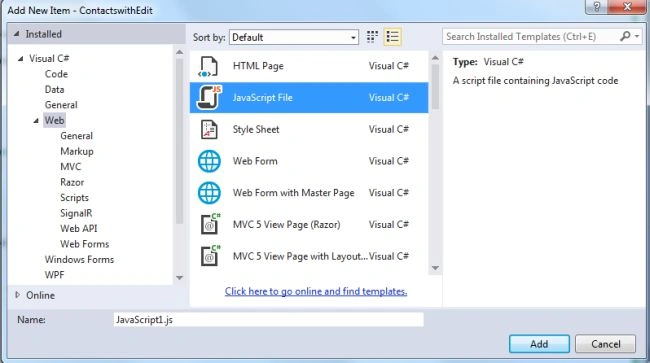
Add the following code:
var AddListProduct = Backbone.Viewmaster.extend({
template: function(context){
return $("#addview").html();
},
events: {
"click button": "addList"
},
addList: function(e){
e.preventDefault();
this.collection.add(new Backbone.Model({
text: this.$("input").val()
}));
this.$("input").val("");
}
});
var ListProduct = Backbone.Viewmaster.extend({
constructor: function(){
Backbone.Viewmaster.prototype.constructor.apply(this, arguments);
// Rerender view after edit
this.listenTo(this.model, "change", this.render);
},
template: function(context){
return _.template($("#product").html(), context);
},
events: {
"click .done": "done",
"click .edit": "edit"
},
done: function(){
// When the task is completed then destroy the model and remove the view
this.model.destroy();
this.remove();
},
edit: function() {
var newContent = prompt("Edit list", this.model.get("text"));
if (newContent !== null) this.model.set("text", newContent);
}
});
var ListProductList = Backbone.Viewmaster.extend({
constructor: function(){
Backbone.Viewmaster.prototype.constructor.apply(this, arguments);
// On load display all products
this.setProducts();
// Add new product view on new product model
this.listenTo(this.collection, "add", function(model) {
// Create new view for the product
this.appendView("ul", new ListProduct({
model: model
}));
// Render the new productand put it to DOM tree
this.refreshViews();
});
// Filter out products on 'search' broadcast events
this.listenTo(this, "search", function(searchString) {
this.setProducts(this.collection.filterSearch(searchString));
this.refreshViews();
});
},
template: function() {
return "<ul></ul>";
},
setProducts: function(products) {
products = products || this.collection;
this.setView("ul", products.map(function(model) {
return new ListProduct({
model: model
});
}));
}
});
var Search = Backbone.Viewmaster.extend({
template: function() {
return "<input type=text placeholder=Search >";
},
events: {
"keyup input": function(e) {
// Bubble search event up to parent layout
this.bubble("search", $(e.target).val());
}
}
});
var ListLayout = Backbone.Viewmaster.extend({
constructor: function(){
Backbone.Viewmaster.prototype.constructor.apply(this, arguments);
// Nest Addlistitem inside List
this.setView(".addview-container", AddListProduct);
this.listProductList = new ListProductList({
collection: this.collection
});
this.setView(".list-container", this.listProductList);
// Add two search fields
this.setView(".footer", Search);
//Listen on bubbled search events from both Search views
this.listenTo(this, "search", function(searchString) {
// Broadcast them to ListProductList view
this.listProductList.broadcast("search", searchString);
});
// Render layout on when a todo is removed or added to update
// the product count
this.listenTo(this.collection, "add remove", this.render);
},
template: function(context){
return _.template($("#layout").html(), context);
},
context: function() {
return {
count: this.collection.size()
};
}
});
$(document).ready(function() {
// Collection containing all list of product
var products = new Backbone.Collection();
products.filterSearch = function(searchString) {
// Do not filter anything on empty string
if (!searchString.trim()) return null;
return this.filter(function(product) {
return product.get("text").indexOf(searchString) !== -1;
});
};
// Initialize whole layout
var layout = new ListLayout({
collection: products
});
layout.render();
$("body").append(layout.el);
});
Step 4
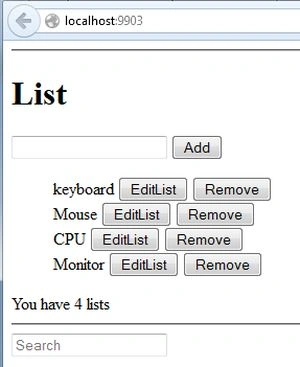
Execute the application, add new products to the list..
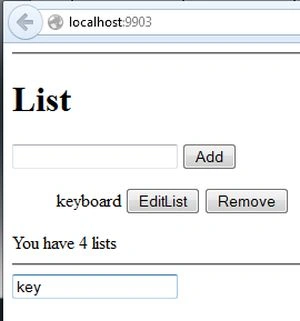
You can filter the product.
Join the conversation! Your thoughts help the community grow.