

In this topic we will focus on how to display real time updates from databases with SignalR on existing ASP.NET MVC CRUD project.
The topic has the following two steps:
- In the first step we will create a sample app to perform CRUD operations.
- In the second step we will make the app real-time with SignalR.
Those who are not familiar with SignalR, visit my previous article on Overview of SignalR.
Step 1: At first we need to create a database named CRUD_Sample. In sample db we have to create a table named Customers.
- CREATE TABLE [dbo].[Customers](
- [Id] [bigint] IDENTITY(1,1) NOT NULL,
- [CustName] [varchar](100) NULL,
- [CustEmail] [varchar](150) NULL,
- CONSTRAINT [PK_Customers] PRIMARY KEY CLUSTERED ([Id] ASC)
- WITH (PAD_INDEX = OFF, STATISTICS_NORECOMPUTE = OFF, IGNORE_DUP_KEY = OFF, _ALLOW_ROW_LOCKS = ON, ALLOW_PAGE_LOCKS = ON) ON [PRIMARY]) ON [PRIMARY]
- GO
- SET ANSI_PADDING OFF
- GO
- USE [CRUD_Sample]
- GO
- /****** Object: StoredProcedure [dbo].[Delete_Customer] Script Date: 12/27/2015 1:44:05 PM ******/
- SET ANSI_NULLS ON
- GO
- SET QUOTED_IDENTIFIER ON
- GO
- -- =============================================
- -- Author: <Author,,Name>
- -- Create date: <Create Date,,>
- -- Description: <Description,,>
- -- =============================================
- CREATE PROCEDURE [dbo].[Delete_Customer]
- -- Add the parameters for the stored procedure here
- @Id Bigint
- AS
- BEGIN
- -- SET NOCOUNT ON added to prevent extra result sets from
- -- interfering with SELECT statements.
- SET NOCOUNT ON;
- -- Insert statements for procedure here
- DELETE FROM [dbo].[Customers] WHERE [Id] = @Id
- SELECT 1
- END
- GO
- /****** Object: StoredProcedure [dbo].[Get_Customer] Script Date: 12/27/2015 1:44:05 PM ******/
- SET ANSI_NULLS ON
- GO
- SET QUOTED_IDENTIFIER ON
- GO
- -- =============================================
- -- Author: <Author,,Name>
- -- Create date: <Create Date,,>
- -- Description: <Description,,>
- -- =============================================
- CREATE PROCEDURE [dbo].[Get_Customer]
- -- Add the parameters for the stored procedure here
- @Count INT
- AS
- BEGIN
- -- SET NOCOUNT ON added to prevent extra result sets from
- -- interfering with SELECT statements.
- SET NOCOUNT ON;
- -- Insert statements for procedure here
- SELECT top(@Count)* FROM [dbo].[Customers]
- END
- GO
- /****** Object: StoredProcedure [dbo].[Get_CustomerbyID] Script Date: 12/27/2015 1:44:05 PM ******/
- SET ANSI_NULLS ON
- GO
- SET QUOTED_IDENTIFIER ON
- GO
- -- =============================================
- -- Author: <Author,,Name>
- -- Create date: <Create Date,,>
- -- Description: <Description,,>
- -- =============================================
- CREATE PROCEDURE [dbo].[Get_CustomerbyID]
- -- Add the parameters for the stored procedure here
- @Id BIGINT
- AS
- BEGIN
- -- SET NOCOUNT ON added to prevent extra result sets from
- -- interfering with SELECT statements.
- SET NOCOUNT ON;
- -- Insert statements for procedure here
- SELECT * FROM [dbo].[Customers]
- WHERE Id=@Id
- END
- GO
- /****** Object: StoredProcedure [dbo].[Set_Customer] Script Date: 12/27/2015 1:44:05 PM ******/
- SET ANSI_NULLS ON
- GO
- SET QUOTED_IDENTIFIER ON
- GO
- -- =============================================
- -- Author: <Author,,Name>
- -- Create date: <Create Date,,>
- -- Description: <Description,,>
- -- =============================================
- CREATE PROCEDURE [dbo].[Set_Customer]
- -- Add the parameters for the stored procedure here
- @CustName Nvarchar(100)
- ,@CustEmail Nvarchar(150)
- AS
- BEGIN
- -- SET NOCOUNT ON added to prevent extra result sets from
- -- interfering with SELECT statements.
- SET NOCOUNT ON;
- -- Insert statements for procedure here
- INSERT INTO [dbo].[Customers]([CustName],[CustEmail])
- VALUES(@CustName,@CustEmail)
- SELECT 1
- END
- GO
- /****** Object: StoredProcedure [dbo].[Update_Customer] Script Date: 12/27/2015 1:44:05 PM ******/
- SET ANSI_NULLS ON
- GO
- SET QUOTED_IDENTIFIER ON
- GO
- -- =============================================
- -- Author: <Author,,Name>
- -- Create date: <Create Date,,>
- -- Description: <Description,,>
- -- =============================================
- CREATE PROCEDURE [dbo].[Update_Customer]
- -- Add the parameters for the stored procedure here
- @Id Bigint
- ,@CustNameNvarchar(100)
- ,@CustEmailNvarchar(150)
- AS
- BEGIN
- -- SET NOCOUNT ON added to prevent extra result sets from
- -- interfering with SELECT statements.
- SET NOCOUNT ON;
- -- Insert statements for procedure here
- UPDATE [dbo].[Customers] SET[CustName] = @CustName,[CustEmail]= @CustEmail
- WHERE [Id] = @Id
- SELECT 1
- END
- GO
To create a sample application, we need to have Visual Studio 2012 or later installed and be able to run the server on a platform that supports .NET 4.5.
Step 1:
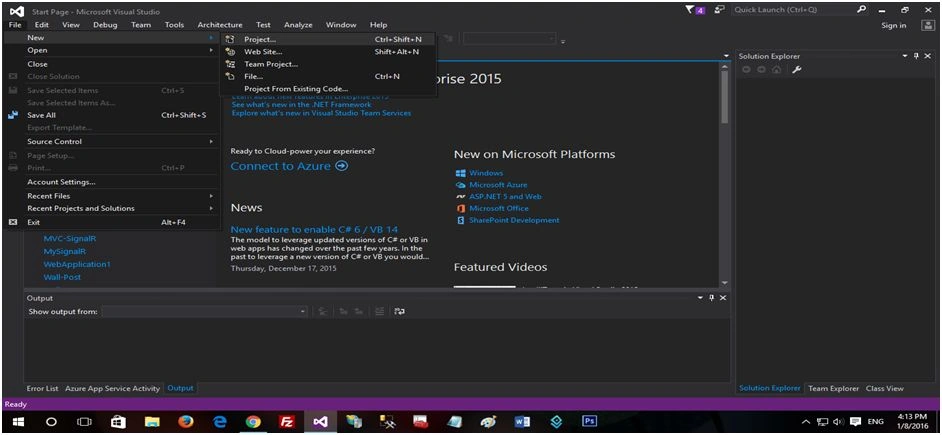
Step 2:
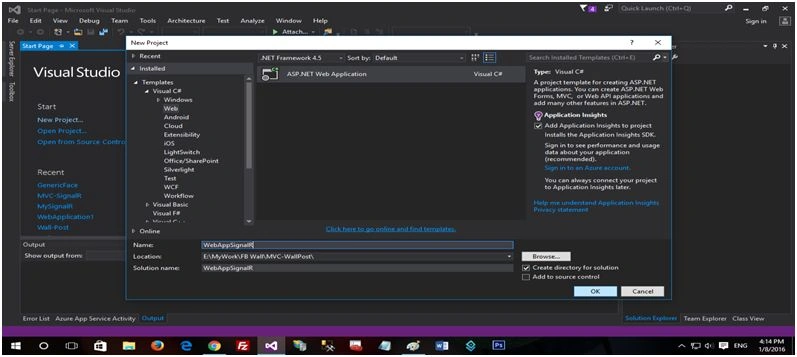
Step 3:
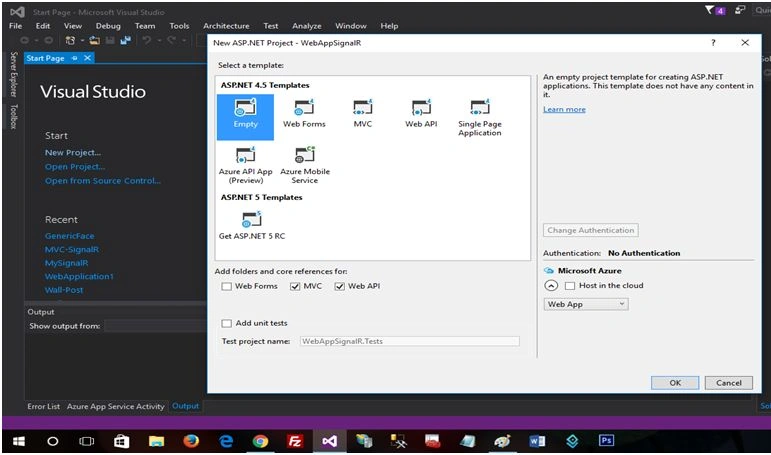
Click OK and Visual Studio will create and load a new ASP.NET application project.
Use of Generic Repository
With a generic feature, we can reduce the amount of code we need for common scenarios.
- namespace WebApplication1.Repository
- {
- interfaceIRepository < T > : IDisposablewhereT: class
- {
- IEnumerable < T > ExecuteQuery(stringspQuery, object[] parameters);
- TExecuteQuerySingle(stringspQuery, object[] parameters);
- intExecuteCommand(stringspQuery, object[] parameters);
- }
- }
Show an interface of a generic repository of type T, which is a LINQ to SQL entity. It provides a basic interface with operations like Insert, Update, Delete, GetById and GetAll.
IDisposable
The IDisposable Interface provides a mechanism for releasing unmanaged resources.
whereT : class
This is constraining the generic parameter to a class. Click for more.
The type of argument must be a reference type; this applies also to any class, interface, delegate, or array type.
- namespace WebApplication1.Repository
- {
- public class GenericRepository < T > : IRepository < T > whereT: class
- {
- Customer_Entities context = null;
- privateDbSet < T > entities = null;
- public GenericRepository(Customer_Entities context)
- {
- this.context = context;
- entities = context.Set < T > ();
- }
- ///<summary>
- /// Get Data From Database
- ///<para>Use it when to retive data through a stored procedure</para>
- ///</summary>
- public IEnumerable < T > ExecuteQuery(stringspQuery, object[] parameters)
- {
- using(context = newCustomer_Entities())
- {
- returncontext.Database.SqlQuery < T > (spQuery, parameters).ToList();
- }
- }
- ///<summary>
- /// Get Single Data From Database
- ///<para>Use it when to retive single data through a stored procedure</para>
- ///</summary>
- public TExecuteQuerySingle(stringspQuery, object[] parameters)
- {
- using(context = newCustomer_Entities())
- {
- returncontext.Database.SqlQuery < T > (spQuery, parameters).FirstOrDefault();
- }
- }
- ///<summary>
- /// Insert/Update/Delete Data To Database
- ///<para>Use it when to Insert/Update/Delete data through a stored procedure</para>
- ///</summary>
- public intExecuteCommand(stringspQuery, object[] parameters)
- {
- int result = 0;
- try
- {
- using(context = newCustomer_Entities())
- {
- result = context.Database.SqlQuery < int > (spQuery, parameters).FirstOrDefault();
- }
- }
- catch
- {}
- return result;
- }
- private bool disposed = false;
- protected virtualvoid Dispose(bool disposing)
- {
- if (!this.disposed)
- {
- if (disposing)
- {
- context.Dispose();
- }
- }
- this.disposed = true;
- }
- public void Dispose()
- {
- Dispose(true);
- GC.SuppressFinalize(this);
- }
- }
- }
- namespace WebApplication1.Services
- {
- public partial class CustomerService
- {
- privateGenericRepository < Customer > CustRepository;
- //CustomerRepositoryCustRepository;
- public CustomerService()
- {
- this.CustRepository = newGenericRepository < Customer > (newCustomer_Entities());
- }
- public IEnumerable < Customer > GetAll(object[] parameters)
- {
- stringspQuery = "[Get_Customer] {0}";
- returnCustRepository.ExecuteQuery(spQuery, parameters);
- }
- public CustomerGetbyID(object[] parameters)
- {
- stringspQuery = "[Get_CustomerbyID] {0}";
- returnCustRepository.ExecuteQuerySingle(spQuery, parameters);
- }
- public int Insert(object[] parameters)
- {
- stringspQuery = "[Set_Customer] {0}, {1}";
- returnCustRepository.ExecuteCommand(spQuery, parameters);
- }
- public int Update(object[] parameters)
- {
- stringspQuery = "[Update_Customer] {0}, {1}, {2}";
- returnCustRepository.ExecuteCommand(spQuery, parameters);
- }
- public int Delete(object[] parameters)
- {
- stringspQuery = "[Delete_Customer] {0}";
- returnCustRepository.ExecuteCommand(spQuery, parameters);
- }
- }
- }
- namespace WebApplication1.Controllers
- {
- public class HomeController: Controller
- {
- private CustomerServiceobjCust;
- //CustomerRepositoryCustRepository;
- public HomeController()
- {
- this.objCust = newCustomerService();
- }
- // GET: Home
- public ActionResult Index()
- {
- int Count = 10;
- object[] parameters = {
- Count
- };
- var test = objCust.GetAll(parameters);
- return View(test);
- }
- public ActionResult Insert()
- {
- return View();
- }
- [HttpPost]
- public ActionResult Insert(Customer model)
- {
- if (ModelState.IsValid)
- {
- object[] parameters = {
- model.CustName,
- model.CustEmail
- };
- objCust.Insert(parameters);
- }
- return RedirectToAction("Index");
- }
- public ActionResult Delete(int id)
- {
- object[] parameters = {
- id
- };
- this.objCust.Delete(parameters);
- return RedirectToAction("Index");
- }
- public ActionResult Update(int id)
- {
- object[] parameters = {
- id
- };
- return View(this.objCust.GetbyID(parameters));
- }
- [HttpPost]
- public ActionResult Update(Customer model)
- {
- object[] parameters = {
- model.Id,
- model.CustName,
- model.CustEmail
- };
- objCust.Update(parameters);
- return RedirectToAction("Index");
- }
- protected override void Dispose(bool disposing)
- {
- base.Dispose(disposing);
- }
- }
- }
Index
- @model IList
- <WebApplication1.Models.Customer>
- @{
- ViewBag.Title = "Index";
- }
- <linkhref="~/Content/bootstrap/css/bootstrap.min.css"rel="stylesheet"/>
- <divclass="clearfix">
- </div>
- <divclass="clearfix">
- </div>
- <divclass="container">
- <divclass="table-responsive">
- @Html.ActionLink("New Customer", "Insert", "Home")
- <tableclass="table table-bordered table-striped">
- <thead>
- <tr>
- <th>ID</th>
- <th>Name</th>
- <th>Email ID</th>
- <th>Delete</th>
- <th>Update</th>
- </tr>
- </thead>
- <tbody>
- @if (Model != null)
- {
- foreach (var item in Model)
- {
- <tr>
- <td>@item.Id</td>
- <td>@item.CustName</td>
- <td>@item.CustEmail</td>
- <td>@Html.ActionLink("Delete", "Delete", "Home", new { id = @item.Id }, null)</td>
- <td>@Html.ActionLink("Update", "Update", "Home", new { id = @item.Id }, null)</td>
- </tr>
- }
- }
- </tbody>
- </table>
- </div>
- <divclass="clearfix">
- </div>
- </div>
- @model WebApplication1.Models.Customer
- @{
- ViewBag.Title = "Insert";
- }
- <link href="~/Content/bootstrap/css/bootstrap.min.css"rel="stylesheet"/>
- <div class="clearfix">
- </div>
- <div class="clearfix">
- </div>
- <div class="container">
- <div class="table-responsive col-md-6 col-md-offset-3">
- <table class="table table-bordered table-striped">
- <tbody>
- @using (Html.BeginForm("Insert", "Home", FormMethod.Post))
- {
- @*
- <tr>
- <td class="col-md-4">ID</td>
- <td class="col-md-8">@Html.TextBoxFor(m =>m.Id)</td>
- </tr>*@
- <tr>
- <td class="col-md-4">Name
- </td>
- <td class="col-md-8">@Html.TextBoxFor(m =>m.CustName)
- </td>
- </tr>
- <tr>
- <td class="col-md-4">Email ID
- </td>
- <td class="col-md-8">@Html.TextBoxFor(m =>m.CustEmail)
- </td>
- </tr>
- <tr>
- <td class="text-right"colspan="2">
- <input type="submit"value="Save"class="btnbtn-primary"/>
- </td>
- </tr>
- }
- </tbody>
- </table>
- </div>
- <div class="clearfix">
- </div>
- @Html.ActionLink("Home", "Index", "Home")
- </div>
- @model WebApplication1.Models.Customer
- @{
- ViewBag.Title = "Update";
- }
- <link href="~/Content/bootstrap/css/bootstrap.min.css"rel="stylesheet"/>
- <div class="clearfix">
- </div>
- <div class="clearfix">
- </div>
- <div class="container">
- <div class="table-responsive">
- <table class="table table-bordered table-striped">
- <thead>
- <tr>
- <th>Name</th>
- <th>Email ID</th>
- <th>Update</th>
- </tr>
- </thead>
- <tbody>
- <tr>
- @using (Html.BeginForm("Update", "Home", FormMethod.Post))
- {
- <td>@Html.TextBoxFor(m =>m.CustName)</td>
- <td>@Html.TextBoxFor(m =>m.CustEmail)</td>
- <td>
- <inputtype="submit"value="Update"class="btnbtn-primary"/>
- </td>
- }
- </tr>
- </tbody>
- </table>
- </div>
- </div>
Getting Started with SignalR
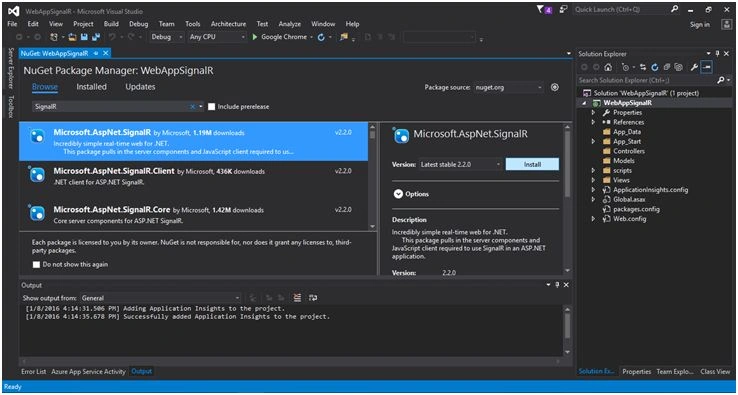
The first thing is getting a reference from NuGet.
Get it on NuGet!
Install-Package Microsoft.AspNet.SignalR
Register SignalR middleware
Once you have installed it let’s create OwinStartup Class.
The following code adds a simple piece of middleware to the OWIN pipeline, implemented as a function that receives a Microsoft.Owin.IOwinContext instance.
When the server receives an HTTP request, the OWIN pipeline invokes the middleware. The middleware sets the content type for the response and writes the response body.
Startup.cs
- using System;
- using System.Threading.Tasks;
- using Microsoft.Owin;
- using Owin;
- [assembly: OwinStartup(typeof (WebAppSignalR.Startup))]
- namespace WebAppSignalR
- {
- public class Startup
- {
- public void Configuration(IAppBuilder app)
- {
- app.MapSignalR();
- }
- }
- }
After finishing the previous process, let’s create a Hub. A SignalR Hub make remote procedure calls (RPCs) from a server to connected clients and from clients to the server.
CustomerHub.cs
- using System;
- using System.Collections.Generic;
- using System.Linq;
- using System.Web;
- using Microsoft.AspNet.SignalR;
- using Microsoft.AspNet.SignalR.Hubs;
- namespace WebApplication1.Hubs
- {
- public class CustomerHub: Hub
- {
- [HubMethodName("broadcastData")]
- public static void BroadcastData()
- {
- IHubContext context = GlobalHost.ConnectionManager.GetHubContext < CustomerHub > ();
- context.Clients.All.updatedData();
- }
- }
- }
- IHubContext context = GlobalHost.ConnectionManager.GetHubContext<CustomerHub>();
- context.Clients.All.updatedData();
Let’s Modify our Existing View
Now we will modify part of Index view as in the following, and we will display data with a partial view.
Index
- @model IList < WebApplication1.Models.Customer > @
- {
- ViewBag.Title = "Index";
- } < linkhref = "~/Content/bootstrap/css/bootstrap.min.css"
- rel = "stylesheet" / > < divclass = "clearfix" > & nbsp; < /div> < divclass = "clearfix" > & nbsp; < /div> < divclass = "container" > < divclass = "table-responsive" > @Html.ActionLink("New Customer", "Insert", "Home") < hr / > < divid = "dataTable" > < /div> < /div> < divclass = "clearfix" > & nbsp; < /div> < /div>
- @section JavaScript
- { < scriptsrc = "~/Scripts/jquery.signalR-2.2.0.min.js" > < /script> < scriptsrc = "/signalr/hubs" > < /script> < scripttype = "text/javascript" > $(function ()
- {
- // Reference the hub.
- var hubNotif = $.connection.customerHub;
- // Start the connection.
- $.connection.hub.start().done(function ()
- {
- getAll();
- });
- // Notify while anyChanges.
- hubNotif.client.updatedData = function ()
- {
- getAll();
- };
- });
- function getAll()
- {
- var model = $('#dataTable');
- $.ajax(
- {
- url: '/home/GetAllData',
- contentType: 'application/html ; charset:utf-8',
- type: 'GET',
- dataType: 'html'
- }).success(function (result)
- {
- model.empty().append(result);
- }).error(function (e)
- {
- alert(e);
- });
- } < /script>
- }
- <table class="table table-bordered table-striped">
- <thead>
- <tr>
- <th>ID</th>
- <th>Name</th>
- <th>Email ID</th>
- <th>Delete</th>
- <th>Update</th>
- </tr>
- </thead>
- <tbody> @if (Model != null) { foreach (var item in Model) {
- <tr>
- <td>@item.Id</td>
- <td>@item.CustName</td>
- <td>@item.CustEmail</td>
- <td>@Html.ActionLink("Delete", "Delete", "Home", new { id = @item.Id }, null)</td>
- <td>@Html.ActionLink("Update", "Update", "Home", new { id = @item.Id }, null)</td>
- </tr> } } </tbody>
- </table>
Home Controller:
In our home controller we will add a method named GetAllData(). Here's the method.
- [HttpGet]
- public ActionResult GetAllData()
- {
- int Count = 10;
- object[] parameters = {
- Count
- };
- var test = objCust.GetAll(parameters);
- return PartialView("_DataList", test);
- }
- // GET: Home
- public ActionResult Index()
- {
- return View();
- }
- public class HomeController: Controller
- {
- private CustomerService objCust;
- //CustomerRepositoryCustRepository;
- public HomeController()
- {
- this.objCust = newCustomerService();
- }
- // GET: Home
- public ActionResult Index()
- {
- return View();
- }
- [HttpGet]
- public ActionResult GetAllData()
- {
- int Count = 10;
- object[] parameters = {
- Count
- };
- var test = objCust.GetAll(parameters);
- return PartialView("_DataList", test);
- }
- public ActionResult Insert()
- {
- return View();
- }
- [HttpPost]
- public ActionResult Insert(Customer model)
- {
- if (ModelState.IsValid)
- {
- object[] parameters = {
- model.CustName,
- model.CustEmail
- };
- objCust.Insert(parameters);
- }
- //Notify to all
- CustomerHub.BroadcastData();
- return RedirectToAction("Index");
- }
- public ActionResult Delete(int id)
- {
- object[] parameters = {
- id
- };
- this.objCust.Delete(parameters);
- //Notify to all
- CustomerHub.BroadcastData();
- return RedirectToAction("Index");
- }
- public ActionResult Update(int id)
- {
- object[] parameters = {
- id
- };
- return View(this.objCust.GetbyID(parameters));
- }
- [HttpPost]
- public ActionResult Update(Customer model)
- {
- object[] parameters = {
- model.Id,
- model.CustName,
- model.CustEmail
- };
- objCust.Update(parameters);
- //Notify to all
- CustomerHub.BroadcastData();
- returnRedirectToAction("Index");
- }
- protected override void Dispose(bool disposing)
- {
- base.Dispose(disposing);
- }
- }
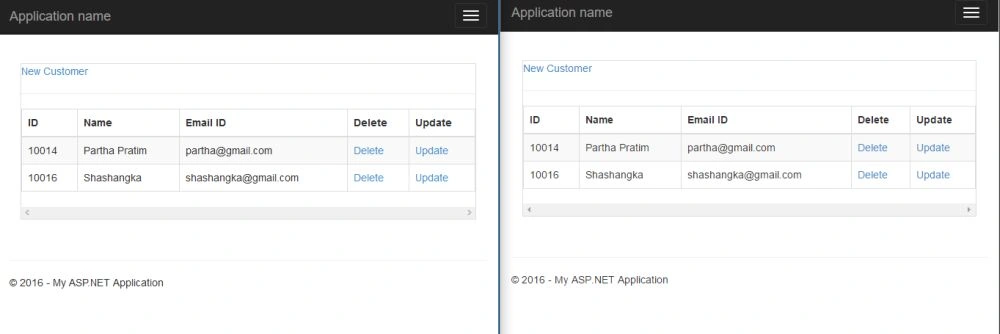
I hope this will help someone.
inco bilgisayarPosted Feb 27, 2020, 4:38 AM
how can we do same sample in Separate Layers as UI-API-Domain (dbentities and services)
Shamim UddinPosted Oct 2, 2016, 1:27 AM
Nice
Manav PandyaPosted Sep 21, 2016, 12:35 PM
Nice sir ...
Ntiyiso MbhalatiPosted Jul 20, 2016, 4:06 AM
I'm unable to download the solution, was it moved?
Sridhar SharmaPosted Mar 10, 2016, 9:58 PM
Nice Share
Anu VPosted Feb 4, 2016, 5:25 AM
Nice
Ankur MistryPosted Jan 27, 2016, 3:19 PM
Really nice share
Arul RPosted Jan 26, 2016, 10:34 PM
Nice share
sreenivasa kPosted Jan 26, 2016, 2:56 PM
excellent
Gowtham KPosted Jan 18, 2016, 10:47 AM
Good One, Thanks for sharing:)
Mohammed IbrahimPosted Jan 18, 2016, 8:59 AM
nice
Raja TPosted Jan 18, 2016, 7:03 AM
Nice,Thanks for sharing
Debasis SahaPosted Jan 18, 2016, 4:08 AM
Nice One..
Ankit BansalPosted Jan 18, 2016, 12:30 AM
Really helpful..
Sabyasachi MishraPosted Jan 17, 2016, 11:51 PM
Good one
Muhammad Aqib ShehzadPosted Jan 17, 2016, 1:55 PM
very nice and detailed article, thanks for sharing.
Santhakumar MunuswamyPosted Jan 13, 2016, 10:18 AM
Thanks for nice article
Muhammad Aqib ShehzadPosted Jan 12, 2016, 9:32 AM
good sharing.....
Humayun Kabir MamunPosted Jan 11, 2016, 11:01 PM
Nice...
Raja TPosted Jan 11, 2016, 10:41 PM
Nice,thanks for sharing
Ehsan SajjadPosted Jan 11, 2016, 1:28 PM
That's good, at least some one used other example than Chat application