

C# ArrayList is a non-generic collection. The ArrayList class represents an array list and it can contain elements of any data types. The ArrayList class is defined in the System.Collections namespace. An ArrayList is dynamic array and grows automatically when new items are added to the collection.
This tutorial explains the basics of C# ArrayList with most common code examples.
1. Why C# ArrayList
C# array is a collection of data types. For example, you can create an array for student marks. The marks are an integer value so you can create an integer array that holds all student marks. Suppose some students have marks from an examination but other students have a grade. A grade is a string value like “A”, ”B” and so on. What do you? You can create two arrays, one for marks that is an integer array and another for grade that is a string array. You have two arrays so you can’t retrieve the result in students sequence because you have marks in the first array then grades in the second array. So when you have multiple types set then you can use an ArrayList. ArrayList is one of the most flexible data structures from C# Collections. An ArrayList contains a simple list of values.
- To use an ArrayList you need to add a System.Collections namespace.
- ArrayList implements the System.Collections.IList interface using an array whose size is dynamically increased as required.
- ArrayList is an alternate of an Array but you can’t implement multi-dimensional arrays using ArrayList.
- Array is a fixed size collection whereas an ArrayList's size can be dynamically increased or decreased.
- An Array is a collection of variables of the same type whereas an ArrayList is a collection of variables of the same type or multiple types.
- The capacity of an ArrayList is the number of elements the ArrayList can hold. As elements are added to an ArrayList, the capacity is automatically increased as required through reallocation. The capacity can be decreased by calling TrimToSize or by setting the Capacity property explicitly.
- Elements in an ArrayList collection can be accessed using an integer index. Indexes in this collection are zero-based.
- The ArrayList collection accepts null as a valid value, an allows duplicate elements.
2. How to add an item to a C# ArrayList
The Add method on ArrayList appends a new item/element object to the end of the ArrayList. You can add elements in the ArrayList until memory runs out. The objects are stored in the managed heap. Let’s see an example of creating an ArrayList and add two elements using the Add() method of ArrayList.
using System;
using System.Collections;

namespace ArrayListApplication
{
    class Program
    {
        static void Main(string[] args)
        {
            ArrayList resultList = new ArrayList();
            resultList.Add(90);
            resultList.Add(95);
            Console.Read();
        }
    }
}
Whenever you execute this program you will get that your ArrayList has been populated by elements as per Figure 1.1.

Figure 1.1 Adds item in ArrayList.
3. How to read elements from an ArrayList
You can read items from the ArrayList using a foreach loop. Let’s see an example.
using System;
using System.Collections;

namespace ArrayListApplication
{
    class Program
    {
        static void Main(string[] args)
        {
            ArrayList personList= new ArrayList();
            personList.Add("Sandeep");
            personList.Add("Raviendra");
            foreach (var item in personList)
            {
               string arrayItem = string.Format($"Name  is {item}");
               Console.WriteLine(arrayItem);
            }
            Console.Read();
        }
    }
}
You execute this program then get output as in Figure 1.2.

Figure 1.2 Read Data from an ArrayList
ArrayList items are stored on an index basis. Let’s see Figure 1.1 where the first item stored is at index 0 whereas the next item stored at the next index, in other words, index 1 so you can also retrieve items from an ArrayList using an index. Let’s see the following code.
using System;
using System.Collections;

namespace ArrayListApplication
{
    class Program
    {
        static void Main(string[] args)
        {
            ArrayList personList = new ArrayList();
            personList.Add("Sandeep");
            personList.Add("Raviendra");
            for (int i = 0; i < personList.Count; i++)
            {
                string arrayItem = string.Format($"Name is {personList[i]}");
                Console.WriteLine(arrayItem);
            }
            Console.Read();
        }
    }
}
When you execute this program you will get the same output as in Figure 1.2. One more point is that you can read items from an ArrayList by an index but you can’t add items in an ArrayList by index.
4. How to insert an Item to a C# ArrayList
You have seen that you can add items to an ArrayList so what is meant by "insert"? The Add method adds an item to the end of the ArrayList whereas Insert adds an item at a specific index position. Let’s see an example where I add an item to index 1.
using System;
using System.Collections;

namespace ArrayListApplication
{
   class Program
    {
        static void Main(string[] args)
        {
            ArrayList personList = new ArrayList();
            personList.Add("Sandeep");
            personList.Add("Raviendra");
            Console.WriteLine("=====Original List======");
            for (int i = 0; i < personList.Count; i++)
            {
                Console.WriteLine(arrayItem);
            }
            personList.Insert(1,"Shaijal");
            Console.WriteLine("=====Modify List======");
            for (int i = 0; i < personList.Count; i++)
            {
                Console.WriteLine(arrayItem);
            }
            Console.Read();
        }
    }
}
Now you can execute this program and get the results as in Figure 1.3.
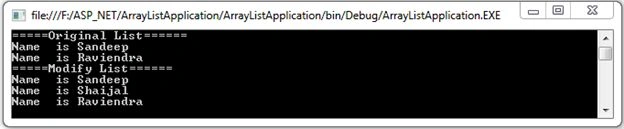
Figure 1.3 Insert an item at index 1
5. How to remove an item from an ArrayList
You can remove an item or items from an ArrayList. The ArrayList class provides four methods to remove an item or items from it. These methods are:
- Remove
- RemoveAt
- RemoveRange
- Clear
Let’s describe each one by one.
1. Remove
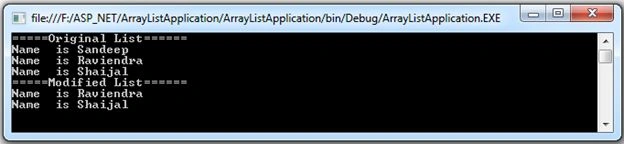
The Remove() method has one parameter that is the object type. You know that each item of the ArrayList is an object type so you need to pass that item in the Remove method to remove that item from the ArrayList. Let’s see an example where the first item is removed from the ArrayList.
using System;
using System.Collections;

namespace ArrayListApplication
{
    class Program
    {
        static void Main(string[] args)
        {
            ArrayList personList = new ArrayList();
            personList.Add("Sandeep");
            personList.Add("Raviendra");
            personList.Add("Shaijal");
            Console.WriteLine("=====Original List======");
            for (int i = 0; i < personList.Count; i++)
            {
                string arrayItem = string.Format($"Name  is {personList[i]}");
                Console.WriteLine(arrayItem);
            }
            //remove first item from person list using index
            personList.Remove("Sandeep");
            Console.WriteLine("=====Modified List======");
            for (int i = 0; i < personList.Count; i++)
            {
                string arrayItem = string.Format($"Name  is {personList[i]}");
                Console.WriteLine(arrayItem);
            }
            Console.Read();
        }
    }
} 



Zulqadar IdrishiPosted Mar 14, 2020, 11:43 PM
Well Explained!
Pankajkumar PatelPosted Sep 27, 2019, 12:28 AM
Nice article
Rajesh KumarPosted Sep 14, 2018, 11:47 PM
Nice article, Thanks for sharing...............................
Bhavesh JadavPosted Sep 11, 2018, 2:13 AM
Very nice explanation with example.
Ankit MishraPosted Mar 25, 2017, 4:37 AM
Nicely written, Thank You :)