

- How to dynamically bind DropDownList from SQL Server database table.
- How to highlight DropDownList item color based on condition or flag.
Database
I used the following table and Stored Procedure to show that.
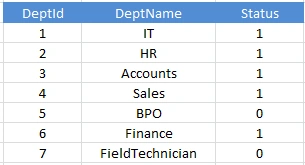
Use the following script to create the preceding table Mas_Department.
I used the following table and Stored Procedure to show that.
Use the following script to create the preceding table Mas_Department.
- Create Table Mas_Department
- (
- DeptId int Primary Key,
- DeptName varchar(50),
- Status bit
- )
- insert Mas_Department values(1, 'IT', 1)
- insert Mas_Department values(2, 'HR', 1)
- insert Mas_Department values(3, 'Accounts', 1)
- insert Mas_Department values(7, 'FieldTechnician', 0)
- insert Mas_Department values(4, 'Sales', 1)
- insert Mas_Department values(5, 'BPO', 0)
- insert Mas_Department values(6, 'Finance', 1)
- insert Mas_Department values(7, 'FieldTechnician', 0)
- Create procedure [dbo].[USP_Select_Mas_Department] AS Begin
- Select
- D.DeptId,
- D.DeptName as Department,
- D.Status
- From
- Mas_Department D END
Go to "Start", then click "All Programs" and open "Microsoft Visual Studio 2010".
In "Microsoft Visual Studio 2015", go to "File", then click "New" and select "Project". Now select "C#" and click "ASP.NET Empty Web Application".
Provide the project the name as you wish and specify the location.
Web.Config
Create the connection string in the Web.Config file as shown in the following:
- <connectionStrings>
- <add name="conStr"
- connectionString="Password=1234; User ID=sa; Database=DB_Jai; Data Source=."
- providerName="System.Data.SqlClient"/>
- </connectionStrings>
.aspx file
Design the .aspx page as in the following:
- <form id="form1" runat="server">
- <div align="center">
- <fieldset style="width: 30%;">
- <legend>Highlight DropDownList Item Color</legend>
- <table style="width: 25%;">
- <tr>
- <td>
- Department :
- </td>
- <td>
- <asp:DropDownList ID="ddlDepartment" runat="server">
- </asp:DropDownList>
- </td>
- </tr>
- </table>
- </fieldset>
- </div>
- </form>
Add the following namespaces:
- using System.Data;
- using System.Data.SqlClient;
- using System.Configuration;
- SqlConnection con = new SqlConnection(ConfigurationManager.ConnectionStrings["conStr"].ConnectionString);
- #region User Defined Methods
- // To dynamically Bind/Fill DropDownList from Sql Server Database table, and highlight the color for flag 0 records.
- protected void ddlBindDepartments() {
- SqlDataAdapter adp = new SqlDataAdapter("USP_Select_Mas_Department", con);
- adp.SelectCommand.CommandType = CommandType.StoredProcedure;
- DataSet ds = new DataSet();
- adp.Fill(ds);
- if (ds != null && ds.Tables.Count > 0 && ds.Tables[0].Rows.Count > 0) {
- ddlDepartment.DataSource = ds;
- ddlDepartment.DataValueField = "DeptId";
- ddlDepartment.DataTextField = "Department";
- ddlDepartment.DataBind();
- }
- DataView dv = ds.Tables[0].DefaultView;
- dv.RowFilter = "Status='" + false + "'";
- foreach(DataRowView dr in dv) {
- foreach(ListItem item in ddlDepartment.Items) {
- if (dr["DeptId"].ToString() == item.Value.ToString()) {
- item.Attributes.Add("style", "background-color:#3399FF;color:white;font-weight:bold;");
- }
- }
- }
- }
- #endregion
- #region Page Event Handlers
- // Page Load
- protected void Page_Load(object sender, EventArgs e) {
- ddlDepartment.SelectedIndex = -1;
- if (!Page.IsPostBack) {
- ddlBindDepartments();
- }
- }
- #endregion
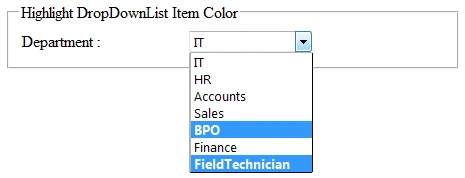
BPO, Field Technician are (Flag 0) highlighted in the following output:
I hope you enjoyed this article. Please provide your valuable suggestions and feedback.
A SharmaPosted Oct 18, 2017, 9:23 AM
The data which i shows is from an xml file
A SharmaPosted Oct 18, 2017, 9:22 AM
How can i add a different colour to each dropdownlist items based on an attribute in xml
Jaipal ReddyPosted Jul 26, 2015, 11:55 PM
Thanks for the feedback. you can change the color of highlighted one by the following statement. item.Attributes.Add("style", "background-color:grey;color:white;font-weight:bold;");
Santhakumar MunuswamyPosted Jul 24, 2015, 2:19 PM
Good one
Nilesh JadavPosted Jul 24, 2015, 9:03 AM
Nice one sir
RakeshPosted Jul 24, 2015, 8:10 AM
good one
Rahul Kumar SaxenaPosted Jul 24, 2015, 7:40 AM
Good Show