

This article explains how to filter a Grid View with a TextBox using a Control Parameter in SqlDataSource in ASP.NET 4.5 and Control Parameter implemented search option to search the record LIKE data Show.
Open your instance of Visual Studio 2012, and create a new ASP.NET Web application. Name the project "Search Student", as shown in the figure.
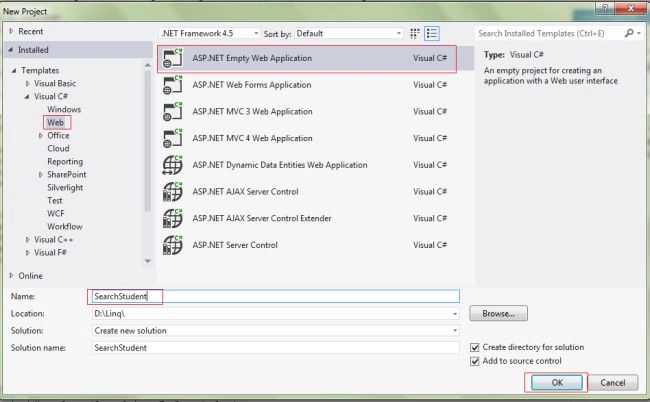
Now design your Student.aspx View design part; use the following code:
- <asp:TextBox ID="txtSearch" runat="server" CssClass="txt"> </asp:TextBox>
- <asp:Button ID="btnSearch" runat="server" Text="Search" CssClass="buttongr" />
- <asp:GridView ID="GridView1" runat="server"></asp:GridView>
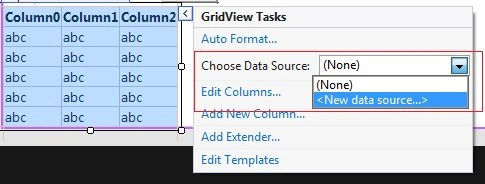
Now, see the following screen; select "grid view" then choose "Data Source" > "New Data Source".
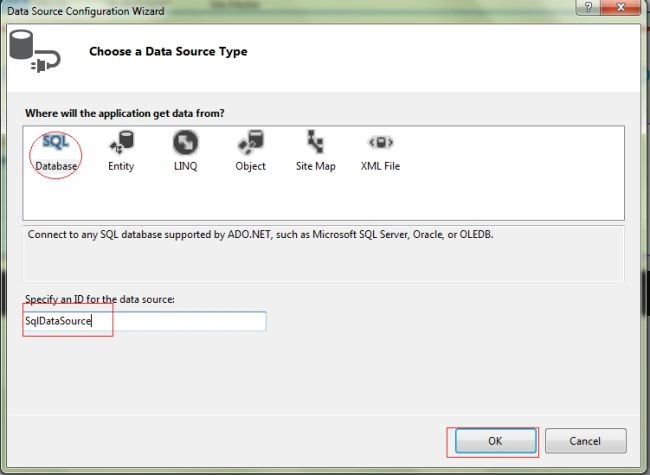
Now see the following screen; open the “Data Source Configuration Wizard” then choose the Data Source Type then select "SQL Database" > "SqlDataSource" > "OK".
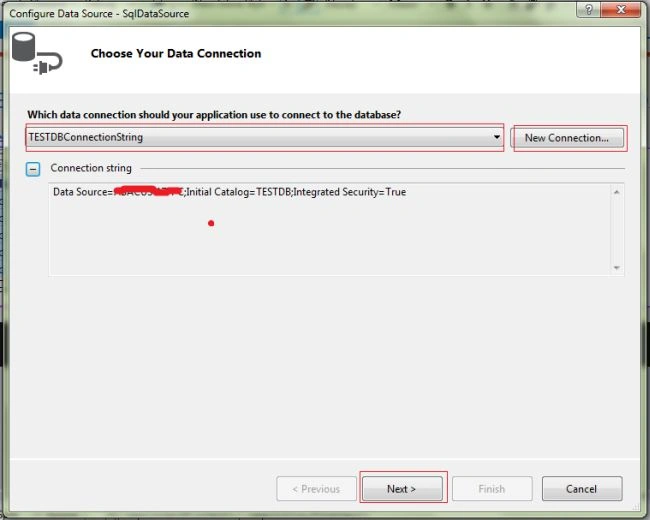
Now, see the following screen; open “Choose Your Data Connection” then seelct "New Connection" then click "Next".
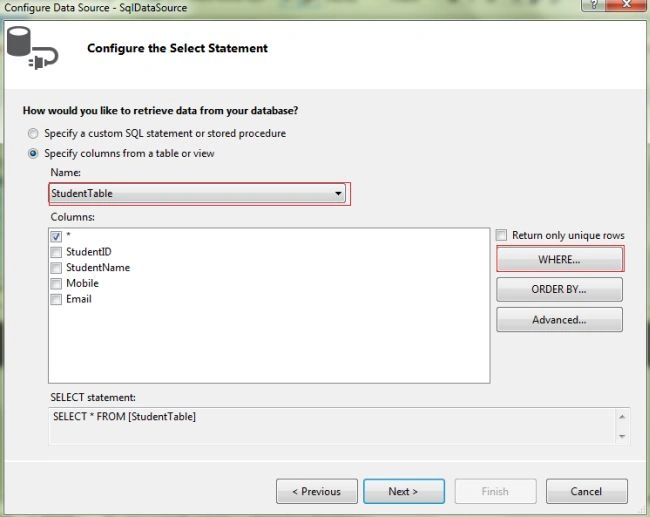
Now, see the following screen “Configure the select Statement” then seelct "Table Name" then click "Where".
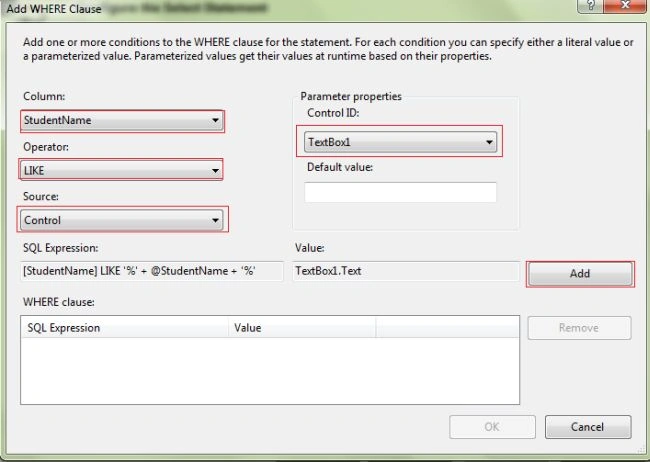
Now, see the following screen “Add WHERE Clause”. For "Column" select something then for "Operator" select something then for "Control ID" select something then click on "Add" as in the following:
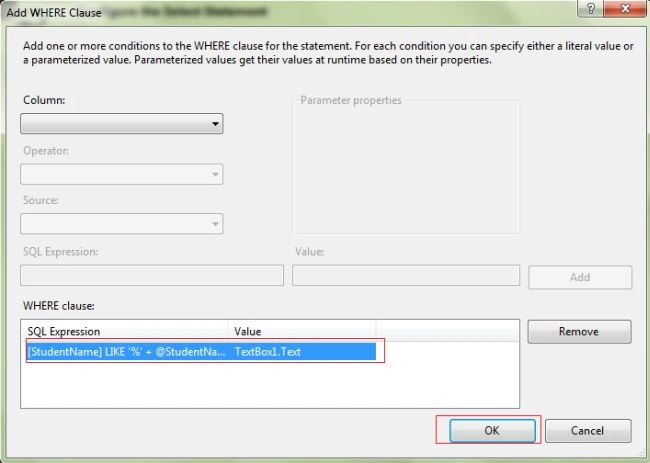
Now, see the following screen; click "OK".
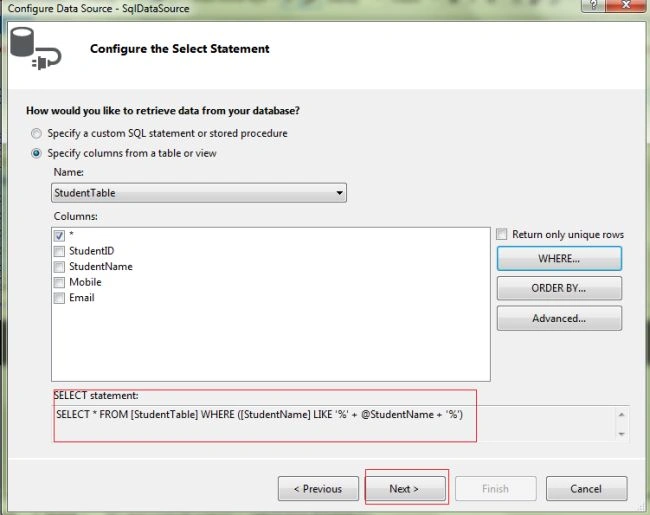
Now, see the following screen; click "Next".
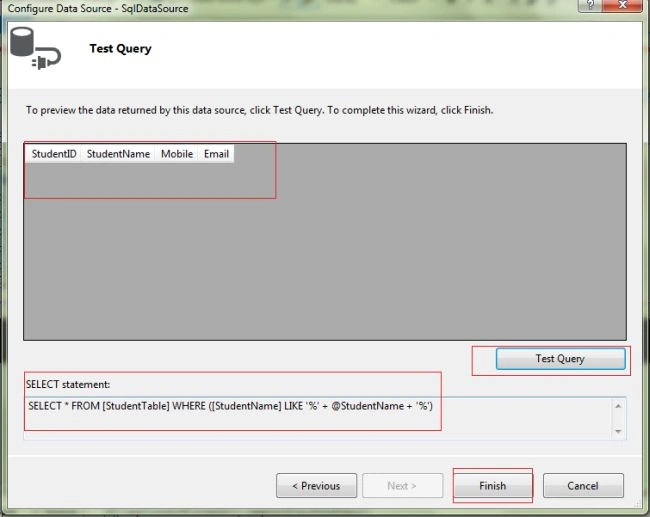
Now, see the following screen Test Query and click "Finish".
Now, open the Student.aspx page, and write the following code:
- <%@ Page Title="" Language="C#" MasterPageFile="~/Site.Master" AutoEventWireup="true"
- CodeBehind="Student.aspx.cs" Inherits="SearchStudent.Student" %>
- <asp:content id="Content1" contentplaceholderid="titleContent" runat="server">
- </asp:content>
- <asp:content id="Content2" contentplaceholderid="head" runat="server">
- </asp:content>
- <asp:content id="Content3" contentplaceholderid="MainContent" runat="server">
- Search:
- <asp:TextBox ID="txtSearch" runat="server" CssClass="txt"></asp:TextBox><asp:Button ID="btnSearch" runat="server" Text="Search" CssClass="buttongr" />
- <asp:GridView ID="GridView1" CssClass="handsontable" runat="server" AutoGenerateColumns="False" DataKeyNames="StudentID" DataSourceID="SqlDataSource">
- <Columns>
- <asp:BoundField DataField="StudentID" HeaderText="StudentID" InsertVisible="False" ReadOnly="True" SortExpression="StudentID" />
- <asp:BoundField DataField="StudentName" HeaderText="StudentName" SortExpression="StudentName" />
- <asp:BoundField DataField="Mobile" HeaderText="Mobile" SortExpression="Mobile" />
- <asp:BoundField DataField="Email" HeaderText="Email" SortExpression="Email" />
- </Columns>
- </asp:GridView>
- <asp:SqlDataSource ID="SqlDataSource" runat="server" ConnectionString="<%$ ConnectionStrings:TESTDBConnectionString %>" SelectCommand="SELECT * FROM [StudentTable] WHERE ([StudentName] LIKE '%' + @StudentName + '%')">
- <SelectParameters>
- <asp:ControlParameter ControlID="txtSearch" Name="StudentName" PropertyName="Text" Type="String" />
- </SelectParameters>
- </asp:SqlDataSource>
- </asp:content>
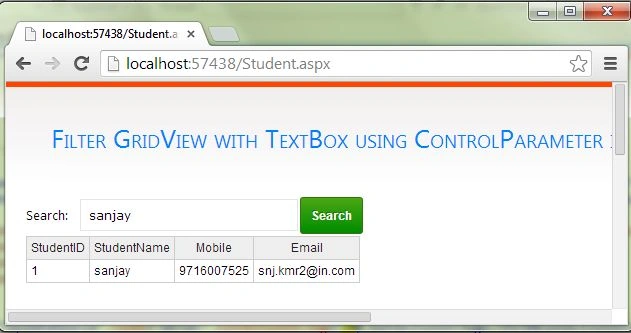
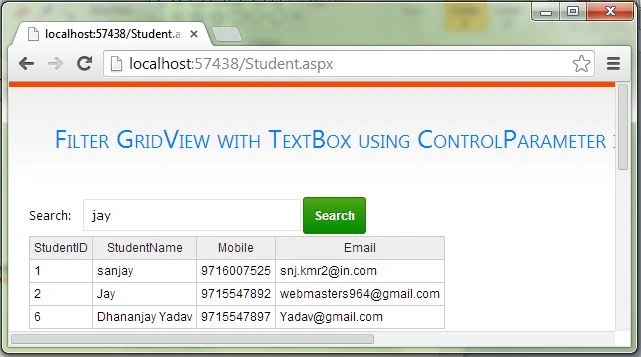
Now run the page, it will look like the following. Enter the Student Name then LIKE Data Show in Grid View.
I hope this article is useful. If you have any other questions then please provide your comments in the following.
Ching KuePosted Sep 23, 2016, 2:46 PM
How would you allow the textbox to query with an apostrophe such as O'neil? I'm getting an error message. This is the message when a search contains an apostrophe: The expression contains an invalid string constant: '.
kalu singh raoPosted Jul 8, 2016, 2:51 AM
Nice...
Benito SuarezPosted Jul 22, 2015, 3:14 PM
And from the button and the data would be passed. Apologize if the translation is not correct, google translate.
Jaipal ReddyPosted Jul 1, 2015, 12:16 AM
Nice
gibson siagianPosted Jul 1, 2015, 12:03 AM
thank you, it's very helpful
John BergPosted Mar 18, 2015, 9:53 PM
Very helpful and useful for me, thank you!If nothing is entered in the text box then no results show up in my Grid View. I updated this by adding the following to the ControlParameter: ConvertEmptyStringToNull="false"
Deepika DeepuPosted Nov 28, 2014, 2:27 AM
Can you please explain how to search data based on First name or lastname od middlename
Sandeep SharmaPosted Apr 16, 2014, 11:09 AM
nice :-)