<phone:PhoneApplicationPage
    x:Class="AboutPromptApplication.MainPage"
    xmlns="http://schemas.microsoft.com/winfx/2006/xaml/presentation"
    xmlns:x="http://schemas.microsoft.com/winfx/2006/xaml"
    xmlns:phone="clr-namespace:Microsoft.Phone.Controls;assembly=Microsoft.Phone"
    xmlns:shell="clr-namespace:Microsoft.Phone.Shell;assembly=Microsoft.Phone"
    xmlns:d="http://schemas.microsoft.com/expression/blend/2008"
    xmlns:mc="http://schemas.openxmlformats.org/markup-compatibility/2006"
    mc:Ignorable="d" d:DesignWidth="480" d:DesignHeight="768"
    FontFamily="{StaticResource PhoneFontFamilyNormal}"
    FontSize="{StaticResource PhoneFontSizeNormal}"
    Foreground="{StaticResource PhoneForegroundBrush}"
    SupportedOrientations="Portrait" Orientation="Portrait"
    shell:SystemTray.IsVisible="True">
<!--LayoutRoot is the root grid where all
page content is placed-->
<Grid
x:Name="LayoutRoot"
Background="Transparent">
<Grid.RowDefinitions>
<RowDefinition
Height="Auto"/>
<RowDefinition
Height="*"/>
</Grid.RowDefinitions>
<!--TitlePanel contains the name of the
application and page title-->
<StackPanel
x:Name="TitlePanel"
Grid.Row="0"
Margin="12,17,0,28">
<TextBlock
x:Name="ApplicationTitle"
Text="About
Prompt - WCF Application" FontFamily="Verdana"
FontSize="22"
Style="{StaticResource
PhoneTextNormalStyle}"/>
<TextBlock
x:Name="PageTitle"
Text="Windows 7
Phone" Margin="9,-7,0,0" Style="{StaticResource
PhoneTextTitle1Style}"/>
</StackPanel>
<!--ContentPanel - place additional
content here-->
<Grid
x:Name="ContentPanel"
Grid.Row="1"
Margin="12,0,12,0">
<TextBlock
Height="30"
HorizontalAlignment="Left"
Margin="6,22,0,0"
Name="textBlock1"
Text="Please
Enter First Number: " FontFamily="Verdana"
FontSize="22"
VerticalAlignment="Top"
/>
<TextBox
Height="72"
HorizontalAlignment="Left"
Margin="318,0,0,0"
Name="textBox1"
VerticalAlignment="Top"
Width="138"
/>
<TextBlock
Height="30"
FontFamily="Verdana"
FontSize="22"
HorizontalAlignment="Left"
Margin="0,113,0,0"
Name="textBlock2"
Text="Please
Enter Second Number: " VerticalAlignment="Top"
/>
<TextBox
Height="71"
HorizontalAlignment="Left"
Margin="318,90,0,0"
Name="textBox2"
VerticalAlignment="Top"
Width="138"
/>
<Button
Content="Addition"
FontFamily="Verdana"
FontSize="22"
Height="72"
HorizontalAlignment="Left"
Margin="130,220,0,0"
Name="button1"
VerticalAlignment="Top"
Width="209"
Click="button1_Click"
/>
<TextBlock
FontFamily="Verdana"
FontSize="22"
Foreground="Red"
Height="30"
HorizontalAlignment="Left"
Margin="77,171,0,0"
Name="textBlock3"
VerticalAlignment="Top"
/>
<Button
Content="Substraction"
FontFamily="Verdana"
FontSize="22"
Height="71"
HorizontalAlignment="Left"
Margin="130,298,0,0"
Name="button2"
VerticalAlignment="Top"
Width="209"
Click="button2_Click"
/>
<Button
Content="Multiplication"
FontFamily="Verdana"
FontSize="22"
Height="66"
HorizontalAlignment="Left"
Margin="130,375,0,0"
Name="button3"
VerticalAlignment="Top"
Width="209"
Click="button3_Click"
/>
<Button
Content="Division"
FontFamily="Verdana"
FontSize="22"
Height="72"
HorizontalAlignment="Left"
Margin="130,447,0,0"
Name="button4"
VerticalAlignment="Top"
Width="209"
Click="button4_Click"
/>
</Grid>
</Grid>
<!--Sample code showing usage of
ApplicationBar-->
<!--<phone:PhoneApplicationPage.ApplicationBar>
<shell:ApplicationBar IsVisible="True" IsMenuEnabled="True">
<shell:ApplicationBarIconButton IconUri="/Images/appbar_button1.png"
Text="Button 1"/>
<shell:ApplicationBarIconButton IconUri="/Images/appbar_button2.png"
Text="Button 2"/>
<shell:ApplicationBar.MenuItems>
<shell:ApplicationBarMenuItem Text="MenuItem 1"/>
<shell:ApplicationBarMenuItem Text="MenuItem 2"/>
</shell:ApplicationBar.MenuItems>
</shell:ApplicationBar>
</phone:PhoneApplicationPage.ApplicationBar>-->
</phone:PhoneApplicationPage> |


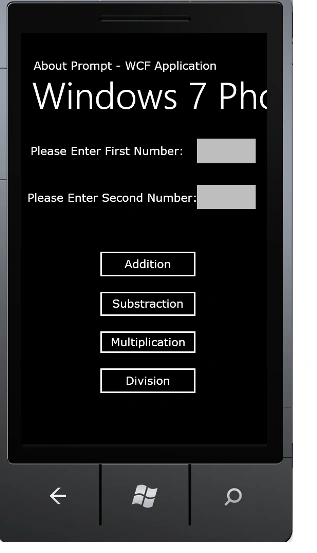
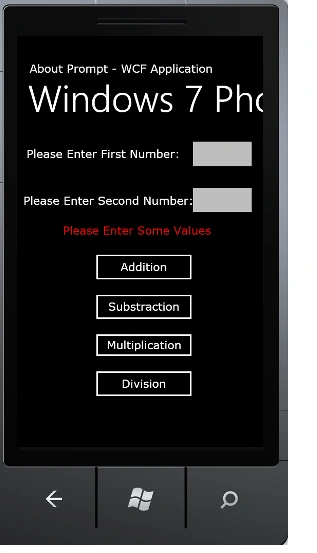
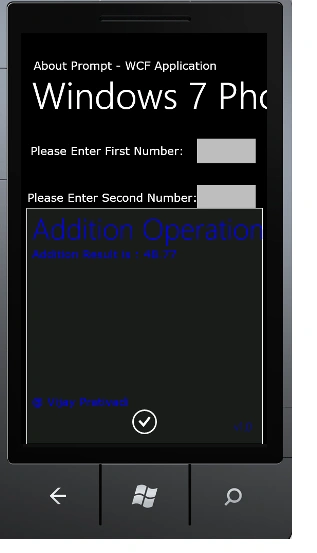
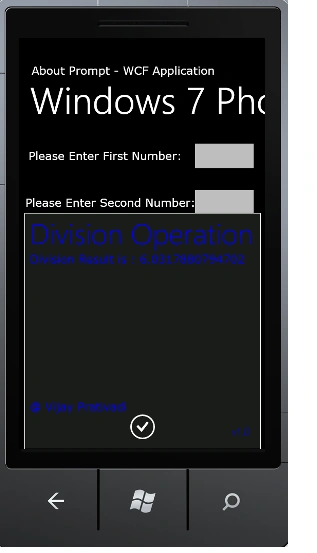
Arjun PanwarPosted Mar 16, 2012, 12:05 AM
Good Explanation...Vijay...Thanks for sharing