

Introduction
Today, in this article let's learn another new
and wonderful concept related to Windows Phone 7, whereby communicating with WCF
Service to perform some operation. The Telerik Rad Controls for Windows Phone 7
can be downloaded from http://www.telerik.com/products/windows-phone.aspx.
The Rad Message Box is used to display the output in nice and enhanced UI.
Question: What is RadLayoutTransform?
In simple terms "It enables to display the UI
layout in flexible way as per user requirement. It is Skewed or Transform or
many more".
Let's get this implemented practically for a better idea of this.
Step 1: The complete code of the IService1.cs looks like this:
using
System;
using
System.Collections.Generic;
using
System.Linq;
using
System.Runtime.Serialization;
using
System.ServiceModel;
using
System.ServiceModel.Web;
using
System.Text;
namespace
WCF_Layout_Transform
{
// NOTE: You can use the "Rename" command on the "Refactor"
menu to change the interface name "IService1" in both code and config file
together.
[ServiceContract]
public interface
IService1
{
[OperationContract]
double add(double
a, double b);
[OperationContract]
double sub(double
a, double b);
[OperationContract]
double mul(double
a, double b);
[OperationContract]
double div(double
a, double b);
}
}
Step 2: The complete code of the Service1.svc.cs looks like this:
using
System;
using
System.Collections.Generic;
using
System.Linq;
using
System.Runtime.Serialization;
using
System.ServiceModel;
using
System.ServiceModel.Web;
using
System.Text;
namespace
WCF_Layout_Transform
{
// NOTE: You can use the "Rename" command on the "Refactor"
menu to change the class name "Service1" in code, svc and config file together.
public class
Service1 : IService1
{
public
double add(double
a, double b)
{
return a + b;
}
public
double sub(double
a, double b)
{
return a - b;
}
public
double mul(double
a, double b)
{
return a * b;
}
public
double div(double
a, double b)
{
return a / b;
}
}
}
Step 3: The complete code of the Web.Config looks like this:
<?xml version="1.0"?>
<configuration>
<system.web>
<compilation debug="true" targetFramework="4.0" />
</system.web>
<system.serviceModel>
<behaviors>
<serviceBehaviors>
<behavior>
<!-- To avoid disclosing metadata information, set the value below to false and remove the metadata endpoint above before deployment -->
<serviceMetadata httpGetEnabled="true"/>
<!-- To receive exception details in faults for debugging purposes, set the value below to true. Set to false before deployment to avoid disclosing exception information -->
<serviceDebug includeExceptionDetailInFaults="false"/>
</behavior>
</serviceBehaviors>
</behaviors>
<serviceHostingEnvironment multipleSiteBindingsEnabled="true" />
</system.serviceModel>
<system.webServer>
<modules runAllManagedModulesForAllRequests="true"/>
</system.webServer>
</configuration>
Step 4: The complete code of the MainPage.xaml looks like this:
<phone:PhoneApplicationPage
x:Class="Rad_Layout_Transform_Application.MainPage"
xmlns="http://schemas.microsoft.com/winfx/2006/xaml/presentation"
xmlns:x="http://schemas.microsoft.com/winfx/2006/xaml"
xmlns:phone="clr-namespace:Microsoft.Phone.Controls;assembly=Microsoft.Phone"
xmlns:shell="clr-namespace:Microsoft.Phone.Shell;assembly=Microsoft.Phone"
xmlns:d="http://schemas.microsoft.com/expression/blend/2008"
xmlns:mc="http://schemas.openxmlformats.org/markup-compatibility/2006"
xmlns:telerik="clr-namespace:Telerik.Windows.Controls;assembly=Telerik.Windows.Controls.Primitives"
mc:Ignorable="d"
d:DesignWidth="480"
d:DesignHeight="768"
FontFamily="{StaticResource
PhoneFontFamilyNormal}"
FontSize="{StaticResource
PhoneFontSizeNormal}"
Foreground="{StaticResource
PhoneForegroundBrush}"
SupportedOrientations="Portrait"
Orientation="Portrait"
shell:SystemTray.IsVisible="True"
Loaded="mainPage_Loaded"
>
<!--LayoutRoot
is the root grid where all page content is placed-->
<Grid
x:Name="LayoutRoot"
Background="Transparent">
<Grid.RowDefinitions>
<RowDefinition
Height="Auto"/>
<RowDefinition
Height="*"/>
</Grid.RowDefinitions>
<!--TitlePanel
contains the name of the application and page title-->
<StackPanel
x:Name="TitlePanel"
Grid.Row="0"
Margin="12,17,0,28">
<TextBlock
x:Name="ApplicationTitle"
Text="Rad Layout
Transform - WCF Application" FontFamily="Verdana"
FontSize="21"
Style="{StaticResource
PhoneTextNormalStyle}"/>
<TextBlock
x:Name="PageTitle"
Text="Windows 7 Phone"
Margin="9,-7,0,0" Style="{StaticResource
PhoneTextTitle1Style}"/>
</StackPanel>
<!--ContentPanel
- place additional content here-->
<Grid
x:Name="ContentPanel"
Grid.Row="1"
Margin="12,0,12,0">
<TextBlock
Height="30"
HorizontalAlignment="Left"
Margin="0,26,0,0"
Text="PLease
Enter First Number: "
FontFamily="Verdana"
FontSize="22"
VerticalAlignment="Top"
/>
<TextBlock
Height="30"
HorizontalAlignment="Left"
Margin="0,103,0,0"
Text="Please
Enter Second Number: "
FontFamily="Verdana"
FontSize="22"
VerticalAlignment="Top"
/>
<TextBox
Height="72"
HorizontalAlignment="Left"
Margin="326,6,0,0"
x:Name="textBox1"
VerticalAlignment="Top"
Width="130"
/>
<TextBox
Height="72"
HorizontalAlignment="Left"
Margin="326,84,0,0"
x:Name="textBox2"
VerticalAlignment="Top"
Width="130"
/>
<TextBlock
Height="30"
HorizontalAlignment="Left"
Margin="60,179,0,0"
x:Name="textBlock3"
FontFamily="Verdana"
FontSize="22"
Foreground="Red"
VerticalAlignment="Top"
/>
<telerik:RadLayoutTransformControl
Height="354"
HorizontalAlignment="Left"
Margin="12,248,0,0"
VerticalAlignment="Top"
Width="438"
x:Name="radLayout1">
<telerik:RadLayoutTransformControl.Content>
<Grid>
<Button
Content="Addition"
x:Name="btnAdd"
Margin="73,0,58,271"
FontFamily="Verdana"
FontSize="22"
Background="Green"
Click="btnAdd_Click"/>
<Button
Content="Subtraction"
FontFamily="Verdana"
FontSize="22"
x:Name="btnsub"
Margin="73,70,58,201"
Background="Red"
Click="btnSub_Click"/>
<Button
Content="Multiplication"
x:Name="btnMul"
Margin="73,144,58,127"
FontFamily="Verdana"
FontSize="22"
Background="Yellow"
Click="btnMul_Click"/>
<Button
Content="Division"
x:Name="btnDiv"
Background="Blue"
FontFamily="Verdana"
FontSize="22"
Margin="73,233,58,38"
Click="btnDiv_Click"/>
</Grid>
</telerik:RadLayoutTransformControl.Content>
</telerik:RadLayoutTransformControl>
</Grid>
</Grid>
</phone:PhoneApplicationPage>
Step 5: The complete code of the MainPage.xaml.cs looks like this:
using
System;
using
System.Collections.Generic;
using
System.Linq;
using
System.Net;
using
System.Windows;
using
System.Windows.Controls;
using
System.Windows.Documents;
using
System.Windows.Input;
using
System.Windows.Media;
using
System.Windows.Media.Animation;
using
System.Windows.Shapes;
using
Microsoft.Phone.Controls;
using
Rad_Layout_Transform_Application.ServiceReference1;
using
Telerik.Windows.Controls;
namespace
Rad_Layout_Transform_Application
{
public
partial class
MainPage : PhoneApplicationPage
{
// Constructor
public MainPage()
{
InitializeComponent();|
this.Loaded +=
new RoutedEventHandler(mainPage_Loaded);
}
private
void mainPage_Loaded(object
sender, RoutedEventArgs e)
{
//objComposite.SkewX = 25;
objComposite.SkewY = 29;
radLayout1.LayoutTransform = objComposite;
}
private
void add_Call(object
sender, addCompletedEventArgs e)
{
RadMessageBox.Show("Addition Result is:
" + e.Result.ToString(), MessageBoxButtons.OKCancel,
"RadLayout Transform - WCF App",
null, false,
false,
System.Windows.HorizontalAlignment.Stretch,
System.Windows.VerticalAlignment.Center, null);
}
public
void btnAdd_Click(object
sender, RoutedEventArgs e)
{
textBlock3.Text =
"";
if (string.IsNullOrEmpty(textBox1.Text)
|| string.IsNullOrEmpty(textBox2.Text))
{
textBlock3.Text = "Please Enter Some
Values";
}
else
{
objClient.addCompleted += new
EventHandler<addCompletedEventArgs>(add_Call);
objClient.addAsync(Convert.ToDouble(textBox1.Text),
Convert.ToDouble(textBox2.Text));
textBox1.Text = "";
textBox2.Text = "";
}
}
private
void sub_Call(object
sender, subCompletedEventArgs e)
{
RadMessageBox.Show("Subtraction Result
is: " + e.Result.ToString(), MessageBoxButtons.OKCancel,
"RadLayout Transform - WCF App",
null, false,
false,
System.Windows.HorizontalAlignment.Stretch,
System.Windows.VerticalAlignment.Center, null);
}
public
void btnSub_Click(object
sender, RoutedEventArgs e)
{
textBlock3.Text = "";
if (string.IsNullOrEmpty(textBox1.Text)
|| string.IsNullOrEmpty(textBox2.Text))
{
textBlock3.Text = "Please Enter Some
Values";
}
else
{
objClient.subCompleted += new
EventHandler<subCompletedEventArgs>(sub_Call);
objClient.subAsync(Convert.ToDouble(textBox1.Text),
Convert.ToDouble(textBox2.Text));
textBox1.Text = "";
textBox2.Text = "";
}
}
private void
mul_Call(object sender, mulCompletedEventArgs e)
{
RadMessageBox.Show("Multiplication
Result is: " + e.Result.ToString(), MessageBoxButtons.OKCancel,
"RadLayout Transform - WCF App",
null, false,
false,
System.Windows.HorizontalAlignment.Stretch,
System.Windows.VerticalAlignment.Center, null);
}
public void
btnMul_Click(object sender, RoutedEventArgs e)
{
textBlock3.Text = "";
if (string.IsNullOrEmpty(textBox1.Text)
|| string.IsNullOrEmpty(textBox2.Text))
{
textBlock3.Text = "Please Enter Some
Values";
}
else
{
objClient.mulCompleted += new
EventHandler<mulCompletedEventArgs>(mul_Call);
objClient.mulAsync(Convert.ToDouble(textBox1.Text),
Convert.ToDouble(textBox2.Text));
textBox1.Text = "";
textBox2.Text = "";
}
}
private void
div_Call(object sender, divCompletedEventArgs e)
{
RadMessageBox.Show("Division Result is:
" + e.Result.ToString(), MessageBoxButtons.OKCancel,
"RadLayout Transform - WCF App",
null, false,
false,
System.Windows.HorizontalAlignment.Stretch,
System.Windows.VerticalAlignment.Center, null);
}
public void
btnDiv_Click(object sender, RoutedEventArgs e)
{
textBlock3.Text = "";
if (string.IsNullOrEmpty(textBox1.Text)
|| string.IsNullOrEmpty(textBox2.Text))
{
textBlock3.Text = "Please Enter Some
Values";
}
else
{
objClient.divCompleted += new
EventHandler<divCompletedEventArgs>(div_Call);
objClient.divAsync(Convert.ToDouble(textBox1.Text),
Convert.ToDouble(textBox2.Text));
textBox1.Text = "";
textBox2.Text = "";
}
}
#region
Instance Variables
Service1Client objClient = new
Service1Client();
CompositeTransform objComposite = new
CompositeTransform();
#endregion
}
}
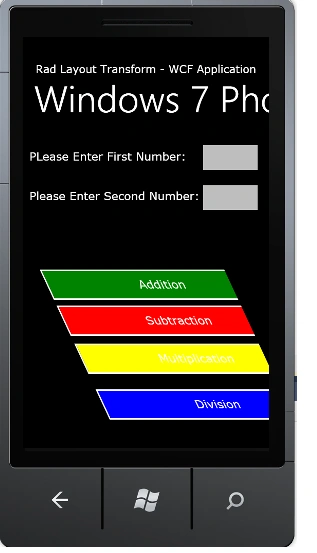
Step 6: The output of the application looks like this:
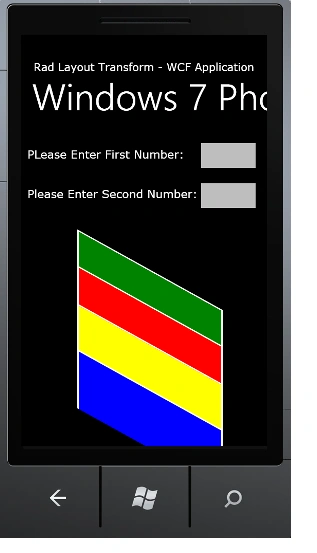
Step 7: The output of the Nothing Entered Application looks like this:
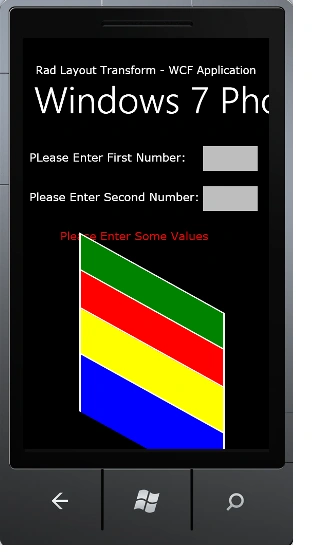
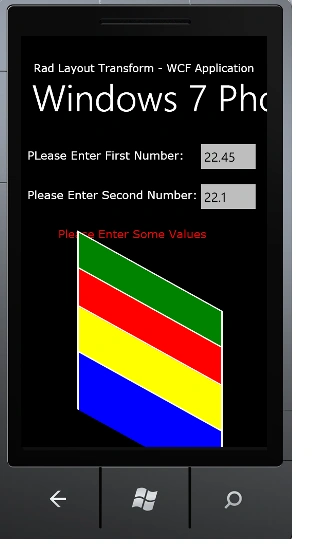
Step 8: The output of the Addition Operation Application looks like this:
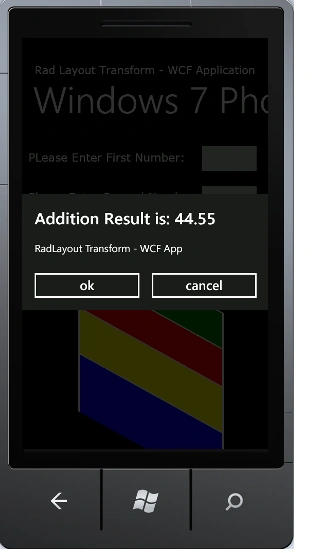
I hope this article is useful for you. I look forward for your comments and feedback.
Jimmy UnderwoodPosted Mar 18, 2012, 11:56 PM
Really very nice article, thanks for sharing.
Amit MaheshwariPosted Mar 18, 2012, 11:53 PM
Hi, Vijay It's a great effort to accomplish such task so keep going and thanks for sharing......