

Introduction
Please see this article in my blog
Background
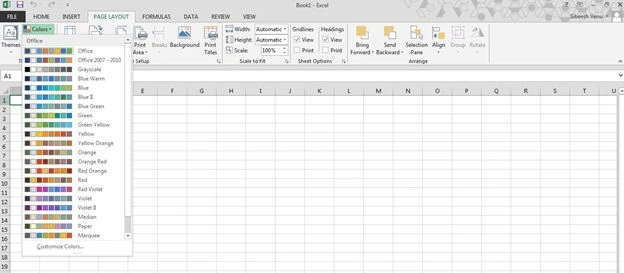
I am working on a dashboard application, where you can find many charts, maps and grids and so on. If you work with a chart, you will definitely know the word series. Previously we were applying the color for every series separately, in other words, the user must select the color for each series or it will take some default color. Your user may think this process is too much work. Here I am providing a custom color palette control.
Why
Instead of applying colors separately, we can just select a palette so that the colors set in the selected palette will be applied automatically as in Excel.
Using the code
I am using jquery-1.9.1.js for the implementation in my application, you can get this file from the attached application.
Once you include the jQuery file, please create an HTML5 page as shown below.
- <!DOCTYPE html>
- <html xmlns="http://www.w3.org/1999/xhtml">
- <head>
- <title></title>
- </head>
- <body>
- </body>
- </html>
- <script src="jquery-1.9.1.js"></script>
- <body>
- <header style="text-align:center"> Custom Color Palette - SibeeshPassion</header>
- <br />
- <br />
- <br />
- <br />
- <br />
- <br />
- Change Series Color:
- <label id="changecolor" title="Change Color"><u><i>Change Color</i></u></label>
- <ul class="containerul">
- <li>
- <p class="boxcontainer">
- Color Palette I :
- <br />
- <span class="simplebox" title="#F29F98" style="background-color: #F29F98"></span>
- <span class="simplebox" title="#F27C72" style="background-color: #F27C72"></span>
- <span class="simplebox" title="#F15C4E" style="background-color: #F15C4E"></span>
- <span class="simplebox boxspecialone" title="#F03B2A" style="background-color: #F03B2A"></span>
- <span class="simplebox" title="#F12815" style="background-color: #F12815"></span>
- <span class="simplebox" title="#FF1601" style="background-color: #FF1601"></span>
- <input type="checkbox" class="boxcheckbox" />
- </p>
- </li>
- <li>
- <p class="boxcontainer">
- Color Palette II :
- <br />
- <span class="simplebox" title="#A3F0BE" style="background-color: #A3F0BE"></span>
- <span class="simplebox" title="#7FEBA5" style="background-color: #7FEBA5"></span>
- <span class="simplebox" title="#48EB81" style="background-color: #48EB81"></span>
- <span class="simplebox boxspecialone" title="#25EB6B" style="background-color: #25EB6B"></span>
- <span class="simplebox" title="#14E85E" style="background-color: #14E85E"></span>
- <span class="simplebox" title="#03E552" style="background-color: #03E552"></span>
- <input type="checkbox" class="boxcheckbox" />
- </p>
- </li>
- <li>
- <p class="boxcontainer">
- Color Palette III :
- <br />
- <span class="simplebox" title="#F48A8A" style="background-color: #F48A8A"></span>
- <span class="simplebox" title="#F57777" style="background-color: #F57777"></span>
- <span class="simplebox" title="#FA2A2A" style="background-color: #FA2A2A"></span>
- <span class="simplebox boxspecialone" title="#FC0909" style="background-color: #FC0909"></span>
- <span class="simplebox" title="#EF0505" style="background-color: #EF0505"></span>
- <span class="simplebox" title="#FF0000" style="background-color: #FF0000"></span>
- <input type="checkbox" class="boxcheckbox" />
- </p>
- </li>
- <li>
- <p class="boxcontainer">
- Color Palette IV :
- <br />
- <span class="simplebox" title="#C3A1E9" style="background-color: #C3A1E9"></span>
- <span class="simplebox" title="#AF7AEC" style="background-color: #AF7AEC"></span>
- <span class="simplebox" title="#A25CF2" style="background-color: #A25CF2"></span>
- <span class="simplebox boxspecialone" title="#8D32F5" style="background-color: #8D32F5"></span>
- <span class="simplebox" title="#811CF5" style="background-color: #811CF5"></span>
- <span class="simplebox" title="#790AF9" style="background-color: #790AF9"></span>
- <input type="checkbox" class="boxcheckbox" />
- </p>
- </li>
- </ul>
- <br />
- <br />
- <br />
- <br />
- <br />
- <br />
- <br />
- <br />
- <br />
- <br />
- <br />
- <br />
- <br />
- <br />
- <br />
- <br />
- <br />
- <br />
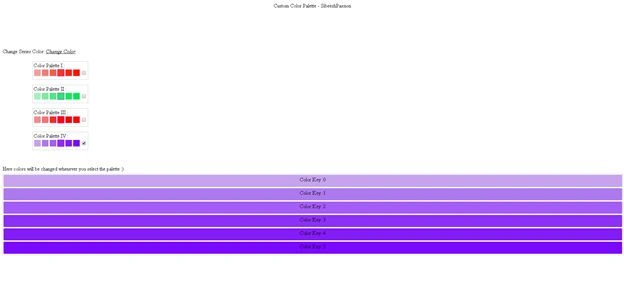
- Here colors will be changed whenever you select the palette :)
- <div id="checker" class="outputcontainer">
- </div>
- </body>
- <style>
- .simplebox {
- cursor: pointer;
- border: 1px solid #f0f8ff;
- float: left;
- margin: 1px;
- width: 20px;
- height: 20px;
- }
- .simpleboxdynamic {
- cursor: pointer;
- border: 1px solid #f0f8ff;
- float: left;
- margin: 1px;
- width: 99.3%;
- height: 27px;
- padding: 5px;
- border-radius: 3px;
- text-align: center;
- }
- .boxspecialone {
- border: 1px solid #ff00ff;
- }
- .boxcontainer {
- border: 1px solid #ccc;
- width: 165px;
- position: relative;
- height: 50px;
- padding: 2px;
- }
- .boxcheckbox {
- float: right;
- margin-top: 6px;
- }
- .outputcontainer {
- border: 1px solid #ccc;
- width: 100%;
- position: relative;
- height: 247px;
- margin-top: 5px;
- }
- .maincontainer {
- display: none;
- }
- .containerul {
- position: absolute;
- width: 190px;
- list-style: none;
- margin: 4px;
- /*border: 2px solid #29b8e5;*/
- -webkit-border-radius: 5px;
- -moz-border-radius: 5px;
- border-radius: 5px;
- background-color: #ffffff;
- overflow-y: auto;
- overflow-x: hidden;
- display: block;
- margin-left: 0px;
- z-index: 200;
- height: 305px;
- display: none;
- left: 60px;
- }
- #changecolor {
- cursor: pointer;
- }
- </style>
- <script>
- $(document).ready(function () {
- $("#changecolor").click(function () {
- $(".containerul").slideToggle(1000);
- });
- $(".boxcheckbox").click(function () {
- $("#checker").html('');
- //checked true only for the current
- $(".boxcheckbox").prop("checked", false);
- $(this).prop("checked", true);
- //bind colors start
- var colorCount = 0;
- var spans = $(this).parent().find('span');
- var test = '<div></div>';
- $.each(spans, function (key, value) {
- var color = $(value).attr('title');
- var p = '<p style="background-color:' + color + '" class="simpleboxdynamic"> Color Key :' + key + '</p>';
- $("#checker").append(p);
- });
- });
- });
- </script>
- <!DOCTYPE html>
- <html xmlns="http://www.w3.org/1999/xhtml">
- <head>
- <title>Custom Color Palette - SibeeshPassion</title>
- <style>
- .simplebox {
- cursor: pointer;
- border: 1px solid #f0f8ff;
- float: left;
- margin: 1px;
- width: 20px;
- height: 20px;
- }
- .simpleboxdynamic {
- cursor: pointer;
- border: 1px solid #f0f8ff;
- float: left;
- margin: 1px;
- width: 99.3%;
- height: 27px;
- padding: 5px;
- border-radius: 3px;
- text-align: center;
- }
- .boxspecialone {
- border: 1px solid #ff00ff;
- }
- .boxcontainer {
- border: 1px solid #ccc;
- width: 165px;
- position: relative;
- height: 50px;
- padding: 2px;
- }
- .boxcheckbox {
- float: right;
- margin-top: 6px;
- }
- .outputcontainer {
- border: 1px solid #ccc;
- width: 100%;
- position: relative;
- height: 247px;
- margin-top: 5px;
- }
- .maincontainer {
- display: none;
- }
- .containerul {
- position: absolute;
- width: 190px;
- list-style: none;
- margin: 4px;
- /*border: 2px solid #29b8e5;*/
- -webkit-border-radius: 5px;
- -moz-border-radius: 5px;
- border-radius: 5px;
- background-color: #ffffff;
- overflow-y: auto;
- overflow-x: hidden;
- display: block;
- margin-left: 0px;
- z-index: 200;
- height: 305px;
- display: none;
- left: 60px;
- }
- #changecolor {
- cursor: pointer;
- }
- </style>
- <script src="jquery-1.9.1.js"></script>
- <script>
- $(document).ready(function () {
- $("#changecolor").click(function () {
- $(".containerul").slideToggle(1000);
- });
- $(".boxcheckbox").click(function () {
- $("#checker").html('');
- //checked true only for the current
- $(".boxcheckbox").prop("checked", false);
- $(this).prop("checked", true);
- //bind colors start
- var colorCount = 0;
- var spans = $(this).parent().find('span');
- var test = '<div></div>';
- $.each(spans, function (key, value) {
- var color = $(value).attr('title');
- var p = '<p style="background-color:' + color + '" class="simpleboxdynamic"> Color Key :' + key + '</p>';
- $("#checker").append(p);
- });
- });
- });
- </script>
- </head>
- <body>
- <header style="text-align:center"> Custom Color Palette - SibeeshPassion</header>
- <br />
- <br />
- <br />
- <br />
- <br />
- <br />
- Change Series Color:
- <label id="changecolor" title="Change Color"><u><i>Change Color</i></u></label>
- <ul class="containerul">
- <li>
- <p class="boxcontainer">
- Color Palette I :
- <br />
- <span class="simplebox" title="#F29F98" style="background-color: #F29F98"></span>
- <span class="simplebox" title="#F27C72" style="background-color: #F27C72"></span>
- <span class="simplebox" title="#F15C4E" style="background-color: #F15C4E"></span>
- <span class="simplebox boxspecialone" title="#F03B2A" style="background-color: #F03B2A"></span>
- <span class="simplebox" title="#F12815" style="background-color: #F12815"></span>
- <span class="simplebox" title="#FF1601" style="background-color: #FF1601"></span>
- <input type="checkbox" class="boxcheckbox" />
- </p>
- </li>
- <li>
- <p class="boxcontainer">
- Color Palette II :
- <br />
- <span class="simplebox" title="#A3F0BE" style="background-color: #A3F0BE"></span>
- <span class="simplebox" title="#7FEBA5" style="background-color: #7FEBA5"></span>
- <span class="simplebox" title="#48EB81" style="background-color: #48EB81"></span>
- <span class="simplebox boxspecialone" title="#25EB6B" style="background-color: #25EB6B"></span>
- <span class="simplebox" title="#14E85E" style="background-color: #14E85E"></span>
- <span class="simplebox" title="#03E552" style="background-color: #03E552"></span>
- <input type="checkbox" class="boxcheckbox" />
- </p>
- </li>
- <li>
- <p class="boxcontainer">
- Color Palette III :
- <br />
- <span class="simplebox" title="#F48A8A" style="background-color: #F48A8A"></span>
- <span class="simplebox" title="#F57777" style="background-color: #F57777"></span>
- <span class="simplebox" title="#FA2A2A" style="background-color: #FA2A2A"></span>
- <span class="simplebox boxspecialone" title="#FC0909" style="background-color: #FC0909"></span>
- <span class="simplebox" title="#EF0505" style="background-color: #EF0505"></span>
- <span class="simplebox" title="#FF0000" style="background-color: #FF0000"></span>
- <input type="checkbox" class="boxcheckbox" />
- </p>
- </li>
- <li>
- <p class="boxcontainer">
- Color Palette IV :
- <br />
- <span class="simplebox" title="#C3A1E9" style="background-color: #C3A1E9"></span>
- <span class="simplebox" title="#AF7AEC" style="background-color: #AF7AEC"></span>
- <span class="simplebox" title="#A25CF2" style="background-color: #A25CF2"></span>
- <span class="simplebox boxspecialone" title="#8D32F5" style="background-color: #8D32F5"></span>
- <span class="simplebox" title="#811CF5" style="background-color: #811CF5"></span>
- <span class="simplebox" title="#790AF9" style="background-color: #790AF9"></span>
- <input type="checkbox" class="boxcheckbox" />
- </p>
- </li>
- </ul>
- <br />
- <br />
- <br />
- <br />
- <br />
- <br />
- <br />
- <br />
- <br />
- <br />
- <br />
- <br />
- <br />
- <br />
- <br />
- <br />
- <br />
- <br />
- Here colors will be changed whenever you select the palette :)
- <div id="checker" class="outputcontainer">
- </div>
- </body>
- </html>
Jis JoPosted Aug 28, 2018, 3:02 PM
Thanks a lot for this article!
Mohamed Gani MnPosted Nov 14, 2015, 5:59 AM
NIce one
Shaili DashoraPosted Apr 10, 2015, 11:50 AM
Nice one..
Sibeesh VenuPosted Apr 10, 2015, 1:32 AM
Nitin Tyagi Thank you buddy.
NitinPosted Apr 10, 2015, 1:13 AM
good one