Introduction
HTML5 is changing more than just websites, it's changing the capabilities of browsers, as well. In this article, we are going to understand working with the color changer in HTML5. We know that HTML is Hyper
Text Markup Language and is used to display data in a browser. CSS is the acronym for Cascading Style Sheet that is used for design. CSS defines how HTML
elements are to be displayed. Styles are normally saved in external .css files.
Normally HTML is saved with a .html file extension.
Here we will make use of a few JavaScript and some styles along with the HTML
code.
Just go through the steps to know how to create this application.
Step 1 : Open a HTML
editor or Visual studio.
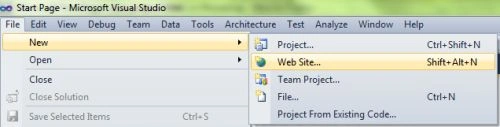
Open File menu ->select new ->Choose Website then.
This is where we will create an HTML5 application.
- Go to Solution Explorer
- Right Click on the Application name
- Select Add-->add new item
- Now in this window that opens up select an HTML page or new Web form.
Step 2: In this section, we will create the style for the media and create the .css on the media screen. Put the given script in the Head section of
the HTML or in between the <head>--</head>
Script for the style tag is as follows:
- < style media = "screen" > body {
- background: #555;color:# 555;font: 300 100.01 % /1.2"Segoe UI","Helvetica Neue",Helvetica,"Arial Unicode",Arial,sans-serif;margin:0 30px;}#content{width:762px;height:507px;position:relative;}
- h1 {
- font - weight: 300;
- font - size: 3 em;
- position: absolute;
- right: 10 px;
- bottom: 50 px;
- }
- p {
- font - size: 2 em;
- }#
- benefits {
- margin - top: 350 px;
- }#
- copy a {
- color: #666;text-decoration:none;}# picker2 {
- width: 300 px;position: absolute;top: 250 px;left: 50 % ;margin - left: -150 px;
- }#
- benefits {
- margin - bottom: 0;
- }#
- output {
- background: #eee;position: absolute;font - size: 30 px;bottom: 10 px;left: 20 px;font - family: monospace;margin - top: -20 px;width: 197 px;
- }#
- copy {
- position: absolute;right: 10 px;bottom: 10 px;margin: 0;font - size: .6 em;color: #666;}# values {
- position: absolute;left: 51 px;top: 366 px;font - size: .7 em;width: 132 px;height: 66 px;
- } < /style>
Step 3: In this section, we need to work on some JavaScript over here. For understanding the full working of
JavaScript download the attached .rar file and run the color picker application.
- < script >
- colors(function() {
- var out1 = document.getElementById("output"),
- dd = document.getElementById("dd"),
- dg = document.getElementById("dg"),
- db = document.getElementById("db"),
- dh = document.getElementById("dh"),
- dl = document.getElementById("dl"),
- ds = document.getElementById("ds"),
- dd.innerHTML = clr.r;
- dg.innerHTML = clr.g;
- db.innerHTML = clr.b;
- dh.innerHTML = dl.innerHTML = Math.round(clr.h * 360) + "°";
- out.onkeyup = function() {
- al.color(this.value);
- ml.color(this.value);
- };
- }); <
- /script>
Step 4 :
In this section, we are going to
become familiar with the body part of HTML scripting. In this part, we will create the
table for the purpose of getting the combination of colors while we are changing the
pointer.
- <body>
- <form id="form1" runat="server">
- <div id="content" style="background-color: #FFFFFF; top: 20px; left: 12px;">
- <h1 id="h1" style="font-family: Verdana; width: 413px; height: 57px; color: #008080; background-color:
- #FFFF00;"> Color Changer</h1>
- <table id="values">
- <tr>
- <th>R</th>
- <td id="vr"></td>
- <th>H</th>
- <td id="vh"></td>
- <th>H</th>
- <td id="vh2"></td>
- </tr>
- <tr>
- <th>G</th>
- <td id="vg"></td>
- <th>S</th>
- <td id="vs"></td>
- <th>S</th>
- <td id="vs2"></td>
- </tr>
- </table>
- <input type="text" id="output" value="#eeeeee"
- style="background-color: #FFFFFF; color: #FF0000;">
- <asp:Label ID="Label1" runat="server"
- style="top: 473px; left: 591px; position: absolute; height: 19px; width: 73px; background-color:
- #FFFFFF"
- Text="DWIJ"></asp:Label>
- </div>
- <div id="picker2"></div>
- </form>
- </body>
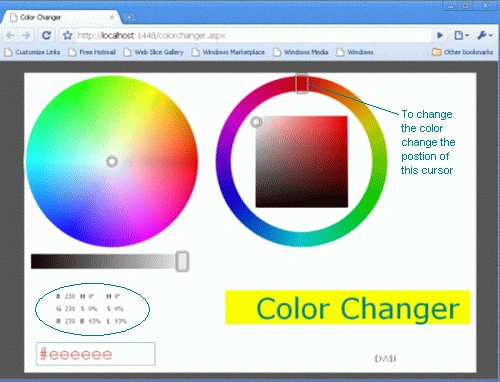
Step 5: Output Press F5.
Note: For the accurate output of HTML5 applications, you must have the Google
Chrome browser on your PC.
Here are your outputs:
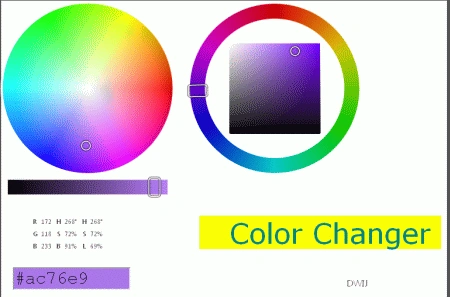
After changing the pointer
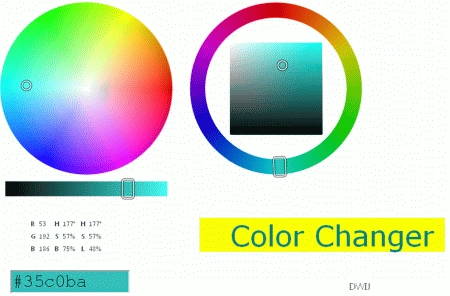
Again changing the pointer.
Resource
Some of the useful resources are :
Basics of Colors in XAML Silverlight
Photo Browser and Wallpaper Changer
Color Picker in XAML Silverlight
Colors, Fonts, and Text in GDI+ 


Krishna GaradPosted Feb 4, 2012, 2:03 AM
nice one