

jQuery can simplify the AJAX call for a RESTful service. So, when we need to consume a RESTful service and then rendering the received XML/JSON data in a Web Application, jQuery automatically becomes a good option.
In this WCF tutorial, we will call a simple RESTful service using a GET request and then display the received data. Since its a continuation of my previous article, I am will not create a new RESTful service now. Please go through my last article "5 simple steps to create your first RESTful service", I will call the same service I created there.
As in the above article, I created a project using Visual Studio 2010 named "MyRESTService". So, we will add a new client project to the same existing solution.
1. Add client project to the same solution.
- Open the solution MyRESTService in Visual Studio.
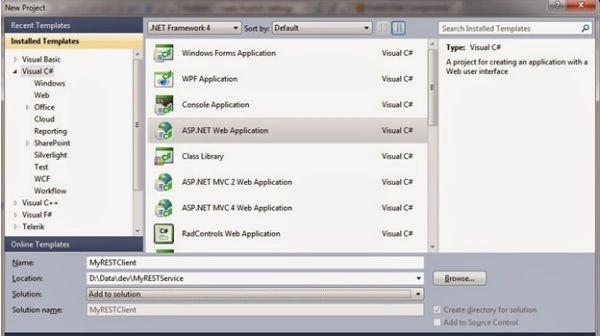
- Add new project to this solution using "File" -> "New Project". Choose the "ASP.NET Web Application" template.
- Name the project as "MyRESTClient".
- Choose "Add to Solution" in the solution dropdown and press "OK" button.
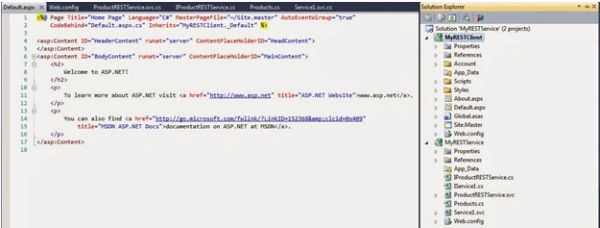
You can now see two projects under a solution. MyRESTService project and the new MyRESTClient project.
2. We will call that existing service using jQuery's Ajax function in our MyRESTClient project.
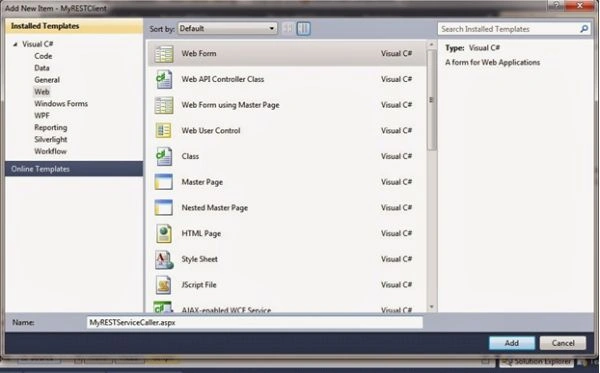
- Add a new ASP.NET WebForm page to the client project and name it "MyRESTServiceCaller.aspx".
- Add a reference to the jQuery Library from Scripts.
<script src="Scripts/jquery-1.4.1.min.js" type="text/javascript"></script>
- Add a table to the HTML body to contain the contents rendered from the RESTful service.
<tableborder='1'id="products">
<!-- Make a Header Row -->
<tr>
<td><b>Product Id</b></td>
<td><b>Name</b></td>
<td><b>Price</b></td>
<td><b>Category</b></td>
</tr>
</table>
- Add the following jQuery code snippets in a script tag for calling the service and rendering the returned XML data.
<script type="text/javascript">
$(document).ready(function () {
$.ajax({
type: "GET",
url: "http://localhost/MyRESTService/ProductRESTService.svc/GetProductList/",
dataType: "xml",
success: function (xml) {
$(xml).find('Product').each(function () {
var id = $(this).find('ProductId').text();
var name = $(this).find('Name').text();
var price = $(this).find('Price').text();
var category = $(this).find('CategoryName').text();
$('<tr><td>' + id + '</td><td>' + name + '</td><td>' + price + '</td><td>' +
category + '</td></tr>').appendTo('#products');
});
},
error: function (xhr) {
alert(xhr.responseText);
}
});
});
</script>
The jQuery Ajax function basically performs an asynchronous HTTP request with parameters, as I mentioned in bold.
-
type is the request method. Possible values can be GET, POST, DELETE, PUT and so on. Here we are making a "GET" request.
-
URL represents a resource on web. In our case we are providing a service URL.
-
datatype specifies the type of data returned from server, in other words XML, text, HTML, script, JSON, JSONP.
-
success is the callback function that will be invoked when the request is completed.
-
error is also a callback function that will be called in case of request failure.
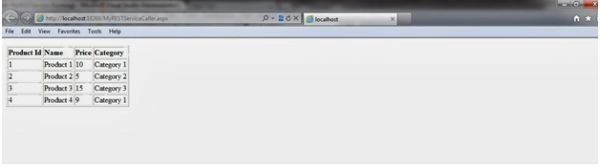
When you run the application, it will call the service, the data is fetched and displayed in a tabular format as shown in the following figure.
Now, hopefully, you can create a simple WCF RESTful service and consume it using jQuery as well. My next article will contain all Create, Read, Update, Delete (CRUD) operations for the RESTful service.
SaiKiran MandhalaPosted Nov 10, 2014, 7:42 AM
This will not work with other browsers Unless you host the application in IIS. And also you need to change the service address after hosting the service in IIS.
Mahesh AllePosted Dec 5, 2013, 4:59 AM
Dear Imran Ghani, Thank you for posting this article. This is working fine in IE but it is not working in chrome and Mozilla. Can you help my why this issue? Please help me to sort this.