

Introduction
This article explains how to consume the ASP.Net Web API using ASP.NET MVC4 with repository pattern.
Database structure
Create a table in a database for Employee to store employee information.
- CREATE TABLE [dbo].[Employe]
- (
- [Empid] [int] NOT NULL,
- [Empname] [varchar](50) NULL,
- [Empcity] [varchar](50) NULL,
- [Empaddress] [varchar](50) NULL,
- )
Create Web API Application
Go to File => New => Project. Choose "ASP.NET MVC 4 Web Application" from the list, then provide the application name as you whish and click the OK button then select Web API. Set the path to the location input where you want to create the application.
Our solution has three class libraries as in the following:
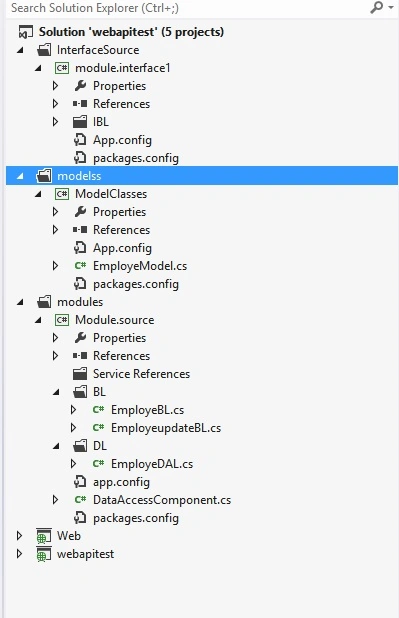
1. Module.interface1
Inside this library we have a folder with the name IBL and IBL contains the interface with the name IEmploye. And IEmploye contains the declaration of some methods defined as follows:
- using System;
- using System.Collections.Generic;
- using System.Linq;
- using System.Text;
- using System.Threading.Tasks;
- using ModelClasses;
- namespace module.interface1.IBL
- {
- public interface IEmploye
- {
- bool InsertEmploye(EmployeModel employee);
- List<EmployeModel> GetAllEmploye();
- List<EmployeModel> GetByid(int Empid);
- bool UpdateEmploye(EmployeModel employee, int Empid);
- //bool UpdateEmp(EmployeModel employee, int Empid);
- bool DeleteEmp(int Empid);
- }
- }
2. ModelClass
Inside this library here we have a class with the name EmployeModel and EmployeModel contains the properties defined as follows.
- using System;
- using System.Collections.Generic;
- using System.Linq;
- using System.Text;
- using System.Threading.Tasks;
- namespace ModelClasses
- {
- #region Employee
- public class EmployeModel
- {
- #region Properties
- public int Empid { get; set; }
- public string Empname { get; set; }
- public string Empcity { get; set; }
- public string Empaddress { get; set; }
- #endregion
- }
- #endregion
- }
Inside this library here we have the two folders BL and DL.
In the Bussiness Logic (BL) folder we have a class named EmployeBL. It contains the business logic defined as follows:
- using System;
- using System.Collections.Generic;
- using System.Linq;
- using System.Text;
- using System.Threading.Tasks;
- using ModelClasses;
- using module.interface1;
- using Module.source.DL;
- using System.IO;
- using Microsoft.Practices.Unity;
- namespace Module.source.BL
- {
- public class EmployeBL : module.interface1.IBL.IEmploye
- {
- public bool InsertEmploye(EmployeModel employee)
- {
- bool employeelist = false;
- try
- {
- employeelist = new EmployeDAL().InsertEmploye(employee);
- }
- catch (Exception ex)
- {
- throw ex;
- }
- return employeelist;
- }
- public List<EmployeModel> GetAllEmploye()
- {
- List<EmployeModel> employelist = null;
- try
- {
- employelist = new EmployeDAL().GetAllEmploye();
- }
- catch (Exception ex)
- {
- throw ex;
- }
- return employelist;
- }
- public List<EmployeModel> GetByid(int Empid)
- {
- List<EmployeModel> readbyid = null;
- try
- {
- readbyid = new EmployeDAL().GetByid(Empid);
- }
- catch (Exception ex)
- {
- throw ex;
- }
- return readbyid;
- }
- public bool UpdateEmploye(EmployeModel employee, int Empid)
- {
- bool updateid = false;
- try
- {
- updateid = new EmployeDAL().UpdateEmploye(employee, Empid);
- }
- catch (Exception ex)
- {
- throw ex;
- }
- return updateid;
- }
- public bool DeleteEmp(int Empid)
- {
- bool deleteemploye = false;
- try
- {
- deleteemploye = new EmployeDAL().DeleteEmp(Empid);
- }
- catch (Exception ex)
- {
- throw ex;
- }
- return deleteemploye;
- }
- }
- }
- using System;
- using System.Collections.Generic;
- using System.Linq;
- using System.Text;
- using System.Threading.Tasks;
- using ModelClasses;
- using Microsoft.Practices.EnterpriseLibrary.Data.Sql;
- using System.Configuration;
- using System.Data.Common;
- using System.Data;
- using Module.source.DL;
- using Microsoft.Practices.Unity;
- using Module.source.BL;
- namespace Module.source.DL
- {
- public class EmployeDAL : DataAccessComponent
- {
- string con = ConfigurationManager.ConnectionStrings["conster"].ConnectionString;
- public bool InsertEmploye(EmployeModel employee)
- {
- bool employelist = false;
- SqlDatabase db = new SqlDatabase(con);
- using (DbCommand objCMD = db.GetStoredProcCommand("usp_insertemp"))
- {
- db.AddInParameter(objCMD, "@Empid", DbType.Int32, employee.Empid);
- db.AddInParameter(objCMD, "@Empname", DbType.String, employee.Empname);
- db.AddInParameter(objCMD, "@Empcity", DbType.String, employee.Empcity);
- db.AddInParameter(objCMD, "@Empaddress", DbType.String, employee.Empaddress);
- db.AddOutParameter(objCMD, "@status", DbType.Int16, 0);
- try
- {
- db.ExecuteNonQuery(objCMD);
- employelist = Convert.ToBoolean(db.GetParameterValue(objCMD, "@Status"));
- }
- catch (Exception ex)
- {
- throw ex;
- }
- }
- return employelist;
- }
- public List<EmployeModel> GetAllEmploye()
- {
- List<EmployeModel> employlist = null;
- SqlDatabase db = new SqlDatabase(con);
- using (DbCommand objcmd = db.GetStoredProcCommand("get_allrecored"))
- {
- try
- {
- // return db.ExecuteDataSet(objcmd);
- using (DataTable dataTable = db.ExecuteDataSet(objcmd).Tables[0])
- {
- employlist = ConvertTo<EmployeModel>(dataTable);
- }
- }
- catch (Exception ex)
- {
- throw ex;
- }
- }
- return employlist;
- }
- public List<EmployeModel> GetByid( int Empid)
- {
- EmployeModel emps = new EmployeModel();
- List<EmployeModel> recordbyid = null;
- SqlDatabase db = new SqlDatabase(con);
- using (DbCommand objcmd = db.GetStoredProcCommand("get_byid"))
- {
- db.AddInParameter(objcmd, "@Empid", DbType.Int32, Empid);
- try
- {
- using (IDataReader objDataReader = db.ExecuteReader(objcmd))
- {
- while (objDataReader.Read())
- {
- emps.Empname = objDataReader["Empname"].ToString();
- emps.Empcity = objDataReader["Empname"].ToString();
- emps.Empaddress = objDataReader["Empaddress"].ToString();
- recordbyid.Add(emps);
- }
- }
- }
- catch (Exception ex)
- {
- throw ex;
- }
- }
- return recordbyid;
- }
- public bool UpdateEmploye(EmployeModel employee, int Empid)
- {
- bool updatelist = false;
- SqlDatabase db = new SqlDatabase(con);
- using (DbCommand objcmd = db.GetStoredProcCommand("update_employedata"))
- {
- db.AddInParameter(objcmd, "@Empid", DbType.String, Empid);
- db.AddInParameter(objcmd, "@Empname", DbType.String, employee.Empname);
- db.AddInParameter(objcmd, "@Empcity", DbType.String, employee.Empcity);
- db.AddInParameter(objcmd, "@Empaddress", DbType.String, employee.Empaddress);
- db.AddOutParameter(objcmd, "@status",DbType.Int16,1);
- try
- {
- db.ExecuteNonQuery(objcmd);
- updatelist = Convert.ToBoolean(db.GetParameterValue(objcmd, "@Status"));
- }
- catch (Exception ex)
- {
- throw ex;
- }
- }
- return updatelist;
- }
- public bool UpdateEmp(EmployeModel employee, int Empid)
- {
- bool updatelist = false;
- SqlDatabase db = new SqlDatabase(con);
- using (DbCommand objcmd = db.GetStoredProcCommand("update_employedata"))
- {
- db.AddInParameter(objcmd, "@Empid", DbType.String, Empid);
- db.AddInParameter(objcmd, "@Empname", DbType.String, employee.Empname);
- db.AddInParameter(objcmd, "@Empcity", DbType.String, employee.Empcity);
- db.AddInParameter(objcmd, "@Empaddress", DbType.String, employee.Empaddress);
- db.AddOutParameter(objcmd, "@status", DbType.Int32, 1);
- //db.AddParameter(objcmd, "@Empname", DbType.String, employee.Empname);
- try
- {
- db.ExecuteNonQuery(objcmd);
- updatelist = Convert.ToBoolean(db.GetParameterValue(objcmd, "@status"));
- //updatelist = Convert.ToBoolean(db.GetParameterValue(objcmd, "@status"));
- }
- catch (Exception ex)
- {
- throw ex;
- }
- }
- return updatelist;
- }
- public bool DeleteEmp(int Empid)
- {
- bool deleteemploye = false;
- SqlDatabase db = new SqlDatabase(con);
- using (DbCommand objcmd = db.GetStoredProcCommand("Delete_employedata"))
- {
- db.AddInParameter(objcmd, "@Empid", DbType.String, Empid);
- db.AddOutParameter(objcmd, "@status", DbType.Int32, 1);
- try
- {
- db.ExecuteNonQuery(objcmd);
- deleteemploye = Convert.ToBoolean(db.GetParameterValue(objcmd, "@status"));
- }
- catch (Exception ex)
- {
- throw ex;
- }
- }
- return deleteemploye;
- }
- }
- }
Let's switch to our Web API controller.
Create a controller class for Employee
Now we can create an Employe controller that has an action for all the CRUD operations of the employee.
In the following code we will use the Repository pattern. First understand why we use a repository in our application. The repository creates an abstraction layer between the data access layer and the business logic layer of an application and if we want to use outside code in our application then we will use it in our applications Repository pattern.
- using System;
- using System.Collections.Generic;
- using System.Linq;
- using System.Net;
- using System.Net.Http;
- using System.Web.Http;
- using System.Data.Common;
- using ModelClasses;
- using module.interface1.IBL;
- using Module.source.BL;
- using Microsoft.Practices.Unity;
- namespace webapitest.Controllers
- {
- public class EmployeController : ApiController
- {
- static readonly IEmploye repository = new EmployeBL();
- HttpResponseMessage response = new HttpResponseMessage();
- [HttpPost, ActionName("InsertEmploye")]
- public HttpResponseMessage InsertEmploye(EmployeModel employee)
- {
- var resultobj = repository.InsertEmploye(employee);
- if (resultobj !=false)
- {
- response = Request.CreateResponse(HttpStatusCode.OK, "value inserted");
- }
- return response;
- }
- [HttpGet, ActionName("GetAllEmploye")]
- public HttpResponseMessage GetAllEmploye()
- {
- var resultobj = repository.GetAllEmploye();
- if (resultobj != null)
- {
- response = Request.CreateResponse<List<EmployeModel>>(HttpStatusCode.OK, resultobj);
- }
- return response;
- }
- [HttpGet, ActionName("GetByid")]
- public HttpResponseMessage GetByid( int Empid)
- {
- var resultobj = repository.GetByid(Empid);
- if (resultobj != null)
- {
- response = Request.CreateResponse(HttpStatusCode.OK, resultobj);
- }
- return response;
- }
- [HttpPut,ActionName("UpdateEmploye")]
- public HttpResponseMessage UpdateEmploye( int Empid,EmployeModel employee)
- {
- var resultobj = repository.UpdateEmploye(employee, Empid);
- if (resultobj !=false)
- {
- response = Request.CreateResponse(HttpStatusCode.OK, "record update");
- }
- return response;
- }
- [HttpDelete,ActionName("DeleteEmp")]
- public HttpResponseMessage DeleteEmp(int Empid)
- {
- var resultobj= repository.DeleteEmp(Empid);
- if (resultobj != false)
- {
- response = Request.CreateResponse(HttpStatusCode.OK, " record successfuly deleted");
- }
- return response;
- }
- }
- }
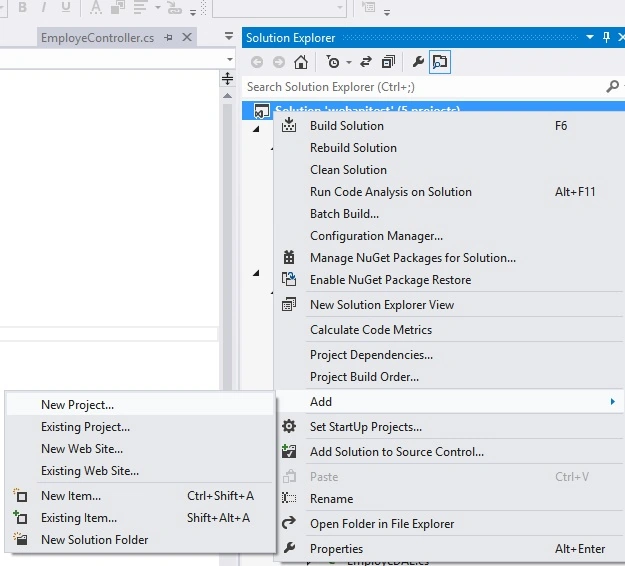
Choose ASP.NET MVC appliaction and click the OK button and select Basic then click the OK button.
Create Model Class
The MVC model contains all the application logic validation, Business Logic and data access logic. We can create an Emps class under the Model Folder.
- using System;
- using System.Collections.Generic;
- using System.Linq;
- using System.Web;
- using System.ComponentModel.DataAnnotations;
- namespace Web.Models
- {
- public class Emps
- {
- [Display(Name = "Employe Id")]
- public int Empid { get; set; }
- [Display(Name = "Employe Name")]
- public string Empname { get; set; }
- [Display(Name = "Employe City")]
- public string Empcity { get; set; }
- [Display(Name = "Employe Address")]
- public string Empaddress { get; set; }
- }
- }
Now we can create an Employee controller that has an action for all the CRUD operations of the employee.
- using System;
- using System.Collections.Generic;
- using System.Linq;
- using System.Net.Http;
- using System.Net.Http.Headers;
- using System.Web;
- using System.Web.Mvc;
- using Web.Models;
- namespace Web.Controllers
- {
- public class EmployeController : Controller
- {
- DataClasses1DataContext db = new DataClasses1DataContext();
- //
- // GET: /Employe/
- public ActionResult Index()
- {
- return View();
- }
- [HttpGet, ActionName("Getcollegelist")]
- public ActionResult GetAllEmploye()
- {
- HttpClient client = new HttpClient();
- client.BaseAddress = new Uri("http://localhost:56129/");
- client.DefaultRequestHeaders.Accept.Add(new MediaTypeWithQualityHeaderValue("application/json"));
- HttpResponseMessage response = client.GetAsync("api/Employe/GetAllEmploye").Result;
- List<Emps> cd = response.Content.ReadAsAsync<List<Emps>>().Result;
- return View("~/Views/GetEmploye.cshtml", cd);
- }
- public ActionResult Create()
- {
- return View();
- }
- [HttpPost, ActionName("Create")]
- public ActionResult Create(Emps e1)
- {
- HttpClient client = new HttpClient();
- client.BaseAddress = new Uri("http://localhost:56129/");
- //client.DefaultRequestHeaders.Add("",)
- client.DefaultRequestHeaders.Accept.Add(new MediaTypeWithQualityHeaderValue("application/json"));
- // HttpResponseMessage response = client.PostAsJsonAsync("api/Employe/InsertEmploye",e1).Result;
- HttpResponseMessage response = client.PostAsJsonAsync("api/Employe/InsertEmploye",e1).Result;
- return RedirectToAction("Getcollegelist");
- }
- public ActionResult Edit(int id )
- {
- Emps model = db.Employes.Where(val => val.Empid == id).Select(val => new Emps()
- {
- Empid = val.Empid,
- Empaddress = val.Empaddress,
- Empcity = val.Empcity,
- Empname = val.Empname,
- }).SingleOrDefault();
- return View( model);
- }
- [HttpPost]
- public ActionResult Edit(Emps model,int id)
- {
- HttpClient client = new HttpClient();
- client.BaseAddress = new Uri("http://localhost:56129/");
- client.DefaultRequestHeaders.Accept.Add(new MediaTypeWithQualityHeaderValue("application/json"));
- HttpResponseMessage response = client.PutAsJsonAsync("api/Employe/UpdateEmploye?Empid="+id, model).Result;
- return RedirectToAction("Getcollegelist");
- }
- public ActionResult Delete( int id)
- {
- HttpClient client = new HttpClient();
- client.BaseAddress = new Uri("http://localhost:56129/");
- client.DefaultRequestHeaders.Accept.Add(new MediaTypeWithQualityHeaderValue("application/json"));
- HttpResponseMessage response = client.DeleteAsync("api/Employe/DeleteEmp?Empid=" +id).Result;
- return RedirectToAction("Getcollegelist");
- }
- public ActionResult Details(int id)
- {
- Emps model = db.Employes.Where(val => val.Empid == id).Select(val => new Emps()
- {
- Empid = val.Empid,
- Empaddress = val.Empaddress,
- Empname = val.Empname,
- Empcity = val.Empcity
- }).SingleOrDefault();
- return View(model);
- }
- }
- }
Let's see each view with code.
Create a view to add a new employee
Now we can create a view (Create.cshtml).
- @model Web.Models.Emps
- @{
- ViewBag.Title = "Create";
- }
- <h2>Create</h2>
- @using (Html.BeginForm()) {
- @Html.ValidationSummary(true)
- <fieldset>
- <legend>Emps</legend>
- <div class="editor-label">
- @Html.LabelFor(model => model.Empid)
- </div>
- <div class="editor-field">
- @Html.EditorFor(model => model.Empid)
- @Html.ValidationMessageFor(model => model.Empid)
- </div>
- <div class="editor-label">
- @Html.LabelFor(model => model.Empname)
- </div>
- <div class="editor-field">
- @Html.EditorFor(model => model.Empname)
- @Html.ValidationMessageFor(model => model.Empname)
- </div>
- <div class="editor-label">
- @Html.LabelFor(model => model.Empcity)
- </div>
- <div class="editor-field">
- @Html.EditorFor(model => model.Empcity)
- @Html.ValidationMessageFor(model => model.Empcity)
- </div>
- <div class="editor-label">
- @Html.LabelFor(model => model.Empaddress)
- </div>
- <div class="editor-field">
- @Html.EditorFor(model => model.Empaddress)
- @Html.ValidationMessageFor(model => model.Empaddress)
- </div>
- <p>
- <input type="submit" value="Create" />
- </p>
- </fieldset>
- }
- <div>
- @Html.ActionLink("Back to List", "Index")
- </div>
- @section Scripts {
- @Scripts.Render("~/bundles/jqueryval")
- }
The following is the output of the preceding code:
We can create a view with the name GetEmploye inside the views folder.
- @model IEnumerable<Web.Models.Emps>
- @{
- ViewBag.Title = "GetEmploye";
- }
- <h2>GetEmploye</h2>
- <p>
- @Html.ActionLink("Create New", "Create")
- </p>
- <table>
- <tr>
- <th>
- @Html.DisplayNameFor(model => model.Empname)
- </th>
- <th>
- @Html.DisplayNameFor(model => model.Empcity)
- </th>
- <th>
- @Html.DisplayNameFor(model => model.Empaddress)
- </th>
- <th></th>
- </tr>
- @foreach (var item in Model) {
- <tr>
- <td>
- @Html.DisplayFor(modelItem => item.Empname)
- </td>
- <td>
- @Html.DisplayFor(modelItem => item.Empcity)
- </td>
- <td>
- @Html.DisplayFor(modelItem => item.Empaddress)
- </td>
- <td>
- @Html.ActionLink("Edit", "Edit", new { id=item.Empid }) |
- @Html.ActionLink("Details", "Details", new { id=item.Empid }) |
- @*@Html.ActionLink("Delete", "Delete", new { id=item.Empid })*@
- <a onclick="return confirm('Are You Sure?');" href="@Url.Action("Delete", "Employe", new { id = item.Empid })">Delete</a>
- </td>
- </tr>
- }
- </table>
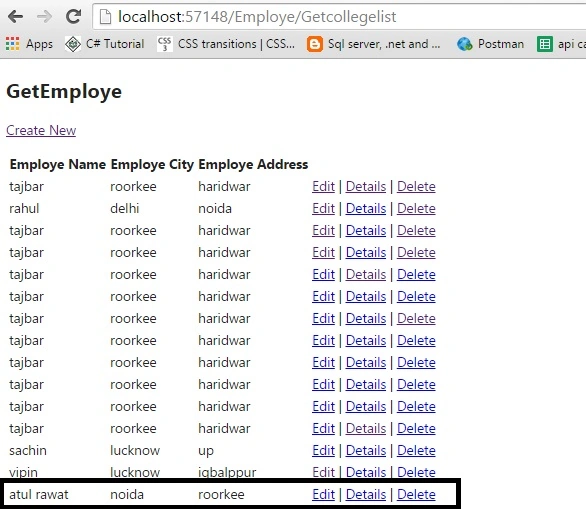
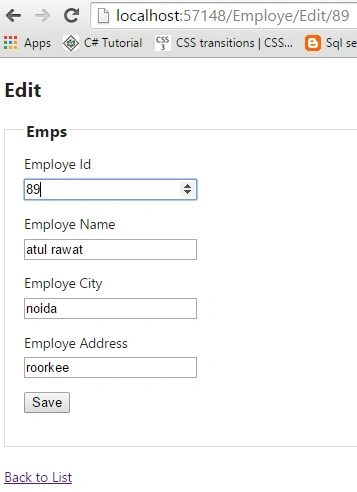
Edit Employe
We can create a view "Edit.cshtml" under the View/Employe folder that uses two action methods of the controller for the Get request and another for the Post request.
- @model Web.Models.Emps
- @{
- ViewBag.Title = "Edit";
- }
- <h2>Edit</h2>
- @using (Html.BeginForm()) {
- @Html.ValidationSummary(true)
- <fieldset>
- <legend>Emps</legend>
- <div class="editor-label">
- @Html.LabelFor(model => model.Empid)
- </div>
- <div class="editor-field">
- @Html.EditorFor(model => model.Empid)
- @Html.ValidationMessageFor(model => model.Empid)
- </div>
- <div class="editor-label">
- @Html.LabelFor(model => model.Empname)
- </div>
- <div class="editor-field">
- @Html.EditorFor(model => model.Empname)
- @Html.ValidationMessageFor(model => model.Empname)
- </div>
- <div class="editor-label">
- @Html.LabelFor(model => model.Empcity)
- </div>
- <div class="editor-field">
- @Html.EditorFor(model => model.Empcity)
- @Html.ValidationMessageFor(model => model.Empcity)
- </div>
- <div class="editor-label">
- @Html.LabelFor(model => model.Empaddress)
- </div>
- <div class="editor-field">
- @Html.EditorFor(model => model.Empaddress)
- @Html.ValidationMessageFor(model => model.Empaddress)
- </div>
- <p>
- <input type="submit" value="Save" />
- </p>
- </fieldset>
- }
- <div>
- @Html.ActionLink("Back to List", "Index")
- </div>
- @section Scripts {
- @Scripts.Render("~/bundles/jqueryval")
- }
Details of employee
We can create a view "Detail.cshtml" under the View/Employe folder that uses one action method (Details) of the controller for the Get request.
- @model Web.Models.Emps
- @{
- ViewBag.Title = "Details";
- }
- <h2>Details</h2>
- <fieldset>
- <legend>Emps</legend>
- <div class="display-label">
- @Html.DisplayNameFor(model => model.Empid)
- </div>
- <div class="display-field">
- @Html.DisplayFor(model => model.Empid)
- </div>
- <div class="display-label">
- @Html.DisplayNameFor(model => model.Empname)
- </div>
- <div class="display-field">
- @Html.DisplayFor(model => model.Empname)
- </div>
- <div class="display-label">
- @Html.DisplayNameFor(model => model.Empcity)
- </div>
- <div class="display-field">
- @Html.DisplayFor(model => model.Empcity)
- </div>
- <div class="display-label">
- @Html.DisplayNameFor(model => model.Empaddress)
- </div>
- <div class="display-field">
- @Html.DisplayFor(model => model.Empaddress)
- </div>
- </fieldset>
- <p>
- @Html.ActionLink("Edit", "Edit", new { /* id=Model.PrimaryKey */ }) |
- @Html.ActionLink("bacl to the list","Getcollegelist","Employe")
- </p>
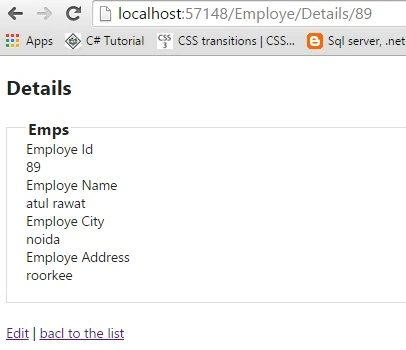
Delete Employe
If we click on the delete link then a confirmation window is opened. Click on the OK button then data will be deleted from the database.
Summary
In this article we learned about CRUD operations using the Repository pattern and how to consume the ASP.NET Web API using ASP.NET MVC4.
Tabrez KPosted Dec 2, 2016, 1:01 PM
Thanks for giving neat and clean code
Upendra Pratap ShahiPosted Oct 29, 2015, 6:13 AM
thanks for sharing...
amit sharanPosted Aug 18, 2015, 2:26 PM
Where is DataAccessComponent ? public class EmployeDAL : DataAccessComponent ,I am Getting Error in : employlist = ConvertTo<EmployeModel>(dataTable); How to Solve ? Please Solve My Issue....
Yatendra SharmaPosted Aug 10, 2015, 10:33 AM
nyc article
Sibeesh VenuPosted Aug 10, 2015, 1:03 AM
Nice Share
RakeshPosted Aug 8, 2015, 12:28 PM
Good one
Ankit BansalPosted Aug 8, 2015, 11:58 AM
thanks for sharing... good one
Rajeesh MenothPosted Aug 8, 2015, 6:17 AM
Good One...
Chervine BhiwooPosted Aug 8, 2015, 2:18 AM
Very detailed! Thanks!
Santhakumar MunuswamyPosted Aug 8, 2015, 2:06 AM
Good article. Thanks for sharing
Sachin KaliaPosted Aug 8, 2015, 1:58 AM
Excellent and very well informative..Keep it up Atul...
Manas MohapatraPosted Aug 8, 2015, 1:00 AM
Thanks for sharing..
Nilesh JadavPosted Aug 8, 2015, 12:30 AM
Really nice share sir :)
Shridhar SharmaPosted Aug 7, 2015, 5:47 PM
good one atul.