
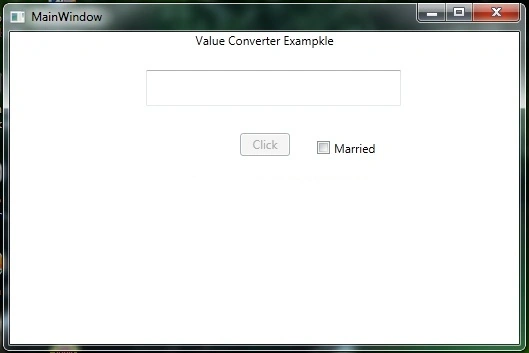
A Value Converter functions as a bridge between a target and a source and it is necessary when a target is bound with one source, for instance you have a text box and a button control. You want to enable or disable the button control when the text of the text box is filled or null.
Code Example1: Declaration of Value Converter class
- using System;
- using System.Collections.Generic;
- using System.Linq;
- using System.Text;
- using System.Threading.Tasks;
- using System.Windows.Data;
- namespace ValueConverters
- {
- public class ValueConverter:IValueConverter
- {
- public object Convert(object value, Type targetType, object parameter, System.Globalization.CultureInfo culture)
- {
- bool isenable = true;
- if (string.IsNullOrEmpty(value.ToString()))
- {
- isenable = false;
- }
- return isenable;
- }
- public object ConvertBack(object value, Type targetType, object parameter, System.Globalization.CultureInfo culture)
- {
- throw new NotImplementedException();
- }
- }
- }
Here in the preceding code I have written code in the convert method to enable or disable the button control and have not written any code in the ConvertBack function. To use the convert back I have another example.
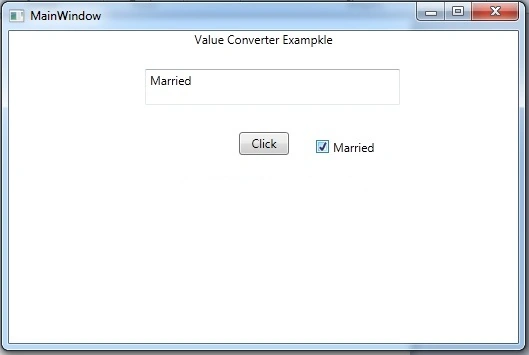
Let's say you have a check box control bound the text with the text of text box control. You want to determine whether the check box is checked when the text is married and unchecked when the text is unmarried.
- using System;
- using System.Collections.Generic;
- using System.Linq;
- using System.Text;
- using System.Threading.Tasks;
- using System.Windows.Data;
- namespace ValueConverters
- {
- class CheckBoxCheckConverter:IValueConverter
- {
- public object Convert(object value, Type targetType, object parameter, System.Globalization.CultureInfo culture)
- {
- if (value.ToString().ToUpper() == "MARRIED")
- {
- return true;
- }
- else
- {
- return false;
- }
- }
- public object ConvertBack(object value, Type targetType, object parameter, System.Globalization.CultureInfo culture)
- {
- bool married = System.Convert.ToBoolean(value);
- if (married == true)
- return "Married";
- else
- return "Unmarried";
- }
- }
- }
In the preceding code, I am checking the text of text box. If it is married then the convert function returns true that will make the check box checked otherwise it will uncheck the checkbox. The convert back function is doing as said above, if the check box is checked it is setting the text of the TextBox to Married and otherwise Unmarried.
Use of Converter
To use the converter you need to implement the interface of the converter class in the XAML page of WPF and need to declare the resource. After declaring the resource there is the need to use it with binding. See the following XAML code example.
- <Window x:Class="ValueConverters.MainWindow"
- xmlns="http://schemas.microsoft.com/winfx/2006/xaml/presentation"
- xmlns:x="http://schemas.microsoft.com/winfx/2006/xaml"
- xmlns:local="clr-namespace:ValueConverters"
- Title="MainWindow" Height="350" Width="525">
- <Window.Resources>
- <local:ValueConverter x:Key="valueconverter"></local:ValueConverter>
- <local:CheckBoxCheckConverter x:Key="checkBoxCheckConverter"></local:CheckBoxCheckConverter>
- </Window.Resources>
- <Grid>
- <TextBlock Text="Value Converter Exampkle" HorizontalAlignment="Stretch" VerticalAlignment="Top" TextAlignment="Center"></TextBlock>
- <TextBox Name="txtFirstName" HorizontalAlignment="Left" VerticalAlignment="Top" Height="36" Width="255" Margin="136,38,0,0" ></TextBox>
- <Button Content="Click" HorizontalAlignment="Left" VerticalAlignment="Top" Height="23" Width="50" Margin="230,101,0,0" IsEnabled="{Binding Path=Text, ElementName=txtFirstName,Converter={StaticResource valueconverter}}"></Button>
- <CheckBox Content="Married" HorizontalAlignment="Left" VerticalAlignment="Top" Margin="307,108,0,0" IsChecked="{Binding Path=Text, ElementName=txtFirstName,Converter={StaticResource checkBoxCheckConverter}}"></CheckBox>
- <TextBlock Text="MultiValue Converter Exampkle" HorizontalAlignment="Stretch" VerticalAlignment="Top" TextAlignment="Center" Margin="10,146,-10,0"></TextBlock>
- </Grid>
- </Window>
I hope you have gotthe the idea of Value Converters and how to use them.
Ammar ShaukatPosted Sep 26, 2017, 7:06 AM
Very good content but examples you used are not mature and strong enough to demonstrate the subject matter . Can you please provide some real time examples.
Rajeev RoyPosted Sep 4, 2017, 3:43 AM
Very easy and useful example. Thank you so much for this example and making me understand the IValueConverter.
Afzaal Ahmad ZeeshanPosted Jun 6, 2015, 3:41 AM
Just a suggestion for you Kailash, if your data type is "bool" and not Nullable bool (bool?). Then you can easily use the variable in the parenthesis as "if(married) { }". There is no need to test it against "true". You only have to test it against a true, if the type is Nullable bool. :) Otherwise, good article.
Former memberPosted May 18, 2015, 3:58 AM
Thanks Santhakumar
Santhakumar MunuswamyPosted May 17, 2015, 1:04 AM
Thanks for sharing