

Performance of JavaScript code
There are ways to speed up your JavaScript code performance.
Reduction of activities in loops
- In our programming, we often use loops for iteration.
- For each iteration of the loop, every statement inside a loop is executed.
- The statements or assignments that are to be searched can be placed outside the loop.
Reduction of DOM Access
- As compared to other JavaScript statements, accessing the HTML DOM is very slow.
- If you want to access the DOM element several times then, access it once and use it as a local variable.
- This is how you can access your DOM element easily as many times as you want.
Example
<html>
   <body>
      <p id="dom"></p>
      <script>
         var obj;
         obj = document.getElementById("dom");
         obj.innerHTML = "Hello JavaScript..!!";
      </script>
   </body>
</html>
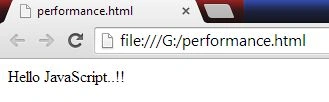
Output
Reduction of DOM size
- In HTML DOM, use only a small number of elements.
- This will always make faster page loading and speed up rendering (page display), especially on a small device.
- Each attempt to search the DOM like “getElementByTagName” will benefit from a smaller DOM.
Avoid Unnecessary variables
- Avoid creating new variables that are not of use to save any value.
- This will unnecessarily create a loading problem.
- You can replace your code with optimized code.
Example
<html>
   <body>
      <p id="dom"></p>
      <script>
         var obj;
         obj = document.getElementById("dom");
         obj.innerHTML = "Hello JavaScript..!!";
      </script>
   </body>
</html>

After reduction or optimization
<p id="dom"></p>
<script>
   document.getElementById("dom").innerHTML = firstName + " " + lastName;
</script>
Delay JavaScript loading
When you put your JavaScript code at the bottom of the page, then the browser will load the page first.
While a script is downloading, the browser will not start any other downloads. In addition, all parsing and rendering might be blocked.
Note. The HTTP specification defines that the browsers should not download more than two components in parallel.
There is an alternative to use defer=” true” on your script page. This attribute specifies that the script should be executed before the page has finished the parsing, but it only works for external scripts.
You can also add your script by the code given below.
<script>
   window.onload = downScripts;

   function downScripts() {
      var element = document.createElement("script");
      element.src = "myScript.js";
      document.body.appendChild(element);
   }
</script>
Avoid using the “with” keyword
Always avoid using the “with” keyword. It has a negative impact on speed and also clutters up the JavaScript scope. It is also not allowed in JavaScript “strict mode”.
K P Singh ChundawatPosted Jan 13, 2015, 8:05 AM
nice...
Mahesh ChandPosted Jul 27, 2014, 1:19 PM
Useful tips.
Guest UserPosted Jul 27, 2014, 8:50 AM
good one!