

CSS Word wrap
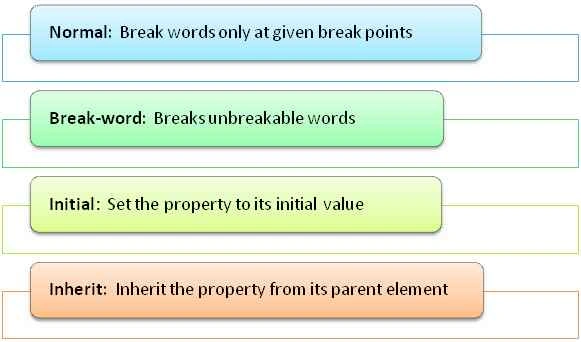
- <html>
- <head>
- <style>
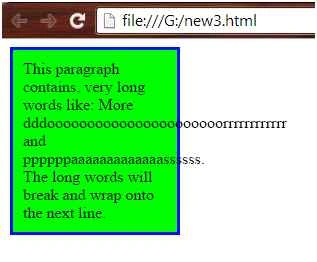
- p.Normal {
- width: 9em;
- background-color: #00ff00;
- border: 3px solid #000fff;
- padding:10px;
- word-wrap: normal;
- }
- </style>
- </head>
- <body>
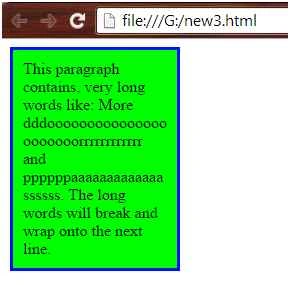
- <p class="Normal"> This paragraph contains, very long words like:
- More dddoooooooooooooooooooooorrrrrrrrrrrr and ppppppaaaaaaaaaaaaassssss. The long words will break and wrap onto the next line.</p>
- </body>
- </html>
Example: Initial
- <html>
- <head>
- <style>
- div {
- color: blue;
- border: 1px solid red;
- }
- h3 {
- color: initial;
- }
- </style>
- </head>
- <body>
- <div>
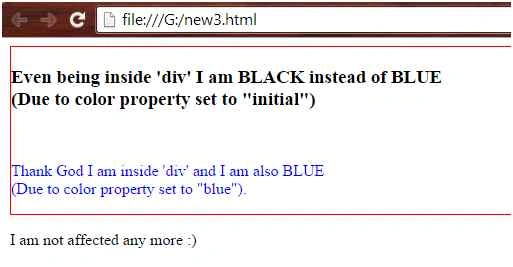
- <h3>Even being inside 'div' I am BLACK instead of BLUE
- <br>(Due to color property set to "initial")
- </h3>
- <br>
- <p>Thank God I am inside 'div' and I am also BLUE
- <br>(Due to color property set to "blue").
- </p>
- </div>
- <p>I am not affected any more :) </p>
- </body>
- </html>
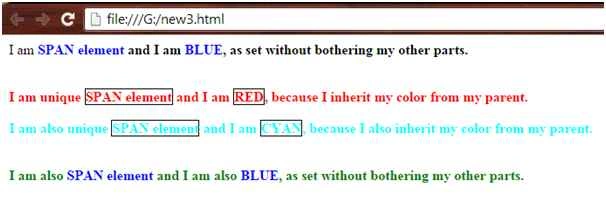
- <html>
- <head>
- span {
- color: blue;
- }
- .unique span {
- color: inherit;
- border: 1px solid black;
- }
- </style>
- </head>
- <body>
- <div>
- I am
- <span>
- <b>SPAN element
- <b>
- </span> and I am
- <span>
- <b>BLUE
- <b>
- </span>, as set without bothering my other parts.
- </div>
- <br>
- <br>
- <div class="unique" style="color:red">
- I am unique
- <span>
- <b>SPAN element</b>
- </span> and I am
- <span>
- <b>RED</b>
- </span>, because I inherit my color from my parent.
- </div>
- <br>
- <div class="unique" style="color:cyan">
- I am also unique
- <span>
- <b>SPAN element</b>
- </span> and I am
- <span>
- <b>CYAN</b>
- </span>, because I also inherit my color from my parent.
- </div>
- <br>
- <br>
- <div style="color:green">
- I am also
- <span>
- <b>SPAN element</b>
- </span> and I am also
- <span>
- <b>BLUE
- <b>
- </span>, as set without bothering my other parts.
- </div>
- </body>
- </html>
Santhakumar MunuswamyPosted Jul 13, 2015, 3:10 PM
Nice article! Thanks for sharing
Vipul MalhotraPosted Jul 13, 2015, 3:57 AM
Nice..Thanks for writing
Sibeesh VenuPosted Jul 13, 2015, 3:30 AM
Nice share
Gopi ChandPosted Jul 13, 2015, 2:39 AM
Thanks to all for your appreciation
Jacob RobinsonPosted Jul 13, 2015, 1:40 AM
Good One..
Debendra DashPosted Jul 13, 2015, 1:31 AM
good one....
Debasis SahaPosted Jul 13, 2015, 12:40 AM
Good One..
Nilesh JadavPosted Jul 13, 2015, 12:03 AM
Nice article sir
RakeshPosted Jul 12, 2015, 11:52 PM
Good one sir
Pankaj Kumar ChoudharyPosted Jul 12, 2015, 11:45 PM
Nice One Sir......