

AJAX - Asynchronous JavaScript and XML
- It allows us to send request OR Post data to a server without submitting the whole page so it's called Asynchronous
- The language we use for it is JavaScript
- The format of the data to be exchanged between the server and client is XML
That's why its called Asynchronous JavaScript and XML.
Advantages
The amount of data to be transferred between the client and server is reduced.
Limitations
- Implementing such concepts directly into the application requires a good knowledge of both JavaScript and XML.
- JavaScript doesn't support classes and other Object Oriented features like inheritance so code management is sometimes difficult.
Update Panel
- ASP.Net provides a rich UpdatePanel control, which helps us to build such AJAX enabled websites without writing any custom JavaScript.
- By using the Update Panel we can refresh only a part of the page instead of the entire page and that is referred to as Partial Page Update.
How to use it
- ScriptManager
This is the most important thing required in every ASP.Net AJAX enabled website.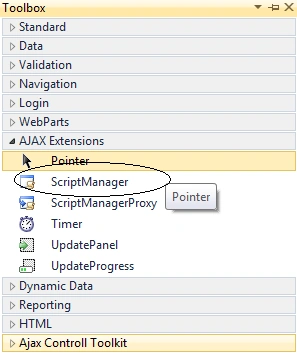
As we discussed earlier AJAX needs JavaScript and since we are not managing any JavaScript by ourself, who does? The ScriptManager does; it manages the client script for ASP.Net AJAX pages.
Just drag the control into the page, as in:
It has a property called EnablePartialRendering which is by default set to true, which gets or sets the value indicating support of Partial Page Updates.
- UpdatePanel
In the toolbox in the same group where the ScriptManager exists you may find one more control called UpdatePanel, as in:
Let's talk about some important properties and methods available with UpdatePanel:
- ContentTemplate : All the contents that must be updated asynchronously (means updated such that, other parts of the page remain untouched) are placed here. You can place any HTML content with any ASP.Net server control (like ListView) here.
- UpdateMode and ChildrenAsTriggers : Decides when the contents will be updated. Possible values are:
- For UpdatePanel Always (Default), Conditional
- For ChildrenAsTriggers True (Default), False (only applicable when Update Mode is Conditional)
- ContentTemplate : All the contents that must be updated asynchronously (means updated such that, other parts of the page remain untouched) are placed here. You can place any HTML content with any ASP.Net server control (like ListView) here.
Let's discuss result with various combinations:
- UpdateMode Always and ChildrenAsTrigger True : Contents will be refreshed on every full and partial Postback.
- UpdateMode Always and ChildrenAsTrigger True : Exception: ChildrenAsTriggers cannot be set to false when UpdateMode is set to Always on UpdatePanel.
- UpdateMode Conditional and ChildrenAsTrigger True : Contents will be refreshed:
- On every full Postback
- On Partial Postback caused by controls inside the same UpdatePanel.
- UpdateMode Conditional and ChildrenAsTrigger False : Contents will be refreshed only on full Postback.
Triggers : A Collection of AsyncPostBackTrigger and PostBackTrigger
- AsyncPostBackTrigger : This property will take the two arguments Id of the control and an optional event and used when we want to refresh the UpdatePanel:
- on an event occurred by control present outside the UpdatePanel.
- on an event occurred by control present inside the UpdatPanel when the ChildrenAsTrigger is set to false.
- on an event occurred by control present inside the nested UpdatePanel.
- PostBackTrigger : Every control inside the UpdatePanel causes asynchronous PostBacks by default. But by using this property we can enable that control to cause a Postback instead of performing an asynchronous Postback.
Update method : If at some point of time we want to explicitly refresh the UpdatePanel content, we can use this method. - AsyncPostBackTrigger : This property will take the two arguments Id of the control and an optional event and used when we want to refresh the UpdatePanel:
Example
Click here to Download the example to better understand the working of the update panel.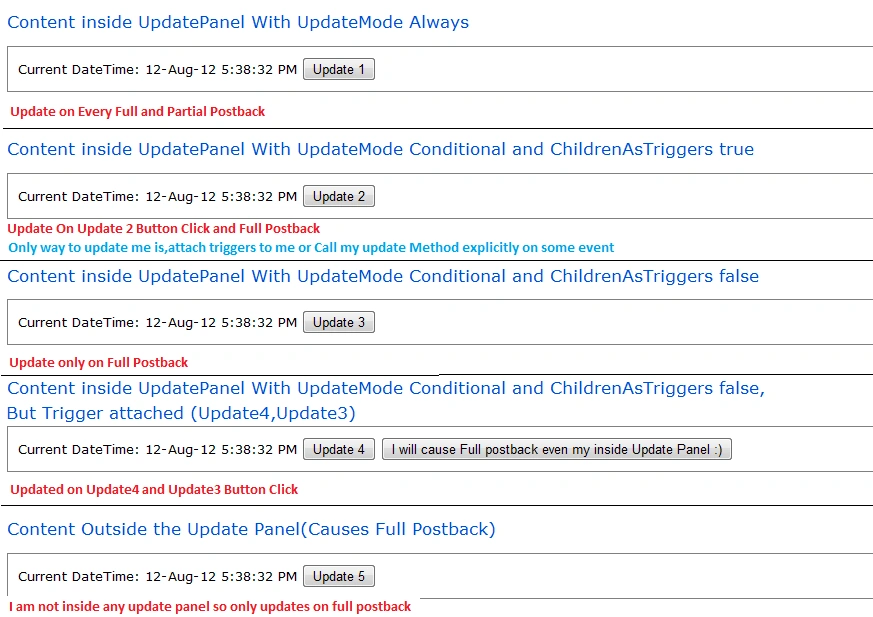
Points to remeber
Whether it's a full or partial Postback, the Life Cycle events will be the same, which I already discussed in my previous article.
Hope you enjoyed this article, make sure you leave some good comments.
Avinash KumarPosted Mar 27, 2017, 7:19 AM
What is difference between these two as they are stating same1. UpdateMode Always and ChildrenAsTrigger True : Contents will be refreshed on every full and partial Postback 3. UpdateMode Conditional and ChildrenAsTrigger True : Contents will be refreshed: On every full Postback On Partial Postback caused by controls inside the same UpdatePanel.
Avinash KumarPosted Mar 27, 2017, 7:17 AM
2. UpdateMode Always and ChildrenAsTrigger True-- i think this line has some mistake. it should be UpdateMode Always and ChildrenAsTrigger False..
kalu singh raoPosted Jul 19, 2016, 1:59 AM
Nice...
angel adinolffiPosted Feb 3, 2014, 2:24 PM
look at this link, you might find an answer: http://www.systemdeveloper.info/2014/01/fileupload-control-in-update-panel.html or in http://www.systemdeveloper.info/2014/02/how-do-i-add-javascript-updatepanel-in.html
sam sameditedPosted Sep 1, 2012, 3:53 AMEdited Sep 1, 2012, 3:53 AM
.