

A few days back I was working on a POC where I needed to add a COM reference to a WCF application. When the client calls the WCF service, a method call will go to the COM dll. I have done much R&D on it because I am doing it for the first time. So I found on the internet that there is not a good solution for it. So I decided I need to write complete instructions for doing it.
Let's see how to call a COM\VB6 dll in WCF.
Step 1: First of all we will create a new WCF Application Project.
Step 2: Now we will add a COM reference.
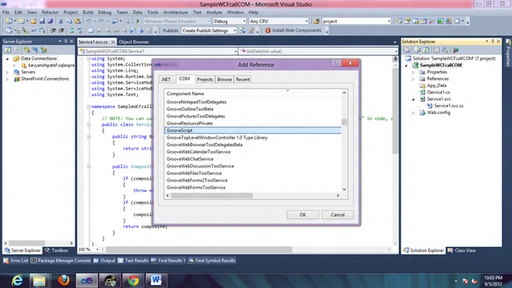
Step 3: Now we will go to the Properties of the COM Assembly that we added a reference for. See the following image:
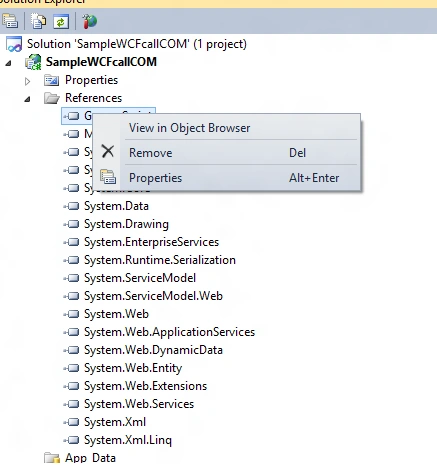
Step 4: Now we need to change Embed Interop Types =TRUE

Step 5: Now we can use that COM dll in a WCF service.
- GrooveScript.GrooveVCardViewerClass c = new GrooveScript.GrooveVCardViewerClass();
- c.Clear();
Happy Coding..
sagar shindePosted Jun 25, 2014, 9:54 AM
I am using Oleprn.Dll
sagar shindePosted Jun 25, 2014, 9:54 AM
Hey i am also using one of com dll but i cant find embedded type in the properties section.
Amit PatelPosted Oct 7, 2012, 11:14 PM
Thanks
Gohil JayendrasinhPosted Sep 25, 2012, 9:11 AM
Hi, Thanks for putting this article . i also search on internet very much. Visual Studio 2010 has a feature, Embed Interop Types, that can simplify application deployment and solve those pesky issues that can arise when using COM Interop and Primary Interop Assemblies (PIAs). If you’ve ever had to ship multiple versions of an application that automates Microsoft Office where the only difference between your published versions is the version of the PIA (to match different Office versions), then this feature is for you. You enable type embedding when you reference an assembly. In Visual Studio, you set the Embed Interop Types property to true (the default).