

This is the aspx code in DataGrid
From Here we can design our web form. We use a DataGrid on webForm. Here we set all the property as we have to perform the operation with in DataGrid.
- <%@ Page Language="C#" AutoEventWireup="true" CodeFile="DataGrid.aspx.cs" Inherits="sapnamalik_DataGrid" %>
- <!DOCTYPE html PUBLIC "-//W3C//DTD XHTML 1.0 Transitional//EN" "http://www.w3.org/TR/xhtml1/DTD/xhtml1-transitional.dtd">
- <html xmlns="http://www.w3.org/1999/xhtml">
- <head runat="server">
- <title>Untitled Page</title>
- </head>
- <body>
- <form id="form1" runat="server">
- <div>
- <asp:DataGrid ID="Grid" runat="server" PageSize="5" AllowPaging="True" DataKeyField="EmpId" AutoGenerateColumns="False" CellPadding="4" ForeColor="#333333" GridLines="None" OnPageIndexChanged="Grid_PageIndexChanged" OnCancelCommand="Grid_CancelCommand" OnDeleteCommand="Grid_DeleteCommand" OnEditCommand="Grid_EditCommand" OnUpdateCommand="Grid_UpdateCommand">
- <Columns>
- <asp:BoundColumn HeaderText="EmpId" DataField="EmpId"> </asp:BoundColumn>
- <asp:BoundColumn HeaderText="F_Name" DataField="F_Name"> </asp:BoundColumn>
- <asp:BoundColumn HeaderText="L_Name" DataField="L_Name"> </asp:BoundColumn>
- <asp:BoundColumn DataField="City" HeaderText="City"> </asp:BoundColumn>
- <asp:BoundColumn DataField="EmailId" HeaderText="EmailId"> </asp:BoundColumn>
- <asp:BoundColumn DataField="EmpJoining" HeaderText="EmpJoining"> </asp:BoundColumn>
- <asp:EditCommandColumn EditText="Edit" CancelText="Cancel" UpdateText="Update" HeaderText="Edit"> </asp:EditCommandColumn>
- <asp:ButtonColumn CommandName="Delete" HeaderText="Delete" Text="Delete"> </asp:ButtonColumn>
- </Columns>
- <FooterStyle BackColor="#990000" Font-Bold="True" ForeColor="White" />
- <SelectedItemStyle BackColor="#FFCC66" Font-Bold="True" ForeColor="Navy" />
- <PagerStyle BackColor="#FFCC66" ForeColor="#333333" HorizontalAlign="Center" Mode="NumericPages" />
- <AlternatingItemStyle BackColor="White" />
- <ItemStyle BackColor="#FFFBD6" ForeColor="#333333" />
- <HeaderStyle BackColor="#990000" Font-Bold="True" ForeColor="White" /> </asp:DataGrid> <br /> <br />
- <table>
- <tr>
- <td>
- <asp:Label ID="lblEmpId" runat="server" Text="EmpId"></asp:Label>
- <asp:TextBox ID="TextBox1" runat="server"></asp:TextBox>
- </td>
- <td>
- <asp:Label ID="lblfname" runat="server" Text="F_Name"></asp:Label>
- <asp:TextBox ID="TextBox2" runat="server"></asp:TextBox>
- </td>
- <td>
- <asp:Label ID="lblLname" runat="server" Text="L_Name"></asp:Label>
- <asp:TextBox ID="TextBox3" runat="server"></asp:TextBox>
- </td>
- <td>
- <asp:Label ID="lblCity" runat="server" Text="City"></asp:Label>
- <asp:TextBox ID="TextBox4" runat="server"></asp:TextBox>
- </td>
- <td>
- <asp:Label ID="lblEmailId" runat="server" Text="EmailId"></asp:Label>
- <asp:TextBox ID="TextBox5" runat="server"></asp:TextBox> Q </td>
- <td>
- <asp:Label ID="lblEmpJoining" runat="server" Text="EmpJoining"></asp:Label>
- <asp:TextBox ID="TextBox6" runat="server"></asp:TextBox>
- </td>
- </tr>
- </table>
- <asp:Button ID="btnsubmit" runat="server" Text="Submit" OnClick="btnsubmit_Click" />
- <asp:Button ID="btnReset" runat="server" Text="Reset" OnClick="btnReset_Click" />
- <asp:Button ID="btnOk" runat="server" Text="OK" OnClick="btnOk_Click" /> </div>
- <div>
- <asp:DataGrid ID="Grid1" runat="server" PageSize="5" AllowPaging="True" AutoGenerateColumns="False" CellPadding="4" ForeColor="#333333" GridLines="None">
- <Columns>
- <asp:BoundColumn HeaderText="EmpId" DataField="EmpId"></asp:BoundColumn>
- <asp:BoundColumn HeaderText="F_Name" DataField="F_Name"></asp:BoundColumn>
- <asp:BoundColumn HeaderText="L_Name" DataField="L_Name"></asp:BoundColumn>
- <asp:BoundColumn DataField="City" HeaderText="City"></asp:BoundColumn>
- <asp:BoundColumn DataField="EmailId" HeaderText="EmailId"></asp:BoundColumn>
- <asp:BoundColumn DataField="EmpJoining" HeaderText="EmpJoining"> </asp:BoundColumn>
- </Columns>
- <FooterStyle BackColor="#990000" Font-Bold="True" ForeColor="White" />
- <SelectedItemStyle BackColor="#FFCC66" Font-Bold="True" ForeColor="Navy" />
- <PagerStyle BackColor="#FFCC66" ForeColor="#333333" HorizontalAlign="Center" Mode="NumericPages" />
- <AlternatingItemStyle BackColor="White" />
- <ItemStyle BackColor="#FFFBD6" ForeColor="#333333" />
- <HeaderStyle BackColor="#990000" Font-Bold="True" ForeColor="White" /> </asp:DataGrid>
- </div>
- </form>
- </body>
- </html>
This is .cs code in DataGrid,
- using System;
- using System.Data;
- using System.Configuration;
- using System.Collections;
- using System.Web;
- using System.Web.Security;
- using System.Web.UI;
- using System.Web.UI.WebControls;
- using System.Web.UI.WebControls.WebParts;
- using System.Web.UI.HtmlControls;
- using System.Data.SqlClient;
- public partial class sapnamalik_DataGrid: System.Web.UI.Page {
- SqlDataAdapter da;
- DataSet ds = new DataSet();
- SqlCommand cmd = new SqlCommand();
- SqlConnection con;
- protected void Page_Load(object sender, EventArgs e) {
- if (!Page.IsPostBack) {
- BindData();
- }
- }
- public void BindData() {
- con = new SqlConnection(ConfigurationManager.AppSettings["connect"]);
- cmd.CommandText = "Select * from Employee";
- cmd.Connection = con;
- da = new SqlDataAdapter(cmd);
- da.Fill(ds);
- con.Open();
- cmd.ExecuteNonQuery();
- Grid.DataSource = ds;
- Grid.DataBind();
- con.Close();
- }
- protected void Grid_PageIndexChanged(object source, DataGridPageChangedEventArgs e) {
- Grid.CurrentPageIndex = e.NewPageIndex;
- BindData();
- }
- protected void Grid_EditCommand(object source, DataGridCommandEventArgs e) {
- Grid.EditItemIndex = e.Item.ItemIndex;
- BindData();
- }
- protected void Grid_CancelCommand(object source, DataGridCommandEventArgs e) {
- Grid.EditItemIndex = -1;
- BindData();
- }
- protected void Grid_DeleteCommand(object source, DataGridCommandEventArgs e) {
- con = new SqlConnection(ConfigurationManager.AppSettings["connect"]);
- cmd.Connection = con;
- int EmpId = (int) Grid.DataKeys[(int) e.Item.ItemIndex];
- cmd.CommandText = "Delete from Employee where EmpId=" + EmpId;
- cmd.Connection.Open();
- cmd.ExecuteNonQuery();
- cmd.Connection.Close();
- Grid.EditItemIndex = -1;
- BindData();
- }
- protected void Grid_UpdateCommand(object source, DataGridCommandEventArgs e) {
- con = new SqlConnection(ConfigurationManager.AppSettings["connect"]);
- cmd.Parameters.Add("@EmpId", SqlDbType.Int).Value = ((TextBox) e.Item.Cells[0].Controls[0]).Text;
- cmd.Parameters.Add("@F_Name", SqlDbType.Char).Value = ((TextBox) e.Item.Cells[1].Controls[0]).Text;
- cmd.Parameters.Add("@L_Name", SqlDbType.Char).Value = ((TextBox) e.Item.Cells[2].Controls[0]).Text;
- cmd.Parameters.Add("@City", SqlDbType.Char).Value = ((TextBox) e.Item.Cells[3].Controls[0]).Text;
- cmd.Parameters.Add("@EmailId", SqlDbType.Char).Value = ((TextBox) e.Item.Cells[4].Controls[0]).Text;
- cmd.Parameters.Add("@EmpJoining", SqlDbType.DateTime).Value = DateTime.Now.ToString();
- cmd.CommandText = "Update Employee set F_Name=@F_Name,L_Name=@L_Name,City=@City,EmailId=@EmailId,EmpJoining=@EmpJoining where EmpId=@EmpId";
- cmd.Connection = con;
- cmd.Connection.Open();
- cmd.ExecuteNonQuery();
- cmd.Connection.Close();
- Grid.EditItemIndex = -1;
- BindData();
- }
- protected void btnsubmit_Click(object sender, EventArgs e) {
- SqlConnection con;
- con = new SqlConnection(ConfigurationManager.AppSettings["connect"]);
- con.Open();
- SqlCommand cmd;
- cmd = new SqlCommand("Insert into Employee (EmpId,F_Name,L_Name,City,EmailId,EmpJoining) values('" + TextBox1.Text + "','" + TextBox2.Text + "','" + TextBox3.Text + "','" + TextBox4.Text + "','" + TextBox5.Text + "','" + TextBox6.Text + "')", con);
- cmd.ExecuteNonQuery();
- con.Close();
- }
- protected void btnReset_Click(object sender, EventArgs e) {
- TextBox1.Text = "";
- TextBox2.Text = "";
- TextBox3.Text = "";
- TextBox4.Text = "";
- TextBox5.Text = "";
- TextBox6.Text = "";
- }
- protected void btnOk_Click(object sender, EventArgs e) {
- BindData1();
- }
- public void BindData1() {
- con = new SqlConnection(ConfigurationManager.AppSettings["connect"]);
- cmd.CommandText = "Select * from Employee";
- cmd.Connection = con;
- da = new SqlDataAdapter(cmd);
- da.Fill(ds);
- con.Open();
- cmd.ExecuteNonQuery();
- Grid1.DataSource = ds;
- Grid1.DataBind();
- con.Close();
- }
- }
Now when User will run the project then the window will look like as,
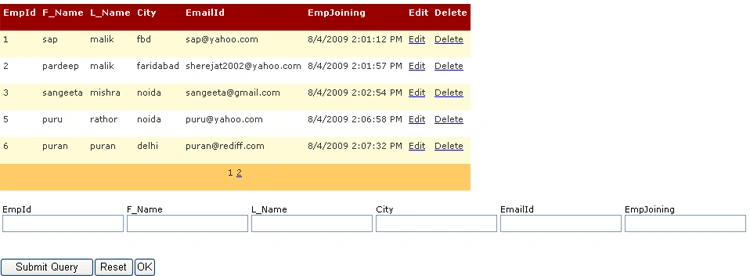
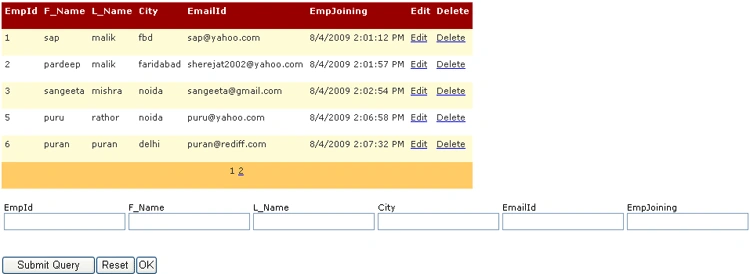
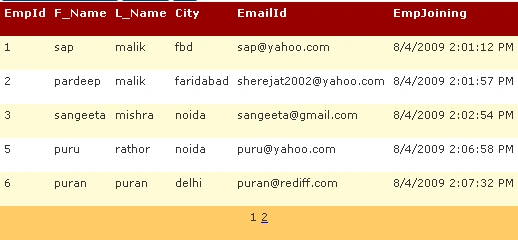
Click the ok button and we can show the data at the same page.
Ermias JerimePosted Apr 18, 2019, 2:19 AM
Every Time when client enters data, he or she have to input EmpJoining do you think it's fair
Ramesh PalaniappanPosted Aug 29, 2016, 2:35 AM
Nice
kalu singh raoPosted Jul 9, 2016, 12:18 PM
Nice...
Rubal BansalPosted Apr 26, 2015, 7:33 AM
(y) perfect...
wael adelPosted Feb 27, 2015, 9:46 AM
Thank you . ???? ??
Pooja PPosted Feb 21, 2013, 7:04 AM
thank you
bala chandarPosted Jan 28, 2013, 4:36 AM
i am having some questions with questionid,question and type in database.that questions should load in a grid and in that same grid a column should added dynamically with textbox or radiobutton using the question type .
aruna dapatlaPosted Feb 10, 2012, 5:01 AM
thank u this code very useful to me
Nagaraju BollineniPosted Oct 10, 2011, 9:01 AM
Not using the cmd.ExecuteNonQuery(); in Bindata methods , in the same way we are using the dataset object no need to use open the connection because it is the disconnected architecture.
rino rajueditedPosted Jul 16, 2011, 7:22 PMEdited Jul 16, 2011, 7:25 PM
nothing geting saved to data base
Ulysses CastilloPosted May 4, 2011, 8:08 PM
Thank you, Sapna. This is exactly what I was looking for. Ulysses
jalpa brahmbhattPosted May 2, 2011, 10:12 PM
Hi i want to srot my grid by column header is that possible in your code please reply me soon
gjaya kanthanPosted Apr 18, 2011, 1:30 AM
Nice Article
Haytham HamdonPosted Apr 9, 2011, 3:21 AM
Please Upload The Source code Thnks for effort
SairamPosted Aug 30, 2010, 1:19 AM
in this datagrid example i don't get the page number in grid1 control..how to enable " page 2 link in that:"? kindly help me .....i need as soon as possible
Lennie KuahPosted Jul 26, 2010, 3:48 AM
Hi Sapna Malik, Regarding the DataGrid Article you posted here, can you please let me know what version of ASPNET are you using. I am looking for help of using ASPNET2008. Thank you
Abhijeet PatilPosted Jun 18, 2010, 1:40 AM
Hi Sapna, Thanks for sharing the code for datagrid. I am facing an error message for "cmd.CommandText = "Select * from Employee";" Where are we specifing the connection string? On which database this command text will execute? Please help.
Jeff VojtkoPosted Jun 11, 2010, 10:13 AM
Is there some way that you can have only one search box and designate to which column in the datagrid the search filter applies? I would like to use something like this on my Red Lobster Recipes website.
Muhammad UmairPosted Dec 22, 2009, 5:05 PM
Great work friend
Former memberPosted Aug 11, 2009, 12:37 PM
Hi, I have read your previous articles so I would like to give a constructive feedback that ur this article is not up to the par with standrd which u created in ur previous articles. This is rather a code snippet that article. There is no explanation.. But i hope ..u would come much better in further articles .. Keep it Up :)