


Few members requested me to write an article for DataGridView with CRUD (Insert, Update, Select and Delete). As a result here I have created a simple demo program with the following features.
This article will explain:
- In this sample demo we will learn in detail how to perform CRUD operation for Student Profile Management using DatGridView WinForms.
- How to upload and insert/edit image for Students to SQL Server Database.
- How to display images from SQL Server to DataGridView Image Column.
- Edit and delete Image column in DataGridView.
- Create DataGridView dynamically using my DataGridview Helper Class (Refer my previous article for DataGridView helper Class Create a DatagGridView helper class using C# ).
- We will be using DAL Class and BizClass for performing CRUD Operation.
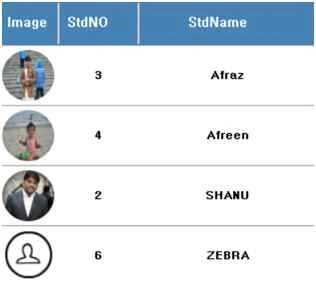
- How to display round shape image to the DataGridview Student Profile Image Column.
Prerequisites
- Visual Studio 2015 - You can download it from here.
Code part
- Create Database and Table
We will create a StudentDetails table to be used for the Student Profile CRUD Operations. The following is the script to create a database and Table query. Run this script in your SQL Server. I have used SQL Server 2014.
After creating our Table we will create a Stored Procedure for our CRUD Operations.- --Script to create DB,Table and sample Insert data
- USE MASTER;
- -- 1) Check for the Database Exists .If the database is exist then drop and create new DB
- IF EXISTS (SELECT [name] FROM sys.databases WHERE [name] = 'StudentsDB' )
- BEGIN
- ALTER DATABASE StudentsDB SET SINGLE_USER WITH ROLLBACK IMMEDIATE
- DROP DATABASE StudentsDB ;
- END
- CREATE DATABASE StudentsDB
- GO
- USE StudentsDB
- GO
- -- 1) //////////// ToysDetails table
- -- Create Table ToysDetails ,This table will be used to store the details like Toys Information
- IF EXISTS ( SELECT [name] FROM sys.tables WHERE [name] = 'StudentDetails' )
- DROP TABLE StudentDetails
- GO
- CREATE TABLE StudentDetails
- (
- std_ID int identity(1,1),
- StudentName VARCHAR(100) NOT NULL,
- Email VARCHAR(100) NOT NULL,
- Phone VARCHAR(100) NOT NULL,
- Address VARCHAR(100) NOT NULL,
- IMAGEs varbinary(MAX)
- CONSTRAINT [PK_StudentDetails] PRIMARY KEY CLUSTERED
- (
- [std_ID] ASC
- )WITH (PAD_INDEX = OFF, STATISTICS_NORECOMPUTE = OFF, IGNORE_DUP_KEY = OFF, ALLOW_ROW_LOCKS = ON, ALLOW_PAGE_LOCKS = ON) ON [PRIMARY]
- ) ON [PRIMARY]
- GO
- select * from StudentDetails
- -- 1) Stored procedure to Select Student Details
- -- Author : Shanu
- -- Create date : 2015-12-01
- -- Description : Student Details
- -- Tables used : Student Details
- -- Modifier : Shanu
- -- Modify date : 2015-12-01
- -- =============================================
- -- exec USP_Student_Select ''
- -- =============================================
- CREATE PROCEDURE [dbo].[USP_Student_Select]
- (
- @StudentName VARCHAR(100) = ''
- )
- AS
- BEGIN
- select std_ID as StdNO,
- StudentName as StdName,
- Email as Email,
- Phone as Phone,
- Address as Address,
- IMAGEs as StdImage
- FROM StudentDetails
- Where
- StudentName like @StudentName +'%'
- ORDER BY
- StudentName
- END
-
- CREATE PROCEDURE [dbo].[USP_StudentID_Select]
- (
- @std_ID int
- )
- AS
- BEGIN
- select std_ID as StdNO,
- StudentName as StdName,
- Email as Email,
- Phone as Phone,
- Address as Address,
- IMAGEs as StdImage
- FROM StudentDetails
- Where
- std_ID = @std_ID
- END
- -- To Insert Student Detail
- CREATE PROCEDURE [dbo].[USP_Student_Insert]
- (
- @StudentName VARCHAR(100),
- @Email VARCHAR(100) = '',
- @Phone VARCHAR(100) = '',
- @Address VARCHAR(100) = '',
- @IMAGEs varbinary(MAX)
- )
- AS
- BEGIN
- IF NOT EXISTS (SELECT StudentName FROM StudentDetails WHERE StudentName=@StudentName)
- BEGIN
- INSERT INTO StudentDetails
- (StudentName ,Email ,Phone ,Address ,IMAGEs)
- VALUES
- (@StudentName ,@Email ,@Phone ,@Address ,@IMAGEs)
- Select 'Inserted' as results
- END
- ELSE
- BEGIN
- Select 'Exists' as results
- END
- END
- -- To Update Student Detail
- CREATE PROCEDURE [dbo].[USP_Student_Update]
- ( @std_ID Int=0,
- @StudentName VARCHAR(100),
- @Email VARCHAR(100) = '',
- @Phone VARCHAR(100) = '',
- @Address VARCHAR(100) = '',
- @IMAGEs varbinary(MAX)
- )
- AS
- BEGIN
- UPDATE StudentDetails SET
- StudentName = @StudentName ,
- Email =@Email,
- Phone =@Phone,
- Address =@Address,
- IMAGEs =@IMAGEs
- WHERE
- std_ID=@std_ID
- Select 'Updated' as results
- END
- -- to Delete
- CREATE PROCEDURE [dbo].[USP_Student_Delete]
- ( @std_ID Int=0 )
- AS
- BEGIN
- DELETE FROM StudentDetails WHERE std_ID=@std_ID
- Select 'Deleted' as results
- END
- Create your MVC Web Application in Visual Studio 2015
After installing our Visual Studio 2015, click Start, then Programs and select Visual Studio 2015 - Click Visual Studio 2015.
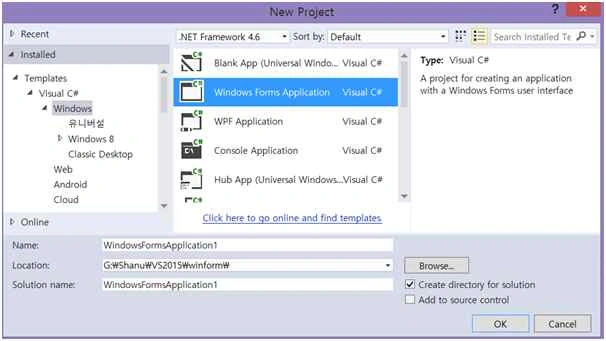
Click New, then Project, select Windows and select Windows Forms Application. Enter your Project Name as “DatagridViewCRUD” and click OK.
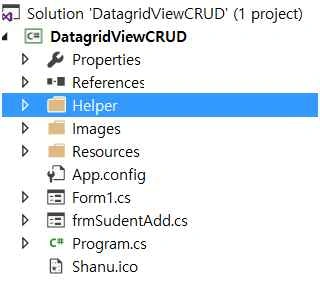
After we have created our WinForms Project. Now we will create a folder named “Images” to add image and “Helper” for creating our DataGridView Helper Class, SQL BIZ and DAL Class from Solution Explorer. Add all the images to the project images folder. And also add the main images like Edit and Delete as Resource file.
1. Creating DatagridView Helper Class
For how to create the Helper Class and its uses kindly refer my previous article: Create a DatagGridView helper class using C#.
Add a new Class named ShanuDGVHelper.cs to the Helper folder. Copy and paste the following code inside the helper class.
Check for your Namespace name and if your namespace name not matched with the class file then change it to your namespace name. For example, here our project name is DatagridViewCRUD, so you can see in the namespace it will be as “DatagridViewCRUD”. If your project name is different than kindly change it.
The complete details of the helper class can be found from the above link.
Note here in this class file for image columns the resource file will be used. In case your resource file name is different then change it.
- using System;
- using System.Collections.Generic;
- using System.ComponentModel;
- using System.Data;
- using System;
- using System.Collections.Generic;
- using System.ComponentModel;
- using System.Data;
- using System.Drawing;
- using System.Linq;
- using System.Text;
- using System.Windows.Forms;
- using System.Windows.Forms;
- using System.ComponentModel;
- using System.Collections.Generic;
- using System.IO;
- using System.Diagnostics;
- using System.Text.RegularExpressions;
- using System.Drawing.Imaging;
- using System.Runtime.InteropServices;
- using System.Drawing.Text;
- using System.Drawing.Drawing2D;
- /// <summary>
- /// Author : Shanu
- /// Create date : 2015-12-01
- /// Description :Student Register
- /// Latest
- /// Modifier :
- /// Modify date :
- namespace DatagridViewCRUD
- {
- public partial class Form1: Form
- {#
- region Attribute
- // ReceptionSystemSrc.Helper.Webcamera.WebCam webcam;
- Boolean keypadOn = false;
- DataGridView Master_shanuDGV = new DataGridView();
- Button btn = new Button();
- Boolean Iscaptuered = false;
- Helper.BizClass bizObj = new Helper.BizClass();
- Helper.ShanuDGVHelper objshanudgvHelper = new Helper.ShanuDGVHelper();
- DataSet ds = new DataSet();
- PrivateFontCollection pfc = new PrivateFontCollection();
- int ival = 0;#
- endregion
- public Form1()
- {
- InitializeComponent();
- }
- private void Form1_Load(object sender, EventArgs e)
- {
- try
- {
- MasterGrid_Initialize();
- }
- catch (Exception ex)
- {}
- }
- public void MasterGrid_Initialize()
- {
- Helper.ShanuDGVHelper.Layouts(Master_shanuDGV, Color.White, Color.White, Color.White, false, Color.SteelBlue, false, false, false, Color.White, 46, 60, "small");
- //Set Height,width and add panel to your selected control
- Helper.ShanuDGVHelper.Generategrid(Master_shanuDGV, pnlGrid, 1000, 600, 10, 10);
- // Color Image Column creation
- Helper.ShanuDGVHelper.Templatecolumn(Master_shanuDGV, ShanuControlTypes.imageEditColumn, "Edit", "Edit", "Edit", true, 60, DataGridViewTriState.True, DataGridViewContentAlignment.MiddleCenter, DataGridViewContentAlignment.MiddleCenter, Color.Transparent, null, "", "", Color.Black);
- // Color Image Column creation
- Helper.ShanuDGVHelper.Templatecolumn(Master_shanuDGV, ShanuControlTypes.imageDelteColumn, "Delete", "Delete", "Delete", true, 60, DataGridViewTriState.True, DataGridViewContentAlignment.MiddleCenter, DataGridViewContentAlignment.MiddleCenter, Color.Transparent, null, "", "", Color.Black);
- // Color Image Column creation
- Helper.ShanuDGVHelper.Templatecolumn(Master_shanuDGV, ShanuControlTypes.imageBoundcolumn, "StdImage", "Image", "Image", true, 60, DataGridViewTriState.True, DataGridViewContentAlignment.MiddleCenter, DataGridViewContentAlignment.MiddleCenter, Color.Transparent, null, "", "", Color.Black);
- //// BoundColumn creation
- Helper.ShanuDGVHelper.Templatecolumn(Master_shanuDGV, ShanuControlTypes.BoundColumn, "StdNO", "StdNO", "StdNO", true, 80, DataGridViewTriState.True, DataGridViewContentAlignment.MiddleCenter, DataGridViewContentAlignment.MiddleCenter, Color.Transparent, null, "", "", Color.Black);
- //// BoundColumn creation
- Helper.ShanuDGVHelper.Templatecolumn(Master_shanuDGV, ShanuControlTypes.BoundColumn, "StdName", "StdName", "StdName", true, 180, DataGridViewTriState.True, DataGridViewContentAlignment.MiddleCenter, DataGridViewContentAlignment.MiddleCenter, Color.Transparent, null, "", "", Color.Black);
- //// BoundColumn creation
- Helper.ShanuDGVHelper.Templatecolumn(Master_shanuDGV, ShanuControlTypes.BoundColumn, "Email", "Email", "Email", true, 180, DataGridViewTriState.True, DataGridViewContentAlignment.MiddleCenter, DataGridViewContentAlignment.MiddleCenter, Color.Transparent, null, "", "", Color.Black);
- //// BoundColumn creation
- Helper.ShanuDGVHelper.Templatecolumn(Master_shanuDGV, ShanuControlTypes.BoundColumn, "Phone", "Phone", "Phone", true, 180, DataGridViewTriState.True, DataGridViewContentAlignment.MiddleCenter, DataGridViewContentAlignment.MiddleCenter, Color.Transparent, null, "", "", Color.Black);
- //// BoundColumn creation
- Helper.ShanuDGVHelper.Templatecolumn(Master_shanuDGV, ShanuControlTypes.BoundColumn, "Address", "Address", "Address", true, 180, DataGridViewTriState.True, DataGridViewContentAlignment.MiddleCenter, DataGridViewContentAlignment.MiddleCenter, Color.Transparent, null, "", "", Color.Black);
- //// Color Image Column creation
- //Helper.ShanuDGVHelper.Templatecolumn(Master_shanuDGV, ShanuControlTypes.ImageColumn, "StaffID", "", "", true, 40, DataGridViewTriState.True, DataGridViewContentAlignment.MiddleCenter, DataGridViewContentAlignment.MiddleRight, Color.Transparent, null, "", "", Color.Black);
- //// Color Image Column creation
- //Helper.ShanuDGVHelper.Templatecolumn(Master_shanuDGV, ShanuControlTypes.imageEditColumn, "Edit", "", "", true, 38, DataGridViewTriState.True, DataGridViewContentAlignment.MiddleCenter, DataGridViewContentAlignment.MiddleRight, Color.Transparent, null, "", "", Color.Black);
- //// Color Image Column creation
- //Helper.ShanuDGVHelper.Templatecolumn(Master_shanuDGV, ShanuControlTypes.imageDelteColumn, "Delete", "", "", true, 38, DataGridViewTriState.True, DataGridViewContentAlignment.MiddleCenter, DataGridViewContentAlignment.MiddleRight, Color.Transparent, null, "", "", Color.Black);
- bindData();
- //objshanudgvHelper.MasterDGVs_CellFormatting(Master_shanuDGV, Master_shanuDGV.Columns["IMG"].Index, ShanuEventTypes.cellContentClick, ShanuControlTypes.ImageColumn ds.Tables[0], "IMG");
- Master_shanuDGV.CellFormatting += new DataGridViewCellFormattingEventHandler(MasterDGVs_CellFormatting);
- Master_shanuDGV.SelectionChanged += new EventHandler(Master_shanuDGV_SelectionChanged);
- Master_shanuDGV.CellContentClick += new System.Windows.Forms.DataGridViewCellEventHandler(Master_shanuDGV_CellContentClick);
- // Master_shanuDGV.DefaultCellStyle.ForeColor = Color.FromA#333333;
- }
- private void Master_shanuDGV_SelectionChanged(Object sender, EventArgs e)
- {
- Master_shanuDGV.ClearSelection();
- }
- private void bindData()
- {
- try
- {
- // Bind data to DGV.
- SortedDictionary < string, string > sd = new SortedDictionary < string, string > ()
- {};
- sd.Add("@StudentName", txtName.Text.Trim());
- ds = bizObj.SelectList("USP_Student_Select", sd);
- Master_shanuDGV.DataSource = null;
- if (ds.Tables[0].Rows.Count > 0)
- {
- Master_shanuDGV.DataSource = ds.Tables[0];
- }
- }
- catch (Exception ex)
- {}
- }
- // Cell Content Click Event
- private void Master_shanuDGV_CellContentClick(object sender, DataGridViewCellEventArgs e)
- {
- if (Master_shanuDGV.Columns[e.ColumnIndex].Name == "Edit")
- {
- try
- {
- string studentID = ds.Tables[0].Rows[e.RowIndex]["StdNO"].ToString();
- frmSudentAdd obj = new frmSudentAdd(studentID);
- obj.ShowDialog();
- bindData();
- }
- catch (Exception ex)
- {}
- }
- else if (Master_shanuDGV.Columns[e.ColumnIndex].Name == "Delete")
- {
- try
- {
- string studentID = ds.Tables[0].Rows[e.RowIndex]["StdNO"].ToString();
- if (MessageBox.Show("Are You Sure to Delete Student Details ?", "Delete Student", MessageBoxButtons.YesNo) == DialogResult.Yes)
- {
- SortedDictionary < string, string > sd = new SortedDictionary < string, string > ()
- {};
- sd.Add("@std_ID", studentID);
- DataSet ds1 = new DataSet();
- ds1 = bizObj.SelectList("USP_Student_Delete", sd);
- if (ds1.Tables[0].Rows.Count > 0)
- {
- string result = ds1.Tables[0].Rows[0][0].ToString();
- if (result == "Deleted")
- {
- MessageBox.Show("Student Deleted Successful, Thank You!", "Successfull", MessageBoxButtons.OK, MessageBoxIcon.Information);
- bindData();
- }
- }
- }
- }
- catch (Exception ex)
- {}
- }
- }#
- region Image Colukmn
- public static Image MakeCircleImage(Image img)
- {
- Bitmap bmp = new Bitmap(img.Width, img.Height);
- using(GraphicsPath gpImg = new GraphicsPath())
- {
- gpImg.AddEllipse(0, 0, img.Width, img.Height);
- using(Graphics grp = Graphics.FromImage(bmp))
- {
- grp.Clear(Color.White);
- grp.SetClip(gpImg);
- grp.DrawImage(img, Point.Empty);
- }
- }
- return bmp;
- }
- void MasterDGVs_CellFormatting(object sender, DataGridViewCellFormattingEventArgs e)
- {
- try
- {
- if (Master_shanuDGV.Columns[e.ColumnIndex].Name == "StdImage")
- {
- if (ds.Tables[0].Rows[e.RowIndex]["StdImage"] != "" && ds.Tables[0].Rows[e.RowIndex]["StdImage"] != DBNull.Value)
- {
- byte[] bits = new byte[0];
- bits = (byte[]) ds.Tables[0].Rows[e.RowIndex]["StdImage"];
- MemoryStream ms = new MemoryStream(bits);
- System.Drawing.Image imgSave = System.Drawing.Image.FromStream(ms);
- e.Value = MakeCircleImage(imgSave);
- }
- else
- {
- System.Drawing.Image imgSave = (Image) DatagridViewCRUD.Properties.Resources.gridUserImage;
- e.Value = MakeCircleImage(imgSave);
- }
- }
- }
- catch (Exception ex)
- {}
- }
- public Image byteArrayToImage(byte[] byteArrayIn)
- {
- using(MemoryStream mStream = new MemoryStream(byteArrayIn))
- {
- return Image.FromStream(mStream);
- }
- }#
- endregion
- private void btnSearch_Click(object sender, EventArgs e)
- {
- bindData();
- }
- private void btnStaffAdd_Click(object sender, EventArgs e)
- {
- frmSudentAdd obj = new frmSudentAdd("0");
- obj.ShowDialog();
- bindData();
- }
- }
- }
- Business logic: Here the Business logic is a class. From the UI (our code behind) we pass all our input from the user to the Business Logic class as objects.
- Data Access Layer: From the Business logic class we pass all the object parameters to this Data Access Layer Class. This class will use the ADO.NET objects like Command (Select), Command Type (Query type is text or Stored Procedure), ExceuteNonQuery (perform Insert/Update and Delete), ExecuteDataset (return select statement) and ExecuteScalar (to return single data).
For creating DAL class right click our Helper folder and add new Class file and give the name as SQLDALClass.cs.
Copy the following code and paste in the DAL Class.AS we have already seen if the Namespace is different then enter your namespace.
Note: In this class file I will be creating a text file for storing the SQL Connection string. Kindly change the connections string with your SQL Connections.
- using System;
- using System.Collections.Generic;
- using System.Linq;
- using System.Text;
- using System.Data;
- using System.Data.SqlClient;
- using System.IO;
- using System.Windows.Forms;
- /// <summary>
- /// Author : Shanu
- /// Create date : 2015-05-09
- /// Description :MYSQL DBCONNECT Helper CLASS
- /// Latest
- /// Modifier :
- /// Modify date :
- /// </summary>
- namespace DatagridViewCRUD.Helper
- {
- class SQLDALClass
- {
- public String ConnectionString = "server=.; database=StudentsDB; user id=URID; password=PWD;";
- public SqlConnection connection;#
- region Initiallize
- public SQLDALClass()
- {
- Initialize();
- }
- //Initialize values
- private void Initialize()
- {
- ConnectionString = ReadConnectionString();
- connection = new SqlConnection(ConnectionString);
- }
- public String ReadConnectionString()
- {
- string path = Application.StartupPath + @ "\DBConnection.txt";
- String connectionString = "";
- if (!File.Exists(path))
- {
- using(StreamWriter tw = File.CreateText(path))
- {
- tw.WriteLine("server=.; database=StudentsDB; user id=URID; password=PWD;");
- tw.Close();
- ConnectionString = "server=.; database=StudentsDB; user id=URID; password=PWD;";
- }
- }
- else
- {
- TextReader tr = new StreamReader(path);
- connectionString = tr.ReadLine();
- tr.Close();
- }
- return connectionString;
- }#
- endregion# region DB ConnectionOpen
- public bool OpenConnection()
- {
- try
- {
- connection.Open();
- return true;
- }
- catch (SqlException ex)
- {
- writeLogMessage(ex.Message.ToString());
- }
- return false;
- }#
- endregion# region DB Connection Close
- //Close connection
- public bool CloseConnection()
- {
- try
- {
- connection.Close();
- return true;
- }
- catch (SqlException ex)
- {
- writeLogMessage(ex.Message.ToString());
- return false;
- }
- }#
- endregion# region ExecuteNonQuery
- for insert / Update and Delete
- // For Student
- // Insert
- public DataSet SP_Student_ImageInsert(String SP_NAME, string StudentName, string Email, string Phone, string Address, byte[] IMAGEs)
- {
- DataSet ds = new DataSet();
- //open connection
- if (OpenConnection() == true)
- {
- //create command and assign the query and connection from the constructor
- SqlCommand cmd = new SqlCommand(SP_NAME, connection);
- cmd.CommandType = CommandType.StoredProcedure;
- cmd.Parameters.Add("@StudentName", SqlDbType.VarChar);
- cmd.Parameters.Add("@Email", SqlDbType.VarChar);
- cmd.Parameters.Add("@Phone", SqlDbType.VarChar);
- cmd.Parameters.Add("@Address", SqlDbType.VarChar);
- cmd.Parameters.Add("@IMAGEs", SqlDbType.VarBinary);
- cmd.Parameters["@StudentName"].Value = StudentName;
- cmd.Parameters["@Email"].Value = Email;
- cmd.Parameters["@Phone"].Value = Phone;
- cmd.Parameters["@Address"].Value = Address;
- if (IMAGEs == null)
- {
- cmd.Parameters["@IMAGEs"].Value = DBNull.Value;
- }
- else
- {
- cmd.Parameters["@IMAGEs"].Value = IMAGEs;
- }
- //Execute command
- SqlDataAdapter da = new SqlDataAdapter(cmd);
- da.Fill(ds);
- //close connection
- CloseConnection();
- }
- return ds;
- }
- // Update
- public DataSet SP_Student_ImageEdit(String SP_NAME, int std_ID, string StudentName, string Email, string Phone, string Address, byte[] IMAGEs)
- {
- DataSet ds = new DataSet();
- //open connection
- if (OpenConnection() == true)
- {
- //create command and assign the query and connection from the constructor
- SqlCommand cmd = new SqlCommand(SP_NAME, connection);
- cmd.CommandType = CommandType.StoredProcedure;
- cmd.Parameters.Add("@std_ID", SqlDbType.Int);
- cmd.Parameters.Add("@StudentName", SqlDbType.VarChar);
- cmd.Parameters.Add("@Email", SqlDbType.VarChar);
- cmd.Parameters.Add("@Phone", SqlDbType.VarChar);
- cmd.Parameters.Add("@Address", SqlDbType.VarChar);
- cmd.Parameters.Add("@IMAGEs", SqlDbType.VarBinary);
- cmd.Parameters["@std_ID"].Value = std_ID;
- cmd.Parameters["@StudentName"].Value = StudentName;
- cmd.Parameters["@Email"].Value = Email;
- cmd.Parameters["@Phone"].Value = Phone;
- cmd.Parameters["@Address"].Value = Address;
- if (IMAGEs == null)
- {
- cmd.Parameters["@IMAGEs"].Value = DBNull.Value;
- }
- else
- {
- cmd.Parameters["@IMAGEs"].Value = IMAGEs;
- }
- //Execute command
- SqlDataAdapter da = new SqlDataAdapter(cmd);
- da.Fill(ds);
- //close connection
- CloseConnection();
- }
- return ds;
- }#
- endregion# region Write Log Message to textFile
- public void writeLogMessage(String logMessage)
- {
- string path = Application.StartupPath + @ "\LogFile.txt";
- if (!File.Exists(path))
- {
- using(StreamWriter tw = File.CreateText(path))
- {
- tw.WriteLine(logMessage);
- tw.Close();
- }
- }
- else
- {
- StreamWriter tr = new StreamWriter(path);
- tr.WriteLine(logMessage);
- tr.Close();
- }
- }#
- endregion# region DataTable
- for select result and
- return as DataTable
- //for select result and return as DataTable
- public DataSet SP_Dataset_return(String ProcName, params SqlParameter[] commandParameters)
- {
- DataSet ds = new DataSet();
- //open connection
- if (OpenConnection() == true)
- {
- //for Select Query
- SqlCommand cmdSel = new SqlCommand(ProcName, connection);
- cmdSel.CommandType = CommandType.StoredProcedure;
- // Assign the provided values to these parameters based on parameter order
- AssignParameterValues(commandParameters, commandParameters);
- AttachParameters(cmdSel, commandParameters);
- SqlDataAdapter da = new SqlDataAdapter(cmdSel);
- da.Fill(ds);
- //close connection
- CloseConnection();
- }
- return ds;
- }
- private static void AttachParameters(SqlCommand command, SqlParameter[] commandParameters)
- {
- if (command == null) throw new ArgumentNullException("command");
- if (commandParameters != null)
- {
- foreach(SqlParameter p in commandParameters)
- {
- if (p != null)
- {
- // Check for derived output value with no value assigned
- if ((p.Direction == ParameterDirection.InputOutput || p.Direction == ParameterDirection.Input) && (p.Value == null))
- {
- p.Value = DBNull.Value;
- }
- command.Parameters.Add(p);
- }
- }
- }
- }
- private static void AssignParameterValues(SqlParameter[] commandParameters, object[] parameterValues)
- {
- if ((commandParameters == null) || (parameterValues == null))
- {
- // Do nothing if we get no data
- return;
- }
- // We must have the same number of values as we pave parameters to put them in
- if (commandParameters.Length != parameterValues.Length)
- {
- throw new ArgumentException("Parameter count does not match Parameter Value count.");
- }
- // Iterate through the SqlParameters, assigning the values from the corresponding position in the
- // value array
- for (int i = 0, j = commandParameters.Length; i < j; i++)
- {
- // If the current array value derives from IDbDataParameter, then assign its Value property
- if (parameterValues[i] is IDbDataParameter)
- {
- IDbDataParameter paramInstance = (IDbDataParameter) parameterValues[i];
- if (paramInstance.Value == null)
- {
- commandParameters[i].Value = DBNull.Value;
- }
- else
- {
- commandParameters[i].Value = paramInstance.Value;
- }
- }
- else if (parameterValues[i] == null)
- {
- commandParameters[i].Value = DBNull.Value;
- }
- else
- {
- commandParameters[i].Value = parameterValues[i];
- }
- }
- }#
- endregion
- }
- }
Same like this we create Biz class where we created a method to pass Parameter Objects by creating methods. Here is the complete code for our Biz class.
- using System;
- using System.Collections.Generic;
- using System.Linq;
- using System.Text;
- using System.Data;
- using System.Data.SqlClient;
- using System.IO;
- using System.Windows.Forms;
- /// <summary>
- /// Author : Shanu
- /// Create date : 2015-12-01
- /// Description : Biz Class
- /// Latest
- /// Modifier :
- /// Modify date :
- /// </summary>
- namespace DatagridViewCRUD.Helper
- {
- class BizClass
- {
- DatagridViewCRUD.Helper.SQLDALClass objDAL = new DatagridViewCRUD.Helper.SQLDALClass();
- //All Business Method here
- #
- region ALL Business method here
- public DataSet SelectList(String SP_NAME, SortedDictionary < string, string > sd)
- {
- try
- {
- return objDAL.SP_Dataset_return(SP_NAME, GetSdParameter(sd));
- }
- catch (Exception ex)
- {
- throw ex;
- }
- }
- // Insert
- public DataSet SP_student_ImageInsert(String SP_NAME, string StudentName, string Email, string Phone, string Address, byte[] IMAGEs)
- {
- try
- {
- return objDAL.SP_Student_ImageInsert(SP_NAME, StudentName, Email, Phone, Address, IMAGEs);
- }
- catch (Exception ex)
- {
- throw ex;
- }
- }
- // EDIT
- public DataSet SP_student_ImageEdit(String SP_NAME, int std_ID, string StudentName, string Email, string Phone, string Address, byte[] IMAGEs)
- {
- try
- {
- return objDAL.SP_Student_ImageEdit(SP_NAME, std_ID, StudentName, Email, Phone, Address, IMAGEs);
- }
- catch (Exception ex)
- {
- throw ex;
- }
- }#
- endregion# region Methods Parameter
- /// <summary>
- /// This method Sorted-Dictionary key values to an array of SqlParameters
- /// </summary>
- public static SqlParameter[] GetSdParameter(SortedDictionary < string, string > sortedDictionary)
- {
- SqlParameter[] paramArray = new SqlParameter[]
- {};
- foreach(string key in sortedDictionary.Keys)
- {
- AddParameter(ref paramArray, new SqlParameter(key, sortedDictionary[key]));
- }
- return paramArray;
- }
- public static void AddParameter(ref SqlParameter[] paramArray, string parameterName, object parameterValue)
- {
- SqlParameter parameter = new SqlParameter(parameterName, parameterValue);
- AddParameter(ref paramArray, parameter);
- }
- public static void AddParameter(ref SqlParameter[] paramArray, string parameterName, object parameterValue, object parameterNull)
- {
- SqlParameter parameter = new SqlParameter();
- parameter.ParameterName = parameterName;
- if (parameterValue.ToString() == parameterNull.ToString()) parameter.Value = DBNull.Value;
- else parameter.Value = parameterValue;
- AddParameter(ref paramArray, parameter);
- }
- public static void AddParameter(ref SqlParameter[] paramArray, string parameterName, SqlDbType dbType, object parameterValue)
- {
- SqlParameter parameter = new SqlParameter(parameterName, dbType);
- parameter.Value = parameterValue;
- AddParameter(ref paramArray, parameter);
- }
- public static void AddParameter(ref SqlParameter[] paramArray, string parameterName, SqlDbType dbType, ParameterDirection direction, object parameterValue)
- {
- SqlParameter parameter = new SqlParameter(parameterName, dbType);
- parameter.Value = parameterValue;
- parameter.Direction = direction;
- AddParameter(ref paramArray, parameter);
- }
- public static void AddParameter(ref SqlParameter[] paramArray, params SqlParameter[] newParameters)
- {
- SqlParameter[] newArray = Array.CreateInstance(typeof (SqlParameter), paramArray.Length + newParameters.Length) as SqlParameter[];
- paramArray.CopyTo(newArray, 0);
- newParameters.CopyTo(newArray, paramArray.Length);
- paramArray = newArray;
- }#
- endregion
- }
- }
- 3. Design Your Form * Design Your Form
- Design your form with search fields and add a panel named as pnlGrid.
- We will be adding the dynamic DataGridView to this panel.
- In form load we will design the DataGridView using our Helper class and add the DataGridView to the Panel.
- private void Form1_Load(object sender, EventArgs e)
- {
- try
- {
- MasterGrid_Initialize();
- }
- catch (Exception ex)
- {}
- }
- public void MasterGrid_Initialize()
- {
- Helper.ShanuDGVHelper.Layouts(Master_shanuDGV, Color.White, Color.White, Color.White, false, Color.SteelBlue, false, false, false, Color.White, 46, 60, "small");
- //Set Height,width and add panel to your selected control
- Helper.ShanuDGVHelper.Generategrid(Master_shanuDGV, pnlGrid, 1000, 600, 10, 10);
- // Color Image Column creation
- Helper.ShanuDGVHelper.Templatecolumn(Master_shanuDGV, ShanuControlTypes.imageEditColumn, "Edit", "Edit", "Edit", true, 60, DataGridViewTriState.True, DataGridViewContentAlignment.MiddleCenter, DataGridViewContentAlignment.MiddleCenter, Color.Transparent, null, "", "", Color.Black);
- // Color Image Column creation
- Helper.ShanuDGVHelper.Templatecolumn(Master_shanuDGV, ShanuControlTypes.imageDelteColumn, "Delete", "Delete", "Delete", true, 60, DataGridViewTriState.True, DataGridViewContentAlignment.MiddleCenter, DataGridViewContentAlignment.MiddleCenter, Color.Transparent, null, "", "", Color.Black);
- // Color Image Column creation
- Helper.ShanuDGVHelper.Templatecolumn(Master_shanuDGV, ShanuControlTypes.imageBoundcolumn, "StdImage", "Image", "Image", true, 60, DataGridViewTriState.True, DataGridViewContentAlignment.MiddleCenter, DataGridViewContentAlignment.MiddleCenter, Color.Transparent, null, "", "", Color.Black);
- //// BoundColumn creation
- Helper.ShanuDGVHelper.Templatecolumn(Master_shanuDGV, ShanuControlTypes.BoundColumn, "StdNO", "StdNO", "StdNO", true, 80, DataGridViewTriState.True, DataGridViewContentAlignment.MiddleCenter, DataGridViewContentAlignment.MiddleCenter, Color.Transparent, null, "", "", Color.Black);
- //// BoundColumn creation
- Helper.ShanuDGVHelper.Templatecolumn(Master_shanuDGV, ShanuControlTypes.BoundColumn, "StdName", "StdName", "StdName", true, 180, DataGridViewTriState.True, DataGridViewContentAlignment.MiddleCenter, DataGridViewContentAlignment.MiddleCenter, Color.Transparent, null, "", "", Color.Black);
- //// BoundColumn creation
- Helper.ShanuDGVHelper.Templatecolumn(Master_shanuDGV, ShanuControlTypes.BoundColumn, "Email", "Email", "Email", true, 180, DataGridViewTriState.True, DataGridViewContentAlignment.MiddleCenter, DataGridViewContentAlignment.MiddleCenter, Color.Transparent, null, "", "", Color.Black);
- //// BoundColumn creation
- Helper.ShanuDGVHelper.Templatecolumn(Master_shanuDGV, ShanuControlTypes.BoundColumn, "Phone", "Phone", "Phone", true, 180, DataGridViewTriState.True, DataGridViewContentAlignment.MiddleCenter, DataGridViewContentAlignment.MiddleCenter, Color.Transparent, null, "", "", Color.Black);
- //// BoundColumn creation
- Helper.ShanuDGVHelper.Templatecolumn(Master_shanuDGV, ShanuControlTypes.BoundColumn, "Address", "Address", "Address", true, 180, DataGridViewTriState.True, DataGridViewContentAlignment.MiddleCenter, DataGridViewContentAlignment.MiddleCenter, Color.Transparent, null, "", "", Color.Black);
- bindData();
- Master_shanuDGV.CellFormatting += new DataGridViewCellFormattingEventHandler(MasterDGVs_CellFormatting);
- Master_shanuDGV.SelectionChanged += new EventHandler(Master_shanuDGV_SelectionChanged);
- Master_shanuDGV.CellContentClick += new System.Windows.Forms.DataGridViewCellEventHandler(Master_shanuDGV_CellContentClick);
- }
4. Circle Image to Display in Grid
In the DatagridView CellFormatting event we check for the Student Image Column. We pass each Student image to MakeCircleImage method to display the student’s image in circle shape inside DataGridView.
- #region Image Colukmn
- public static Image MakeCircleImage(Image img)
- {
- Bitmap bmp = new Bitmap(img.Width, img.Height);
- using(GraphicsPath gpImg = new GraphicsPath())
- {
- gpImg.AddEllipse(0, 0, img.Width, img.Height);
- using(Graphics grp = Graphics.FromImage(bmp))
- {
- grp.Clear(Color.White);
- grp.SetClip(gpImg);
- grp.DrawImage(img, Point.Empty);
- }
- }
- return bmp;
- }
- void MasterDGVs_CellFormatting(object sender, DataGridViewCellFormattingEventArgs e)
- {
- try
- {
- if (Master_shanuDGV.Columns[e.ColumnIndex].Name == "StdImage")
- {
- if (ds.Tables[0].Rows[e.RowIndex]["StdImage"] != "" && ds.Tables[0].Rows[e.RowIndex]["StdImage"] != DBNull.Value)
- {
- byte[] bits = new byte[0];
- bits = (byte[]) ds.Tables[0].Rows[e.RowIndex]["StdImage"];
- MemoryStream ms = new MemoryStream(bits);
- System.Drawing.Image imgSave = System.Drawing.Image.FromStream(ms);
- e.Value = MakeCircleImage(imgSave);
- }
- else
- {
- System.Drawing.Image imgSave = (Image) DatagridViewCRUD.Properties.Resources.gridUserImage;
- e.Value = MakeCircleImage(imgSave);
- }
- }
- }
- catch (Exception ex)
- {}
- }
In the search button click I will call the bindData() method to bind the result. We will pass the Student Name as parameter with SP name to our Business Logic class and from Bizx class we get the result as Dataset and bind the result to DataGridView.
- private void btnSearch_Click(object sender, EventArgs e)
- {
- bindData();
- }
- private void bindData()
- {
- try
- {
- // Bind data to DGV.
- SortedDictionary < string, string > sd = new SortedDictionary < string, string > ()
- {};
- sd.Add("@StudentName", txtName.Text.Trim());
- ds = bizObj.SelectList("USP_Student_Select", sd);
- Master_shanuDGV.DataSource = null;
- if (ds.Tables[0].Rows.Count > 0)
- {
- Master_shanuDGV.DataSource = ds.Tables[0];
- }
- }
- catch (Exception ex)
- {}
- }
We will create new form for Insert and Update and will use one form for both Add/Edit Student Details. Also, we will design our form with all the needed controls and add a PictureBox and Upload Button to save the Student Profile photos to SQL Server.
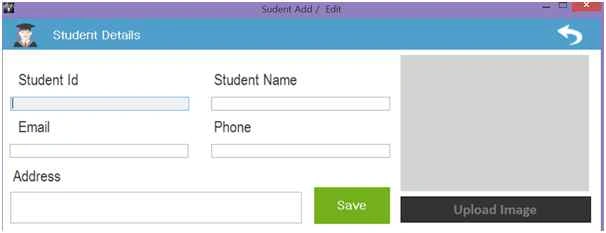
From our main form for Add we pass parameter 0 for Add and Student ID as parameter for Edit.
Here we can see from our Add Student button click we will pass the parameter as “0” for Student Add form.
- private void btnStaffAdd_Click(object sender, EventArgs e)
- {
- frmSudentAdd obj = new frmSudentAdd("0");
- obj.ShowDialog();
- bindData();
- }
- public frmSudentAdd(string StudentID)
- {
- InitializeComponent();
- StudentIDS = StudentID;
- }
- private void frmSudentAdd_Load(object sender, EventArgs e)
- {
- try
- {
- isImageCaptuerd = false;
- // setFont();
- if (StudentIDS != "0")
- {
- displayVisitorDetails();
- }
- }
- catch (Exception ex)
- {}
- }
- private void displayVisitorDetails()
- {
- // lblUserType.Text = VisitorTypes;
- try
- {
- SortedDictionary < string, string > sd = new SortedDictionary < string, string > ()
- {};
- //sd.Add("@searchType", VisitorTypes);
- sd.Add("@std_ID", StudentIDS);
- DataSet ds = new DataSet();
- ds = bizObj.SelectList("USP_StudentID_Select", sd);
- if (ds.Tables[0].Rows.Count > 0)
- {
- txtStudentID.Text = ds.Tables[0].Rows[0]["StdNO"].ToString();
- txtstdName.Text = ds.Tables[0].Rows[0]["StdName"].ToString();
- txtEmail.Text = ds.Tables[0].Rows[0]["Email"].ToString();
- txtphone.Text = ds.Tables[0].Rows[0]["Phone"].ToString();
- txtAddress.Text = ds.Tables[0].Rows[0]["Address"].ToString();
- if (ds.Tables[0].Rows[0]["StdImage"].ToString() != "")
- {
- byte[] bits = new byte[0];
- bits = (byte[]) ds.Tables[0].Rows[0]["StdImage"];
- MemoryStream ms = new MemoryStream(bits);
- this.picImage.Image = System.Drawing.Bitmap.FromStream(ms);
- ms = null;
- }
- }
- }
- catch (Exception ex)
- {}
- }
- private void btnCaptuer_Click(object sender, EventArgs e)
- {
- try
- {
- isImageCaptuerd = false;
- OpenFileDialog ofd = new OpenFileDialog();
- ofd.Filter = "JPEG Files (*.jpeg)|*.jpeg|PNG Files (*.png)|*.png|JPG Files (*.jpg)|*.jpg|GIF Files (*.gif)|*.gif";
- ofd.Title = "Please Upload Image";
- if (ofd.ShowDialog() == DialogResult.OK)
- {
- isImageCaptuerd = true;
- picImage.Image = Image.FromFile(ofd.FileName);
- }
- }
- catch (Exception ex)
- {}
- }
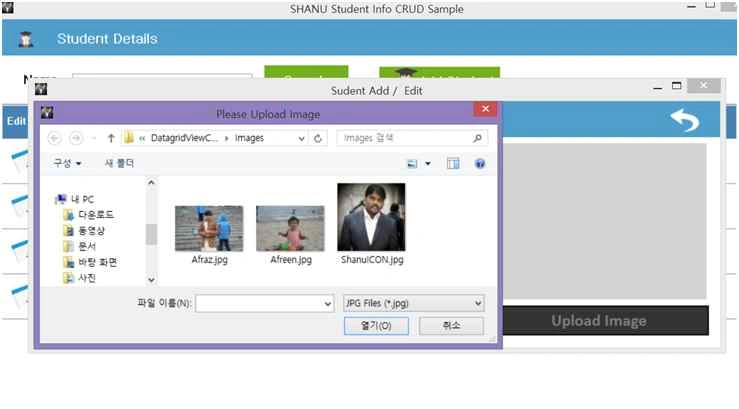
Save Button Click
In Save Button click first we check for New User or Edit the existing user. For New user call the following,
- private void btnSave_Click(object sender, EventArgs e)
- {
- if (StudentIDS != "0")
- {
- EditStaffDetails();
- }
- else
- {
- AddNewStaffDetails();
- }
- }
We will pass all the parameters to the BIZ class with Image as Byte Object. After Successful insert we will display the message to the user.
- private void AddNewStaffDetails()
- {
- try
- {
- byte[] ImageData = null;
- string result = "";
- if (isImageCaptuerd == true)
- {
- try
- {
- if (picImage.Image != null)
- {
- ImageData = imgToByteArray(picImage.Image);
- }
- }
- catch (Exception ex)
- {}
- }
- SortedDictionary < string, string > sd = new SortedDictionary < string, string > ()
- {};
- DataSet ds = new DataSet();
- ds = bizObj.SP_student_ImageInsert("USP_Student_Insert", txtstdName.Text.Trim(), txtEmail.Text.Trim(), txtphone.Text.Trim(), txtAddress.Text.Trim(), ImageData);
- if (ds.Tables[0].Rows.Count > 0)
- {
- result = ds.Tables[0].Rows[0][0].ToString();
- if (result == "Inserted")
- {
- MessageBox.Show("Student Added Successful, Thank You!", "Successfull", MessageBoxButtons.OK, MessageBoxIcon.Information);
- this.Close();
- }
- else
- {
- MessageBox.Show(result, "Error", MessageBoxButtons.OK, MessageBoxIcon.Warning);
- }
- }
- }
- catch (Exception ex)
- {}
- }

Edit Student Details
For Edit in Main form DataGridView Cell content click we will get the selected student id and pass the id to frmStudentAdd for editing the student details.
- private void Master_shanuDGV_CellContentClick(object sender, DataGridViewCellEventArgs e)
- if (Master_shanuDGV.Columns[e.ColumnIndex].Name == "Edit")
- {
- try
- {
- string studentID = ds.Tables[0].Rows[e.RowIndex]["StdNO"].ToString();
- frmSudentAdd obj = new frmSudentAdd(studentID);
- obj.ShowDialog();
- bindData();
- }
- catch (Exception ex)
- {
- }
- }
- private void EditStaffDetails()
- {
- try
- {
- byte[] ImageData = null;
- string result = "";
- if(picImage.Image!=null)
- {
- try
- {
- ImageData = imgToByteArray(picImage.Image);
- }
- catch (Exception ex)
- {
- }
- }
- SortedDictionary<string, string> sd = new SortedDictionary<string, string>() { };
- DataSet ds = new DataSet();
- int StudentID = Convert.ToInt32(StudentIDS);
- ds = bizObj.SP_student_ImageEdit("USP_Student_Update", StudentID,txtstdName.Text.Trim(),
- txtEmail.Text.Trim(),
- txtphone.Text.Trim(),
- txtAddress.Text.Trim(),
- ImageData);
- if (ds.Tables[0].Rows.Count > 0)
- {
- result = ds.Tables[0].Rows[0][0].ToString();
- if (result == "Updated")
- {
- MessageBox.Show("Student Updated Successful, Thank You!", "Successfull", MessageBoxButtons.OK, MessageBoxIcon.Information);
- this.Close();
- }
- else
- {
- MessageBox.Show(result, "Error", MessageBoxButtons.OK, MessageBoxIcon.Warning);
- }
- }
- }
- catch (Exception ex)
- {
- }
- }
- // Picbox to Byte Convert
- public byte[] imgToByteArray(Image img)
- {
- using (MemoryStream mStream = new MemoryStream())
- {
- img.Save(mStream, img.RawFormat);
- return mStream.ToArray();
- }
- }

7. Delete Student Details
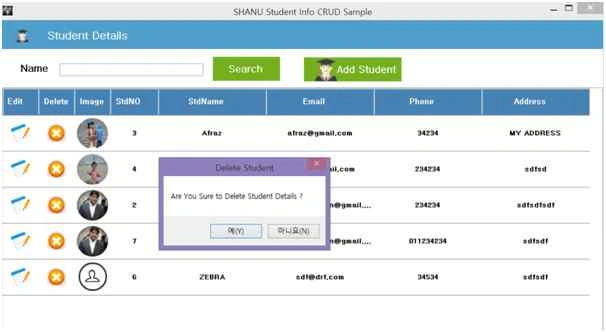
In the DataGridView Cell Content click event we will check that the clicked column is equal to delete. If the clicked column is deleted then we display the confirmation box for user for confirmation to delete. If user confirms for delete then we will delete the selected Student details.
- private void Master_shanuDGV_CellContentClick(object sender, DataGridViewCellEventArgs e)
- {
- if (Master_shanuDGV.Columns[e.ColumnIndex].Name == "Edit")
- {
- try
- {
- string studentID = ds.Tables[0].Rows[e.RowIndex]["StdNO"].ToString();
- frmSudentAdd obj = new frmSudentAdd(studentID);
- obj.ShowDialog();
- bindData();
- }
- catch (Exception ex)
- {}
- }
- else if (Master_shanuDGV.Columns[e.ColumnIndex].Name == "Delete")
- {
- try
- {
- string studentID = ds.Tables[0].Rows[e.RowIndex]["StdNO"].ToString();
- if (MessageBox.Show("Are You Sure to Delete Student Details ?", "Delete Student", MessageBoxButtons.YesNo) == DialogResult.Yes)
- {
- SortedDictionary < string, string > sd = new SortedDictionary < string, string > ()
- {};
- sd.Add("@std_ID", studentID);
- DataSet ds1 = new DataSet();
- ds1 = bizObj.SelectList("USP_Student_Delete", sd);
- if (ds1.Tables[0].Rows.Count > 0)
- {
- string result = ds1.Tables[0].Rows[0][0].ToString();
- if (result == "Deleted")
- {
- MessageBox.Show("Student Deleted Successful, Thank You!", "Successfull", MessageBoxButtons.OK, MessageBoxIcon.Information);
- bindData();
- }
- }
- }
- }
- catch (Exception ex)
- {}
- }
- }

Yasmin KhanPosted Dec 11, 2015, 4:31 AM
thanks sir
Yasmin KhanPosted Dec 11, 2015, 4:30 AM
please give me this project as asp.net
Yasmin KhanPosted Dec 11, 2015, 4:29 AM
please give me this project as asp.net
Manoj KumarPosted Dec 9, 2015, 4:40 AM
please try to make as video ..any way good one
Mukesh KumarPosted Dec 8, 2015, 12:42 AM
Good One Sir
sreenivasa kPosted Dec 7, 2015, 12:31 PM
good*
sreenivasa kPosted Dec 7, 2015, 12:31 PM
god
Senthil KiumarPosted Dec 7, 2015, 8:13 AM
Nice Article
Sridhar SharmaPosted Dec 7, 2015, 4:31 AM
Nice Share
Humayun Kabir MamunPosted Dec 7, 2015, 3:13 AM
Nice...
Raja TPosted Dec 7, 2015, 2:26 AM
Nice Sir, Thanks for sharing
Jaipal ReddyPosted Dec 7, 2015, 2:05 AM
nice work sir.
ahmed mohmed ahmedPosted Dec 6, 2015, 10:01 AM
good
Santhakumar MunuswamyPosted Dec 4, 2015, 2:00 PM
Good article. keep it up
Imran Javed ZiaPosted Dec 4, 2015, 9:29 AM
Nice and very detailed article
Ankur MistryPosted Dec 4, 2015, 8:27 AM
Nice