

Bitwise Operators in TypeScript
~ (Bitwise Negation) operator
The Bitwise negation operator (~) will invert it's single operand, in other words, the negation operator performs a bitwise complement on its single integer operand.
| Initial value1 (A) | Initial value2 (B) | Resulting value1 (~A) | Initial value2 (~B) |
| 0 | 0 | 1 | 1 |
| 0 | 1 | 1 | 0 |
| 1 | 0 | 0 | 1 |
| 1 | 1 | 0 | 0 |
Example
var a=3
var c=~a;
var c=~a;
Then the result in c is -4.
& (Bitwise And) operator
| Initial value1 (A) | Initial value2 (B) | |
| 0 | 0 | 0 |
| 0 | 1 | 0 |
| 1 | 0 | 0 |
| 1 | 1 | 1 |
Example
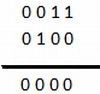
var a=3,b=4;
var c=a&b;
var c=a&b;
Then the result in c is 0 because the above example is evaluated that way.
| (Bitwise OR) operator
| Initial value1 (A) | Initial value2 (B) | A|B |
| 0 | 0 | 0 |
| 0 | 1 | 1 |
| 1 | 0 | 1 |
| 1 | 1 | 1 |
Example
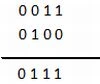
var a=3,b=4;
var c=a|b;
var c=a|b;
Then the result c is 7 because the above example is evaluated that way.
^ (Bitwise XOR) operator
| Initial value1 (A) | Initial value2 (B) | A^B |
| 0 | 0 | 0 |
| 0 | 1 | 1 |
| 1 | 0 | 1 |
| 1 | 1 | 0 |
Example
var a=2,b=3;
var c=a^b;
The result c is 1 because the above example is evaluated that way.
The value of a is 2 (0010) and the value of b is 3, in other words, 0011' now 0010 | 0011 is 1:
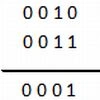 The result is 0001, in other words, decimal One (1).
The Bitwise LeftShift (<<) operator shifts bits from the low bits to the high bits by the specified number of bit positions.
Example
var a=3,b=4;
The result is 0001, in other words, decimal One (1).
The Bitwise LeftShift (<<) operator shifts bits from the low bits to the high bits by the specified number of bit positions.
Example
var a=3,b=4;
var c=a<<b;
The result c is 48.
The Bitwise LeftShift (<<) operator shifts the bits from the high bits to the low bits by the specified number of bit positions.
Example
var a=3,b=4;
var c=a>>b;
The result of c is 0.
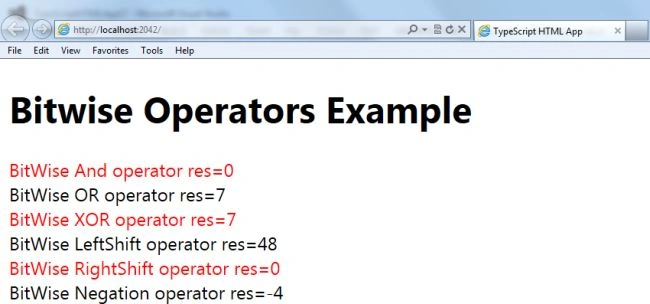
The following examples show you how to use bitwise operators in TypeScript. Use the following to create a program using bitwise operators.
Step 1
Open Visual Studio 2012 and click on "File" menu -> "New" -> "Project". A window is opened. Provide the name of your application like "BitWiseOperators", then click on the Ok button.
Step 2
After Step 1 your project has been created. The Solution Explorer, which is at the right side of Visual Studio, contains the js file, ts file, CSS file, and HTML files.
Step 3
The code of the Bitwise operator's program.
var c=a^b;
<< (Bitwise LeftShift) operator
var c=a<<b;
>> (Bitwise RightShift) operator
var c=a>>b;
Join the conversation! Your thoughts help the community grow.