

Introduction
An "index" can improve the speed of operation in a table. MySQL automatically creates an index for primary key, foreign key, and unique constraints. In addition, you may want to create "indexes" for other columns that are frequently used in joins or search conditions.
The user can not see indexes. The indexes are used to speed up database queries and also used by a database engine to locate records very quickly.
You must have used a "CREATE INDEX" statement to create an index for one or more columns of a table. To create an index, write the table name and column names after the "on" clause. You can also use "UNIQUE" keywords to specify that an "index" has only unique values. You can also specify "ASC" and "DESC" keywords with a column name to indicate whether you want the "index" stored in ascending or descending order. If you do not specify "asc" or "desc", then "asc" is the default same as the "order by" keyword (which is also able to sort columns in "asc" or "desc" order) .
Syntax
The syntax of the "CREATE INDEX" statement is as follows:
| CREATE [UNIQUE] INDEX index_name ON [database_name.] [table_name] (column_name1[ASC|DESC] , column_name2[ASC|DESC]............................) |
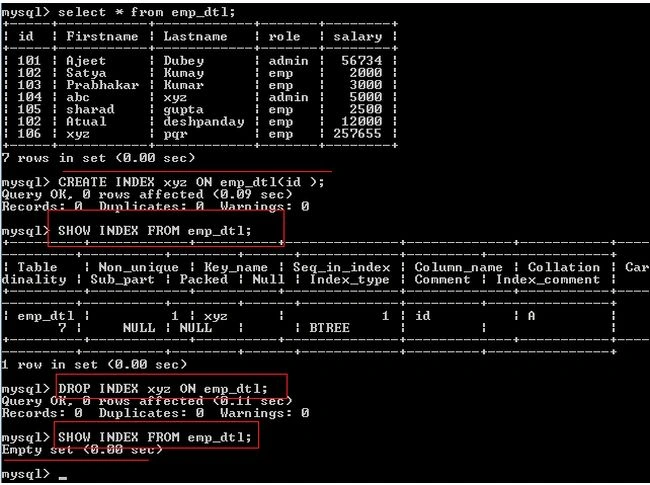
In the following query image, the first query "select * from emp_dtl" simply shows all records of the emp_dtl table. The second MySQL query "CREATE INDEX xyz ON emp_dtl(id)" creates an index with the name xyz for table emp_dtl on id columns. The third query "SHOW INDEX FROM emp_dtl" shows the description of the emp_dtl table index. You can use a "DROP INDEX" statement to drop an index. The fourth query "DROP INDEX xyz ON emp_dtl" removes the index of the emp_dtl table.
Example of a MySQL create and drop MySQL index in PHP
The following is an example of a MySQL create and drop of an index in PHP:
<?php
$con=mysql_connect("localhost"
if (!$con)
{
die('Could not connect: ' . mysql_error());
}
mysql_select_db("mysql", $con);
print "<h2>MySQL: Simple select statement</h2>";
$result = mysql_query("select * from emp_dtl");
echo "<tableborder='1'>
<tr>
<th>EmpId</th>
<th>Firstname</th>
<th>Lastname</th>
<th>Role</th>
<th>Salary</th>
</tr>";
while($row = mysql_fetch_array($result))
{
echo "<tr>";
echo "<td>" . $row['id'] . "</td>";
echo "<td>" . $row['Firstname'] . "</td>";
echo "<td>" . $row['Lastname'] . "</td>";
echo "<td>" . $row['role'] . "</td>";
echo "<td>" . $row['salary'] . "</td>";
echo "</tr>";
}
echo "</table>";
//Create an index in PHP
$result = mysql_query("CREATE INDEX xyz ON emp_dtl(id)",$con);
print "<h2>MySQL: MySQl index has been Created. </h2>";
//Drop an index in PHP
$result = mysql_query("DROP INDEX xyz ON emp_dtl",$con);
print "<h2>MySQL: MySQl index has been Removed. </h2>";
mysql_close($con);
?>
Output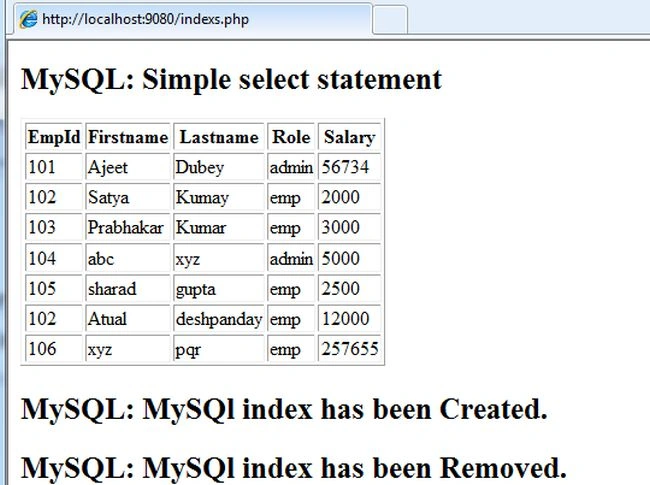
Join the conversation! Your thoughts help the community grow.