

You have the GeoLocator class in the Windows.Devices.GeoLocation namespace.
As a developer the first thing you need to be sure of is that the location capabilities in the Package.appxmanifest are enabled as shown below.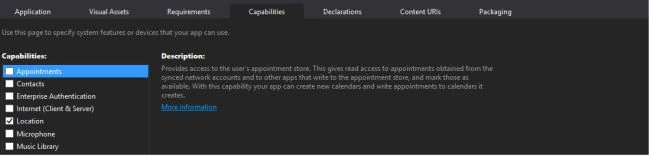
The following is a sample code to fetch the Location information.
- private Geolocator _geolocator = null;
- async private void GetGeolocation()
- {
- _geolocator = new Geolocator();
- // Desired Accuracy needs to be set
- // before polling for desired accuracy.
- _geolocator.DesiredAccuracyInMeters = 50;
- try
- {
- // Carry out the operation Geoposition pos =
- await _geolocator.GetGeopositionAsync();
- }
- catch
- {
- /*Operation aborted Your App does not have permission to access location data. Make sure you have defined ID_CAP_LOCATION in the application manifest and that on your phone, you have turned on location by checking Settings > Location.*/
- //if the location service is turned off then you can take the user to the location setting with the below code
- await Launcher.LaunchUriAsync(new Uri("ms-settings-location:"));
- }
- }
- Geoposition pos = await _geolocator.GetGeopositionAsync(TimeSpan.FromMinutes(10), TimeSpan.FromMinutes(15));
How to Cancel a request made to get the Geo location information
If you have requested location information and for some reason you want to cancel the request then all you need to do is to use the CancellationToken Object in conjunction with the GeoLocator object as shown below.
- private CancellationTokenSource _cts = null;
- async private void GetGeolocation()
- {
- _geolocator = new Geolocator();
- _cts = new CancellationTokenSource();
- CancellationToken token = _cts.Token;
- // Desired Accuracy needs to be set
- // before polling for desired accuracy.
- _geolocator.DesiredAccuracyInMeters = 50;
- try
- {
- // Carry out the operation Geoposition pos = await _geolocator.GetGeopositionAsync().AsTask(token);
- }
- catch
- {
- /*Operation aborted Your App does not have permission to access location data. Make sure you have defined ID_CAP_LOCATION in the application manifest and that on your phone, you have turned on location by checking Settings > Location.*/
- //if the location service is turned off then you can take the user to the location setting with the below code
- await Launcher.LaunchUriAsync(new Uri("ms-settings-location:")); }
- }
- //Call this Method to cancel the current location access request cancelGelocationRequest()
- {
- if (_cts != null)
- { _cts.Cancel();
- _cts = null;
- }
- }
If you want real-time info as soon as the user location changes then you need to subscribe to the StatusChanged and PositionChanged events of the GeoLocator object.
The following is the code snippet for that:
- private Geolocator _geolocator = new Geolocator();
- TrackMyLocation()
- {
- _geolocator.StatusChanged += _geolocator_StatusChanged; _geolocator.PositionChanged += _geolocator_PositionChanged;
- }
- void _geolocator_PositionChanged(Geolocator sender, PositionChangedEventArgs args)
- {
- // will get a new GeoPostion object in the args paramter which gives the updated lat long values
- }
- void _geolocator_StatusChanged(Geolocator sender, StatusChangedEventArgs args)
- { //gives s postionstatus object with below values
- /* Ready
- Initilizing
- NoData
- Disabled
- NotInitilized
- NotAvalible */
- }
Dinesh BeniwalPosted Jan 7, 2015, 10:49 AM
Good start Sanath, welcome to C# Corner.