

Introduction
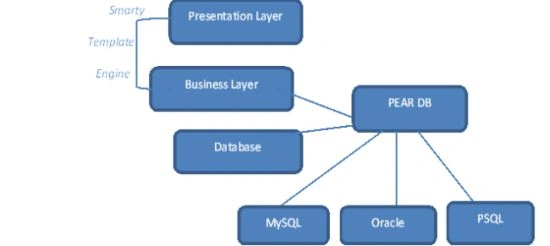
It is important to make the separation between display (presentation) design and creating the application. Simply, you can create content first without having to consider display (the Presentation Layer). Or, you can design the look without the design of the application code. At first, Smarty wants to act as a "Template Engine". However, now they claim that it is not only a template engine; Smarty is a template/presentation framework. The Word Framework that refers to Smarty is no longer a simple tag of a template engine. He has focused on how to help you make a high-performance, scalable, secure and flexible application.
What is Smarty
Smarty is a "Template Engine" which separates Presentation Layer from the Business Layer and provides manageable wait exchange data between the two layers.
- Parallel development is a challenge.
- It is more error-prone.
Why use Smarty
- A framework that allows you to separate the design from the implementation of application code
- Quick and painless development
Smarty Installation
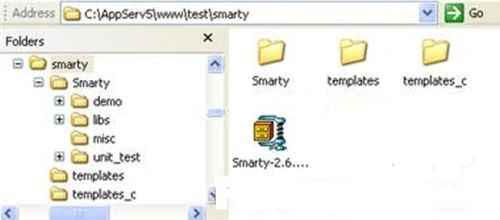
- Prepare a directory for practicing, for example wamp/www/smarty.
- Download the file Smarty Template. You can download it from their site at smarty.php.net. Place it within the practice directory. Thus, we will get (for example), www\smarty\Smarty-2.6.27.tar.gz.
- Extract the Smarty compressed file. We will get a folder named "Smarty-2.6.27".
- Then simply rename that folder to "smarty".
- Create two folders named: template and template_c. So, you get a structure like this:
Ok, in the next article, we will try to test it.
First Program in Smarty
Create a file named "test.tpl" within the template folder. Enter the following code:
<html>
<head>
<title>{$title}</title>
</head>
<body>
{$hello}
</body>
</html>
Next, create a PHP file named "test.php" within www/test/smarty. Enter the following code:
<?php
require 'Smarty/libs/Smarty.class.php';
$smarty = new Smarty;
$smarty->assign('title','Hello World');
$smarty->assign('hello','Hello World, this is my first Smarty!');
$smarty->display('test.tpl');
?>
Output

Smarty Template Basic
We will see something basic about Smarty. You must be familiar with them.
Comment
Comments are statements added in code to explain something or to provide a note. In Smarty we can use comments such as:
<html>
<body>
{* this template use Smarty! *}
{* put any code at here! *}
</Body>
</html>
Method
Such as with other classes, Smarty has methods. We can use a Smarty method to help our job. I just want to show a little of that and then we will talk later. See:
<html>
<Body>
{config_load file="colors.conf"}
{include file="header.tpl"}
{if $somebody}
Welcome, {$name}
{else}
Who are you?!?
{/if}
</Body>
</html>
Attribute
Such as HTML, in Smarty a tag/command can have one or more attributes. Example:
<html>
<Body>
{include file="footer.tpl"}
</Body>
</html>
Variable
<html>
<Body>
{funk var="test $foo test"}
{funk var="test $foo_bar test"}
{funk var="test $foo[0] test"}
{funk var="test $foo[bar] test"}
{funk var="test $foo.bar test"}
{funk var="test `$foo.bar` test"}
</Body>
</html>
Mathematics
<Body>
{$foo * $bar}
{$foo + $bar}
</Body>
Associative array in Smarty
Build a template by creating a file named "test.tpl" within a template. Enter the following code:
<html>
<head>
<title>{$title}</title>
</head>
<body>
id : {$contact.id} <br>
name : {$contact.name} <br>
email : {$contact.email} <br>
phone : {$contact.phone} <br>
</body>
</html>
Next, create a file named "test.php" and enter the following code:
<?php
require 'Smarty/libs/Smarty.class.php';
$smarty = new Smarty;
$smarty->assign('title','Contact Detail');
$smarty->assign('contact',array('id'=>1,
'name'=>'Vinod Kumar',
'email'=>'[email protected]',
'phone'=>'8506800799'
));
$smarty->display('test.tpl');
?>
Create Object in Smarty
We will see how to access data from a class.
Build a template by creating a file named "test.tpl" within the template. Enter the following code:
<html>
<head>
<title>{$title}</title>
</head>
<body>
id : {$contact->id} <br>
name : {$contact->name} <br>
email : {$contact->email} <br>
phone : {$contact->phone} <br>
</body>
</html>
Next, create a file named "test.php" and enter the following code:
<?php
require 'Smarty/libs/Smarty.class.php';
class Contacts{
var $id = "1;"
var $name = 'Vinod kumar';
var $email = '[email protected]';
var $phone = '8506800799';
}
$contact = new Contacts;
$smarty = new Smarty;
$smarty->assign('title','Contact Detail');
$smarty->assign('contact',$contact);
$smarty->display('test.tpl');
?>
Vinod KumareditedPosted Jan 17, 2013, 6:32 AMEdited Jan 21, 2013, 7:56 AM
hi.. vineet, defferent between CodeIgniter and smarty. CodeIgniter is a framework but smarty is a template engine in php, As the codeIgniter framework doesn’t include any template engine, many developers love to use smarty with codeigniter.
Vineet Kumar SainiPosted Jan 16, 2013, 3:55 AM
Hi Vinod !! I wnat to know difference between CodeIgniter and Smarty in PHP. Plesae explain in detail with an any example ?