

Introduction
JavaScript work on a single thread environment, it means we can’t run multiple scripts at the same time. JavaScript will hang your browser in a situation where CPU utilization is high. A web worker is a JavaScript running in the background, without affecting the performance of the page.
Firstly, we will understand why we need web workers. Let us take an example.
- <!DOCTYPEhtml>
- <scriptrunatscriptrunat="server">
- </script>
- <htmlxmlnshtmlxmlns="http://www.w3.org/1999/xhtml">
- <headrunatheadrunat="server">
- <title></title>
- <script>
- function count()
- {
- var j;
- for (var i = 0; i <= 10000000000; ii = i + 1)
- {
- j += i;
- }
- alert("Value of j is=" + j);
- }
- function Hello_Fun()
- {
- alert("Hello World!");
- }
- count();
- </script>
- <style>
- #div1 {
- background-color: blueviolet;
- height: 100px;
- width: 150px;
- margin-left: 50px;
- margin-top: 30px;
- font-size: 24px;
- text-align: center;
- padding-top: 50px
- }
- </style>
- </head>
- <body>
- <formidformid="form1" runat="server">
- <div>
- <dividdivid="div1" onclick="Hello_Fun()"><span>Click Me!</span></div>
- </div>
- </form>
- </body>
- </html>
- </Script>
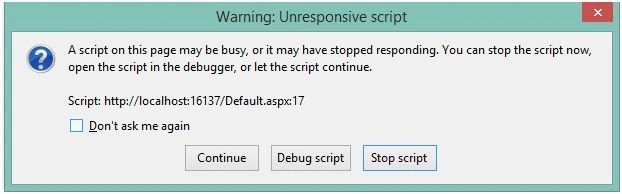
Why this warning occur?
How to resolve this issue?
There are several methods likes setTimeout(), setInterval(), and xmlHTTPRequest that provide asynchronous execution of code. Asynchronous events are processed after the currently executing script yielded. The good news is that HTML5 gives us something better than these approaches. Now read about Web Worker.
Introduction to Web Worker
Why Web Workers doesn’t block Browser UI?
Browser Support

How Did Web Workers work?
Using the Worker constructor we define the URL of JavaScript file that contains the code for our program. In the constructor, we pass the path as a parameter. The following code shows a demo.
- var Obj_ = new Worker('Call.js');
If the application has more than one JavaScript file then we can use importScript() method in which we can pass multiple paths of file separated by a comma.
- importScripts("File1.js", "File2.js");
- If any specified file doesn’t exist or workers return 404, the worker will stop to work. If the file exists then Web Worker will spawn a new worker thread, which is downloaded asynchronously.
Paste the following code in the “Call.js” file.
- //JavaScript File Code
- var j = 0;
- for (var i = 0; i <= 100000000; i = i + 1)
- {
- j += i;
- }
- postMessage(j);
Received Data at Parent Page
- Obj_.onmessage = function (event) {
- alert("Your Total Sum is= " + event.data);
Terminate the Web Worker Object
Once the Web Browser object is created then it is necessary to terminate it because it will continue to listen for messages even after the external script is finished until it is terminated. To terminate the object using the “terminate ” method.
- Obj_.terminate();
Checking Browser Support
- if (window.Worker)
- {
- alert("Web Workers supported by Browser.");
- }
- else
- {
- alert("OOPS! Web Workers not supported by Browser.");
- }
Handling Error
- worker.onerror = function (event) {
- alert("Oops! An Error is Occur "+event.message);
- };
- <html>
- <head>
- <title></title>
- <script>
- function Hello_Fun()
- {
- document.getElementById("div1").style.backgroundColor = "Red";
- if (window.Worker)
- {
- if (typeof(Obj_) == "undefined")
- {
- var Obj_ = new Worker('Call.js');
- Obj_.onmessage = function(event)
- {
- alert("Your Total Sum is= " + event.data);
- }
- worker.onerror = function(event)
- {
- alert("Oops! An Error is Occur " + event.message);
- }
- Obj_.terminate();
- }
- else
- {
- alert("OOPS! Web Workers not supported by Browser.");
- }
- };
- }
- </script>
- <style>
- #div1 {
- background-color: blueviolet;
- height: 100px;
- width: 150px;
- margin-left: 50px;
- margin-top: 30px;
- font-size: 24px;
- text-align: center;
- padding-top: 50px;
- margin-left: 450px;
- margin-top: 100px;
- }
- </style>
- </head>
- <body>
- <formid="form1" runat="server">
- <div>
- <divid="div1" onclick="Hello_Fun()"><span>Click Me!</span></div>
- </div>
- </form>
- </body>
- </html>


- Web Worker runs JavaScript in the background on a separate thread.
- Web Workers can't call alert() or confirm() functions.
- Web Workers can't access DOM elements from the web page.
- Web Workers can't access global variables from the webpage.
- Web Workers can't access JavaScript functions from the web page.
- Objects such as windows, documents, and parents can't be accessed inside the Web Worker.
- Web Worker comes in two types Dedicated and Shared Web Worker.
- Dedicated web workers come into existence and die along with a web page that created them. It means dedicated Web Worker can’t access across multiple web pages.
- Web Worker object refers to a dedicated Web Worker.
- Shared web workers are shared across multiple web pages.
- Web Worker can use XMLHttp request to communicate with the server.
Summary
In this article, we learned about HTML5 - Web Workers.
Thanks for reading the article.
Prasanna MuraliPosted May 20, 2016, 11:21 AM
Nice one....
Bhuvanesh MohankumarPosted Apr 30, 2016, 3:10 PM
Good one...
Asfend YarPosted Feb 29, 2016, 1:58 PM
good
Pankaj Kumar ChoudharyPosted Jan 6, 2016, 12:58 PM
Thanks to All of you..........
Pankaj Kumar ChoudharyPosted Jan 6, 2016, 12:58 PM
Thanks Ankit Bansal Sir...........
Pankaj Kumar ChoudharyPosted Jan 6, 2016, 12:58 PM
Thanks Santhakumar Munuswamy Sir..........
Pankaj Kumar ChoudharyPosted Jan 6, 2016, 12:58 PM
Thanks Raja T........
Pankaj Kumar ChoudharyPosted Jan 6, 2016, 12:57 PM
Thanks Arul R Sir...........
Sumant MishraPosted Jan 6, 2016, 5:36 AM
Intereseting topic. Nice Share
Ankit BansalPosted Jan 6, 2016, 2:16 AM
Thanks for sharing
Humayun Kabir MamunPosted Jan 5, 2016, 11:08 PM
Nice...
Santhakumar MunuswamyPosted Jan 5, 2016, 10:55 PM
Thanks for nice article
Raja TPosted Jan 5, 2016, 10:45 PM
Nice, Thanks for sharing
Arul RPosted Jan 5, 2016, 10:26 PM
Nice