

Introduction
This article provides a short description of Custom Cookies. Custom Cookies can be implemented in a WCF Service and they do not need to be managed with a special handling. That means the handling of Custom Cookies is very easy. Let us see, the example of Custom Cookies can be passed over the HTTP Header in WCF Services.
A cookie is a collection of key/value pairs that are stored within the HTTP header to the client. If cookies are set, then it is distributed over the client and server architecture.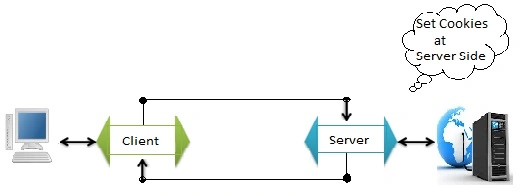
Message inspectors allows modification of all incoming or outgoing messages in the WCF messaging pipeline that transit on the server-side as well as on the client-side. The inspectors that are registered with the WCF runtime receive the messages before they are passed on to the application or sent to the wire, depending on whether it is an incoming or outgoing message. The cookies were designed to keep the stateful information or record the client's details and their activities.
All HTTP responses are caught that comes from the web server, extract any cookies contained within the messages and manually inject them in all subsequent HTTP requests on their way out. The cookie has the following features:
- A Cookie cannot carry the viruses.
- A Cookie cannot install the harmful/undesired programs into server machines.
- A Cookie can be easily managed.
- A Cookie is distributed in Non-Plain/Un-readable format over the network.
- The cookie is encrypted with the private key over the network and encryption/decryption is managed automatically. No need to handle the encryption and decryption mechanism by the programmer.
Building the Sample
Here, it shows the example of outgoing and incoming Custom Cookies over the client and server service model.
This example demonstrates how a client can check whether or not the service is alive.
Server-Side Samples
For cookies the service must have the ASPNET compatibility and the compatibility can be managed in the configuration file as well.
- <serviceHostingEnvironment aspNetCompatibilityEnabled="true"/>
- // Server Side Program
- if (WebOperationContext.Current != null)
- {
- // Here you can see the IncomingRequest Header is providing the incoming Cookies.
- string cookieHeader
- =WebOperationContext.Current.IncomingRequest.Headers[HttpRequestHeader.Cookie];
- // Here you can see the OutgoingResponse Header has set the cookies.
- if (cookieHeader == null)
- {
- Guid sessionId = Guid.NewGuid();
- WebOperationContext.Current.OutgoingResponse.Headers[HttpResponseHeader.SetCookie]
- =string.Format("SessionID={0}", sessionId);
- return sessionId;
- }
- Match match = Regex.Match(cookieHeader, @"^SessionID=(?<SessionID>.*)$");
- if (match.Success)
- {
- return new Guid(match.Groups["SessionID"].Value);
- }
- }
- SessionAuthority.SessionCollector sessionCollector = SessionAuthority.GetSessionDetail();
- return string.Format("{0} time(s) called for product : {1}",
sessionCollector.SessionCollectionData[NumberOfTimesCalled],
sessionCollector.SessionCollectionData[Product]);
Binding definition for server:
- <bindings>
- <wsHttpBinding>
- <binding name="higherMessageSize_WS" closeTimeout="00:01:00"
- openTimeout="00:01:00" receiveTimeout="00:10:00" sendTimeout="03:01:00"
- bypassProxyOnLocal="false" transactionFlow="false" hostNameComparisonMode="StrongWildcar
- "
- maxBufferPoolSize="2147483647" maxReceivedMessageSize="2147483647"
- messageEncoding="Text" textEncoding="utf-8" useDefaultWebProxy="true"
- allowCookies="true">
- <readerQuotas maxDepth="32" maxStringContentLength="2147483647"
- maxArrayLength="2147483647" maxBytesPerRead="4096" maxNameTableCharCount="16384" />
- <security mode="Transport">
- <transport clientCredentialType="Windows" />
- </security>
- </binding>
- </wsHttpBinding>
- </bindings>
Client-Side Samples
- // Client Side Program
- // Enter the Product Detail Or Name
- Console.WriteLine("Enter product :");
- string input = Console.ReadLine();
- Console.WriteLine(Environment.NewLine + "Processing started....");
- // Set or Pass the Product as Cookie
- asyncClient.WriteCookies(input);
- // Invoke the entered Cookie
- IAsyncResult asyncResult = InvokedService(asyncClient, input);
- finaldata = asyncClient.EndGetFinalOutput(asyncResult);
- int i = 0;
- IAsyncResult invokedServicecall = serviceClient.BeginGetFinalOutput(productData, delegate { },null);
- while (invokedServicecall.AsyncWaitHandle.WaitOne(2000) == false)
- {
- string getStatus = serviceClient.KeepStatus();
- Console.WriteLine(Environment.NewLine + i + ".The KeepGetStatus = " + getStatus);
- i++;
- }
The following is the binding definition for the client:
- <system.serviceModel>
- <bindings>
- <wsHttpBinding>
- <binding name="WSHttpBinding_ICookies" sendTimeout="00:31:00"
- allowCookies="true">
- <security mode="Transport">
- <message algorithmSuite="Default" />
- </security>
- </binding>
- </wsHttpBinding>
- </bindings>
- <client>
- <endpoint address=https://localhost/MyCookies/CookiesSample.svc
- binding="wsHttpBinding" bindingConfiguration="WSHttpBinding_ICookies"
- contract="ServiceCookies.ICookies" name="WSHttpBinding_ICookies">
- <identity>
- <dns value="localhost" />
- </identity>
- </endpoint>
- </client>
- </system.serviceModel>
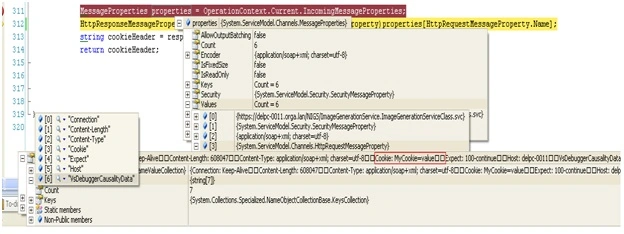
You can find the debugging details in the debugger as well or Quick Watch for cookies:
Deepak GaurPosted Oct 20, 2014, 1:36 AM
Dear All, If you see some improvements Please let me know.
Vithal WadjePosted Sep 24, 2014, 11:09 AM
very useful
Hemant SrivastavaPosted Aug 15, 2014, 11:22 AM
Nice article!
Divya SharmaPosted Aug 14, 2014, 2:15 PM
Good one...
Sachin KaliaPosted Aug 14, 2014, 12:59 PM
Welcome dost..