

Changing the font style when writing is a great fun. In Windows Phone 8.1 you can have multiple font styles. You must simply select them from the list and your font style will be changed.
- Open Visual Studio 2013.
- Add a new Windows Phone (Silverlight) App project and provide an appropriate name.
- Now go to TOOLS -> Nuget Package Manager -> Package Manager Console.
- Write Install-Package WPtoolkit after PM>.
- After installing the package you will see its assembly added into your references in Solution Explorer.
Note: Add a reference for the Silverlight toolkit to your project and add this namespace into your XAML page.
- xmlns: hello="clr-namespace:Microsoft.Phone.Controls;assembly=Microsoft.Phone"
- In XAML, add a button and a TextBox.
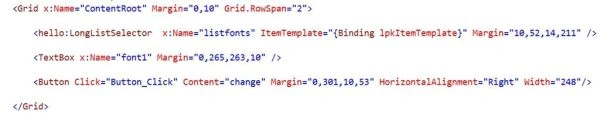
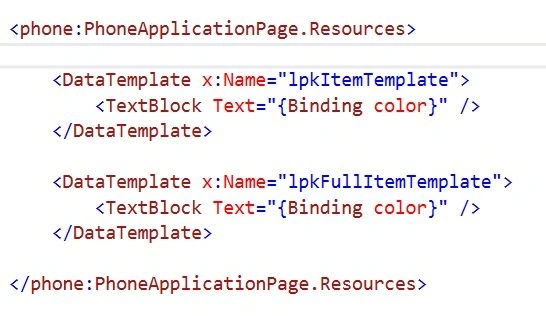
- Now add this data template code before grid (Grid x:Name="Layout").
- Now in XAML.cs add this code.
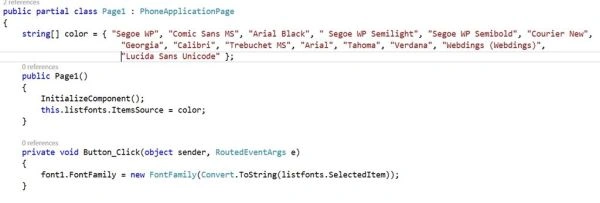
Now save then press F5, you will be able to play with multiple font styles.



Happy coding :)
Santhakumar MunuswamyPosted Apr 25, 2015, 7:54 AM
Good work