

In this article, we'll explore system databases, their uses, benefits, and what to do and not do with system databases. So let's get started.
Microsoft SQL Server has the following 4 system databases:
- MASTER
- MSDB
- MODEL
- TEMPDB
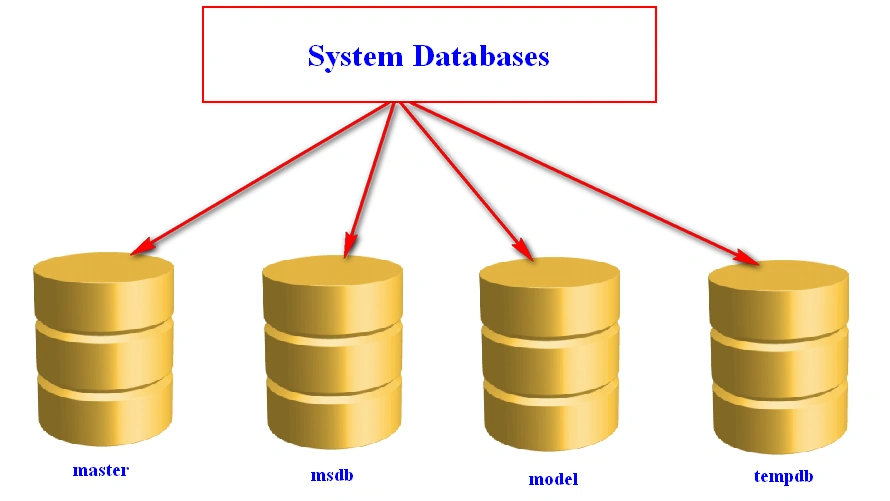
Figure 1: Database
Microsoft SQL Server uses these databases to perform its own internal operations. Every time when you start your computer (If your SQL Server start type is Automatic) or when you start/restart your SQL Server Services, SQL Server starts all the system databases with other databases. If you want to check this, you can run sp_readerrorlog 0,1,'starting'. This will show you the starting time of your databases.
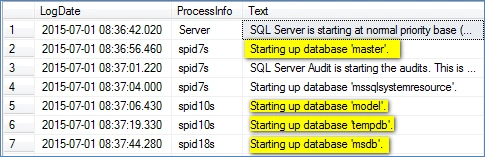
Figure 2: Starting Time
Just to show this, I'm restarting the SQL Server Service and when starting, it also starts all the databases as shown below.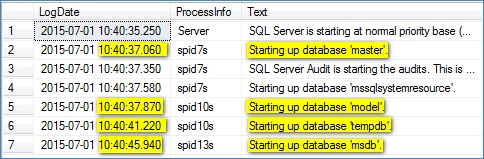
Figure 3: Restarting Services
Now you can clearly see that, first I started my computer at 08:37 AM, hence SQL Service started and with that all the databases were also started. Then at 10:40 AM I restarted SQL Services and again it starts all the databases when starting the service.
The following is the table that tells you the default size of these system databases (as per technet.microsoft.com )
| Database file | Physical file name | Default size, typical setup |
| master primary data | Master.mdf | 11.0 MB |
| master log | Mastlog.ldf | 1.25 MB |
| tempdb primary data | Tempdb.mdf | 8.0 MB |
| tempdb log | Templog.ldf | 0.5 MB |
| model primary data | Model.mdf | 0.75 MB |
| model log | Modellog.ldf | 0.75 MB |
| msdb primary data | Msdbdata.mdf | 12.0 MB |
| msdb log | Msdblog.ldf | 2.25 MB |
Now let's explore these databases one-by-one.
Master Databases
- The Master database records all the information like system-level information for SQL Server.
- It records all the configuration settings for SQL Server.
- It's the first database in the SQL Server startup process.
- The main purpose of the master database is to manage the SQL Server instances.
- It keeps all the existing database details like all your user databases and the system as well.
- If you're creating any login for any user, SQL Server stores that information in the master databases.
- Each and every user's details are stored in master databases.
- The Master database records all the physical location of the other databases.
- If your master database gets corrupted, it should be restored from the latest backup.
- If your master database is unavailable, SQL Server cannot start.
The following is what to do for the master database:
- Always keep the latest backup of the master database.
- If you're creating, dropping or altering any object in any database, immediately take a backup of the master database.
Don't do the following for the Master database:
- You cannot drop the Master database. If you try to do that then you'll get the following error message.
Msg 3708, Level 16, State 4, Line 1
Cannot drop the database 'master' because it is a system database.
- You cannot take a Master database offline.
- You cannot set this database to read-only mode. If you try to do, you'll get the following error message.
Msg 5058, Level 16, State 5, Line 1
Option 'READ_ONLY' cannot be set in database 'master'.
Model Database
When you create a database with the "CREATE DATABASE" command, your database is created within a minute. But have you ever thought:
- From where it takes the security features?
- From where your database gets those string, metadata, cursor, aggregate functions?
- From where you get the default system views?
So the answer is all these features, functionalities, everything are defined under the model database. And this is what the main purpose of the model database is, to act as the template for all the user-defined databases. If I say this in programmatically terms, the model database acts as "Parent" for all other databases, it's a kind of "Inheritance" in SQL Server where all the user databases inherits the functionality of the model database.
Let's see this in an example.
We'll create a table in the model database, then we'll create a new database and let's check whether it inherits that table or not.
- USE model
- GO
- CREATE TABLE tblDemo
- (
- Id int,
- Name char(5)
- )
- GO
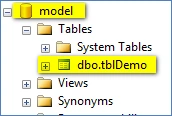
Figure 4: tbldemo
Now let's create a new database.
- USE master
- GO
- CREATE DATABASE FunDatabase
- GO
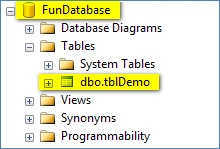
Figure 5: Fun Database
So this is what the purpose of the model database is.
Whenever you create a new database its recovery type set to FULL by default, this is because your model database's recovery type is set to FULL. If you change the model's recovery type to simple, then the new databases follows that rule only.
The following is what to do for the model database:
- Always keep the latest backup of your model database.
- If you're modifying anything in the model database then take a backup immediately.
MSDB Database
- A MSDB database is used by SQL Server Agent to schedule jobs, database mail, service broker and alerts.
- All the information related to Jobs, Job history, alerts and so on are stored in MSDB database tables.
- If you want to check any job schedule you can look into the "sysjobschedules" table.
Command:
This will provide you the next date and time of the job.- select * from sysjobschedules;
- If you want job history then you can check that in the "sysjobhistory" table.
- The MSDB database drivers ship in the simple recovery model, it is a best practice to change to the full recovery model and take log backups if you are using backup and restore of history tables.
- Log shipping details, operator details, alert details, job details, maintenance plan details are stored in a MSDB database.
TEMPDB database
- The Tempdb database contains all the temporary objects for SQL Server.
- When we create temporary objects, we can use the “#” sign. For example, to create a temporary table the command will be CREATE table #MyTestTable.
- On execution of such commands, SQL Server automatically stores such objects inside the tempdb database.
- Once your work is done and you close your active connection, SQL Server automatically ends those temporary objects.
- Backup and restore operations are not possible on the tempdb database.
- You cannot bring this database OFFLINE.
- A Tempdb is recreated every time we start SQL Services.
- A Tempdb database is much more heavily used during business operations.
The following is what to do for a tempdb database:
- Due to potential for heavy write activity, always keep a tempdb on a separate disk from other databases and backup files.
With this I'm winding up this article on System databases.
In my next article we'll explain recovery models available in SQL Server, until then keep learning and sharing.
If there's any mistake in this article then please let me know. Please provide your valuable feedback and comments that enable me to provide a better article the next time.
Santhakumar MunuswamyPosted Jul 23, 2015, 3:01 PM
Thanks for nice article:)
Sibeesh VenuPosted Jul 22, 2015, 4:04 AM
Nice Share.
Debasis SahaPosted Jul 22, 2015, 12:50 AM
Good One..
Pankaj Kumar ChoudharyPosted Jul 22, 2015, 12:46 AM
Nice Share Sir........
Jaipal ReddyPosted Jul 22, 2015, 12:12 AM
Nice article sir.