

Introduction
- Allow user to login using "Admin" and "Jignesh" user ID
- Token keep alive 30 minutes
- Authenticated user will access certain views.
Prerequisites
Before reading this article, you must have some basic knowledge about AngularJS and Token-based authentication using OWIN.
The following are the steps to create AngularJS Token Authentication using ASP.NET Web API 2 and OWIN
Step 1
Include 3rd party libraries
To get started, we required to include the following libraries:
AngularJS
We can download the latest AngularJS version using the NuGet package manager.
PM> Install-Package angularjs
Preceding command includes all available AngularJS libraries including minified version. So delete script files that are not required.
UI Bootstrap
We can download the latest Bootstrap version using the NuGet package manager.
PM> Install-Package bootstrap -Version 3.3.5
Step 2
Organize Project Structure
We can use any IDE to build the web application because this web app totally decouples with backend API and it develops using HTML, AngularJS, and CSS. Here I am using Visual Studio 2013. I have created a project using the empty project template.
In this project structure, I have created a folder named "Modules", this contains all AngularJS application files and resources files and the "Asset" folder contains the asset of this project i.e. AngularJS libraries file, CSS files, etc.
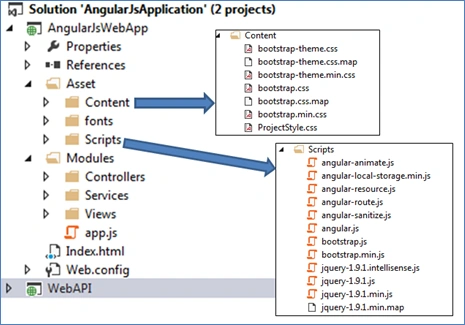 Step 3
Boot Strapping Angular Application
Boot Strapping Angular Application means creating angular applications and modules (modules are nothing but a collection of services, directives, filters which are used by the application). Each module has a configuration block and applied to the application during this process. To do this, I have added a file called "app.js" in the root folder. This file also contains the route and interceptor.
Interceptor is a regular service and it allows us to capture every XHR request and we can also manipulate it before sending it to a server endpoint (web API). It also captures all response and response errors.
- var serviceBase = 'http://localhost:49707/';
- var app = angular.module('AngularApp', ['ngRoute', 'LocalStorageModule']);
- app.config(function ($routeProvider) {
- $routeProvider.when("/home", {
- controller: "homeController",
- templateUrl: "/Modules/views/home.html"
- });
- $routeProvider.when("/login", {
- controller: "loginController",
- templateUrl: "/Modules/views/login.html"
- });
- $routeProvider.when("/next", {
- controller: "nextController",
- templateUrl: "/Modules/views/Next.html"
- });
- $routeProvider.when("/myInfo", {
- templateUrl: "/Modules/views/Info.html"
- });
- $routeProvider.otherwise({ redirectTo: "/home" });
- })
- .config(['$httpProvider', function ($httpProvider) {
- $httpProvider.interceptors.push(function ($q, $rootScope, $window, $location) {
- return {
- request: function (config) {
- return config;
- },
- requestError: function (rejection) {
- return $q.reject(rejection);
- },
- response: function (response) {
- if (response.status == "401") {
- $location.path('/login');
- }
- //the same response/modified/or a new one need to be returned.
- return response;
- },
- responseError: function (rejection) {
- if (rejection.status == "401") {
- $location.path('/login');
- }
- return $q.reject(rejection);
- }
- };
- });
- }]);
- Home: It is home page. It can be also access by the anonymous users.
- Login: It shows the login form. It can be also access by the anonymous users.
- next: It shows after user has been logged-in.
- myInfo: It shows my details.
Step 4
Add Index.html (Shell Page)
Single page application contains the Shell page which is a container for the application. It will contain the navigation menus which contains all the available links for the application. It also contains a reference of all the 3rd party JavaScript and CSS files which are required by the application.
- <!DOCTYPE html>
- <html data-ng-app="AngularApp">
- <head>
- <meta content="IE=edge, chrome=1" http-equiv="X-UA-Compatible" />
- <title>AngularJS - OWIN Authentication</title>
- <link href="Asset/Content/bootstrap.min.css" rel="stylesheet" />
- <link href="Asset/Content/ProjectStyle.css" rel="stylesheet" />
- </head>
- <body>
- <div class="navbar navbar-inverse navbar-fixed-top" role="navigation" data-ng-controller="indexController">
- <div class="container">
- <div class="collapse navbar-collapse" data-collapse="!navbarExpanded">
- <ul class="nav navbar-nav navbar-right">
- <li data-ng-hide="!authentication.IsAuthenticated"><a href="#">Welcome, {{authentication.userName}}</a></li>
- <li data-ng-hide="!authentication.IsAuthenticated"><a href="#/myInfo">My Info</a></li>
- <li data-ng-hide="!authentication.IsAuthenticated"><a href="" data-ng-click="logOut()">Logout</a></li>
- <li data-ng-hide="authentication.IsAuthenticated"> <a href="#/login">Login</a></li>
- </ul>
- </div>
- </div>
- </div>
- <div class="jumbotron">
- <div class="container">
- <div class="page-header text-center">
- <h3>AngularJS Owin Authentication</h3>
- </div>
- </div>
- </div>
- <div class="container">
- <div data-ng-view="">
- </div>
- </div>
- <hr />
- <div id="footer">
- <div class="container">
- <div class="row">
- AngularJS - OAuth Bearer Token Implementation Example
- </div>
- </div>
- </div>
- <!-- 3rd party libraries -->
- <script src="Asset/Scripts/angular.js"></script>
- <script src="Asset/Scripts/angular-route.js"></script>
- <script src="Asset/Scripts/angular-local-storage.min.js"></script>
- <!-- Load app main script -->
- <script src="Modules/app.js"></script>
- <!-- Load Angular services -->
- <script src="Modules/Services/loginService.js"></script>
- <script src="Modules/Services/AuthenticationService.js"></script>
- <script src="Modules/Services/AuthData.js"></script>
- <!-- Load Angular controllers -->
- <script src="Modules/Controllers/indexController.js"></script>
- <script src="Modules/Controllers/homeController.js"></script>
- <script src="Modules/Controllers/loginController.js"></script>
- <script src="Modules/Controllers/nextController.js"></script>
- </body>
- </html>
- (function () {
- 'use strict';
- app.controller('indexController', ['$scope', '$location', 'authData','LoginService', function ($scope, $location, authData, loginService) {
- $scope.logOut = function () {
- loginService.logOut();
- $location.path('/home');
- }
- $scope.authentication = authData.authenticationData;
- }]);
- })();
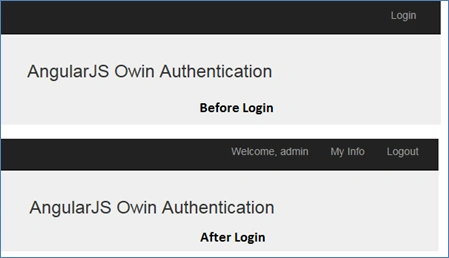
Add AngularJS Authentication Data (Factory)
- 'use strict';
- app.factory('authData', [ function () {
- var authDataFactory = {};
- var _authentication = {
- IsAuthenticated: false,
- userName: ""
- };
- authDataFactory.authenticationData = _authentication;
- return authDataFactory;
- }]);
- (function () {
- 'use strict';
- app.service('AuthenticationService', ['$http', '$q', '$window',
- function ($http, $q, $window) {
- var tokenInfo;
- this.setTokenInfo = function (data) {
- tokenInfo = data;
- $window.sessionStorage["TokenInfo"] = JSON.stringify(tokenInfo);
- }
- this.getTokenInfo = function () {
- return tokenInfo;
- }
- this.removeToken = function () {
- tokenInfo = null;
- $window.sessionStorage["TokenInfo"] = null;
- }
- this.init = function () {
- if ($window.sessionStorage["TokenInfo"]) {
- tokenInfo = JSON.parse($window.sessionStorage["TokenInfo"]);
- }
- }
- this.setHeader = function (http) {
- delete http.defaults.headers.common['X-Requested-With'];
- if ((tokenInfo != undefined) && (tokenInfo.accessToken != undefined) && (tokenInfo.accessToken != null) && (tokenInfo.accessToken != "")) {
- http.defaults.headers.common['Authorization'] = 'Bearer ' + tokenInfo.accessToken;
- http.defaults.headers.common['Content-Type'] = 'application/x-www-form-urlencoded;charset=utf-8';
- }
- }
- this.validateRequest = function () {
- var url = serviceBase + 'api/home';
- var deferred = $q.defer();
- $http.get(url).then(function () {
- deferred.resolve(null);
- }, function (error) {
- deferred.reject(error);
- });
- return deferred.promise;
- }
- this.init();
- }
- ]);
- })();
- function () {
- 'use strict';
- app.service('LoginService', ['$http', '$q', 'AuthenticationService', 'authData',
- function ($http, $q, authenticationService, authData) {
- var userInfo;
- var loginServiceURL = serviceBase + 'token';
- var deviceInfo = [];
- var deferred;
- this.login = function (userName, password) {
- deferred = $q.defer();
- var data = "grant_type=password&username=" + userName + "&password=" + password;
- $http.post(loginServiceURL, data, {
- headers:
- { 'Content-Type': 'application/x-www-form-urlencoded' }
- }).success(function (response) {
- var o = response;
- userInfo = {
- accessToken: response.access_token,
- userName: response.userName
- };
- authenticationService.setTokenInfo(userInfo);
- authData.authenticationData.IsAuthenticated = true;
- authData.authenticationData.userName = response.userName;
- deferred.resolve(null);
- })
- .error(function (err, status) {
- authData.authenticationData.IsAuthenticated = false;
- authData.authenticationData.userName = "";
- deferred.resolve(err);
- });
- return deferred.promise;
- }
- this.logOut = function () {
- authenticationService.removeToken();
- authData.authenticationData.IsAuthenticated = false;
- authData.authenticationData.userName = "";
- }
- }
- ]);
- })();

- (function () {
- 'use strict';
- app.controller('loginController', ['$scope', 'LoginService', '$location', function ($scope, loginService, $location) {
- $scope.loginData = {
- userName: "",
- password: ""
- };
- $scope.login = function () {
- loginService.login($scope.loginData.userName, $scope.loginData.password).then(function (response) {
- if (response != null && response.error != undefined) {
- $scope.message = response.error_description;
- }
- else {
- $location.path('/next');
- }
- });
- }
- }]);
- })();
- (function ()
- {
- 'use strict';
- app.controller('nextController', ['$scope', 'AuthenticationService', function ($scope, authenticationService) {
- authenticationService.validateRequest();
- }]);
- })();
- <form role="form">
- <div class="row">
- <div class="col-md-2">
- </div>
- <div class="col-md-4">
- <h2 class="form-login-heading col-md-12">Login</h2>
- <div class="col-md-12 PaddingTop">
- <input type="text" class="form-control" placeholder="Username" data-ng-model="loginData.userName" required autofocus>
- </div>
- <div class="col-md-12 PaddingTop">
- <input type="password" class="form-control" placeholder="Password" data-ng-model="loginData.password" required>
- </div>
- <div class="col-md-12 PaddingTop">
- <button class="btn btn-md btn-info btn-block" type="submit" data-ng-click="login()">Login</button>
- </div>
- <div data-ng-hide="message == ''">
- {{message}}
- </div>
- </div>
- <div class="col-md-2">
- </div>
- </div>
- </form>
- (function () {
- 'use strict';
- app.controller('homeController', ['$scope', function ($scope) {
- }]);
- })();
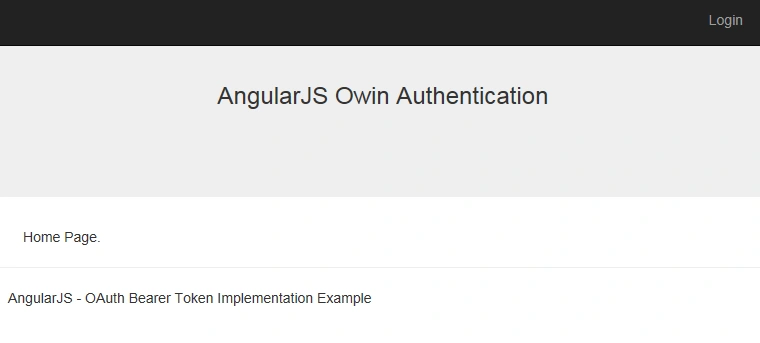
Moises OlmoPosted Oct 16, 2018, 9:47 AM
Would you can tell me how can i implement CRUD operations with this
Tridip BhattacharjeePosted Apr 11, 2018, 4:25 AM
Please tell me what the below line will be doing.......config(['$httpProvider', function ($httpProvider) { $httpProvider.interceptors.push(function ($q, $rootScope, $window, $location) { return { request: function (config) { return config; }, requestError: function (rejection) { return $q.reject(rejection); }, response: function (response) { if (response.status == "401") { $location.path('/login'); } //the same response/modified/or a new one need to be returned. return response; }, responseError: function (rejection) { if (rejection.status == "401") { $location.path('/login'); } return $q.reject(rejection); } }; });
Tridip BhattacharjeePosted Apr 11, 2018, 4:23 AM
Nice article but like title of article there is no web api code in this post.
Rupesh prasadPosted Aug 16, 2016, 4:21 PM
Can you tell me how do i get this token based auth work with ASP.NET web forms. I mean if user is not logged in then redirect to login page and all, most importantly how do i check if user is logged in or not?? For federation authentication we simple check page.isuerAuthenticated which gets set by IuserPrincipal. For this how is it gonna work?
kalu singh raoPosted Jul 4, 2016, 2:03 AM
Nice...
Debasis SahaPosted May 26, 2016, 8:12 AM
Nice sharing..
Claude JoasilPosted Feb 25, 2016, 11:27 AM
The headers were never set for the request. in this.validateRequest Make sure you add this.setHeader($http); before $http.get(url).then(function () {.... So between line 37 and 38 in authenticationService.js
jasmin patelPosted Feb 21, 2016, 1:36 AM
another problem is after login try to refresh page welcome message ,my info,logout link hide
jasmin patelPosted Feb 21, 2016, 1:16 AM
can u solve that problem and upload sample project again?
jasmin patelPosted Feb 21, 2016, 1:04 AM
Nice example but after login page redirect to next page and then validate request function called this.validateRequest = function () { debugger; var url = serviceBase + 'api/home'; var deferred = $q.defer(); $http.get(url).then(function () { deferred.resolve(null); }, function (error) { deferred.reject(error); }); return deferred.promise; } and got this error when get request to api/home --> GET http://localhost:49707/api/home 401 (Unauthorized)
Sabyasachi MishraPosted Dec 19, 2015, 7:19 AM
Good one
Marco TugnoliPosted Nov 16, 2015, 3:48 AM
Nice work, but ... 1) after logged, "next" page is not available 2) on logging if I debug this error occour : "GET http://localhost:49707/api/home 401 (Unauthorized)", but i'm authorized !! 3) after logout have to go to login page 4) will be nice if showing a "wait icon" on loading
Ajeet MishraPosted Sep 26, 2015, 2:16 AM
nice
Saineshwar BageriPosted Sep 25, 2015, 8:33 AM
Nice one
Sibeesh VenuPosted Sep 25, 2015, 3:40 AM
Nice Share :)
Pankaj Kumar ChoudharyPosted Sep 25, 2015, 3:34 AM
Great Article Sir..........
Santhakumar MunuswamyPosted Sep 25, 2015, 2:38 AM
Good work
Ankit BansalPosted Sep 25, 2015, 1:07 AM
nice...thanks for sharing
Harshad PansuriyaPosted Sep 25, 2015, 12:48 AM
Nice Share
Shridhar SharmaPosted Sep 24, 2015, 1:22 PM
nice share :)
Rajeesh MenothPosted Sep 24, 2015, 12:47 PM
Nice One...
Nilesh JadavPosted Sep 24, 2015, 11:51 AM
Great work sir !!