

Introduction
Service in AngularJS is a function or an object that can be used to share data and the behaviour across the application (controller, directives, filters, other services etc.) or we can say services in AngularJS are objects that are wired together using DI (dependency injection) and it can be used to share and organize code across the application.
We can consider services as a singleton object because their is only one instance of a specific service available during the lifetime of the Angular application. They are instantiated by using the "$injector". Generally they provide an interface to create logical grouping of method together related to a specific function.
There are the following two characteristics of AngularJS services:
- Lazy instantiated: AngularJS application instantiates a service component when any application component depends on it.
- Singletons: All components, those dependent on a service get a reference to the single instance generated by the service factory.
Structure of Idle AngularJS Application
Separation of concern is the main objective of AngularJS application. Our controller must be responsible for databinding with the view using $scope and contains some business logic. Controller does not contain any logic to fetch the data. AngularJS services manage the data fetching. In AngularJS application, each component has their own responsibilities so that each component can become more testable.

AngularJS internal services
AngularJS internally provides many services that can be used in our application. All the AngularJS internal service start with $ (dollar) sign. $http, $route, $location, $window, $q, etc are useful services provided by AngularJS.
AngularJS custom services
With AngularJS application, we can define our own service and we can use them whenever required. There are many ways to create Services in AngularJS. The following are two very simple ways to create service.
- Using service keyword
Use the "service" keyword is the easiest way to create Service in AngularJS application. In the following code snippet, second parameter is service function in which we define the behaviour of the service. Once we define the service, we can use this service anywhere by injecting this service as dependency.Defining service with dependency:- Defining service without dependency:
- var app = angular.module('myapp', []);
- app.service('myTestService', function(){
- // write your service here
- // define variable and methods
- });
- var app = angular.module('myapp', []);
- app.service('myTestService', ['$http', function($http){
- // write your service here
- // define variable and methods
- }]);
- Using factory method
Instead of defining the service directly using the "Service" keyword of the Angular module we can also use the Factory method and services will be created on request when defined by a factory function. The purpose of the service factory is to generate the single object that can be used for the rest of the application.
Defining service without dependency:Defining service with dependency.- var app = angular.module('myapp', []);
- app. factory ('myTestService', function(){
- // write your service here
- // define variable and methods
- });
- var app = angular.module('myapp', []);
- app.factory('myTestService', ['$http', function($http){
- // write your service here
- // define variable and methods
- }]);
End to End example of application using AngularJS Service
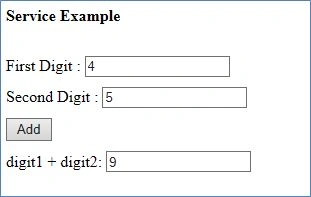
The first step is to create AngularJS application. Following code snippet is use to create AngularJS application. In this example, I have created one JavaScript file named app.js and placed the following code in this file.
- app.js
- var app = angular.module("myapp", []);
appService.js
- app.service('appService', function () {
- this.add = function (a1, a2) {
- return parseInt(a1) + parseInt(a2);
- }
- })
appController.js
- app.controller("appController", function ($scope, appService) {
- $scope.Add = function () {
- $scope.total = appService.add($scope.digit1, $scope.digit2);
- }
- });
HTML file (TestAgularJs.html)
- <html>
- <head>
- <title>Understanding Services In AngularJS</title>
- <script src="angular.js"></script>
- <script src="app.js"></script>
- <script src="appService.js"></script>
- <script src="appController.js"></script>
- </head>
- <body ng-app="myapp">
- <h4>Service Example</h4>
- <div ng-controller="appController">
- <div width="100%" style="padding-top:10px;">
- <label>First Digit : </label><input type="text" name="number" ng-model="digit1" />
- </div>
- <div width="100%" style="padding-top:10px;">
- <label>Second Digit : </label><input type="text" name="number" ng-model="digit2" />
- </div>
- <div width="100%" style="padding-top:10px;">
- <button ng-click="Add()">Add</button>
- </div>
- <div width="100%" style="padding-top:10px;">
- <label>digit1 + digit2: </label><input type="text" name="number" ng-model="total" />
- </div>
- </div>
- </body>
- </html>
Summary
Service in AngularJS is an important element in application. Service allows us to share data and behaviour with other object such as Controller. Services are singleton in AngularJS.
Santhakumar MunuswamyPosted Oct 18, 2015, 5:48 AM
Good one
Ankit BansalPosted Oct 7, 2015, 1:28 AM
nice..thanks for sharing knowledge..
Sibeesh VenuPosted Oct 7, 2015, 12:58 AM
Nice Share
Humayun Kabir MamunPosted Oct 7, 2015, 12:09 AM
Nice...
Nilesh JadavPosted Oct 6, 2015, 9:22 PM
Thank you for sharing
Priyaranjan K SPosted Oct 6, 2015, 1:07 PM
Nice Article ...
Rajeesh MenothPosted Oct 6, 2015, 10:58 AM
Good One Sir..