

C# List<T> class provides methods and properties to create a list of objects (classes). The IndexOf method returns the first index of an item if found in the List.
List is a generic class. You must import the following namespace before using the List<T> class.
- using System.Collections.Generic;
The LastIndexOf method returns the last index of an item if found in the List.
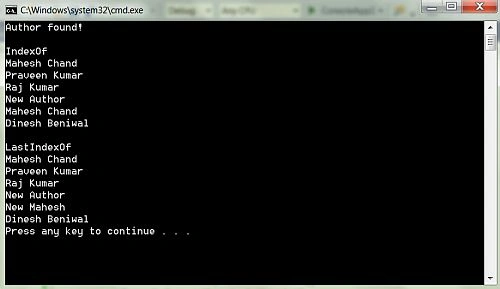
The following code snippet shows how to use the Contains, the IndexOf and the LastIndexOf methods.
- using System;
- using System.Collections.Generic;
- namespace ConsoleApp1
- {
- class Program
- {
- static void Main(string[] args)
- {
- List<string> AuthorList = new List<string>();
- AuthorList.Add("Mahesh Chand");
- AuthorList.Add("Praveen Kumar");
- AuthorList.Add("Raj Kumar");
- AuthorList.Add("Nipun Tomar");
- AuthorList.Add("Mahesh Chand");
- AuthorList.Add("Dinesh Beniwal");
- // Contains - Check if an item is in the list
- if (AuthorList.Contains("Mahesh Chand"))
- {
- Console.WriteLine("Author found!");
- }
- // Find an item and replace it with new item
- int idx = AuthorList.IndexOf("Nipun Tomar");
- if (idx >= 0)
- {
- AuthorList[idx] = "New Author";
- }
- Console.WriteLine("\nIndexOf ");
- foreach (var author in AuthorList)
- {
- Console.WriteLine(author);
- }
- // Find Last index of
- idx = AuthorList.LastIndexOf("Mahesh Chand");
- if (idx >= 0)
- {
- AuthorList[idx] = "New Mahesh";
- }
- Console.WriteLine("\nLastIndexOf ");
- foreach (var author in AuthorList)
- {
- Console.WriteLine(author);
- }
- }
- }
- }
Rajan MishraPosted Oct 8, 2018, 3:53 AM
Thats simple and complete.