

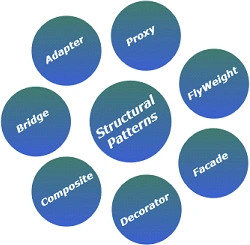
Structural design patterns are patterns that describe how objects and classes can be combined and form a large structure and that ease design by identifying a simple way to realize relationships between entities. There are seven structural patterns described. They are as follows:
Adapter:
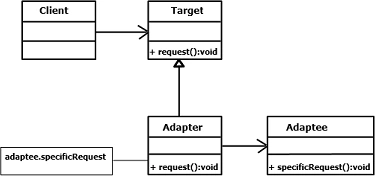
In the Adapter pattern two incompatible types can communicate between each other as the adapter acts as a translator between the two. This is something like when we convert an interface of one class into an interface expected by the client. It is like the problem of inserting a new three-prong electrical plug into an old two-prong wall outlet; some kind of adapter or intermediary is necessary.
Model:
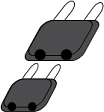
That additional plug is an 'Adaptor'.
UML Diagram:
Example:
using System;
using System.Collections.Generic;
using System.Linq;
using System.Text;
namespace AdapterPattern
{
class Example
{
static void Main()
{
// Non-adapted chemical compound
Compound unknown = new Compound("Unknown");
unknown.Display();
// Adapted chemical compounds
Compound water = new RichCompound("Water");
water.Display();
Compound ethanol = new RichCompound("Ethanol");
ethanol.Display();
Console.ReadKey();
}
}
class Compound
{
protected string _chemical;
protected float _boilingPoint;
protected float _meltingPoint;
protected string _molecularFormula;
// Constructor
public Compound(string chemical)
{
this._chemical = chemical;
}
public virtual void Display()
{
Console.WriteLine("\nCompound: {0} ------ ", _chemical);
}
}
class RichCompound : Compound
{
private ChemicalDatabank _bank;
public RichCompound(string name)
: base(name)
{ }
public override void Display()
{
// Adaptee
_bank = new ChemicalDatabank();
_boilingPoint = _bank.GetCriticalPoint(_chemical, "B");
_meltingPoint = _bank.GetCriticalPoint(_chemical, "M");
_molecularFormula = _bank.GetMolecularStructure(_chemical);
base.Display();
Console.WriteLine(" Formula: {0}", _molecularFormula);
Console.WriteLine(" Melting Pt: {0}", _meltingPoint);
Console.WriteLine(" Boiling Pt: {0}", _boilingPoint);
}
}
// 'Adaptee' class
class ChemicalDatabank
{
// databank 'legacy API'
public float GetCriticalPoint(string compound, string point)
{
// Melting Point
if (point == "M")
{
switch (compound.ToLower())
{
case "water": return 0.0f;
case "ethanol": return -114.1f;
default: return 0f;
}
}
// Boiling Point
else
{
switch (compound.ToLower())
{
case "water": return 100.0f;
case "ethanol": return 78.3f;
default: return 0f;
}
}
}
public string GetMolecularStructure(string compound)
{
switch (compound.ToLower())
{
case "water": return "H20";
case "ethanol": return "C2H5OH";
default: return "";
}
}
public double GetMolecularWeight(string compound)
{
switch (compound.ToLower())
{
case "water": return 18.015;
case "ethanol": return 46.0688;
default: return 0d;
}
}
}
}
Bridge:
The Bridge pattern is quite a bit more complex than the other patterns. It is used to form large object structures across many disparate objects; also separate out the interface from its implementation. The switch of the fan is one of the best examples of this pattern.
Model: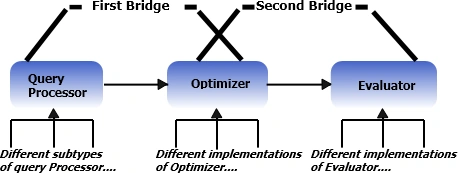
UML Diagram: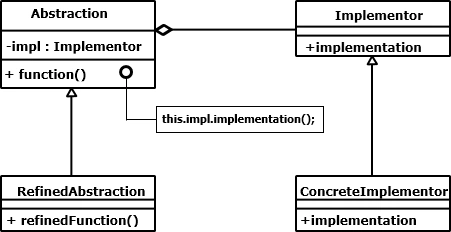
Example:
using System;
using System.Collections.Generic;
using System.Linq;
using System.Text;
namespace BridgePattern
{
class Example
{
static void Main()
{
// Create RefinedAbstraction
Customers customers = new Customers("India");
// Set ConcreteImplementor
customers.Data = new CustomersData();
// Exercise bridge
customers.Show();
customers.Next();
customers.Show();
customers.Next();
customers.Show();
customers.Add("Kapil Chawla");
customers.ShowAll();
Console.ReadKey();
}
}
// 'Abstraction' class
class CustomersBase
{
private DataObject _dataObject;
protected string group;
public CustomersBase(string group)
{
this.group = group;
}
// Property
public DataObject Data
{
set { _dataObject = value; }
get { return _dataObject; }
}
public virtual void Next()
{
_dataObject.NextRecord();
}
public virtual void Prior()
{
_dataObject.PriorRecord();
}
public virtual void Add(string customer)
{
_dataObject.AddRecord(customer);
}
public virtual void Delete(string customer)
{
_dataObject.DeleteRecord(customer);
}
public virtual void Show()
{
_dataObject.ShowRecord();
}
public virtual void ShowAll()
{
Console.WriteLine("Customer Group: " + group);
_dataObject.ShowAllRecords();
}
}
// 'RefinedAbstraction' class
class Customers : CustomersBase
{
public Customers(string group)
: base(group)
{ }
public override void ShowAll()
{
// Add separator lines
Console.WriteLine();
Console.WriteLine("------------------------");
base.ShowAll();
Console.WriteLine("------------------------");
}
}
// 'Implementor' abstract class
abstract class DataObject
{
public abstract void NextRecord();
public abstract void PriorRecord();
public abstract void AddRecord(string name);
public abstract void DeleteRecord(string name);
public abstract void ShowRecord();
public abstract void ShowAllRecords();
}
// 'ConcreteImplementor' class
class CustomersData : DataObject
{
private List<string> _customers = new List<string>();
private int _current = 0;
public CustomersData()
{
_customers.Add("Rahul Narang");
_customers.Add("Dolly Sinha");
_customers.Add("Aaliya Bose");
_customers.Add("Prashant Tondon");
_customers.Add("Amrita Singhal");
}
public override void NextRecord()
{
if (_current <= _customers.Count - 1)
{
_current++;
}
}
public override void PriorRecord()
{
if (_current > 0)
{
_current--;
}
}
public override void AddRecord(string customer)
{
_customers.Add(customer);
}
public override void DeleteRecord(string customer)
{
_customers.Remove(customer);
}
public override void ShowRecord()
{
Console.WriteLine(_customers[_current]);
}
public override void ShowAllRecords()
{
foreach (string customer in _customers)
{
Console.WriteLine(" " + customer);
}
}
}
}
Composite:
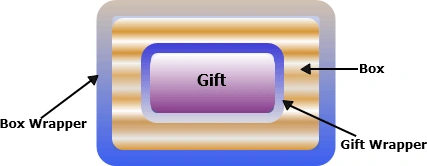
To compose an object and present the hierarchies in tree-structures the composite design pattern is used. It allows clients to treat individual objects equally. The client never knows that it is working on an object which has many other objects inside it.
Model:
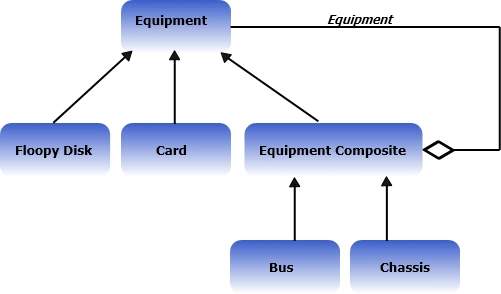
UML Diagram:
Example:
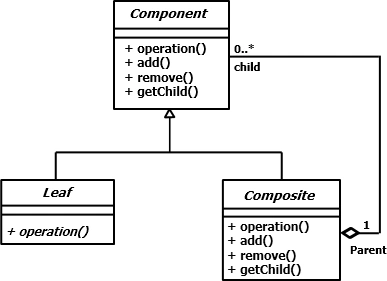
using System;
using System.Collections.Generic;
using System.Linq;
using System.Text;
namespace CompositePattern
{
class Example
{
static void Main()
{
// Create a tree structure
Composite root = new Composite("root");
root.Add(new Leaf("Leaf A"));
root.Add(new Leaf("Leaf B"));
Composite comp = new Composite("Composite X");
comp.Add(new Leaf("Leaf XA"));
comp.Add(new Leaf("Leaf XB"));
root.Add(comp);
root.Add(new Leaf("Leaf C"));
// Add and remove a leaf
Leaf leaf = new Leaf("Leaf D");
root.Add(leaf);
root.Remove(leaf);
// Recursively display tree
root.Display(1);
Console.ReadKey();
}
}
// 'Component' abstract class
abstract class Component
{
protected string name;
// Constructor
public Component(string name)
{
this.name = name;
}
public abstract void Add(Component c);
public abstract void Remove(Component c);
public abstract void Display(int depth);
}
// Composite Class
class Composite : Component
{
private List<Component> _children = new List<Component>();
public Composite(string name)
: base(name)
{ }
public override void Add(Component component)
{
_children.Add(component);
}
public override void Remove(Component component)
{
_children.Remove(component);
}
public override void Display(int depth)
{
Console.WriteLine(new String('-', depth) + name);
// Recursively display child nodes
foreach (Component component in _children)
{
component.Display(depth + 2);
}
}
}
Join the conversation! Your thoughts help the community grow.