

I have written something like this earlier but I got a request from one of my follower to write it again by extending functionality like how we can show this report in ASP.NET and change color of Grid View by putting some condition. I will explain this in the following.
I have 2 tables in my SQL Server.
- Customer
- CREATE TABLE [dbo].[Customer](
- [Customer_ID] [int] IDENTITY(1,1) NOT NULL,
- [Customer_Name] [varchar](50) NULL,
- CONSTRAINT [PK_Customer] PRIMARY KEY CLUSTERED
- (
- [Customer_ID] ASC
- )WITH (PAD_INDEX = OFF, STATISTICS_NORECOMPUTE = OFF, IGNORE_DUP_KEY = OFF, ALLOW_ROW_LOCKS = ON, ALLOW_PAGE_LOCKS = ON) ON [PRIMARY]
- ) ON [PRIMARY]
- GO
- SET ANSI_PADDING OFF
- GO
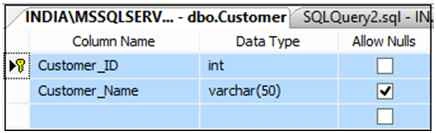
Figure 1
Data in my Customer Table:
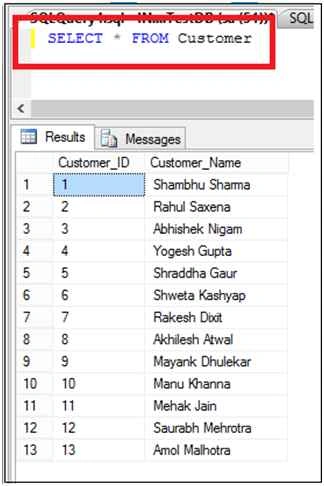
Figure 2
Now my Second Table,
- Customer_Orders
- CREATE TABLE [dbo].[Customer_Orders](
- [OrderID] [int] IDENTITY(1,1) NOT NULL,
- [Customer_ID] [int] NULL,
- [Unit_Order] [int] NULL,
- [Month] [varchar](50) NULL,
- [Year] [int] NULL,
- CONSTRAINT [PK_Customer_Orders] PRIMARY KEY CLUSTERED
- (
- [OrderID] ASC
- )WITH (PAD_INDEX = OFF, STATISTICS_NORECOMPUTE = OFF,
- IGNORE_DUP_KEY = OFF, ALLOW_ROW_LOCKS = ON, ALLOW_PAGE_LOCKS = ON) ON [PRIMARY]
- ) ON [PRIMARY]
- GO
- SET ANSI_PADDING OFF
- GO

Figure 3
Data in my Customer_Orders table:
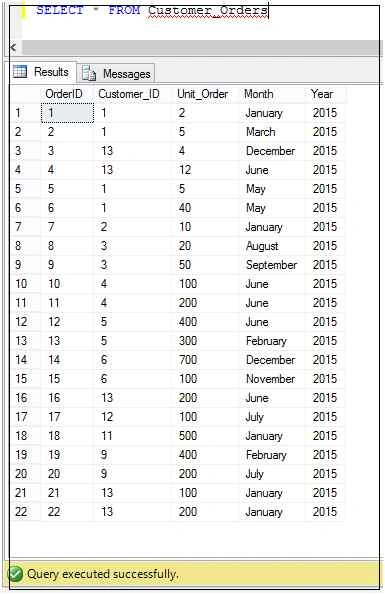
Figure 4
Now my Stored Procedure to generate report:
- CREATE PROCEDURE GenerateReport
- AS
- BEGIN
- SELECT * FROM (
- SELECT c.Customer_Name, d.[Month],
- ISNULL(d.Unit_Order,0) AS Unit
- FROM Customer_Orders d RIGHT JOIN Customer c
- ON d.Customer_ID=c.Customer_ID)
- AS s PIVOT ( SUM(Unit)
- FOR [Month] in (January, February, March, April, May, June, July,
- August, September, October, November, December))
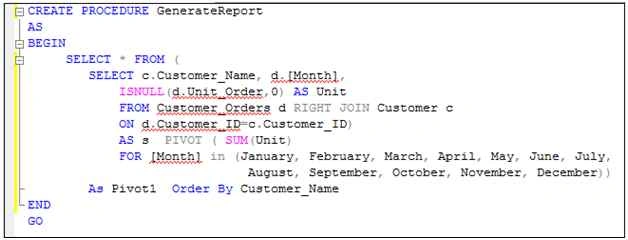
Figure 5
Now execute this Stored Procedure:
EXEC GenerateReport
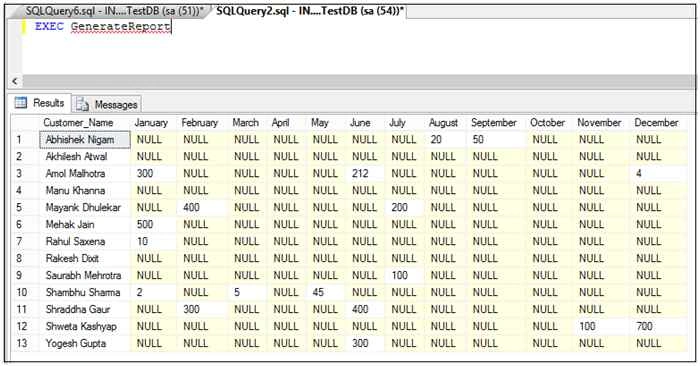
Figure 6
Now we will show this report in GridView using ASP.NET.
Open Visual Studio -> New Web Site:
Add a GridView on your aspx and do coding in aspx.cs page to call stored procedure:
The following is my aspx page:
- <%@ Page Language="C#" AutoEventWireup="true" CodeFile="Report.aspx.cs" Inherits="Report" %>
- <!DOCTYPE html>
- <html xmlns="http://www.w3.org/1999/xhtml">
- <head runat="server">
- <title></title>
- </head>
- <body>
- <form id="form1" runat="server">
- <table style="width: 100%; text-align: center; border: 15px solid blue;">
- <tr style="background-color:orangered; height:25px; color:white; font-size:16pt; font-weight:bold;">
- <td>Customer Order Monthly Report Using Pivot In SQL Server </td>
- </tr>
- <tr style="background-color:yellow;">
- <td style="padding:10px;">
- <asp:GridView ID="gvCustomerOrder" runat="server" Width="100%" CellPadding="4" ForeColor="#333333" GridLines="Both">
- <AlternatingRowStyle BackColor="White" ForeColor="#284775" />
- <EditRowStyle BackColor="#999999" />
- <FooterStyle BackColor="#5D7B9D" Font-Bold="True" ForeColor="White" />
- <HeaderStyle BackColor="#5D7B9D" Font-Bold="True" ForeColor="White" />
- <PagerStyle BackColor="#284775" ForeColor="White" HorizontalAlign="Center" />
- <RowStyle BackColor="#F7F6F3" ForeColor="#333333" />
- <SelectedRowStyle BackColor="#E2DED6" Font-Bold="True" ForeColor="#333333" />
- <SortedAscendingCellStyle BackColor="#E9E7E2" />
- <SortedAscendingHeaderStyle BackColor="#506C8C" />
- <SortedDescendingCellStyle BackColor="#FFFDF8" />
- <SortedDescendingHeaderStyle BackColor="#6F8DAE" /> </asp:GridView>
- </td>
- </tr>
- </table>
- </form>
- </body>
- </html>
- using System;
- using System.Collections.Generic;
- using System.Linq;
- using System.Web;
- using System.Web.UI;
- using System.Web.UI.WebControls;
- using System.Data;
- using System.Data.SqlClient;
- using System.Configuration;
- public partial class Report: System.Web.UI.Page
- {
- protected void Page_Load(object sender, EventArgs e)
- {
- if (!Page.IsPostBack) BindReport();
- }
- private void BindReport()
- {
- String strConnString = ConfigurationManager.ConnectionStrings["conString"].ConnectionString;
- SqlConnection con = new SqlConnection(strConnString);
- SqlCommand cmd = new SqlCommand();
- cmd.CommandType = CommandType.StoredProcedure;
- cmd.CommandText = "GenerateReport";
- cmd.Connection = con;
- try
- {
- con.Open();
- gvCustomerOrder.EmptyDataText = "No Records Found";
- gvCustomerOrder.DataSource = cmd.ExecuteReader();
- gvCustomerOrder.DataBind();
- }
- catch (Exception ex)
- {
- throw ex;
- }
- finally
- {
- con.Close();
- con.Dispose();
- }
- }
- }
- <configuration>
- <connectionStrings>
- <add name="conString" connectionString="Data Source=INDIA\MSSQLServer2k8; database=TestDB;uid=sa; pwd=india" /> </connectionStrings>
- </configuration>
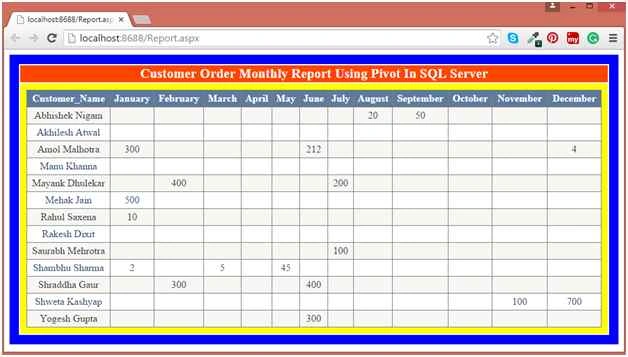
Figure 7
Delpin Susai RajPosted Aug 28, 2016, 6:37 AM
Nice one
Rahul Kumar SaxenaPosted Nov 16, 2015, 4:35 AM
Thanks Santhakumar Munuswamy
Santhakumar MunuswamyPosted Nov 16, 2015, 4:02 AM
Good one
Rahul Kumar SaxenaPosted Nov 16, 2015, 2:46 AM
Thanks Gowtham K
Rahul Kumar SaxenaPosted Nov 16, 2015, 2:46 AM
Thanks Harshad Pansuriya
Rahul Kumar SaxenaPosted Nov 16, 2015, 2:45 AM
Thanks Ankit Bansal
Gowtham KPosted Nov 16, 2015, 1:53 AM
Good One
Harshad PansuriyaPosted Nov 16, 2015, 1:26 AM
Nice one
Ankit BansalPosted Nov 16, 2015, 1:13 AM
Nice...thanks for sharing
Rahul Kumar SaxenaPosted Nov 15, 2015, 10:05 PM
Thank u Anish Ansari
Anish AnsariPosted Nov 15, 2015, 10:53 AM
Nice