

Introduction
In this article, we are going to discuss Joins in SQL Server.
Joins in SQL Server
A join is used to combine columns from two or more tables into a single result set. To join data from two tables you write the names of two tables in the FROM clause along with the JOIN keyword and an ON phrase that specifies the join condition. The join condition indicates how two tables should be compared. In most cases, they are compared on the basis of the relationship between the primary key of the first table and the foreign key of the second table. In this article, I will tell you about three important joins.
- Inner Join
- Outer Join
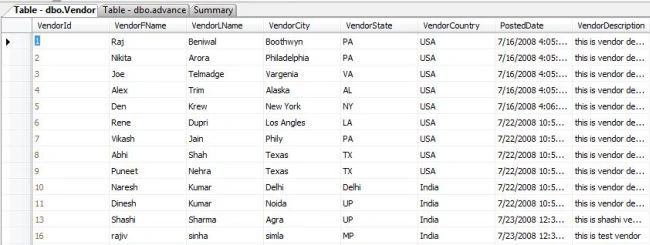
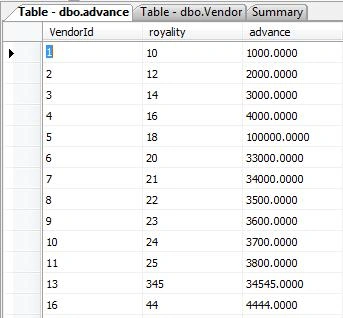
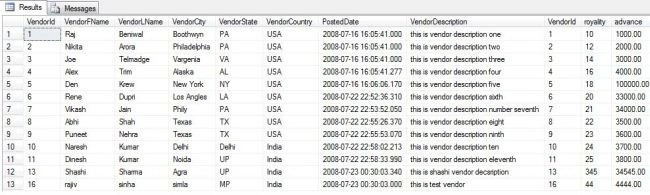
I have two tables - A vendor table and an Advance table. This is what my database tables and data look like. I will be using these tables in my samples below.
Vendor table
Advance table
Now we are going to apply joins on these tables and see the data results.
Inner Joins in SQL Server
An inner join requires each record in the two joined tables to have a matching record. An inner join essentially combines the records from two tables (A and B) based on a given join predicate. The result of the join can be defined as the outcome of first taking the Cartesian product (or cross-join) of all records in the tables (combining every record in table A with every record in table B) - then returning all records which satisfy the join predicate.
Actual SQL implementations will normally use other approaches where possible, since computing the Cartesian product is not very efficient. This type of join occurs most commonly in applications and represents the default join type.
Explicit inner join
Use Vendor
GO

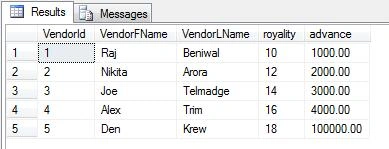
SELECT v.VendorId, v.VendorFName, v.VendorLName, a.royality, a.advance
FROM dbo.Vendor as v
INNER JOIN advance as a
ON v.VendorId = a.VendorId
WHERE v.VendorId <= 5
GO
Output
Implicit inner join
Use Vendor
GO

SELECT * FROM Vendor, advance
WHERE Vendor.VendorId = advance.VendorId AND Vendor.VendorId <= 5
GO
Output

Type of inner joins
1. Equi-Join
An equi-join, also known as an equijoin, is a specific type of comparator-based join, or theta join that uses only equality comparisons in the join-predicate. Using other comparison operators (such as <) disqualifies a join as an equi-join. The query shown above has already provided an example of an equijoin:
Example
Use Vendor
SELECT * FROM Vendor INNER JOIN advance
ON Vendor.VendorId = advance.VendorId
2. Natural Join
A natural join offers a further specialization of equi-joins. The join predicate arises implicitly by comparing all columns in both tables that have the same column name in the joined tables. The resulting joined table contains only one column for each pair of equally-named columns.
Example
Use Vendor
GO

SELECT * FROM Vendor NATURAL JOIN advance
GO
3. Cross Join
A cross joins, Cartesian join, or product provides the foundation upon which all types of inner joins operate. A cross-join returns the Cartesian product of the sets of records from the two joined tables. Thus, it equates to an inner join where the join-condition always evaluates to True or the join-condition is absent in the statement.
Example
Use Vendor
SELECT * FROM Vendor CROSS JOIN advance
GO

Use Vendor
GO

SELECT * FROM Vendor, advance
GO
Outer Joins
An outer join retrieves all rows that satisfy the join condition plus unmatched rows in one or both tables. In most cases, you use the equal operator to retrieve rows with matching columns. However, you can also use any of the other comparison operators. When a row with unmatched columns has been retrieved any columns from the other table that are included in the result are given null values.
- Note1- The OUTER keyword is optional and typically omitted
- Note 2- You can also code left outer joins and right outer joins using the implicit syntax.
Three types of outer joins.
1. Left Outer Join
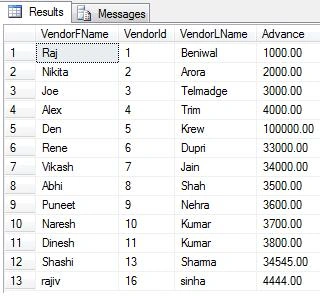
The result of a left outer join (or simply left join) for tables A and B always contains all records of the "left" table (A), even if the join condition does not find any matching record in the "right" table (B). This means that if the ON clause matches 0 (zero) records in B, the join will still return a row in the result but with NULL in each column from B. This means that a left outer join returns all the values from the left table, plus matched values from the right table (or NULL in case of no matching join predicate).
Example
Use Vendor
GO

SELECT VendorFName, Vendor.VendorId, VendorLName, Advance
FROM Vendor LEFT JOIN advance
ON Vendor.VendorId = advance.VendorId
GO
Output
2. Right Outer Join
A right outer join (or right join) closely resembles a left outer join, except with the tables reversed. Every record from the "right" table (B) will appear in the joined table at least once. If no matching row from the "left" table (A) exists, NULL will appear in columns from A for those records that have no match in A.
Example
Use Vendor
GO

SELECT VendorFName, advance.VendorId, VendorLName, Advance
FROM Vendor RIGHT JOIN advance
ON Vendor.VendorId = advance.VendorId
GO
3. Full outer join
A full outer join combines the results of both left and right outer joins. The joined table will contain all records from both tables, and fill in NULLs for missing matches on either side.
Example
Use Vendor
GO

SELECT * FROM Vendor FULL OUTER JOIN advance
ON Vendor.VendorId = advance.VendorId
GO
Output
Conclusion
In this article, we learned about Joins in SQL Server with examples and different types of Joins in SQL Server.
Manav PandyaPosted Oct 2, 2016, 5:58 AM
Great
deva nathanPosted Nov 22, 2012, 4:15 AM
super qurey
naren prasathPosted May 10, 2011, 7:33 AM
hi raj!! this is naren from coimbatore working in s/w concern.i got big problem in joints.this lets to terminate me from office..but ur tutorial helps me lot to understand the concepts.thank very much...
Shrikant GuptaPosted Mar 3, 2011, 6:26 AM
very easly define thanks..
jyothsna tadikondaPosted Jan 21, 2011, 12:39 AM
Hi it's good but we need more examples individually.........
avinash guptaPosted Jan 19, 2011, 8:07 AM
ur explanation is good....
narkees banuPosted Dec 25, 2010, 5:45 AM
how can i add new field at the middle of the table via query
Donald AtsaamPosted Jul 26, 2010, 8:14 AM
Many thanks to the Author. This article gave me all I was looking for. Once again thanks. Donald Atsa'am
DZone TechPosted Jun 7, 2010, 12:16 AM
Is that possible to add primary key to a column after the table is created. In a procedure is that possible i can send only one value in that i have four values as parameters say for create procedure samp @name,@no,@subject as here is that i want the code can any one help me with this query
abhi vseditedPosted Jan 14, 2010, 8:29 PMEdited Jan 14, 2010, 8:30 PM
hi i have 2 tables on which i have done inner join on a copmanyseqno. ok in the result set i am getting values like this for companyseqno= 0 i have the values for adresscode and shippinginfo. and for companyseqno<>0 i dont have any values for the fields shipping info and addresscode. now i want the same values for shipping and addresscode for companyseqno<>0 same as companyseqno=0 for that i need to do some joins i think. i am not able to figure out how to append the values ..please help me
Saisrinivas polamuriPosted Sep 23, 2009, 10:13 AM
Hi Raj, This is very usefull and clear article, people who don't have technical background also easily understand. Thank you very much, keep posting.
Vijaya KadiyalaPosted Sep 7, 2009, 11:31 AM
Which version of SQL Server Supports Natural Join?????
G PPosted Jul 27, 2009, 11:40 AM
This is exactly what I was looking for. You give a simple explanation which is good for beginners. Books Online has great information, but it is too detailed for a beginner.
pandu sweetyPosted Jul 23, 2009, 10:40 PM
Hi, I have the problem with ,One database tables data transfering to other database tables.where the tables and procedures all structures are same. I have DB1 and DB2 Databases. In DB1->Table 1 table 2 tabl3 means upto 15 tables have . In DB2 - the above same Tables and same datatypes and structures. I need to transfer the DB1 Tables data to DB2 Tables. " I used the following command for shift table be table but ..it is failing. -SELECT * INTO DB2.dbo.RFmaster FROM ILS.db1.RFmaster INSERT INTO [DB2].[dbo].[Table1] (ItemID,Barcode, TagUID , ItemTitle , MediaTypeCode , BranchCode , BibliographicCode , BibliographicRef , SortingCode , LocationCode , Tagstatus, Volume ) SELECT * FROM DB1.dbo.Table1 Like that I have to do...... :My problem is to resolve this.....using by StoreProcedure concept only. Advance thanks for the best reply.
evenderz elsonPosted Jul 12, 2009, 1:56 PM
hey man thanks ya ... this stuff is a real good one..
Kalyan BandarupalliPosted May 12, 2009, 5:08 PM
More about sql server joins can be read here Joins in SQL server
Arun GopalPosted Mar 31, 2009, 9:58 AM
Hi Rajkumar, This is Arunagiri, It is one of the best site for Joins. and it have very good examples. It is very useful one. Thanks G Arunagiri
Rahul Kumar SaxenaPosted Nov 6, 2008, 4:07 AM
Good Job buddy Keep it up knowledgable post ....