

Twitter Bootstrap provides built-in CSS that makes it very quick and easy to add clean and functional interface elements to your page. In this article we use some built-in Twitter Bootstrap CSS class to make Forms layout.
What Bootstrap is
Twitter Bootstrap was created by two guys at Twitter who wanted to speed up (bootstrap) their workload and code. The Bootstrap framework is used to develop front-facing web applications and sites. When we work on the project there are many things that are required in nearly every project. For example a Grid, Tables, Forms, Buttons and so on. These are the common requirements of any project. With these you can get a web project up and running quickly and easily. The Bootstrap framework provides you all those components. The entire framework is module based, you can customize it with your own bit of CSS. It also provides JavaScript plugins for things like tooltips, popovers, modals and more.
To read more see Bootstrap.
Include with HTML
Now to include them in the project. So let’s imagine we have a blank HTML file that goes something like the following:
HTML file
<!DOCTYPE HTML PUBLIC "-//W3C//DTD HTML 4.0 Transitional//EN">
<html>
<head>
<title></title>
</head>
<body>
</body>
</html>
Now we need to add a reference to the bootstrap CSS file and JavaScrit file with the HTML file as in the following:
<!DOCTYPE HTML PUBLIC "-//W3C//DTD HTML 4.0 Transitional//EN">
<html>
<head>
<title></title>
<script src="Scripts/jquery-1.4.1.min.js" type="text/javascript"></script>
<link href="Bootstrap/css/bootstrap.css" rel="stylesheet" type="text/css" />
<script src="Bootstrap/js/bootstrap.min.js" type="text/javascript"></script>
</head>
<body>
</body>
</html>
Note: Also don’t forget to include jQuery if you’ll be using Bootstraps JS plugins.
The following code defines the simple forms. The HTML file looks as in the following:
Creating Forms with Twitter Bootstrap
To make the forms more attractive using Bootstrap, open up the bootstrap.css file and check out the following Bootstrap CSS class.
-
Vertical Form (default form layout)
-
Horizontal Form
-
Inline Form
1. Using default form layout
Now first we use the form tag with label and TextBox. The HTML file looks such as in the following:
<!DOCTYPE HTML PUBLIC "-//W3C//DTD HTML 4.0 Transitional//EN">
<html>
<head>
<title></title>
<link href="Bootstrap/css/bootstrap.css" rel="stylesheet" type="text/css" />
<script src="dist/js/bootstrap.js" type="text/javascript"></script>
</head>
<body>
<form>
<div>
<label for="inputUserName">UserName</label>
<input type="email" id="inputEmail" placeholder="UserName">
</div>
<div >
<label for="inputPassword">Password</label>
<input type="password" id="inputPassword" placeholder="Password">
</div>
<div class="checkbox">
<label><input type="checkbox"> Remember me</label>
</div>
<button type="submit">Login</button>
</form>
</body>
</html>
The HTML will render without Bootstrap as in the following:
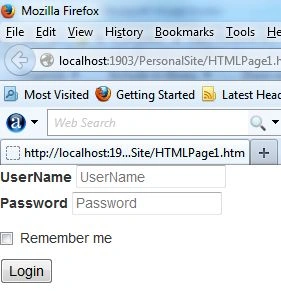
Now using some important BootStrap CSS class to make form attractive.
- form-group class
- form-control class
Using bootstrap CSS class="form-group"
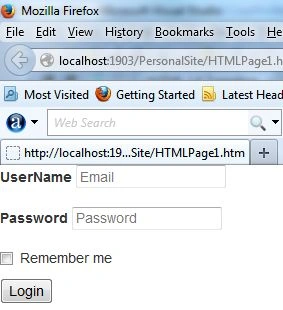
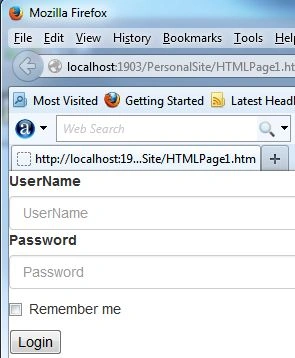
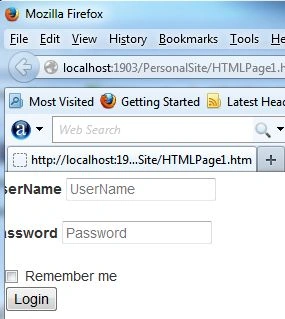
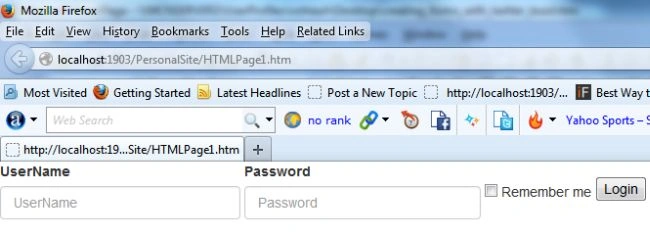
The form-group class is used to Wrap labels and controls in .form-group for optimum spacing on the form. You can do this by simply applying the Bootstrap's class form-group.
The HTML file looks as in the following:
<form>
<div class="form-group" >
<label for="inputUserName">UserName</label>
<input type="email" id="inputEmail" placeholder="UserName">
</div>
<div class="form-group">
<label for="inputPassword">Password</label>
<input type="password" id="inputPassword" placeholder="Password">
Alexandre PaivaPosted Jun 9, 2020, 1:16 PM
The simplest and most efficient approach for this instructions about form layout. Thank you.
Saravanakumar SekaranPosted Nov 29, 2014, 12:29 AM
nice article.
Priti KumariPosted May 14, 2014, 5:50 AM
I have download bootstrap library from this site http://getbootstrap.com/ and include all downloaded file in VS2010 after that i have add html page in this application and add reference of css in html file....but i am not able to build proper html login form....plz help me....if u have any idea.
Priti KumariPosted May 14, 2014, 5:42 AM
I am new in bootstrap css.........i am learn about bootstrap and i m start to build a simple login form from reference of some article .....but when i use placeholder attribute of input tag then its nt show proper result according to placeholder attribute.and its show error placeholder attribute not a valid attribute of input tag.why this error show........?same problem occur when i use form tag role attribute.This problem occur when some supporting file missing but i dont knw which file missing. plz help me....
Oguzhan TasPosted Mar 22, 2014, 2:36 AM
Good article
Mahesh ChandPosted Mar 21, 2014, 8:54 AM
Good to know, Rohtash.