

Here, you will see how to perform insert, update, or delete operations on a target table based on the results of a join with a source table. Using the Merge statement you can easily perform the operations insert, update, and delete logic to handle criteria for maintaining a table. The Merge statement is also used to minimize the code in comparison to stored procedures. The MERGE statement handles all the joining of the source and target. So let's take a look at a practical example. The example is developed in SQL Server 2012 using the SQL Server Management Studio.
The following is a sample of how to use the merge statement with source and target tables:
MERGE [INTO] <target table>
USING <source table>
ON <join/merge predicate> (semantics similar to outer join)
WHEN MATCHED <statement to run when match found in target>
WHEN [TARGET] NOT MATCHED <statement to run when no match found in target>
In the preceding merge statement, there are two tables, one is the source table the other one is the target table. You will perform updates or inserts to a target table based on a source table.
Source Table - The source table will contain the records you either want to insert or update.
Target table - The target table will be the table where the inserts or updates will actually be performed.
Important points to remember while using the MERGE statement are:
- The merge statement must be terminated by a semicolon otherwise an error will occur.
- When there is a MATCH clause used along with some condition, it must be specified first amongst all other WHEN MATCH clauses.
Creating source table in SQL Server Database
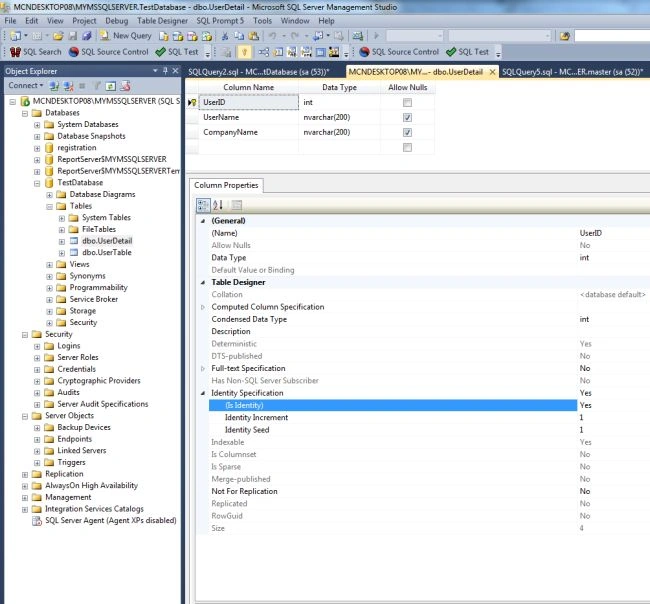
Now create a table named UserDetail with the columns UserID, UserName and CompanyName. Set the identity property=true for UserID. The table looks as in the following:
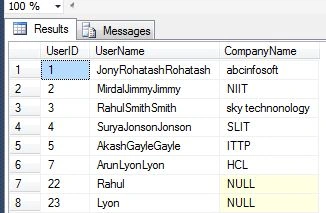
Now insert some values in this table. The table looks like this:
Creating target table in SQL Server Database
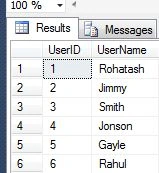
Now create a table named UserTable with the columns UserID, UserName. Set the identity property=true for UserID. The table looks as in the following:
The following is the MERGE statement:
MERGE Usertable AS T
USING userdetail AS S
ON s.UserID = T.UserID
WHEN MATCHED THEN
UPDATE SET T.UserName = S.UserName
WHEN NOT MATCHED THEN
INSERT (UserName)
VALUES (S.UserName
)
WHEN NOT MATCHED BY SOURCE THEN
DELETE;
Now using OUTPUT clause
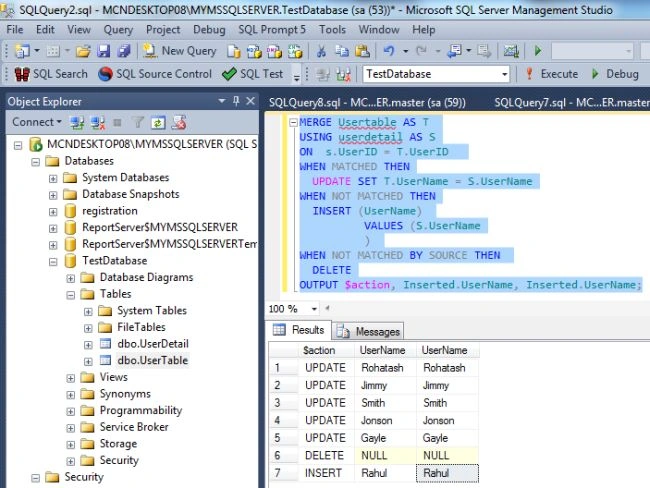
The OUTPUT clause itself first specifies the built-in $action variable, which returns one of three nvarchar(10) values INSERT, UPDATE, or DELETE. The variable is available only to the MERGE statement.
MERGE Usertable AS T
USING userdetail AS S
ON s.UserID = T.UserID
WHEN MATCHED THEN
UPDATE SET T.UserName = S.UserName
WHEN NOT MATCHED THEN
INSERT (UserName)
VALUES (S.UserName
)
WHEN NOT MATCHED BY SOURCE THEN
DELETE
OUTPUT $action, Inserted.UserName, Inserted.UserName;
Now Press F5 to see the result.
Join the conversation! Your thoughts help the community grow.