

The "like" operator is used in a "where" clause to search for a specified pattern of characters using the wildcard mechanism in a column. Wildcard characters make the "like" operator more flexible than using = and != (Not Equal To) string comparison operators. To search for a character string using one or more wildcard characters in a LIKE query, simply include the wildcards in a string literal along with the portion of the string. So let's take a look at a practical example of how to use a like operator to search in SQL Server. The example is developed in SQL Server 2012 using the SQL Server Management Studio.
Wildcard Characters
There are four types of wildcard characters in SQL Server:
- Percent sign (%)
- Underscore (_)
- Bracket ([])
- Caret (^)
Creating a Table in SQL Server
The table looks as in the following figure:
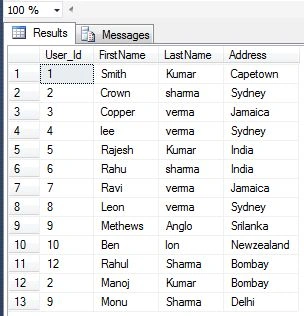
Now we perform searching on the above table using wildcard characters.
Like with Percent sign (%)
It is used to search any string of zero or more characters.
- SELECT * FROM UserDetail WHERE FirstName LIKE 'ra%' -- return all columns from UserDetail table where FirstName name start with 'ra'
- SELECT * FROM UserDetail WHERE FirstName LIKE '%n' -- return all columns from UserDetail table where FirstName name End with 'n'
- SELECT * FROM UserDetail WHERE FirstName LIKE '%an%'-- return all columns from UserDetail table where FirstName name have the letters End with 'an'
The result table will show the following information:

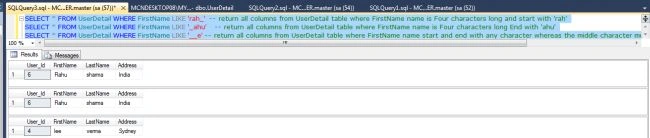
Like with Underscore (_)
It is used to search for a single character.
Join the conversation! Your thoughts help the community grow.