Introduction
AngularJS the way I learned, I thought to share with the audience who are searching for learning AngularJS in a simplified way. This article is for them.
Here's the flow of this article which we will get into step by step. Firstly, we will pick with what & why.
- What is AngularJS?
- Why named AngularJS?
- Why another JavaScript framework? JQuery VS Angular.
- We will differentiate them with an example.
- Download & Install AngularJS Library in Visual Studio 2015.
- Start AngularJS with Visual Studio.
- We will submit a form with AngularJS.
- About Form State
- Send form data to MVC Controller.
- Make URL (# free) in AngularJS.
Ok, let's get started. Before we focus on any topic let's know what is AngularJS.

What is AngularJS
AngularJS is a client-side JavaScript MVC-Based framework. It is Open source, supported & maintained by Google. AngularJS as “
Angular” or “
Angular.js” was initially released in 2009, which goal to enhanced the development process and testing.
Why named AngularJS
We know HTML that is contained (eg: <html>) with angle brackets(<>) thus the name[according to
FAQ] came "
Angular". AngularJS uses directives like ng-app, ng-model that prefixed with "ng"(base directive) which bring to mind "
Angular".
Why another JavaScript framework
Both are purposed to client-side scripting, but AngularJS simply offers more features and advantages. As we know that AngularJS is MVC-Based framework which is modular and reusable.
Here's an overview of both:
AngularJS
- Google supported & maintained open source JavaScript MVC framework.
- Smart Data-binding
- Use MVC design pattern.
- Form Validations
- Supports routing (Single Page Application).
- Uses Dependency Injection(DI).
- Easy to Unit test
- Modular & reusable architecture
- REST-friendly
JQuery
- Lightweight open source JavaScript framework
- Great tool for manipulating and controlling DOM elements
Example:
AngularJS
- <body ng-app>
- First Name: <input type="text"ng-model="fname"/><br/>
- Last Name: <input type="text"ng-model="lname"/><br/>
- Result: {{fname+''+lname}}
- </body>
- </html>
- <script src="Scripts/angular.min.js"></script>
JQuery
- <body>
- First Name: <inputtype="text"id="txtfName"/><br/>
- Last Name: <inputtype="text"id="txtlName"/><br/>
- Result: <labelid="lblName"></label>
- </body>
- </html>
- <script src="Scripts/jquery-2.2.0.min.js"></script>
- <script type="text/javascript">
- $(document).ready(function () {
- $(function () {
- $('#txtfName').keyup(function () {
- $('#lblName').text($('#txtfName').val() + ' ' + $('#txtlName').val());
- });
-
- $('#txtlName').keyup(function () {
- $('#lblName').text($('#txtfName').val() + ' ' + $('#txtlName').val());
- });
- });
- });
- </script>
Isn’t it cool? The main thing is both the results are same.
Ok, let’s get started with AngularJS: First test with a simple website in Visual Studio 2015.
Download & Install AngularJS Library in Visual Studio 2015
Go to AngularJS website and
download.

Click on the Download link to download the latest version of AngularJS library.
AngularJS with Visual Studio
Let’s open Visual Studio 2015(IDE) click: File, New, Project and then the new window will appear like the following image:

Figure 1.0
Click on ASP.NET Web Application, rename the application and hit “ok” button at bottom right. Choose empty template in next window and click on “ok” button. It will take a while to load a sample empty project.
Now the first thing we need to do is register AngularJS.Core in this application. We need to get reference from NuGet.
To do that right click on project name and click on “
Manage NuGet Packages” like the following image.
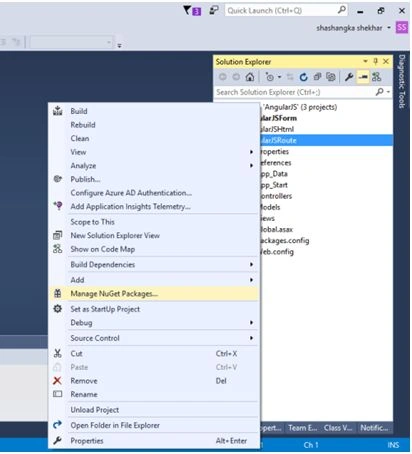
Figure 1.1
And in next window browse searching “Angular” and install the updated version of AngularJS.Core like the following image:
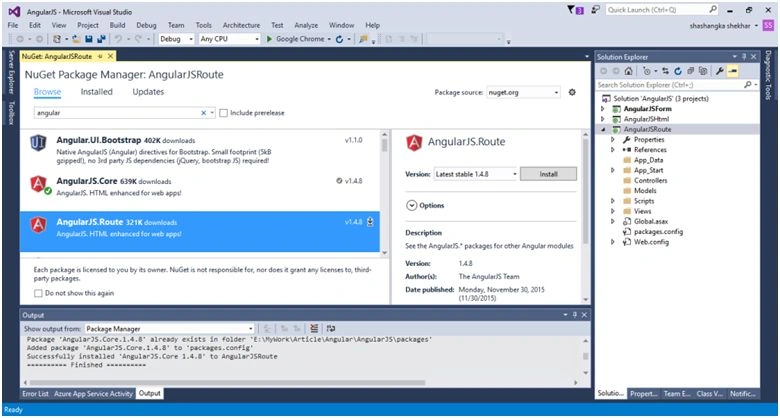
Figure 1.2
Or click on Tools, NuGet Package Manager, then Package Manager Console and write Install-Package AngularJS.Core, also we need to add jQuery library in our project like below:

Figure 1.3
Our Installation process is done. Now test it with our previous AngularJS code in comparison with jQuery section.
Let’s add a new HTML page and name it “
Index”.
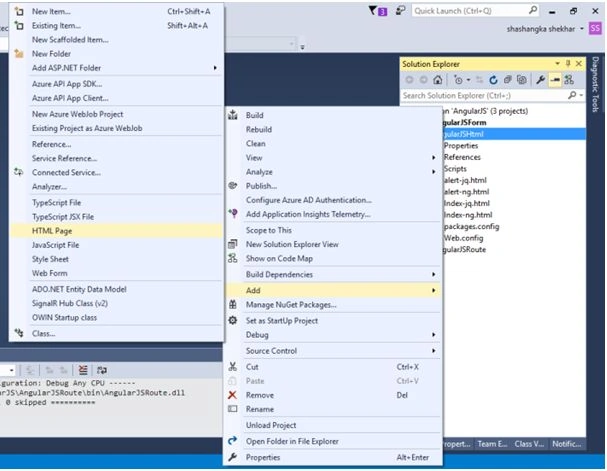
Figure 1.4
Code in Index.html
- <body ng-app> First Name:
- <input type="text" ng-model="fname" />
- <br/> Last Name:
- <input type="text" ng-model="lname" />
- <br/> Result: {{fname+''+lname}} </body>
-
- </html>
- <script src="Scripts/angular.min.js">
- </script>
Notice that the above example is a simple HTML code, but there are some new unknown attributes and braces.
The new attributes "
ng-app", "
ng-model" are AngularJS directives, and the "
{{}}" is expression. Later we will discuss about those.
Well, what is AngularJS directives? AngularJS directives extends the HTML attributes with the prefix "
ng".
Know more about AngularJS directives
here.
Output
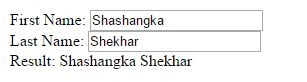 Form with AngularJS
Let’s add a new MVC empty project to work with form and later we will send the data to Controller. To do that right click on the existing solution, click: File, New, then Project and name it “
AngularJSForm“.
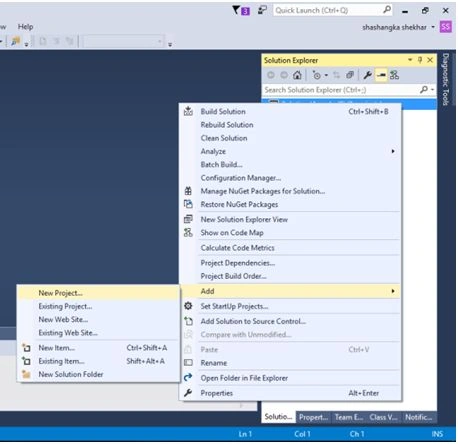
Figure 1.5
Now register AngularJS library and others repeating Fig:1.1 – 1.3.
In the controller folder let’s create HomeController class and generate View.

Figure 1.6
Let’s goto Views, Shared, then _layout.cshtml and add Module, this is the start point where application should be bootstrapped.
Form:
- <div id="content" ng-controller="CustomerController">
- <span ng-show="isViewLoading" class="viewLoading">
- <img src="~/Content/images/ng-loader.gif" /> loading... </span>
- <div ng-class="result">{{message}}</div>
- <hr/>
- <form ng-submit="submitForm()" name="frmCustomer">
- <div>
- <label for="email">Customer Name</label>
- <input type="text" ng-model="cust.CustName" name="cname" placeholder="Enter your name" requiredng-minlength="4" ng-maxlength="14" />
- <span class="error" ng-show="(frmCustomer.$dirty||submitted)&&frmCustomer.cname.$error.required">Customer name is Required</span>
- <span class="error" ng-show="frmCustomer.$dirty&&frmCustomer.cname.$error.minlength">Minimum length required is 5</span>
- <span class="error" ng-show="frmCustomer.$dirty&&frmCustomer.cname.$error.maxlength">Minimum length required is 15</span>
- </div>
- <div>
- <label for="email">E-mail address</label>
- <input type="email" ng-model="cust.CustEmail" name="email" placeholder="Enter your Email" required/>
- <span class="error" ng-show="(frmCustomer.$dirty||submitted)&&frmCustomer.email.$error.required">EmailId is Required!</span>
- <span class="error" ng-show="(frmCustomer.$dirty||submitted)&&frmCustomer.$error.email">Invalid EmailId!</span>
- </div>
- <div>
- <input type="submit" value="Submit" ng-disabled="myForm.$invalid">
- </div>
- </form>
- </div>
Script:
- @section JavaScript
- { < script src = "~/Scripts/jquery-1.10.2.min.js" > < /script> < script src = "~/Scripts/angular.min.js" > < /script> < scriptsrc = "~/Scripts/angular-route.min.js" > < /script> < script > angular.module('myFormApp', []).
- controller('CustomerController', function ($scope, $http, $location, $window)
- {
- $scope.cust = {};
- $scope.message = '';
- $scope.result = "color-default";
- $scope.isViewLoading = false;
-
- $scope.submitForm = function ()
- {
- $scope.isViewLoading = true;
- console.log('Form is submitted with:', $scope.cust);
-
- $http(
- {
- method: 'POST',
- url: '/Home/CreateCustomer',
- data: $scope.cust
- }).success(function (data, status, headers, config)
- {
- $scope.errors = [];
- if (data.success === true)
- {
- $scope.cust = {};
- $scope.message = 'Form data Submitted!';
- $scope.result = "color-green";
- $location.path(data.redirectUrl);
- $window.location.reload();
- }
- else
- {
- $scope.errors = data.errors;
- }
- }).error(function (data, status, headers, config)
- {
- $scope.errors = [];
- $scope.message = 'Unexpected Error while saving data!!';
- });
- $scope.isViewLoading = false;
- }
- }).config(function ($locationProvider)
- {
-
- $locationProvider.html5Mode(true);
- }); < /script>
- }
Form Style
- <style>
- #content label {
- width: 150px;
- }
-
- #content input[type=submit] {
- margin-left: 154px;
- width: 120px;
- padding: 5px15px;
- background: #ff6a00;
- border: 0none;
- cursor: pointer;
- color: #fff;
- }
-
- .error {
- color: red;
- }
-
- .color-default {
- color: #000;
- }
-
- .color-red {
- color: red;
- }
-
- .color-green {
- color: green;
- }
-
- #content input.ng-dirty.ng-invalid {
- border: 1pxsolidred;
- background-color: #fff4f4;
- }
- </style>
Output
 Code Explanation
In our form example we have some new attributes "
ng-app, ng-controller, ng-show, ng-class, ng-submit, ng-model, ng-disabled". we have seen “ng-model ” use in our first example.
Those all are
AngularJS directives.
Let's discuss with the AngularJS application start point, the
Module. What is
module in AngularJS?
Module: Module is nothing but a container of the different parts of an application such as controller, service, filters, directives, factories, etc.
Module defines where the application should be bootstrapped.
angular.module('myFormApp', [])
This is a module method which has two parameters.
- The first parameter is module name, that reference to "myFormApp" module in <body ng-app="myFormApp"> which is same as specified by ng-app directive. This is what bootstraps the app using our module.
- The second parameter is an empty[] array in "angular.module(‘myFormApp’, [])" method. This array is the list of other dependent modules.
Next focus to JavascriptController(CustomerController)
JavaScript Controller
- .controller('CustomerController', function ($scope) {
-
- });
Controller is a JavaScript function in AngularJS. The ng-controller directive in
<div id=”content” ng-controller=”CustomerController”> defines the application controller.
Using
$scope object the controller control the application behavior. Well then, what is
$scope?
$scope: Scope is an "object" that "binds together" to DOM element where controller relay. Simply, scope connect between the HTML View & the JavaScript Controller.
HTML View:
- <div ng-class="result">{{message}}</div>
JavaScript Controller:
- .controller('CustomerController', function ($scope) {
- $scope.message = 'Show in view';
- })
Let's discuss about the validations of the form.
Validations
Validations check that the information that users enter is valid or not. AngularJS also have form validation features like JQuery/JQueryUnobtrusive Validation. Here we will overview some of them.
Know more about Custom Validation
here.
Required Field Validator: To validate users empty input with AngularJS we used HTML5 attribute "
required" or we can use
ng-required="true" .
- <inputtype="email"ng-model="cust.CustEmail"name="email"required/>
Validation Message:
- <spanclass="error"ng-show="(frmCustomer.$dirty||submitted)&&frmCustomer.email.$error.required">EmailId is Required!</span>
Range Validator: To validate user input by range with AngularJS we used HTML5 attribute "
ng-minlength, ng-maxlength".
- <inputtype="text"ng-model="cust.CustName"name="cname"requiredng-minlength="4"ng-maxlength="14"/>
Validation Message:
- <spanclass="error"ng-show="frmCustomer.$dirty&&frmCustomer.cname.$error.minlength">Minimum length required is 5</span>
-
- <spanclass="error"ng-show="frmCustomer.$dirty&&frmCustomer.cname.$error.maxlength">Minimum length required is 15</span>
Type Validation: To validate the email type we can use this in AngularJS.
- <spanclass="error"ng-show="(frmCustomer.$dirty||submitted)&&frmCustomer.$error.email">Invalid EmailId!</span>
Updating the Form State
AngularJS itself has some properties to updating the state of the form. They are true or false.
- $ error: Object contains all the validation attributes applied to the specified element.
- $ pristine: True if the user has not interacted with control yet else returns false.
- $ valid: True if the model is valid
- $ invalid: True if the model is invalid
- $ dirty: True if user changed the value of model at least once
- $ touched: True if the user has tabbed out from the control.
- $ untouched: True if the user has not tabbed out from the control.
Send Form data to MVC Controller
To submit the form to MVC Controller we need to add a new method in our HomeController and we need to modify our CustomerController in script section.
In HomeController we need to add the following method.
- [HttpPost]
- public JsonResultCreateCustomer(Customer model)
- {
- if (ModelState.IsValid)
- {
-
- returnJson(new
- {
- success = true
- });
- }
- return Json(new
- {
- success = false,
- errors = ModelState.Keys.SelectMany(i => ModelState[i].Errors).Select(m => m.ErrorMessage).ToArray()
- });
- }
Let's modify our JavascriptCustomerController.
- angular.module('myFormApp', []).
- controller('CustomerController', function ($scope, $http)
- {
- $scope.cust = {};
- $scope.message = '';
- $scope.result = "color-default";
- $scope.isViewLoading = false;
-
- $scope.submitForm = function ()
- {
- $scope.isViewLoading = true;
- console.log('Form is submitted with:', $scope.cust);
-
- $http(
- {
- method: 'POST',
- url: '/Home/CreateCustomer',
- data: $scope.cust
- }).success(function (data, status, headers, config)
- {
- $scope.errors = [];
- if (data.success === true)
- {
- $scope.cust = {};
- $scope.message = 'Form data Submitted!';
- $scope.result = "color-green";
- }
- else
- {
- $scope.errors = data.errors;
- }
- }).error(function (data, status, headers, config)
- {
- $scope.errors = [];
- $scope.message = 'Unexpected Error while saving data!!';
- });
- $scope.isViewLoading = false;
- }
- });
Let’s put a breakpoint on CreateCustomer() method in HomeController and run it, after submitting the form it’ll hit the breakpoint.

Figure 1.7
In debug mode we can see the model is populated with form data, which we can send it to database & save the data.
Output:

Output is same as before.
Code Explanation
In the above example of sending form data to Controller we have used $http service. Well then what are those?
- Service: AngularJS services are JavaScript functions to relate with the controller, model or custom directives. AngularJS also have other useful services like $interval, $window, $log. To know more about services click here.
- $http service: We can use $http service to send an AJAX request. In this example we have sent Http POST request to the remote server to submit the data.
Make URL HashTag(#) free in AngularJS
Next we will redirect to new URL after form submission using $location service. Using $location service AngularJS add ‘#’ to the url which prevent to redirect to a desired url.
Know more about $locationProvider
here.
To solve this by removing
‘#’ from URL we need to Inject $locationProvider in config() function of angular root module then set html5Mode() to true.
- .config(function ($locationProvider) {
- $locationProvider.html5Mode(true);
- });
In the script section we need to modify our CustomerController and add two new line of code which will indicate the path and redirect with full page reload.
- $location.path(data.redirectUrl);
- $window.location.reload();
Add base tag in head section(_Layout.cshtml) of master page/layout of application.
Finally CustomerController(Javascript):
- angular.module('myFormApp', []).
- controller('CustomerController', function ($scope, $http, $location, $window)
- {
- $scope.cust = {};
- $scope.message = '';
- $scope.result = "color-default";
- $scope.isViewLoading = false;
-
- $scope.submitForm = function ()
- {
- $scope.isViewLoading = true;
- console.log('Form is submitted with:', $scope.cust);
-
- $http(
- {
- method: 'POST',
- url: '/Home/CreateCustomer',
- data: $scope.cust
- }).success(function (data, status, headers, config)
- {
- $scope.errors = [];
- if (data.success === true)
- {
- $scope.cust = {};
- $scope.message = 'Form data Submitted!';
- $scope.result = "color-green";
- $location.path(data.redirectUrl);
- $window.location.reload();
- }
- else
- {
- $scope.errors = data.errors;
- }
- }).error(function (data, status, headers, config)
- {
- $scope.errors = [];
- $scope.message = 'Unexpected Error while saving data!!';
- });
- $scope.isViewLoading = false;
- }
- }).config(function ($locationProvider)
- {
-
- $locationProvider.html5Mode(true);
- });
Finally HomeController(MVC):
- public class HomeController: Controller
- {
-
- publicActionResult Index()
- {
- return View();
- }
- [HttpPost]
- public JsonResultCreateCustomer(Customer model)
- {
- if (ModelState.IsValid)
- {
-
- varRedirectUrl = Url.Action("About", "Home", new
- {
- area = ""
- });
- returnJson(new
- {
- success = true, redirectUrl = RedirectUrl
- });
- }
- returnJson(new
- {
- success = false,
- errors = ModelState.Keys.SelectMany(i => ModelState[i].Errors).Select(m => m.ErrorMessage).ToArray()
- });
- }
-
- public ActionResult About()
- {
- return View();
- }
- }
Output


Points of Interest
Next part we will create a sample application with AngularJS to perform CRUD operations with ASP.NET MVC.
Next part of this series:


Sougato DasPosted Jul 3, 2024, 7:17 AM
What is the password of .rar file ASP.NETMVC5withAngularJSPart1.part1.rar
Balasubramanian RPosted Mar 19, 2023, 11:45 AM
SetTimeout(function () { $window.location.reload(); }, 100);
Balasubramanian RPosted Mar 19, 2023, 11:35 AM
$window.location.reload(); is not working
lalit chaudharyPosted Jun 21, 2021, 6:23 AM
<label for="email">E-mail address</label> <label for="email">Customer Name</label> You used same label for both.
lalit chaudharyPosted Jun 21, 2021, 6:22 AM
<label for="email">Customer Name</label>
lalit chaudharyPosted Jun 21, 2021, 6:21 AM
<label for="email">Customer Name</label> cname
Raj GKPosted Mar 5, 2021, 11:02 AM
Your thought is great but you need to give full steps. You skipped some steps after "Figure 1.6 Let’s goto Views, Shared, then _layout.cshtml and add Module, this is the start point where application should be bootstrapped."
Dharmendra Kumar PanditPosted May 19, 2020, 10:30 AM
NIce.......
Rajni pathaniaPosted Dec 18, 2018, 4:34 AM
If possible please share crud operation in asp.net mvc with angular 7
sanjeev yadavPosted Sep 14, 2018, 2:16 AM
There is spelling mistake on the top of the page Lightweight ppen source JavaScript framework there may be open not ppen.
Patel SoniyaPosted Jul 31, 2018, 11:32 PM
Thanks .........
Syed SohelPosted Jul 26, 2018, 12:49 AM
Thanks Brother. You r great.
Ravi ShankarPosted Dec 22, 2017, 1:05 AM
After download, extracting there is some problem, and it says files are missing
Bilel JebaliPosted Jul 31, 2017, 9:51 AM
Great article thanks a lot .
McElie MMPosted Apr 26, 2017, 5:19 PM
Great thanks bro. I like style
Josh YatesPosted Apr 12, 2017, 1:31 PM
Great article. I appreciate your time in creating this short tutorial.
Shams RehmanPosted Jan 25, 2017, 11:52 PM
This crud operation is define with Entity Frame work i need with Ado.Net and please Explain Every method that how we can User Angular From the Start because at some point your answer is not cleared So i am still confused.But Thanks for this Example.
Sailaja TummuruPosted Dec 12, 2016, 9:44 PM
Great article, Shekhar. Easy to understand also
Parth DavePosted Oct 15, 2016, 9:48 AM
Thanks Man
Shamim UddinPosted Jul 30, 2016, 4:38 PM
Nice
Thiruppathi RPosted Jun 7, 2016, 10:14 AM
Great article for angularjs
Anuprita WayangankarPosted May 19, 2016, 3:59 AM
Nice Article ... Thanks for Sharing ...
Omprakash AmarwalPosted Jan 24, 2016, 11:46 AM
NICE
Santhakumar MunuswamyPosted Jan 23, 2016, 2:09 AM
Thanks for nice share
Prakash TripathiPosted Jan 22, 2016, 3:21 AM
Good one. I liked the code comparison of jQuery and angular in starting.
Ankit BansalPosted Jan 22, 2016, 12:54 AM
keep sharing..thanks
Humayun Kabir MamunPosted Jan 21, 2016, 11:59 PM
Nice...
Pankaj Kumar ChoudharyPosted Jan 21, 2016, 8:49 PM
Really Nice Work Sir..........
Muhammad Aqib ShehzadPosted Jan 21, 2016, 2:12 PM
nice article
Ankur MistryPosted Jan 21, 2016, 1:34 PM
Nice share