This article explains how to implement client-side validation in an ASP.NET MVC application. The validation implemented using jQuery and jQuery validation plug-in (jquery.validate.min.js and jquery.validate.unobtrusive.min.js).
In the server-side validation, the page must be submitted via a postback to be validated on the server and if the model data is not valid then the server sends a response back to the client with client-side validation, the input data is checked as soon as they are submitted, so there is no postback to the server and there is no page refresh.
When you are developing an MVC application in Visual Studio 2012 then the client-side becomes enabled by default, but you can easily enable or disable the writing of the following app setting code snippet in the web.config file.
- <configuration>
- <appSettings>
- <add key="ClientValidationEnabled" value="true" />
- <add key="UnobtrusiveJavaScriptEnabled" value="true" />
- </appSettings>
- </configuration>
The jQuery validation plug-in takes advantage of the Data Annotation attributes defined in the model, which means that you need to do very little to start using it. Let's create an Employee model (Employee.cs class file under the Models folder) that has two properties with Data annotation attributes.
- using System.ComponentModel.DataAnnotations;
- namespace ClientValidation.Models
- {
- public class Employee
- {
- [Required(ErrorMessage = "Name is Requirde")]
- public string Name { get; set; }
- [Required(ErrorMessage = "Email is Requirde")]
- [RegularExpression(@"^([a-zA-Z0-9_\-\.]+)@((\[[0-9]{1,3}" +
- @"\.[0-9]{1,3}\.[0-9]{1,3}\.)|(([a-zA-Z0-9\-]+\" +
- @".)+))([a-zA-Z]{2,4}|[0-9]{1,3})(\]?)$",
- ErrorMessage = "Email is not valid")]
- public string Email { get; set; }
- }
- }
After that you need to create the controller's action methods. These render views on the UI and bind a model with the view. So let's create a controller with two action methods that handle both request types (GET and POST respectively).
- using System.Web.Mvc;
- using ClientValidation.Models;
- namespace ClientValidation.Controllers
- {
- public class EmployeeController : Controller
- {
- public ActionResult Index()
- {
- return View();
- }
- [AcceptVerbs(HttpVerbs.Post)]
- public ActionResult Index(Employee model)
- {
- if (ModelState.IsValid)
- {
- ViewBag.Name = model.Name;
- ViewBag.Email = model.Email;
- }
- return View(model);
- }
- }
- }
Now create a view by right-clicking on the action method then click on "Add View" as:
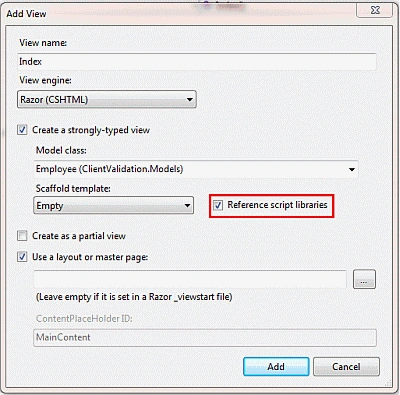 Figure 1.1 :
 Add New View Screen
Here I checked "Reference script libraries"which means Visual Studio adds these references automatically. Visual Studio adds the following code snippet to the bottom of the view.
- @section Scripts {
- @Scripts.Render("~/bundles/jqueryval")
- }
-
- Now click on the "Add" button and the view is created as in the following code snippet:
-
- @model ClientValidation.Models.Employee
- @{
- ViewBag.Title = "Index";
- }
- @if (ViewData.ModelState.IsValid)
- {
- if(@ViewBag.Name != null)
- {
- <b>
- Name : @ViewBag.Name<br />
- Email : @ViewBag.Email
- </b>
- }
- }
- @using (Html.BeginForm()) {
- @Html.ValidationSummary(true)
- <fieldset>
- <legend>Employee</legend>
- <div class="editor-label">
- @Html.LabelFor(model => model.Name)
- </div>
- <div class="editor-field">
- @Html.EditorFor(model => model.Name)
- @Html.ValidationMessageFor(model => model.Name)
- </div>
- <div class="editor-label">
- @Html.LabelFor(model => model.Email)
- </div>
- <div class="editor-field">
- @Html.EditorFor(model => model.Email)
- @Html.ValidationMessageFor(model => model.Email)
- </div>
- <p>
- <input type="submit" value="Create" />
- </p>
- </fieldset>
- }
- @section Scripts {
- @Scripts.Render("~/bundles/jqueryval")
- }
Let's run the application and test the following scenario.
- When all fields are empty:
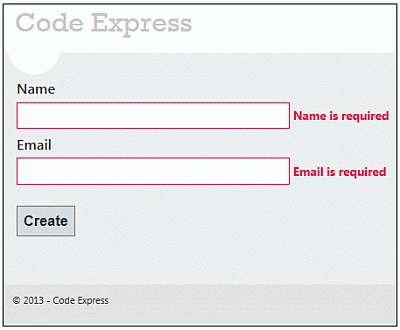
Figure 1.2: Validation Message when both fields are empty
- When the Name field is empty but Email is not valid:
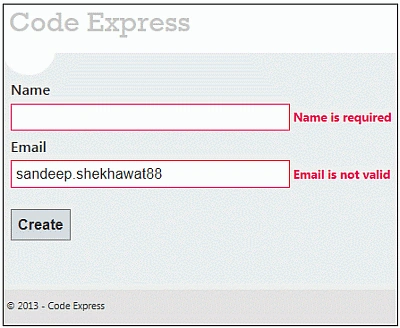
Figure 1.3 : Validation Message when Email is not valid
- When both fields are valid:
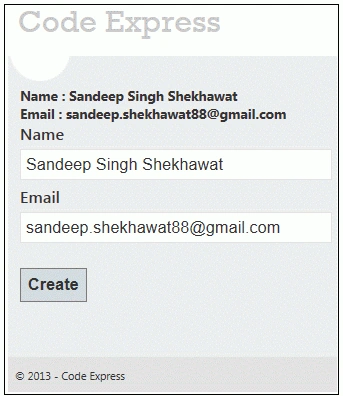
Figure 1.4 All fields are valid


Vaidehi YelnarePosted Apr 22, 2018, 11:48 AM
Hello I tried this example and I am stuck with this since 2 days.The comment is coming but it is not dissappearing once fields in the textboxes are typed . Please help