

This article shows how to create an employee designation by role and by city. In this form select the first Employee's location and after login. Also Login User name is stored in the session and displayed in a redirect page.
Step 1: Database Side
In this section create an Employee Designation, City and a User login table.
Table 1: Designation
The following creates the Designation table.
- create table Designation
- (
- Designationid int identity(1,1) primary key,
- Designation varchar(30)
- )
Table 2: City
The following creates the Usercity table.
- create table Usercity
- (
- cityid int identity(1,1) primary key,
- city varchar(20)
- )
Table 3: User Login
The following creates the UserLogin table.
- create table UserLogin
- (
- UserId int identity(1,1) primary key,
- UserName varchar(20),
- Password varchar(20),
- Designationid int foreign key references Designation(Designationid),
- cityid int foreign key references UserCity(cityid)
- )
Step 2: Create SQL Procedure
Now also create two select procedures in SQL as in the following.
Step 1: Select City
The following will select a City.
- create procedure sp_GetCity
- as
- begin
- set nocount on;
- select cityid, city from Usercity
- End
Step 2: Select User Login
The following will select a User Login.
- create procedure sp_CheckUser
- as
- begin
- set nocount on;
- select UserId,UserName,Password,Designationid,cityid from UserLogin
- End
- Go to Visual Studio.
- Add a new project.
- Right-click on the project in the Solution Explorer.
- Add a new item.
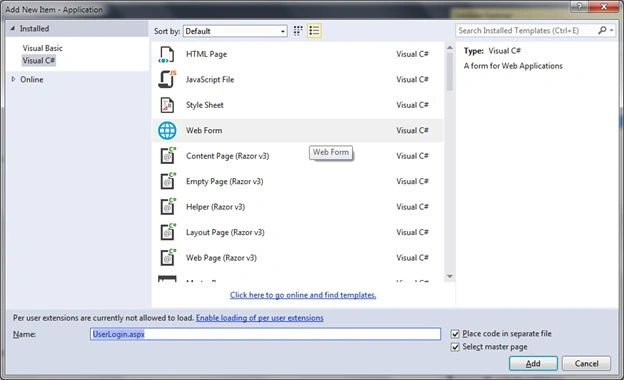
Figure 1: Add Web Form
Step 4: UI Design Side
In this page design side add a TextBox control, dropdown list and button control.
UI Design Code
- <%@ Page Title="" Language="C#" MasterPageFile="~/Master/Master.master" AutoEventWireup="true" CodeFile="UserLogin.aspx.cs" Inherits="UI_UserLogin" %>
- <asp:Content ID="Content1" ContentPlaceHolderID="head" Runat="Server">
- </asp:Content>
- <asp:Content ID="Content2" ContentPlaceHolderID="ContentPlaceHolder1" Runat="Server">
- <link href="../Styles/site.css" rel="stylesheet" />
- <div class="page">
- <h1 class="header" style="color: #FFFFFF"> Role Based Login Form Example</h1>
- <div>
- <div class="login">
- <fieldset><legend>User Login</legend>
- <asp:Table runat="server" >
- <asp:TableRow>
- <asp:TableCell>City</asp:TableCell><asp:TableCell><asp:DropDownList runat="server" ID="ddlcity" ></asp:DropDownList></asp:TableCell>
- </asp:TableRow>
- <asp:TableRow>
- <asp:TableCell>UserName</asp:TableCell><asp:TableCell><asp:TextBox runat="server" ID="txtUser"></asp:TextBox></asp:TableCell>
- </asp:TableRow>
- <asp:TableRow>
- <asp:TableCell>Password</asp:TableCell><asp:TableCell><asp:TextBox runat="server" ID="txtpassword" TextMode="Password"></asp:TextBox></asp:TableCell>
- </asp:TableRow>
- <asp:TableRow>
- <asp:TableCell></asp:TableCell><asp:TableCell><asp:Button runat="server" ID="btnlogin" Text="Login" OnClick="btnlogin_Click" /></asp:TableCell>
- </asp:TableRow>
- </asp:Table>
- </fieldset>
- </div>
- </div>
- </div>
- </asp:Content>

Figure 2: Login Design
Also add another something from which to redirect after the user login.

Figure 3: Add Role form
Step 5: Database Table
Now your table's records are filled in as in the following:
- Designation Table:
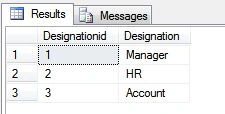
Figure 4: Designation Data
- City Table:
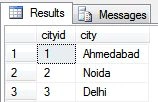
Figure 5: City Data
- User Login Table:

Figure 6: User name and Password
Step 6: UI Code
- Define a database connection.
Maintain a database connection string in the project's web.config file as in the following:
- <connectionStrings>
- <add name="connstring" connectionString="Data Source=RAKESH-PC;Initial Catalog=SqlServerTech;User ID=sa;Password=password" providerName="System.Data.SqlClient"/>
- </connectionStrings>
- Code.
In this section first show the bound City dropdown list from the database using the preceding select city procedure. Then provide the login code for a login button event.
Now your code is ready to run.- using System;
- using System.Collections.Generic;
- using System.Linq;
- using System.Web;
- using System.Web.UI;
- using System.Web.UI.WebControls;
- using System.Configuration;
- using System.Data;
- using System.Data.SqlClient;
- public partial class UI_UserLogin : System.Web.UI.Page
- {
- string connection = ConfigurationManager.ConnectionStrings["connstring"].ConnectionString;
- protected void Page_Load(object sender, EventArgs e)
- {
- BindCity();
- }
- public void BindCity()
- {
- using (SqlConnection con = new SqlConnection(connection))
- {
- using (SqlCommand cmd = new SqlCommand("sp_GetCity", con))
- {
- cmd.CommandType = CommandType.StoredProcedure;
- SqlDataAdapter dt = new SqlDataAdapter(cmd);
- DataSet dst = new DataSet();
- dt.Fill(dst);
- ddlcity.DataSource = dst.Tables[0];
- ddlcity.DataTextField = "city";
- ddlcity.DataValueField = "cityid";
- ddlcity.DataBind();
- ddlcity.Items.Insert(0, new ListItem("---Select City---"));
- }
- }
- }
- protected void btnlogin_Click(object sender, EventArgs e)
- {
- int RowCount;
- string User, Password, Cityid;
- using (SqlConnection con = new SqlConnection(connection))
- {
- using (SqlCommand cmd = new SqlCommand("sp_CheckUser", con))
- {
- using (SqlDataAdapter da = new SqlDataAdapter(cmd.CommandText, con))
- {
- DataTable dt = new DataTable();
- da.Fill(dt);
- RowCount = dt.Rows.Count;
- for (int i = 0; i < RowCount; i++)
- {
- User = dt.Rows[i]["UserName"].ToString();
- Password = dt.Rows[i]["Password"].ToString();
- Cityid = dt.Rows[i]["cityid"].ToString();
- if (User == txtUser.Text && Password == txtpassword.Text )
- {
- Session["UserName"] = User;
- if (dt.Rows[i]["Designationid"].ToString() == "1")
- Response.Redirect("~/Roles/Manager.aspx");
- else if (dt.Rows[i]["Designationid"].ToString() == "2")
- Response.Redirect("~/Roles/HR.aspx");
- else if (dt.Rows[i]["Designationid"].ToString() == "3")
- Response.Redirect("~/Roles/Account.aspx");
- }
- else
- {
- lblmsg.Text = "UserName or Password Not Correct.....!";
- }
- }
- }
- }
- }
- }
- }
Step 7: Account.aspx Form
UI Design
- <%@ Page Title="" Language="C#" MasterPageFile="~/Master/Master.master" AutoEventWireup="true" CodeFile="Account.aspx.cs" Inherits="Roles_Account" %>
- <asp:Content ID="Content1" ContentPlaceHolderID="head" Runat="Server">
- </asp:Content>
- <asp:Content ID="Content2" ContentPlaceHolderID="ContentPlaceHolder1" Runat="Server">
- <link href="../Styles/site.css" rel="stylesheet" />
- <div class="page">
- <h1 class="title">Welcome to Account Page...........!!</h1>
- <span class="title"><asp:Label ID="lblName" runat="server" ></asp:Label></span>
- </div>
- </asp:Content>
- using System;
- using System.Collections.Generic;
- using System.Linq;
- using System.Web;
- using System.Web.UI;
- using System.Web.UI.WebControls;
- public partial class Roles_Account : System.Web.UI.Page
- {
- protected void Page_Load(object sender, EventArgs e)
- {
- lblName.Text = "<b><font color=Brown>" + "WELCOME: " + "</font>" + "<b><font color=white>" + Session["UserName"] + "</font>";
- }
- }
UI Design
- <%@ Page Title="" Language="C#" MasterPageFile="~/Master/Master.master" AutoEventWireup="true" CodeFile="HR.aspx.cs" Inherits="Roles_HR" %>
- <asp:Content ID="Content1" ContentPlaceHolderID="head" Runat="Server">
- </asp:Content>
- <asp:Content ID="Content2" ContentPlaceHolderID="ContentPlaceHolder1" Runat="Server">
- <link href="../Styles/site.css" rel="stylesheet" />
- <div class="page">
- <h1 class="title">Welcome to HR Page...........!!</h1>
- <span class="title"><asp:Label ID="lblName" runat="server" ></asp:Label></span>
- </div>
- </asp:Content>
- using System;
- using System.Collections.Generic;
- using System.Linq;
- using System.Web;
- using System.Web.UI;
- using System.Web.UI.WebControls;
- public partial class Roles_HR : System.Web.UI.Page
- {
- protected void Page_Load(object sender, EventArgs e)
- {
- lblName.Text = "<b><font color=Brown>" + "WELCOME: " + "</font>" + "<b><font color=white>" + Session["UserName"] + "</font>";
- }
- }
UI Design
- <%@ Page Title="" Language="C#" MasterPageFile="~/Master/Master.master" AutoEventWireup="true" CodeFile="Manager.aspx.cs" Inherits="Roles_Manager" %>
- <asp:Content ID="Content1" ContentPlaceHolderID="head" Runat="Server">
- </asp:Content>
- <asp:Content ID="Content2" ContentPlaceHolderID="ContentPlaceHolder1" Runat="Server">
- <link href="../Styles/site.css" rel="stylesheet" />
- <div class="page">
- <h1 class="title">Welcome to Manager Page...........!!</h1>
- <span class="title"><asp:Label ID="lblName" runat="server" ></asp:Label></span>
- </div>
- </asp:Content>
- using System;
- using System.Collections.Generic;
- using System.Linq;
- using System.Web;
- using System.Web.UI;
- using System.Web.UI.WebControls;
- public partial class Roles_Manager : System.Web.UI.Page
- {
- protected void Page_Load(object sender, EventArgs e)
- {
- lblName.Text = "<b><font color=Brown>" + "WELCOME: " + "</font>" + "<b><font color=white>" + Session["UserName"] + "</font>";
- }
- }

Figure 7: Login Page
Select the location and then fill in the user information for the login.
Step 11: Account Level Login
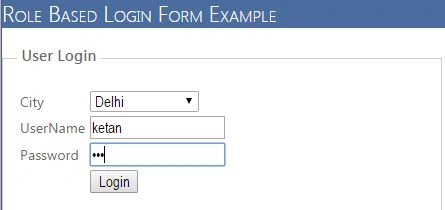
Figure 8: Account branch login
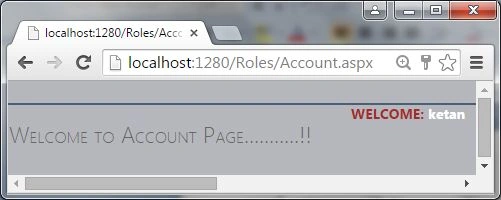
Figure 9: Account Welcome Page
Step 12: HR Level Login

Figure 10: HR Login
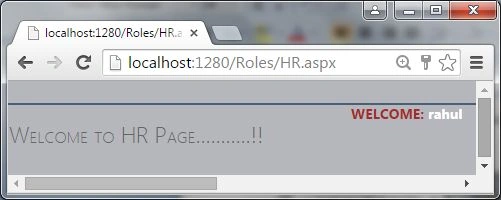
Figure 11: HR Welcome Page
Step 13: Manager Level Login
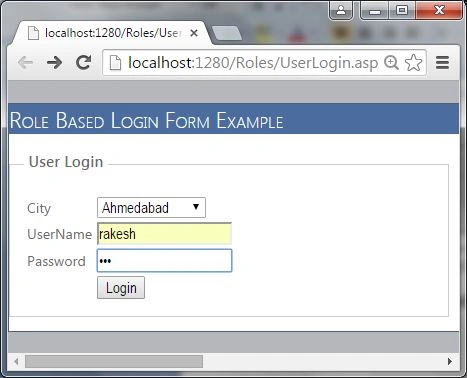
Figure 12: Manager Login

Figure 13: Manager welcome page
I hope you understood how to create a role-based login form using SQL procedure with the user name stored in the session and displayed in a welcome page.
Ishtiaq ahmadPosted Apr 25, 2019, 9:36 AM
Thank you bro but how to restrict a page from being accessed by someone #unauthorized user
jayantha kvPosted Jul 8, 2018, 3:00 AM
An exception of type 'System.NullReferenceException' occurred at string connection = ConfigurationManager.ConnectionStrings["connstring"].ConnectionString; can anyone help me with this.
aiman gfjhPosted Nov 27, 2017, 6:08 AM
Thanks mate helpful
Jaipal ReddyPosted Aug 20, 2015, 11:08 PM
nice one sir
RakeshPosted Aug 19, 2015, 9:49 AM
thank you Vaikesh K P
RakeshPosted Aug 19, 2015, 9:49 AM
thank you Yashwanth Muthineni
Vaikesh K PPosted Aug 19, 2015, 9:36 AM
Good one
RakeshPosted Aug 19, 2015, 7:20 AM
thank you Sibeesh Venu
Sibeesh VenuPosted Aug 19, 2015, 6:55 AM
Nice Share
Yashwanth MuthineniPosted Aug 19, 2015, 6:09 AM
Nice share
RakeshPosted Aug 19, 2015, 3:49 AM
thank you Nilesh Jadav
RakeshPosted Aug 19, 2015, 3:49 AM
thank you Karthikeyan
RakeshPosted Aug 19, 2015, 3:48 AM
Thank you Gowtham K
RakeshPosted Aug 19, 2015, 3:48 AM
thank you Rahul Prajapat
RakeshPosted Aug 19, 2015, 3:47 AM
thank you Gopi Chand sir
RakeshPosted Aug 19, 2015, 3:47 AM
thank you Santhakumar Munuswamy sir
RakeshPosted Aug 19, 2015, 3:47 AM
Thank you Rajeesh Menoth
Nilesh JadavPosted Aug 19, 2015, 12:17 AM
Nice work sir
Karthikeyan KPosted Aug 18, 2015, 11:12 PM
Good one sir...Thanks for sharing
Gowtham KPosted Aug 18, 2015, 9:19 PM
Nice one
Rahul PrajapatPosted Aug 18, 2015, 8:21 PM
Nice article thanks for sharing
Gopi ChandPosted Aug 18, 2015, 2:46 PM
Awesome
Santhakumar MunuswamyPosted Aug 18, 2015, 2:26 PM
Good one
Rajeesh MenothPosted Aug 18, 2015, 2:18 PM
Good One :)