

This article assumes that the user is familiar with C# programming. The intention of the article is not to stress extension methods too much, but to give an idea of what extension methods are and their benefits and the most important part of the article is not to reinvent the wheel by coding the methods which are already developed and shared by other developers and contributed for the benefit of the Microsoft development community. CodePlex provides the source openly for the developers.
The best resource for any of the Microsoft articles is the MSDN and to learn more about extension methods in Microsoft's words please refer to the URL:
http://msdn.microsoft.com/en-us/library/bb383977.aspx.
Before extension methods, we used to write our own methods in the class whenever needed in our projects. There are many built-in functions provided by the Microsoft .NET framework which can be used by developers without having them to rewrite the code for achieving basic functionality like all primitive date types can be converted into a string object using the ToString() method or to check if both the string objects are equal by Equals(object object) and so on.
Before the invention of extension methods
Let us see how a normal developer writes code to achieve functionality without using the extension methods.
Here in this example we look at two ways of coding:
- Writing lines of code without modularity i.e., just writing lines of code whenever needed by duplicating the efforts when the same code is to be used in some other module or project in the application.
- Converting the common lines of code into a method which can be reused whenever needed.
Create a Console application project using Visual Studio 2008 and modify the file Program.CS with the following code:
using System;
using System.Collections.Generic;
using System.Linq;
using System.Text;
namespace ExtensionMethods
{
class Program
{
static void Main(string[] args)
{
string userName = "John";
string emptyString = "";
int? number = 5;
int? number2 = null;
//Normally we use the following condition to check if a string
//is not an empty value
Console.WriteLine("****Writing lines of code as needed on the fly****");
if (!string.IsNullOrEmpty(userName))
Console.WriteLine("User Name is not Empty");
else
Console.WriteLine("User Name is Empty");
if (!string.IsNullOrEmpty(emptyString))
Console.WriteLine("EmptyString is not Empty");
else
Console.WriteLine("EmptyString is Empty");
//Similarly to check if an integer is null then return default value
//else convert the integer value to string value.
if (number == null)
Console.WriteLine("Number is null and so it is empty");
else
Console.WriteLine("Converted string value of number is {0}", number.ToString());
if (number2 == null)
Console.WriteLine("number2 is null and so it is empty");
else
Console.WriteLine("Converted string value of number2 is {0}", number2.ToString());
Console.WriteLine("*************************************************");
Console.WriteLine("****Calling a method to reuse the same code*******");
//Otherwise, we write a method that checks if the string is not null or empty
//More better way to write code
Console.WriteLine("User Name is Not Empty?? {0}", IsNotNullOrEmpty(userName));
Console.WriteLine("EmptyString is Not Empty?? {0}", IsNotNullOrEmpty(emptyString));
//Better way to write code. Convert the lines of code into a method and call it.
Console.WriteLine("String value of number is {1}", number, ToString(number,"empty"));
Console.WriteLine("String value of number2 is {1}", number2, ToString(number2, "empty"));
Console.WriteLine("***********************************************");
Console.ReadLine();
}
/// <summary>
/// Method to check if a string is not null or empty.
/// </summary>
/// <param name="input"></param>
/// <returns></returns>
static bool IsNotNullOrEmpty(string input)
{
return !string.IsNullOrEmpty(input);
}
/// <summary>
/// Method to convert an integer value to string if it is not null
/// otherwise return default value.
/// </summary>
/// <param name="value"></param>
/// <param name="defaultvalue"></param>
/// <returns></returns>
static string ToString(int? value, string defaultvalue)
{
if (value == null) return defaultvalue;
return value.Value.ToString();
}
}
}
Now run the program: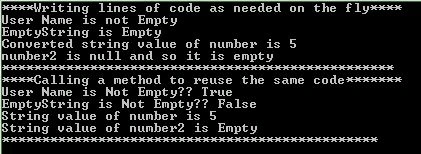
Tip: There are two beautiful and helpful tools provided by Microsoft for the developer community to beautify the code to make it more clean and maintainable. One is the Code Analyzer and the other one Code Metrics. Always use the Code Analyzer and Code Metrics tools in the Visual Studio to fine-tune your code so that your code will be clean and maintainable. You are not compelled to do all the changes, but you can follow whenever you feel it is good to change. As a developer, we sometimes ignore the best practices in a rush to complete the code within the deadline. For example, when I the run code analysis on the above project it shows me the following warning:
CA1305 : Microsoft.Globalization : Because the behavior of 'int.ToString()' could vary based on the current user's locale settings, replace this call in 'Program.ToString(int?, string)' with a call to 'int.ToString(IFormatProvider)'. If the result of 'int.ToString(IFormatProvider)' will be displayed to the user, specify 'CultureInfo.CurrentCulture' as the 'IFormatProvider' parameter. Otherwise, if the result will be stored and accessed by software, such as when it is persisted to disk or to a database, specify 'CultureInfo.InvariantCulture'.
Back to the topic. Now in my project, I have to check the string value and show on the UI the value if it is not empty or null otherwise, show that it is empty. To check that we use the built-in method for the string class IsNullOrEmpty and accordingly we will display the value in the UI. Similarly, I have a requirement that I check if a integer value is null then show it as "No records found" in the UI or convert the integer to a string and append to your message like "5 records found". To do this we check if an integer is null then return a default value otherwise, convert the integer to a string using the method ToString() and append to the string message whatever you would like to show in the UI.
Note: In general you cannot assign a null value to an int variable. Microsoft has introduced nullable types in the .NET framework to support assigning null to value types. Note that reference types already support null values. To learn more about the Nullable types refer to the MSDN article http://msdn.microsoft.com/en-us/library/1t3y8s4s%28v=vs.80%29.aspx.
Now what? If I have to use the same methods in various projects, I cannot rewrite the methods in each class and so we need to place all these methods in one place. For that we need to create a class library and add a static class and include all these methods in the class. Then reference these methods by adding the reference to the class library project.
Note: In many projects, we name this static class as "Helper" since it helps all the projects in providing the helpful methods in achieving the functionality. It is not necessary that the class be a static class, but the best practices from Microsoft says that any class that only supports some operations and does not need to be instantiated, you can make the class static. You can learn more about this from the MSDN article http://msdn.microsoft.com/en-us/library/79b3xss3(v=vs.80).aspx. Also note that even if you do not create a static class and instantiate every time to call the methods, when you run the Code Analyzer tool, it suggests you make the class as static and use the methods without instantiating the class. See how the tool helps you even if you forget something. That is the great thing about Microsoft which is committed to making the developer's life easy.
So, our next step is to create a class library project and add a static class called "Helper.CS" and add these methods in the class. I name my project as "Common" and modified the name of the file "Class1.CS" to "Helper.cs".
Here is my new class:
using System;
using System.Collections.Generic;
using System.Linq;
using System.Text;
namespace Common
{
public static class Helper
{
/// <summary>
/// Method to check if a string is not null or empty.
/// </summary>
/// <param name="input"></param>
/// <returns></returns>
public static bool IsNotNullOrEmpty(string input)

Akkiraju IvaturiPosted Aug 19, 2012, 3:47 PM
Hi Rohatash, sorry for late reply on this. Yes Extension methods can be overridden and they cannot override the existing methods of the class.
Rohatash KumarPosted Aug 6, 2012, 11:14 PM
Good explained Article.Akkiraju, C# Extension Methods can be override.